
Blast पर liquidity pool कैसे बनाएं step by step (Smithii और Uniswap)
Blast पर liquidity pool कैसे बनाएं ये जानना आपके token के लिए एक key step है ताकि वो सिर्फ blockchain पर एक contract बनकर न रह जाए और उसका price, volume और traders मिलें। Blast Ethereum के L2 के तौर पर काम करता है और इसका dominant DEX Uniswap V3 है, इसलिए pools बनाने का flow concentrated liquidity के rules को follow करता है।
इस guide में हम pool बनाने के दो रास्ते देखेंगे: एक है Blast के लिए Smithii tool, जो पूरा setup एक ही transaction में centralize कर देता है, और दूसरा है directly Uniswap V3 के native interface पर, जहां हर parameter पर ज़्यादा granular control मिलता है।
अगर अभी तक आपने token नहीं बनाया है, तो आगे बढ़ने से पहले Blast पर token बनाने की guide से शुरू करना बेहतर रहेगा। बाकी post ये assume करती है कि आपके पास पहले से token का contract है और pair करने के लिए अपने wallet में कुछ ETH भी है।
liquidity pool क्या है और इसे Blast पर क्यों बनाएं?
एक liquidity pool एक smart contract में deposit किए गए tokens का pair होता है जिसे traders swaps करने के लिए use करते हैं। Uniswap पर liquidity providers एक specific price range define करते हैं जिसमें उनका capital काम करता है (concentrated liquidity)।
Blast के मामले में, एक detail है जो दूसरे L2s के मुक़ाबले equations बदल देती है: network ETH और USDB पर native yield pay करता है। इसका मतलब है कि जो ETH wallet या contract के अंदर हैं वो by default yield generate करते हैं (official documentation के मुताबिक ETH के लिए लगभग 4% और USDB के लिए 5%)। ये एक ऐसा behavior है जिसे अपनी pool की economy design करते वक़्त ध्यान में रखना चाहिए।
दूसरा relevant factor है DEXs का ecosystem। Uniswap V3 Blast के ज़्यादातर volume को concentrate करता है, जिससे ये एक नए token को list करने के लिए natural जगह बन जाती है। इसी वजह से ये guide pool को Uniswap V3 पर बनाने पर focused है, चाहे आप Smithii की suite इस्तेमाल करें या directly native UI पर करें।
अगर अभी तक आपने अपने token का contract deploy नहीं किया है, तो pool पर आगे बढ़ने से पहले Blast पर token deploy करने का step-by-step tutorial ज़रूर देखें।
Smithii tool के साथ Blast पर liquidity pool कैसे बनाएं
Blast के लिए Smithii का liquidity pool tool पूरा process एक ही transaction में reduce कर देता है और अगर आप उस detail में नहीं जाना चाहते तो fee tier और ranges की manual configuration को skip करने देता है। Tool की cost 0.001 ETH plus transaction का gas है।
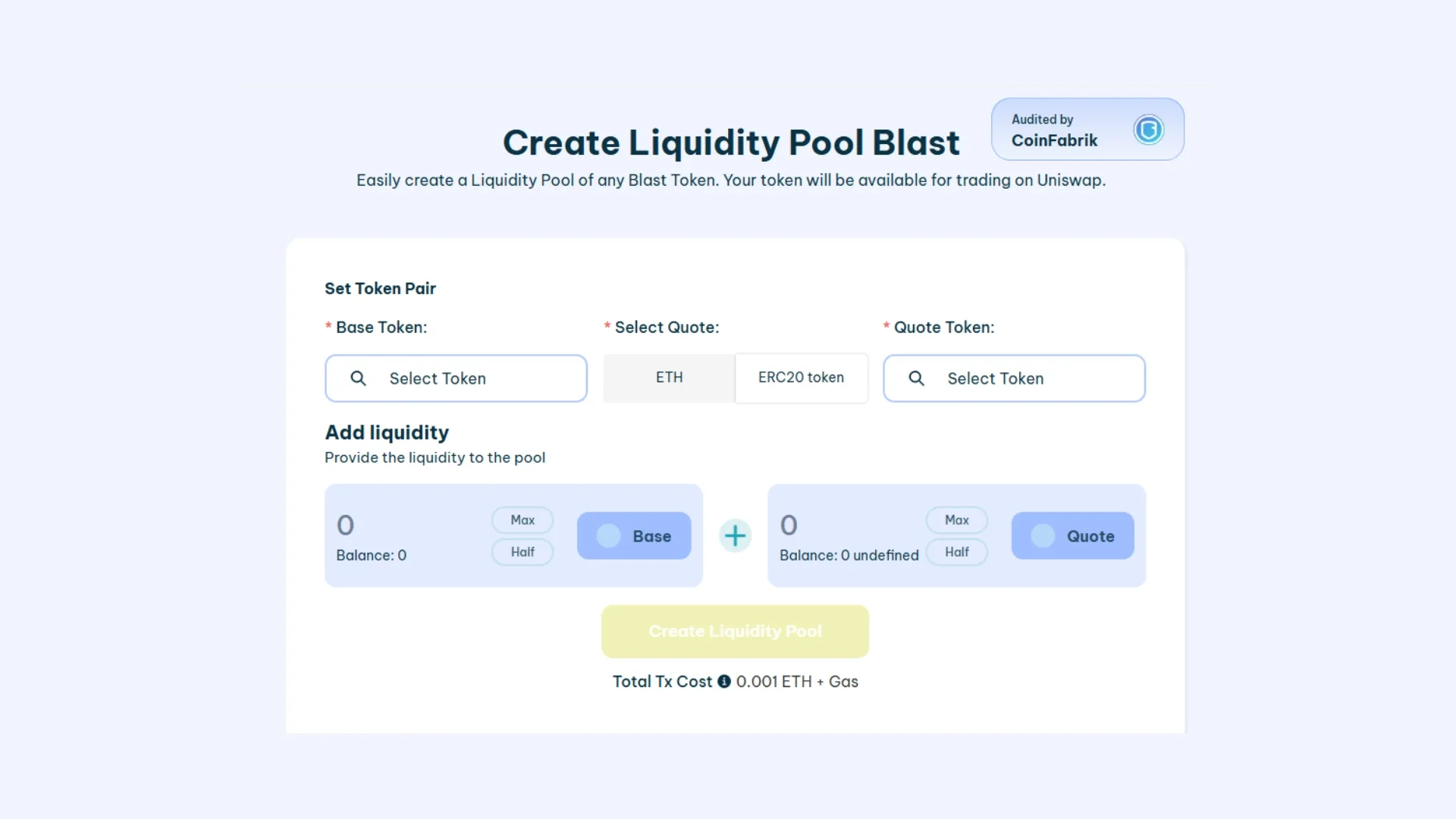
- Blast network पर अपना wallet connect करें: MetaMask, Rabby या कोई और EVM wallet। अगर अभी तक आपने Blast configure नहीं की है, तो tool network को detect करके आपको automatically add करने का option देता है।
- Base token और अपना token select करें: base token आमतौर पर WETH या USDB होता है, ये depend करता है कि आप अपने token को कैसे price करना चाहते हैं। अपने token का address corresponding field में paste करें।
- Pool के दोनों sides की quantities define करें: जो ratio आप डालेंगे वो initial price set करेगा। For example, अगर आप 1 WETH और 10,00,000 अपने token deposit करते हैं, तो initial price 0.000001 WETH per token होगा।
- Pool बनाएं और transaction sign करें: tool tokens का approval और pair का creation एक ही flow में group कर देता है। Transaction confirm होते ही pool Blast पर Uniswap V3 में active हो जाती है और traders swaps करना शुरू कर सकते हैं।
अगर आपको बाद में liquidity withdraw करनी है, तो उसके लिए एक अलग flow है जो Blast पर liquidity remove करने की guide में मिलेगा।
Directly Uniswap पर Blast में liquidity pool कैसे बनाएं
अगर आप fee tier, price range और liquidity curve पर granular control चाहते हैं, तो Uniswap के interface (V3 या V4) पर direct वाला रास्ता आपके लिए सही है। Steps ज़्यादा हैं, लेकिन सारे levers आपके हाथ में रहते हैं।
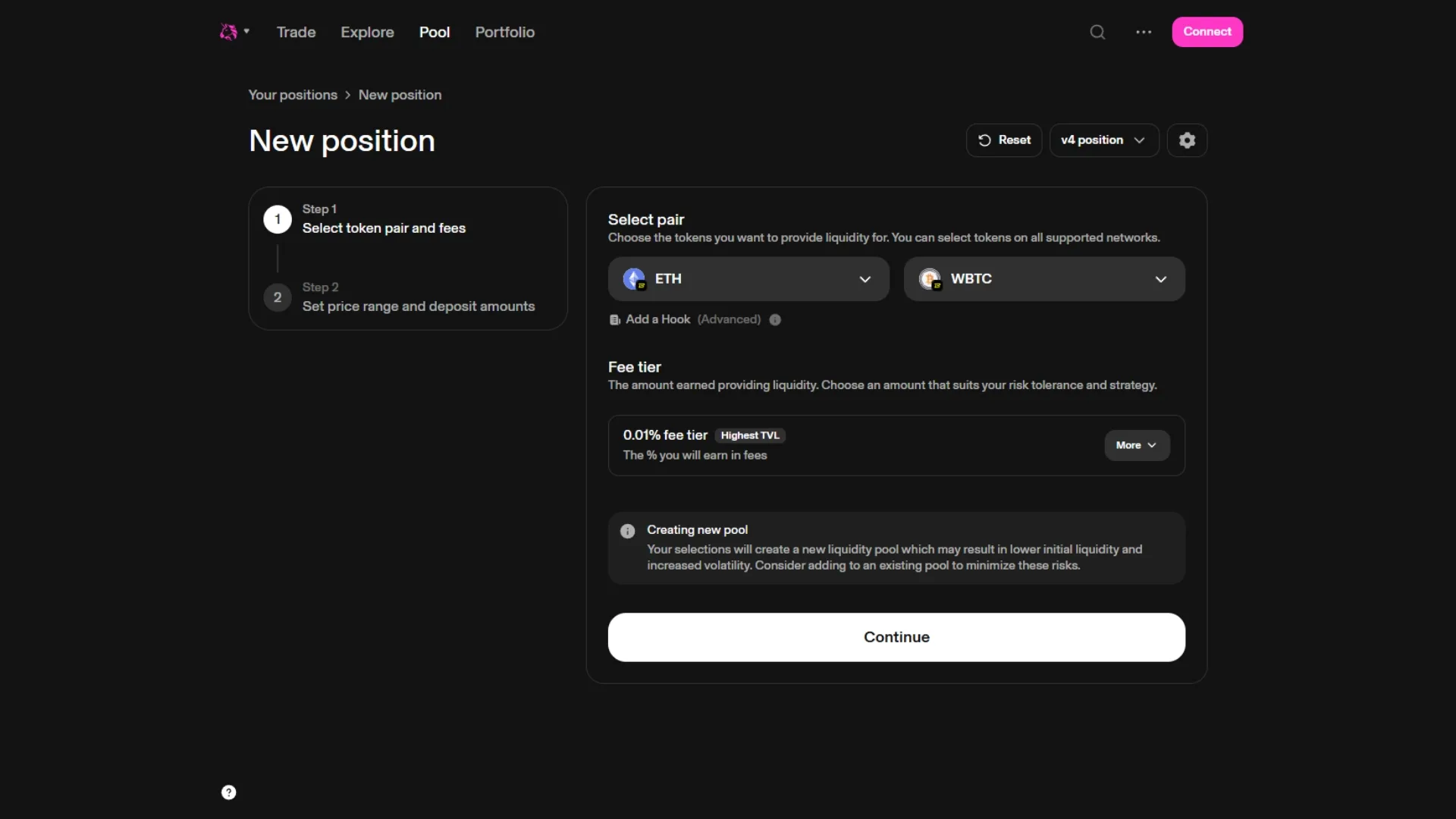
1. Blast network पर अपना wallet Uniswap से connect करें
app.uniswap.org पर जाएं, अपना wallet connect करें और networks के dropdown में (top right में) Blast select करें। फिर Pools section open करें और “New position” पर click करें।
2. Token pair बनाएं और fee tier चुनें
Base token select करें (WETH, USDB या जो आप prefer करें) और फिर दूसरे field में अपने token का address paste करें। Uniswap आपको बताएगा कि pool अभी exist नहीं करती और आपसे एक fee tier चुनने को कहेगा:
- 0.05%: stable pairs (stable-stable) के लिए।
- 0.3%: कुछ volatility वाले अधिकांश token pairs के लिए default। Memecoins और नए tokens के लिए सबसे common है।
- 1%: बहुत volatile pairs या exotic tokens के लिए।
3. Initial price और range सेट करें
यहाँ आप तय करते हैं कि आपका token किस price पर शुरू होगा और आपकी liquidity किन दो prices के बीच active रहेगी। आपके पास दो modes हैं: full range (आपकी liquidity 0 से infinity तक काम करती है, बिल्कुल Uniswap V2 की तरह) या concentrated (आपकी liquidity एक specific range में concentrate होती है, जिससे ज्यादा fees मिलती है पर price हिलने पर range से बाहर निकलने का risk रहता है)।
एक नए token के typical launch के लिए, कई creators शुरुआत में full range चुनते हैं और price stabilize होने के बाद concentrated positions पर migrate करते हैं।
4. Tokens approve करें और liquidity deposit करें
हर token की वो quantity डालें जो आप deposit करने वाले हैं। Uniswap initial price के आधार पर दूसरी side automatically calculate कर देता है। आपको दो से तीन transactions sign करनी होंगी: हर token के लिए approve और position का mint। पूरा होने के बाद pool create हो जाती है और आपकी liquidity position आपके wallet में एक NFT के रूप में दिखती है।
Smithii vs Uniswap native: comparison
दोनों रास्तों के बीच के differences का summary, ताकि आप वो choose करें जो आपकी situation के लिए best fit हो:
| विशेषता | Smithii tool | Uniswap V3 directly |
|---|---|---|
| Sign करने वाली transactions | 1 ही bundled transaction | 2-3 transactions (approve + mint) |
| Fee tier configuration | Preselected (default 0.3%) | 0.05%, 0.3% और 1% में से चुनें |
| Price range | Default full range | Full range या concentrated, पूरी तरह customizable |
| Learning curve | Uniswap V3 का previous experience न रखने वाले users के लिए suitable | Concentrated liquidity समझने की जरूरत |
| लागत | 0.001 ETH + gas | सिर्फ gas |
| Granular control | Limited | पूरा |
अगर आप अभी launch से पहले हैं, तो Blast के लिए Smithii suite पर एक नजर डालें, जहाँ token create करने, pool launch करने और launch को operate करने के लिए tools मौजूद हैं।
Blast पर अपना liquidity pool create करने से पहले ध्यान देने योग्य बातें
सही fee tier चुनना
Fee tier इस बात को affect करता है कि आप अपनी pool के against swap करने वाले हर trader से कितना charge करते हैं। High volatility वाले एक नए token के लिए, 0.3% safe choice है। 1% तक जाने से organic volume आम तौर पर भाग जाता है, और 0.05% तक नीचे जाना तभी समझ आता है जब pair price में बहुत correlated हो (typically stable-stable)।
Concentrated vs full range
Concentrated प्रति unit capital ज्यादा fees देती है, पर आपको range को actively manage करना पड़ता है। अगर price defined range के बाहर चला जाता है, तो जब तक price वापस नहीं आता या आप position को readjust नहीं करते, तब तक आपकी liquidity fees generate करना बंद कर देती है।
Full range ज्यादा passive है और launch की शुरुआत में आम तौर पर preferred होता है, जब आपको पता नहीं होता कि token किस price पर stabilize होगा। यह Uniswap V2 के behavior के सबसे करीब है।
Impermanent loss और इसे कैसे कम करें
Impermanent loss तब आता है जब आपके दो tokens के बीच का relative price deposit के time के मुकाबले बदलता है। Blast पर, ETH और USDB पर मिलने वाला native yield उस passive loss का एक हिस्सा compensate करता है, पर इसे खत्म नहीं करता। अगर आप concentrated liquidity के साथ जा रहे हैं तो active range monitor करना जरूरी है, और जब market इतना हिल जाए कि rebalance का gas justify हो जाए तो readjust करें।
Blast पर अपना liquidity pool क्यों create करें?
Pool host करने के मामले में Blast में दूसरे L2s से अलग कुछ properties हैं:
- ETH और USDB पर native yield: assets जो yield generate करते हैं वो बिना किसी extra step के accumulate होता रहता है, जो impermanent loss के एक हिस्से को compensate करने में help करता है।
- Ethereum L1 से काफी कम gas: pools बनाने और rebalance करने की operations mainnet पर pay करने वाले amount का एक छोटा हिस्सा खर्च होती हैं।
- Main DEX के रूप में Uniswap V3: यह ecosystem के volume को concentrate करता है, जिसका मतलब है कि pool बनने के बाद आपको ज्यादा organic exposure मिलती है।
- Active incentives वाला ecosystem: Blast ecosystem में समय-समय पर retroactive programs और liquidity campaigns चलते रहते हैं (updated data के लिए DefiLlama check करें)।
FAQ
ये वो सवाल हैं जो Blast पर liquidity pool create करने को लेकर हमें सबसे ज्यादा मिलते हैं:
Blast पर liquidity pool create करने का खर्च कितना है?
Smithii tool के साथ cost 0.001 ETH plus bundled transaction का gas है। अगर आप directly Uniswap V3 से जाते हैं, तो कोई tool fee नहीं है और आप सिर्फ दो या तीन transactions (approve + mint) का gas pay करते हैं। किसी भी case में, Blast पर total cost Ethereum L1 के मुकाबले काफी कम पड़ता है क्योंकि L2 पर gas का difference बहुत बड़ा है।
क्या Blast पर LP बनाने के लिए मुझे coding आनी चाहिए?
नहीं। Smithii tool और Uniswap V3 का native interface, दोनों ही no-code हैं। आपको बस अपना wallet connect करना है, अपने token का address चाहिए और वो दूसरा asset जिसके साथ pair करना है (WETH, USDB, वगैरह)।
Blast पर अपनी token के लिए कौन सा fee tier चुनना चाहिए?
Blast पर ज़्यादातर नए tokens के लिए 0.3% सबसे ज़्यादा इस्तेमाल होने वाला fee tier है। 0.05% सिर्फ़ उन stable pairs के लिए सही बैठता है जो आपस में बहुत correlated हों, और 1% आम तौर पर उन tokens के लिए रखा जाता है जो बहुत volatile हों या जिनका volume कम हो, क्योंकि इतना high fee pool के against swap करने का incentive कम कर देता है।
अगर मेरा ETH या USDB pool के अंदर है तो native yield का क्या होगा?
Native yield का behaviour इस बात पर depend करता है कि tokens को hold करने वाला contract कैसे implement किया गया है। Blast पर Uniswap V3 का rebasing को handle करने का अपना तरीका है, और कई cases में yield का एक हिस्सा redistribute होता है या protocol के through manage किया जाता है। Expected returns पर detailed calculations करने से पहले Blast की yield mode documentation देख लेना बेहतर है।
क्या मैं अपनी liquidity कभी भी withdraw कर सकता हूँ?
हाँ। Position के मालिक आप हैं (Uniswap V3 में ये आपके wallet में एक NFT के रूप में represent होती है) और आप जब चाहें liquidity withdraw कर सकते हैं। Step-by-step process Blast पर अपनी pool से liquidity withdraw करने की guide में दिया गया है।
निष्कर्ष
Blast पर liquidity pool बनाना कुछ ही मिनटों का काम है, चाहे आप Smithii tool इस्तेमाल करें (तेज़, कम settings) या सीधे Uniswap V3 पर जाएँ (ज़्यादा manual, ज़्यादा control)। चुनाव इस बात पर निर्भर करता है कि आप कितनी detail control करना चाहते हैं और concentrated liquidity से कितने familiar हैं।
Pool बनाने से पहले, जो fee tier और range आप use करने वाले हैं उन्हें एक बार review कर लें, और ये भी ध्यान में रखें कि Blast का native yield pair की economics को कैसे affect करता है। Launch के बाद, active range को monitor करते रहें और जब price इतना move कर जाए कि rebalance का खर्च gas के मुक़ाबले sahi बैठे, तो adjust कर लें।
