

How to create a liquidity pool on Blast step by step (Smithii and Uniswap)
Knowing how to create a liquidity pool on Blast is one of the key steps for your token to stop being just a contract on a blockchain and start having a price, volume, and traders. Blast runs as an L2 of Ethereum and its dominant DEX is Uniswap V3, so the pool creation flow follows concentrated liquidity rules.
In this guide we walk through two paths to create your pool: one with the Smithii tool for Blast, which wraps the setup into a single transaction, and another directly in the native Uniswap V3 interface, with more granular control over every parameter.
If you haven’t created the token yet, start with the guide to creating a token on Blast before moving forward. The rest of this post assumes you already have the token contract and some ETH in your wallet to pair with.
What is a liquidity pool and why create one on Blast?
A liquidity pool is a token pair deposited into a smart contract that traders use to make swaps. On Uniswap, liquidity providers set a specific price range where their capital works (concentrated liquidity).
In Blast’s case, there’s one detail that changes the math compared to other L2s: the network pays native yield on ETH and USDB. That means the ETH sitting inside the wallet or the contract generate yield by default (around 4% for ETH and 5% for USDB according to the official documentation). It’s something worth factoring in when you design your pool’s economy.
The other relevant factor is the DEX ecosystem. Uniswap V3 holds most of Blast’s volume, which makes it the natural place to list a new token. That’s why this guide focuses on creating the pool on Uniswap V3, either with the Smithii suite or directly in the native UI.
If you haven’t deployed your token contract yet, check out the step-by-step tutorial to deploy a token on Blast before moving on to the pool.
How to create a liquidity pool on Blast with the Smithii tool
The Smithii liquidity pool tool for Blast collapses the whole process into a single transaction and lets you skip the manual fee tier and range setup if you don’t want to get into that level of detail. The tool costs 0.01 ETH plus the transaction gas.
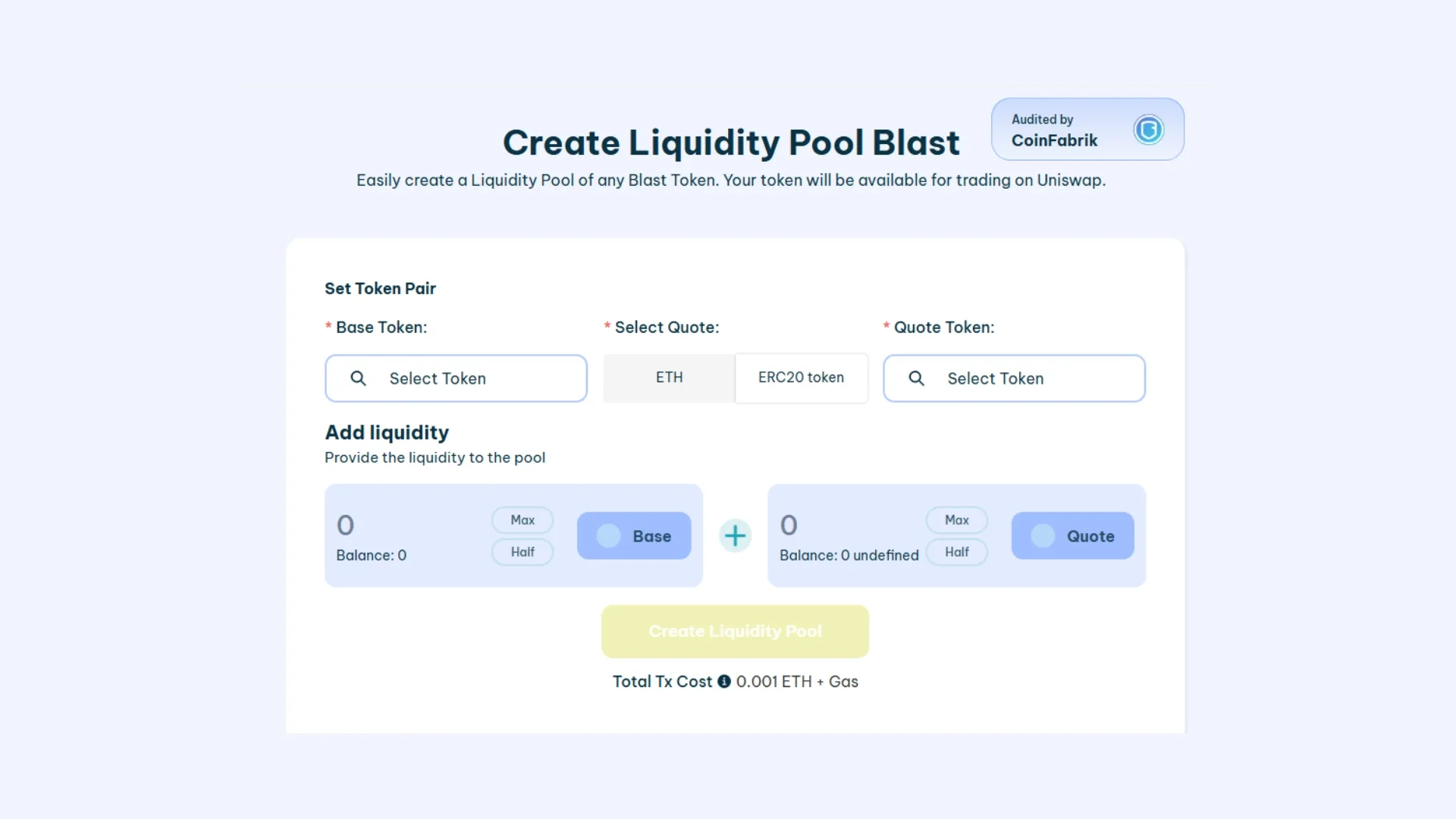
- Connect your wallet on the Blast network: MetaMask, Rabby, or any other EVM wallet. If you haven’t set up Blast yet, the tool detects the network and offers to add it automatically.
- Pick the base token and your token: the base token is usually WETH or USDB, depending on how you want your token to be priced. Paste your token address into the matching field.
- Set the amounts on each side of the pool: the ratio you put in sets the initial price. For example, if you deposit 1 WETH and 1,000,000 of your token, the initial price will be 0.000001 WETH per token.
- Create the pool and sign the transaction: the tool bundles the token approvals and the pair creation into a single flow. Once the transaction is confirmed, the pool goes live on Uniswap V3 on Blast and traders can start swapping.
If you need to pull the liquidity out later, there’s a separate flow for that in the guide to removing liquidity on Blast.
How to create a liquidity pool on Blast directly on Uniswap
If you prefer granular control over the fee tier, the price range, and the liquidity curve, the direct path through the Uniswap interface (V3 or V4) is the way to go. It’s a few more steps, but you keep every lever in your hands.
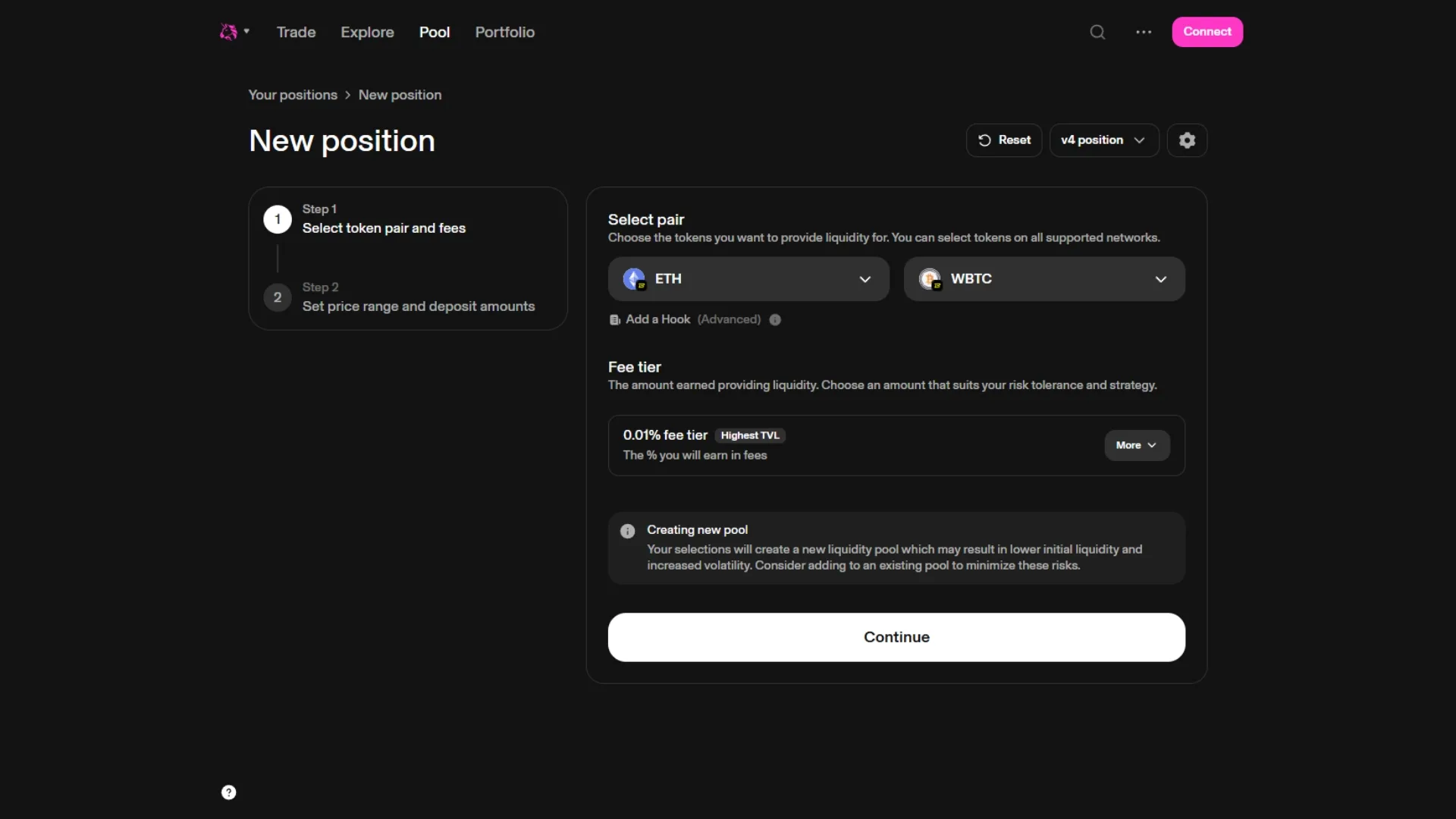
1. Connect your wallet to Uniswap on the Blast network
Go to app.uniswap.org, connect your wallet and select Blast in the network dropdown (top right). Then open the Pools section and click “New position”.
2. Create the token pair and pick the fee tier
Pick the base token (WETH, USDB, or whichever you prefer) and then paste your token address into the other field. Uniswap will warn you that the pool doesn’t exist yet and ask you to choose a fee tier:
- 0.05%: for stable pairs (stable-stable).
- 0.3%: the default for most token pairs with some volatility. It’s the most common choice for memecoins and new tokens.
- 1%: for highly volatile pairs or exotic tokens.
3. Set the initial price and the range
This is where you define the starting price of your token and the two prices your liquidity will sit between. You have two modes: full range (your liquidity works from 0 to infinity, just like Uniswap V2) or concentrated (your liquidity is concentrated in a specific range, earning more fees but with the risk of going out of range if the price moves).
For a typical launch of a new token, many creators go with full range at the start and then migrate to concentrated positions once the price stabilizes.
4. Approve the tokens and deposit the liquidity
Enter the amounts you’ll deposit for each token. Uniswap automatically calculates the other side based on the initial price. You’ll sign two or three transactions: approve for each token and mint for the position. Once it’s done, the pool is live and your liquidity position shows up as a NFT in your wallet.
Smithii vs native Uniswap: side-by-side
A quick rundown of the differences between the two paths, so you can pick the one that fits your situation best:
| Feature | Smithii tool | Uniswap V3 direct |
|---|---|---|
| Transactions to sign | 1 single bundled transaction | 2-3 transactions (approve + mint) |
| Fee tier setup | Preset (0.3% by default) | Choose between 0.05%, 0.3% and 1% |
| Price range | Full range by default | Full range or concentrated, fully customizable |
| Learning curve | Suitable for users without prior Uniswap V3 experience | Requires understanding concentrated liquidity |
| Cost | 0.01 ETH + gas | Gas only |
| Granular control | Limited | Full |
If you’re still pre-launch, take a look at the Smithii suite for Blast, where you’ll find the tools to create the token, launch the pool, and run the launch.
If the pool ends up too thin later on, there’s no need to rebuild it: you just add more funds to deepen it.
Things to consider before creating your liquidity pool on Blast
Picking the right fee tier
The fee tier sets how much you charge every trader who swaps against your pool. For a new token with high volatility, 0.3% is the safe pick. Bumping it to 1% usually scares off organic volume, and dropping to 0.05% only makes sense when the pair is very price-correlated (typically stable-stable).
Concentrated vs full range
Concentrated earns more fees per unit of capital, but it forces you to actively manage the range. If price moves outside the range you set, your liquidity stops generating fees until price comes back or you readjust the position.
Full range is more passive and is usually preferred early in a launch, when you don’t know what price the token will settle at. It’s the closest thing to how Uniswap V2 behaves.
Impermanent loss and how to mitigate it
Impermanent loss shows up when the relative price between your two tokens shifts from where it was at deposit. On Blast, the native yield on ETH and USDB offsets part of that passive loss, but doesn’t kill it. It pays to monitor the active range if you’re running concentrated liquidity, and rebalance when the market has moved enough to justify the gas of the rebalance itself.
Why create your liquidity pool on Blast?
Blast has a couple of properties that set it apart from other L2s when it comes to hosting a pool:
- Native yield on ETH and USDB: the yield generated by the assets accrues with no extra steps, which helps offset part of the impermanent loss.
- Significantly lower gas than Ethereum L1: creating and rebalancing pools costs a fraction of what you’d pay on mainnet.
- Uniswap V3 as the main DEX: it concentrates ecosystem volume, which translates into more organic exposure for your pool once it’s live.
- Ecosystem with active incentives: retroactive programs and liquidity campaigns pop up regularly across the Blast ecosystem (check DefiLlama for up-to-date data).
FAQ
These are the questions we get most often about creating a liquidity pool on Blast:
How much does it cost to create a liquidity pool on Blast?
With the Smithii tool the cost is 0.01 ETH plus the gas of the bundled transaction. If you go directly through Uniswap V3, there’s no tool fee and you only pay the gas for the two or three transactions (approve + mint). Either way, the total cost on Blast tends to be much lower than on Ethereum L1 thanks to the gas difference on an L2.
Do I need to know how to code to create an LP on Blast?
No. Both the Smithii tool and Uniswap V3’s native interface are no-code. All you need is your wallet connected, your token address and the other asset you’re going to pair it with (WETH, USDB, etc.).
Which fee tier should I pick for my token on Blast?
For most new tokens on Blast, 0.3% is the most-used fee tier. 0.05% only makes sense for highly correlated stable pairs, and 1% is usually reserved for very volatile or low-volume tokens, since such a high fee cuts the incentive to swap against the pool.
What happens with the native yield if my ETH or USDB is inside the pool?
How native yield behaves depends on how the contract holding the tokens is implemented. Uniswap V3 on Blast has its own rebasing treatment and, in many cases, part of the yield is redistributed or handled at the protocol level. It’s worth checking the Blast yield mode documentation before running detailed numbers on expected returns.
Can I withdraw my liquidity at any time?
Yes. You own the position (which on Uniswap V3 is represented as an NFT in your wallet) and can pull the liquidity whenever you want. The step-by-step is in the guide to withdrawing liquidity from your pool on Blast.
Conclusion
Spinning up a liquidity pool on Blast takes just a few minutes, either through the Smithii tool (faster, fewer knobs) or directly on Uniswap V3 (more manual, more control). Which path you pick depends on how much detail you want to fine-tune and how comfortable you are with concentrated liquidity.
Before you deploy the pool, double-check the fee tier and the range you’re going to use, and factor in how Blast’s native yield affects the economics of the pair. After launch, keep an eye on the active range and rebalance once the price has drifted far enough that the move is worth the gas.

Industrial Engineer turned Solana trader. Marketing at Smithii and contributor to the $SHRIMP memecoin launch.



