

How to Tell if a NEAR token Is Safe: the 8 Checks to Run Before You Buy
Before buying a new token or adding liquidity to its pool, knowing how to tell if a NEAR token is safe can save you some serious pain. In a couple of minutes you can find out whether anyone can change its code, mint more supply or block your sells, and whether it can actually be sold on Rhea.
In this guide I’ll show you where the risk actually sits in a token on NEAR, how to analyze it for free with Smithii’s Rug Checker, what each of its 8 checks actually means, and what no automated analysis can see for you. Let’s get into it.
Why on NEAR the risk starts with the token’s account
On NEAR, every token lives in its own account, and that account can hold access keys of two types. Limited access keys can only call specific functions. Full access keys can do anything, including swapping the contract’s code for a different one.
That means a token can look clean today and change tomorrow if someone still holds a full access key over its account. That’s why the first thing to check on NEAR are the keys, and then the code: if it matches a known, audited contract, you know how it will behave; if it’s custom code, you’ll have to trust whoever wrote it.
How to check if a NEAR token is safe, step by step
Smithii’s Rug Checker for NEAR is a free tool that lets you analyze any NEP-141 token without connecting your wallet or signing anything. It reads the account’s keys and code, the owner’s permissions, the holders, visible liquidity, and simulates a buy and a sell on Rhea. Once you’re inside the interface, you’ll see something like this:
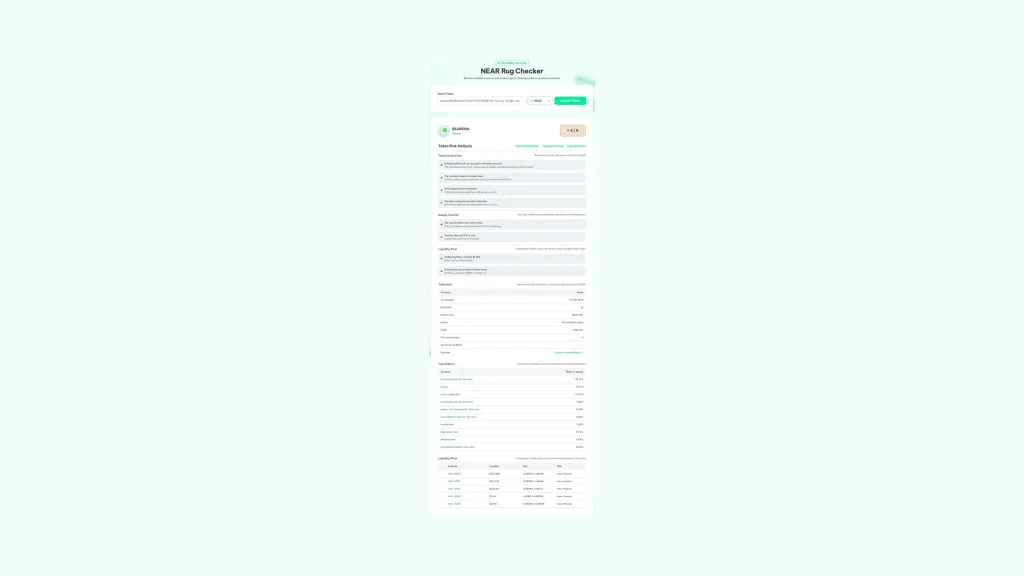
All you need is the token’s contract account, which you can copy from NearBlocks or from the project itself. With that in hand, do this:
- Paste the token’s account: for example token.v2.ref-finance.near. No need to connect wallet.
- Hit Check Token: the tool reads the account, its code, and its markets.
- Check the score: it sums up how many of the 8 checks the token passes.
- Review each block: authorities, supply control, liquidity, holders, and the Rhea simulation.
- Use the report as one piece of the puzzle: combine it with what you already know about the team and the project before buying.
The analysis costs nothing and never touches your wallet, because it’s all on-chain reads. You can run it as many times as you want, for example before and after a project announces changes.
The 8 checks in the report, one by one
The report groups the checks into three blocks. Each one shows up with its result and a short explanation, and together they build the score you see next to the token’s name.
token authorities
- Nobody holds a full access key: if the account has none, nobody can swap its code or move its NEAR.
- The code is a known token: it compares the code against audited contracts, including every token created with Smithii. If it’s custom code, its behavior can’t be verified automatically.
- No new supply can be minted: it checks whether the owner can create new tokens.
- Transfers can’t be paused or blocked: it looks for a pause switch or a blacklist that could leave you unable to sell.
Supply control
- The top 10 holders hold 50% or less: calculated without counting the pools. If a handful of accounts concentrate the supply, they can tank the price with a single sell.
- Transfer fees are 10% or less: a very high tax eats a big chunk of every buy and every sell.
Liquidity
- Visible liquidity is at least $1,000: below that line, any medium-sized sell moves the price sharply.
- A simulated buy and sell both work on Rhea: the analysis simulates buying with up to 1 NEAR in wNEAR, deducts the token’s fees, and simulates selling the result. If the sell doesn’t go through, that’s the clearest sign of a token you can’t exit.
Cómo leer la puntuación sin equivocarte
The score sums up how many checks the token passes and comes with a Good, Caution or Danger label. It’s useful for a quick first read, but you need to interpret it in context.
The most important rule is that unknown data doesn’t count as safe. Tokens not created with Smithii don’t publish their mint, pause or blacklist rules on-chain, so those checks come back unverified and drag the confidence down. That doesn’t mean the token is dangerous, just that you’ll need to verify that part yourself in the docs or in the code.
It also works the other way around. A large, well-known token can score low because its supply sits in a DAO or a treasury that shows up among the top holders. The number looks the same as an anonymous project’s, but the risk doesn’t, so always check who those accounts are in the holders table.
| What you see | What it usually means | What to do |
|---|---|---|
| Full access key active | Someone can change the contract | Ask the team why they’re keeping it |
| Unknown code | Unverified behavior | Look for an audit or published code |
| Simulated sell that fails | Possible token you can’t exit | Don’t buy |
| Top 10 holding over 50% | High concentration | Check whether they’re pools, DAOs or anonymous wallets |
What the analysis can’t see
No on-chain analysis will tell you whether the team is trustworthy. The report shows what’s written on-chain, and some risks live off-chain.
- The team’s intentions: an owner with legitimate permissions can use them well or badly.
- What happens later: a token can change hands, renounce permissions or lose liquidity after the analysis.
- Community and product: real activity, roadmap and support don’t show up in any check.
That’s why the report is one input into your decision, not the whole decision. Use it to rule out the clear cases and to know what questions to ask on the rest.
Run your own token through the analysis
If you’re a dev, the rug check is also a way to look at your token through a buyer’s eyes. A token created with Smithii has no full access keys and uses audited code from day one, so what’s left on your side is distributing the supply properly, giving depth to the pool and deciding which owner permissions to close.
If you want your token to also pass the authority checks, here’s how to renounce ownership of your token on NEAR.
FAQ
How can I check if a NEAR token is safe without connecting my wallet?
Use the Rug Checker from Smithii for NEAR. It’s free, read-only and doesn’t need a wallet: paste the token account and within seconds you get the report with its keys, its code, its holders and a buy and sell simulation.
Why do full access keys matter so much on NEAR?
Because a full access key can deploy new code to the token’s account or move its NEAR. A token account with no full access keys can’t be changed by anyone.
How is the sell simulated without spending anything?
Rhea reports what a pool would return for a given trade. The analysis simulates a buy of up to 1 NEAR into wNEAR, subtracts the token’s fees, and simulates selling the result back, all through read-only calls.
Does the analysis guarantee that a token is safe?
No. It surfaces the risks you can observe in the contract and in the market, but it can’t predict price, team behavior, or anything that happens off-chain.
Why do some results come back as unknown?
Because only tokens created with Smithii publish their mint, pause, and blacklist rules on-chain. For other tokens those checks can’t be verified automatically, and an unverified data point lowers confidence instead of counting as safe.
Conclusion
Now that you know how to tell whether a NEAR token is safe, you can review the signals that matter most in a couple of minutes: who can change the contract, who can mint or block, how the supply is distributed, and whether it can actually be sold. The analysis is free and doesn’t need your wallet.
Run it before every buy or liquidity add, and don’t mistake an unknown data point for a safe one. And if the token is yours, run it through the analysis too: that’s exactly what your next buyer will see.

Content creator and SEO contributor at Smithii. Systems Engineering student and crypto-tech enthusiast.



