

Multisender on TRON: split your TRC-20 across hundreds of wallets
The multisender on TRON turns hundreds of transfers into a single signed operation, no code required. It’s what you need when you have to distribute your token across many wallets and don’t want to spend the afternoon signing them one by one from your wallet, risking a mistake on any of them.
The Token Multisender from Smithii groups every recipient into a single contract call and validates addresses before sending, so one bad row won’t cost you gas. Here’s how to use the tool, what you need, and what to keep in mind to run a bulksend.
Where the recipient list comes from
A lot of people arrive at the multisender planning to paste addresses by hand and only later realize they didn’t have to. The tool offers three loading methods and two of them build the list for you.
- CSV File: upload a CSV or TXT file, or paste the addresses straight into the box. No extra cost. This is the option when you already have the list, whether it came from a form, a giveaway, or your own database.
- Token Holders (+180 TRX): the tool pulls the wallets holding a specific token and loads them for you. Perfect for rewarding holders of your own TRC-20 or reaching the ones from another project. It’s the integration of the token snapshot from TRON.
- NFT Holders (+180 TRX): same idea, but for holders of a collection. In short, it combines the NFT Snapshot from TRON with the multisender.
The last two cost the same as running the snapshot separately, so if you’re distributing to holders you skip the middle step without paying extra. If what you want is to save the list to analyze or reuse it later, then it does make sense to run the snapshot on its own and keep the CSV.
One limit worth keeping in mind before building your list: each send supports up to 1,000 wallets. If your distribution is larger, you’ll have to split it into several batches.
How to use the multisender on TRON step by step
The TRON Token Multisender from Smithii groups all recipients into a single contract call, so you sign once and the full distribution goes out. Before sending it validates addresses and discards the invalid ones, so a bad row won’t burn TRX on a broken send. When you open it, you’ll see this screen:
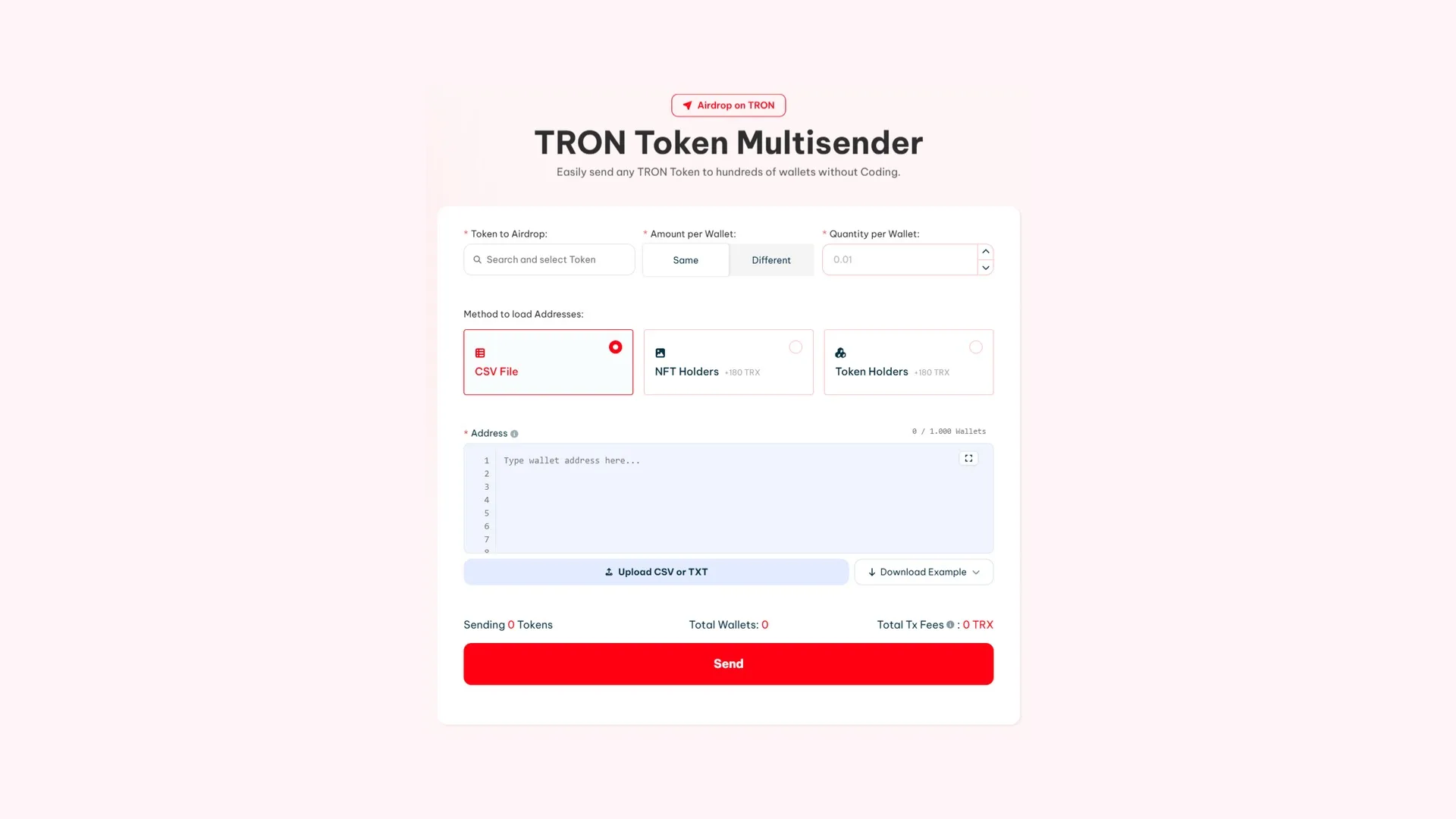
With the token in the wallet and your list ready, the send goes like this:
- Connect your wallet TRON: TronLink, Coinbase Wallet, or any wallet via WalletConnect. The tokens go out from there, so it needs enough balance.
- Pick the token to distribute under Token to Airdrop, searching for it in the dropdown.
- Decide whether everyone gets the same: Same sends the same amount to every wallet, Different lets you assign a different amount per address.
- Load the addresses using the method you picked: upload the CSV, paste them into the box, or let it pull them from the holders of a token or a collection.
- Check the counter: the footer shows the tokens about to go out, the total wallet count, and the Total Tx Fees already calculated for your list.
- Hit Send and confirm. The distribution takes a few minutes to complete and you can track it from the panel.
How much a bulk distribution costs on TRON
Here’s the point that gets misread most often: the fee is 1 TRX per wallet, not a flat amount per send. It scales with the size of the list, so the budget comes out of multiplying, not looking up.
| Recipients | Fee | With holder loading |
|---|---|---|
| 100 wallets | 100 TRX | 280 TRX |
| 400 wallets | 400 TRX | 580 TRX |
| 1,000 wallets | 1,000 TRX | 1,180 TRX |
On top of that, you pay network gas. The right-hand column includes the 180 TRX for pulling the list automatically from the holders of a token or a collection; if you upload your own CSV, that extra cost isn’t there.
You don’t have to do the math yourself: the tool shows the full total already calculated under Total Tx Fees as soon as your list loads, before you sign anything.
What to check on the list before signing
The tool spots invalid addresses and sets them aside before sending, so that risk is covered. What it can’t catch is anything that’s technically valid but not what you actually wanted.
- Duplicates: a repeated address is still a valid address, so it gets paid twice. This is the most common mistake when your list comes from merging several sources.
- Your own wallet on the list: happens often when the list comes from a holder snapshot, because you’re a holder too.
- Contract addresses: if a contract shows up among the holders and isn’t set up to receive, those tokens end up stuck where nobody can pull them out.
- The total against your balance: if the sum is bigger than what you hold, the send won’t go through. Check the Sending figure against your balance before you sign.
If you don’t have your own token yet, we’ve got a dedicated guide: learn how to create a token on TRON.
FAQ
How much does the multisender cost on TRON?
1 TRX per wallet on the list, plus network gas. It’s not a flat fee: a distribution to 100 addresses costs 100 TRX and one to 1,000 costs 1,000 TRX. If you also pull the list from the holders of a token or a collection, add another 180 TRX for that extraction.
How many wallets can a single send handle?
Up to 1,000 addresses per send. If your distribution is larger, you’ll have to split it into several batches, each one with its own signature and its own fee based on the number of wallets it includes.
Can I send different amounts to each wallet?
Yes. Under Amount per Wallet you get two options: Same sends the same amount to everyone, and Different lets you set a specific amount for each address, which is what you usually want when the payout is tiered or rewards early supporters.
What happens if an address is typed wrong?
The tool validates the list before sending and sets aside invalid addresses, so you don’t burn TRX on broken rows. What it can’t catch are mistakes that produce a valid but wrong address, like a duplicate. That’s why you should look over the list before signing.
Can a distribution be undone once it’s sent?
No. Each transfer settles on the blockchain and gets logged on TronScan like any other. Recovering tokens sent by mistake depends on whoever received them wanting to send them back, so reviewing the list before you sign is the only real safety net.
Wrapping up
Batch sending handles in one signature what would otherwise be hours of repetitive work with a chance to slip up at every step. The part that’s still on you, and that no tool can do for you, is deciding who goes on the list and how much they get.
Now you know how to run a airdrop on TRON and you can reward the community you’re building, pay multiple wallets in a single move, or promote your memecoin.

Content creator and SEO contributor at Smithii. Systems Engineering student and crypto-tech enthusiast.



