










Getting Started with Solana: A Beginner’s Guide
Information overload is something every newcomer goes through when figuring out how to get started with Solana, especially if you’ve never dealt with blockchain ecosystems before.
That’s exactly why I put together this beginner’s guide to Solana: so you can send transactions and use dApps without drowning in jargon or unnecessary complexity.
Note: Nothing in this guide should be taken as investment advice or a professional financial recommendation. With that said, let’s get into it.
Getting Started with Solana: Get SOL
Whatever you want to do inside Solana, you’re going to need a wallet and SOL.
Among the most popular wallets, Phantom is the most widely used in the Solana ecosystem and keeps expanding to new networks. In any case, a wallet gives you an account address that’s randomly generated and works just like a traditional bank account number.
Below I’ll walk you through how to install Phantom, set up an account, and get enough SOL to start exploring the Solana ecosystem.
1. Install Phantom
To use Phantom, you have two options:
- Install the browser extension on desktop for browsers like Brave and Chrome.
- Download the mobile app, available on iOS and Android.
You can find the official links to download Phantom directly on their site.
Installing Phantom on PC
Using a wallet as a browser extension is convenient and secure. In Phantom, once you’ve picked a supported browser, just follow these steps:
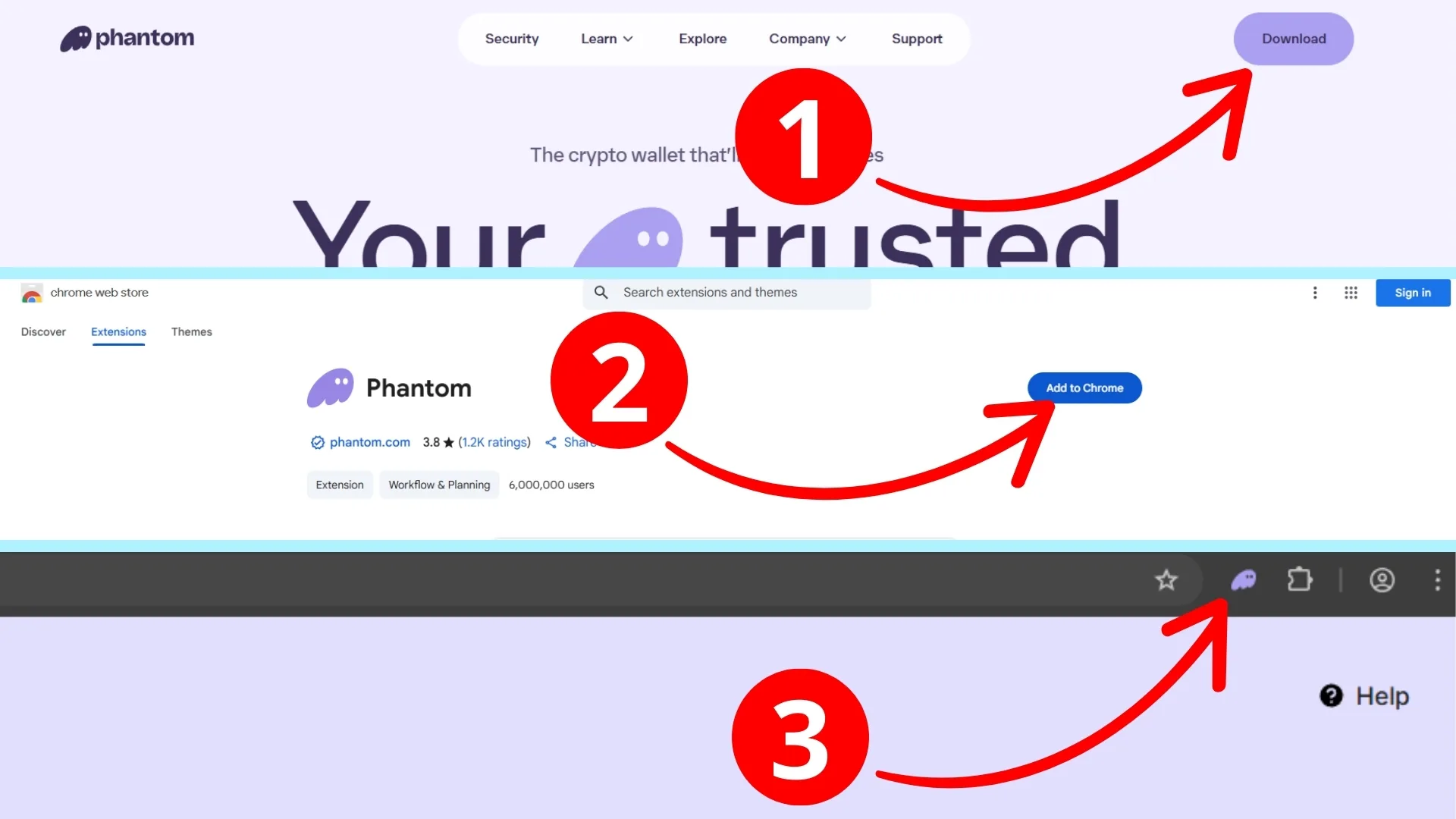
- Click “Download”, pick your browser, and you’ll be taken to the web store.
- Click “Add to…” to start the download and installation.
- Open the extensions menu and click “Pin” so you can access your wallet faster.
Installing Phantom on Mobile
If you want to get started with Solana from your phone, you can also install Phantom on any mobile OS.
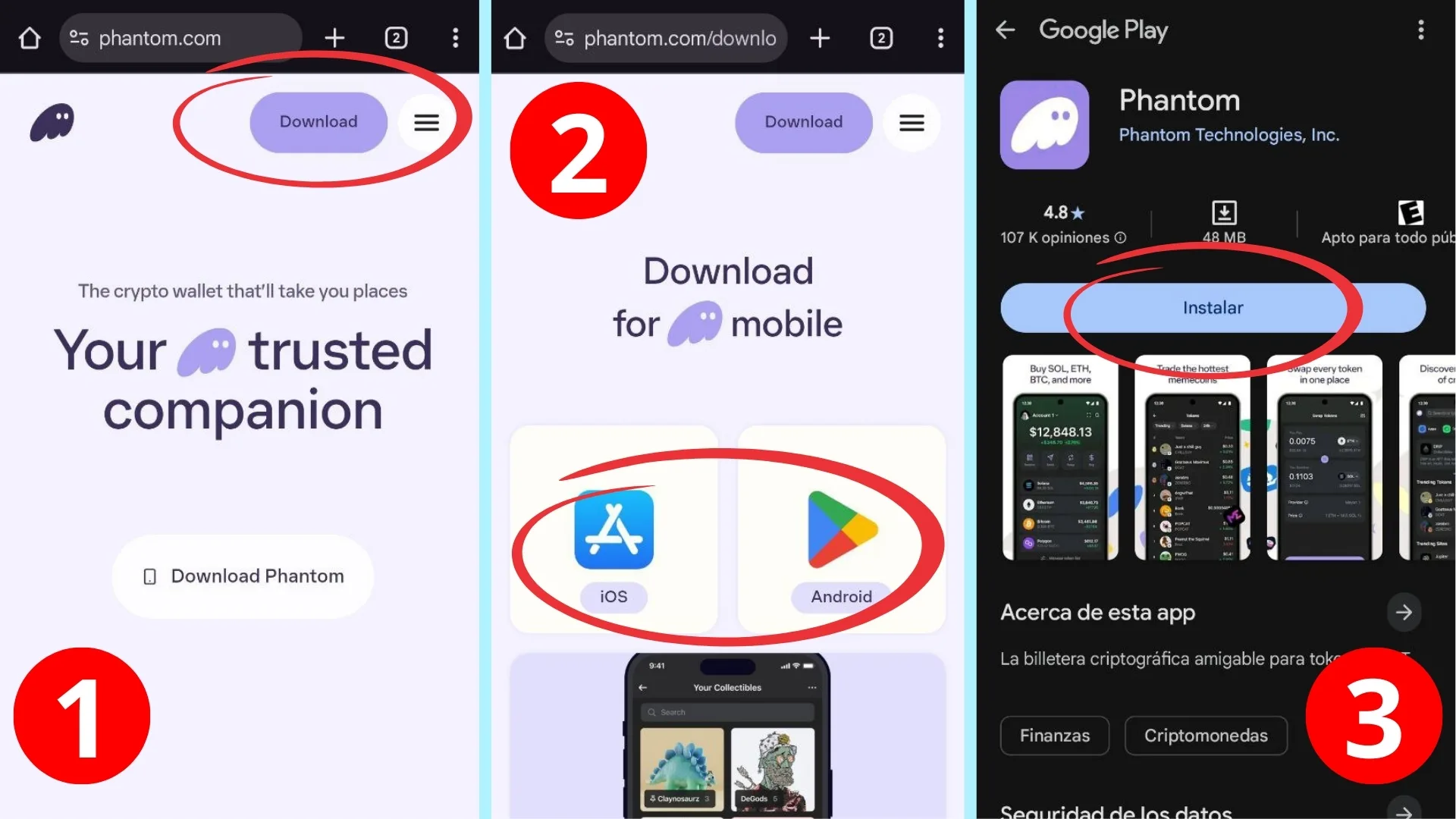
- Click “Download”.
- Choose your operating system and your device’s app store will open automatically.
- Tap “Get” or “Install”.
The Phantom extension or app is now installed. Next up: creating your account.
2. Create a wallet on Phantom
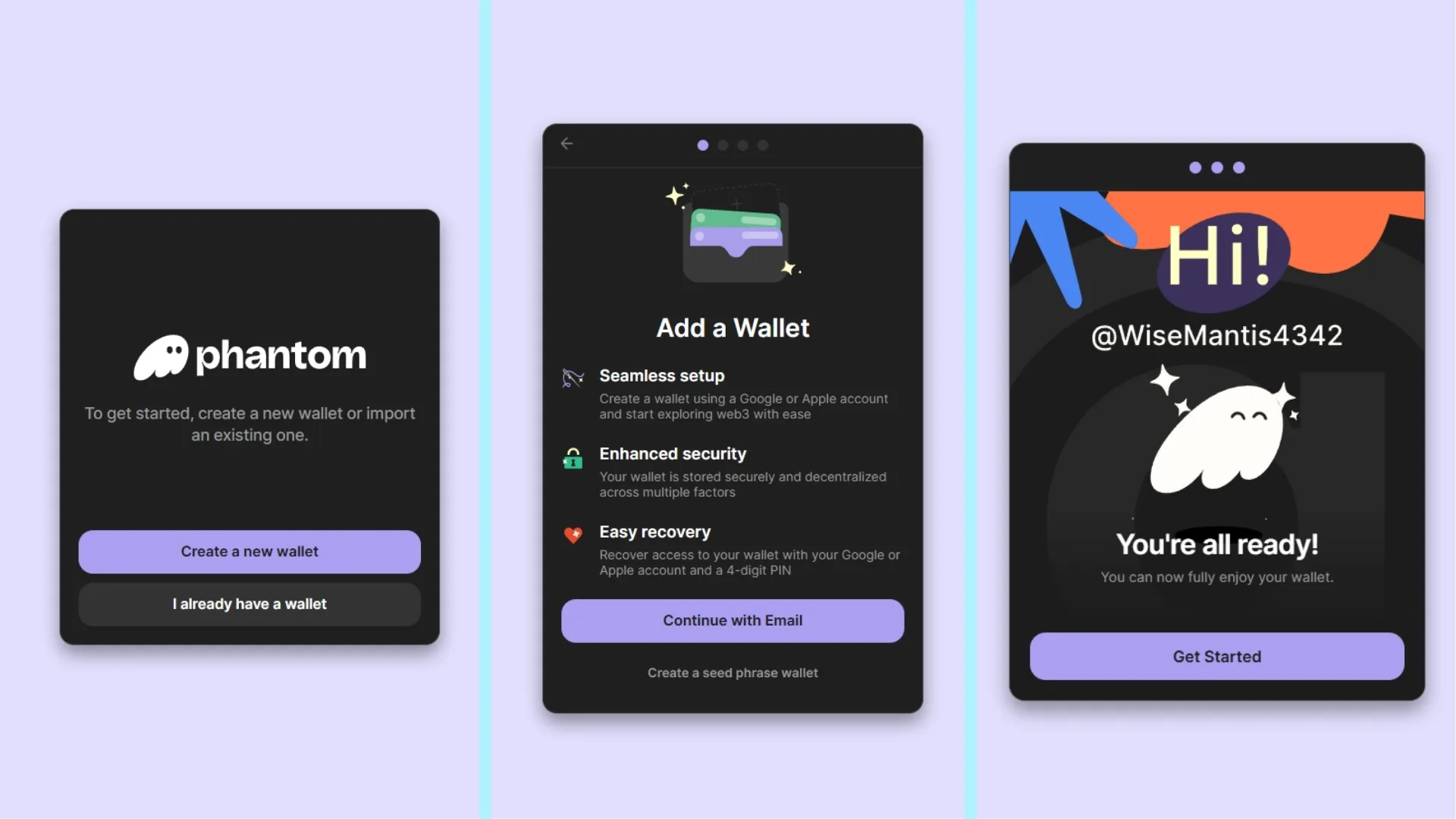
When setting up your account, you have two options. You can link an email address, or you can generate a Seed Phrase. Linking an email makes it easy to access your Phantom wallets, but it also introduces an extra layer of risk.
If you go the Seed Phrase route, I’d strongly recommend writing it down on paper and keeping it somewhere safe. Keep in mind that on blockchain, transactions are permanent, so following solid security practices now will save you a lot of headaches down the road.
A Seed Phrase is essentially a unique, highly secure master password that lets you recover access to your account in any situation. It’s a sequence of 12-24 random words.
When you create your Phantom account, you’ll need to choose a password and username. Here’s the screen flow you’ll go through:
What Can You Do with a Phantom Account?
On its own, a Phantom wallet is one of the most powerful ways to get started in Solana. It covers all the core bases:
- Swap tokens directly.
- Send and receive tokens.
- Manage multiple wallets from a single account.
- Discover and use dApps directly.
- Stake your tokens.
Of course, for any of these actions you’ll need funds in SOL. In the next step, I’ll walk you through the ways to get enough to start taking advantage of everything this ecosystem has to offer.
3. Buy or Receive SOL
Every transaction on the Solana network requires SOL, the native token. You need it to cover the gas fee on every operation you confirm (sending funds, interacting with a dApp or DeFi protocol, swapping tokens, and so on), and it’s also the token base for the vast majority of trading pairs.
To get SOL, you can use a payment gateway directly with Phantom to convert fiat into SOL. Just open the extension popup or launch the app on your phone and tap “Buy SOL with cash”.
From there, you can pay with a debit or credit card, or use a payment method common in your region, like Apple Pay.
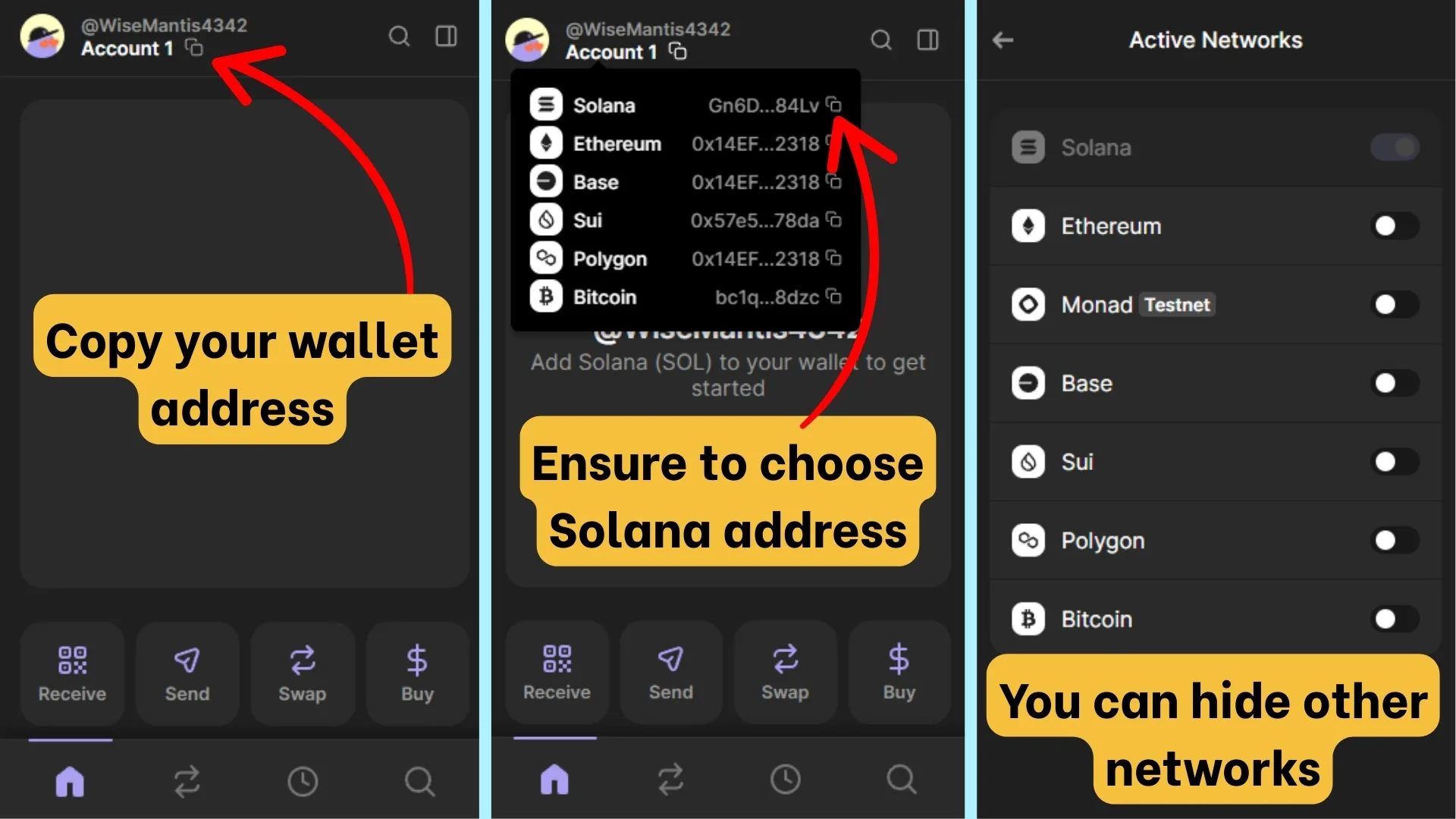
The other way to get SOL into your wallet is by receiving a direct transfer from another wallet. P2P platforms and major exchanges like Binance let you receive funds via other payment methods. Here’s how to copy your wallet Solana address (plus one important tip):
I’ve Got a wallet and SOL. Now What?
At this point, you have everything you need to get started in Solana. At the time of writing this guide, Solana just hit $240 USD, a clear signal of how popular it’s become and how many things you can do with it. But what are those use cases, exactly?
For starters, this is an incredibly cheap and efficient network. That alone has been enough to push people to explore everything Solana has to offer, giving rise to some major projects along the way.
For example, memecoin communities drive a significant share of overall volume, and some excellent platforms have been built specifically to launch these assets (like Pump.fun or LetsBonk). That said, millions of wallets are also here to generate yield at every capital size, through DeFi protocols like Lince Yields or RECC, or through token staking.
Just as relevant, tokens can function as utility assets for accessing exclusive services or products. Some users still prefer to deploy SOL in play-to-earn games or NFT projects, though both have lost traction over the past year.
Every project in Solana is part of a massive ecosystem that keeps growing every day. At Smithii, our goal is to simplify the creation and management of Web3 projects, with a strong focus on Solana. So if you want to learn how to launch in Solana with your own token, try our toolsuite: no-code tools built to remove every technical barrier from your path.
With that covered, let’s walk through the core pillars of Solana and how to make the most of them as a newcomer.
Core Pillars of Solana: Where to Put Your SOL to Work
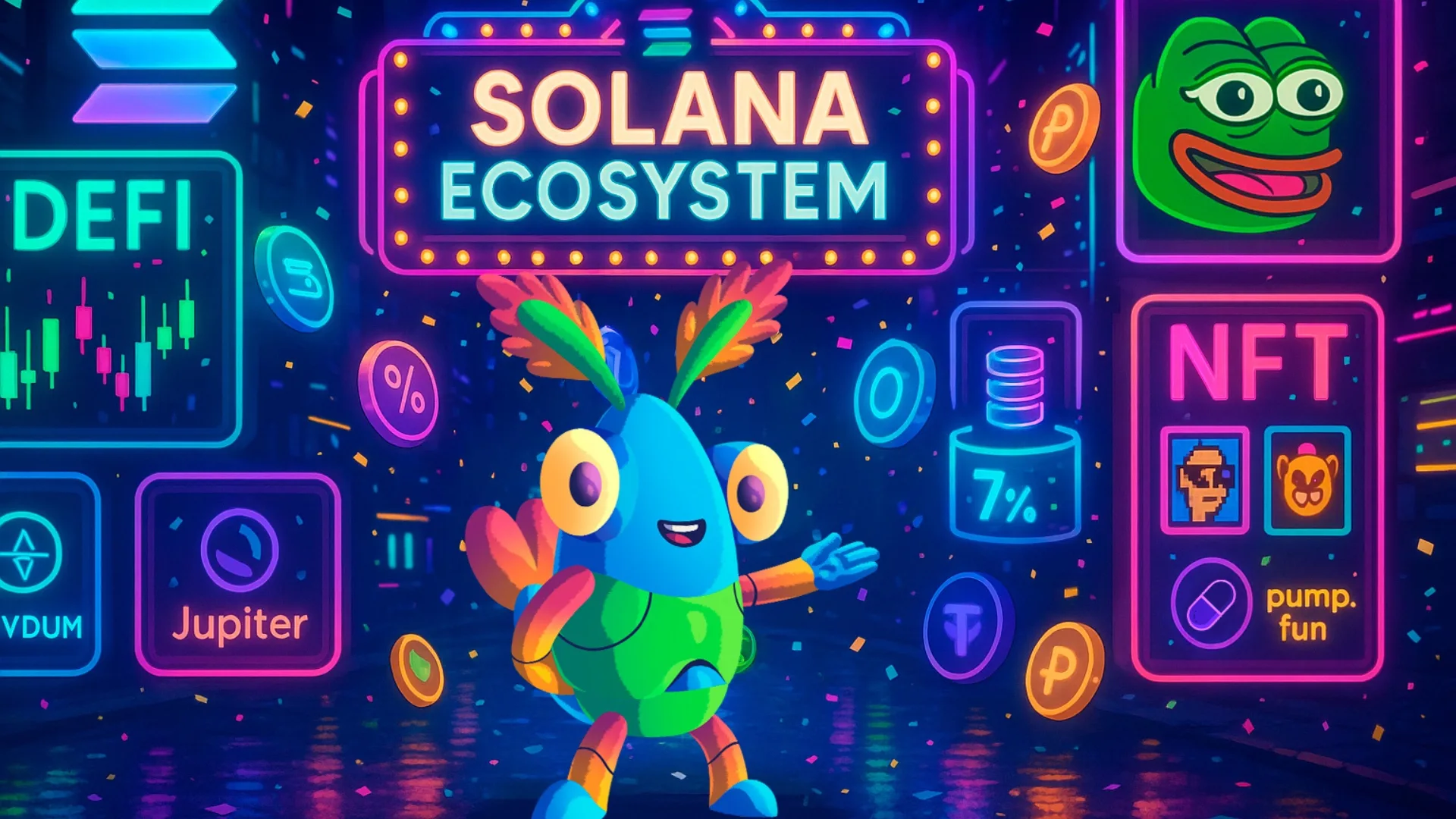
Holding SOL puts you in the ecosystem, but you’re barely scratching the surface of what you can do. To really get started on Solana, here are the core pillars so you can put the SOL sitting in your wallet to work.
Memecoins
Meme coins are a core reason Solana is what it is today: a massive share of daily volume runs through them. A meme coin typically has no real utility beyond capturing something funny or riding the wave of a recent event.
In this space, launchpads have completely reinvented themselves, becoming platforms for launching all kinds of tokens backed by real innovation. Pumpfun and Letsbonk are the biggest names in this category. If trading is more your style, you can also use the advanced version of Pump.fun or turn to GMGN for that.
Memecoins are worth a word of caution: crypto is volatile by nature, and meme coins take that to another level. There’s always some token that pulls a 50x in a matter of hours and then vanishes. So if this is the path you’re taking, make sure you do your research before jumping into any community.
Want to be a creator? We have a complete guide to help you launch meme coins or utility tokens.
Staking
Staking is a foundational piece of how the network stays secure and operational. It’s also one of the simplest and most reliable ways to generate yield, as long as you approach it with the right amount of care and due diligence.
Essentially, you and thousands of other users “lock” your assets so a network validator can verify transactions and create new blocks. The more tokens are staked, the higher the odds of being selected as a validator, which generates rewards distributed to all participants.
On top of that, you can stake SOL and many other assets, with yield rates ranging anywhere from 2% to 10%.
DeFi
DeFi (Decentralized Finance) refers to blockchain-based platforms and protocols built around financial services with no intermediaries or centralized institutions in the picture. Through DeFi, you get access to DEXes that support staking and yield farming.
On Solana, the most popular DeFi platforms are Jupiter and Raydium: an aggregator and DEX respectively, both letting you swap multiple tokens and get the best transaction rates available.
If you want to use Solana to generate annual yields for saving and investing, there are dozens of DeFi protocols ready to fit your needs. Lince Yields, for instance, optimizes your asset portfolio by automatically routing your funds to the highest-yielding opportunities, within base at whatever risk level you’re comfortable with.
Another standout platform is RECC, a Real Estate Crypto Crowdfunding protocol that lets you invest in purchasing and renovating properties in Spain. You can get started with as little as 10 USDC and tap into yields that can easily exceed 20% per year.
Token Creation and Integration
One of the core strengths of this ecosystem and a key reason to get into Solana is its broad compatibility across projects of every kind. Tokens on this network follow the SPL standard, so you can create tokens with whatever attributes you need. On top of that, DeFi platforms and launchpads are actively positioning Solana as the go-to ecosystem for startups and next-gen tech companies.
Beyond creating tokens, you can also integrate them into existing DeFi protocols or ones you’re building yourself. With Solana on track to reclaim its all-time high, more participants will be drawn into the ecosystem, opening up a market full of potential opportunities.
We’ll soon be publishing a guide on giving DeFi utility to a token on Solana that drives purchases and generates sustained usage. Subscribe to our newsletter so you don’t miss that one and everything else we have coming.
NFT and Play-to-Earn
To be fair, NFTs and play-to-earn aren’t exactly the hottest topic right now, but that doesn’t mean there’s no viable path for collections or blockchain-based games.
One of the most enduring NFT collections on Solana since its early days has been Solana Monkey Business (SMB). Meanwhile, Mad Lads has gained serious traction recently and has grown into one of the largest communities in the space.
Beyond the hype of owning an SMB, the real value is the active, tight-knit community behind it. Think of it as getting into an exclusive club made up of people who are genuinely embedded in Solana and everything it stands for.
If you’re looking to get into Solana and connect with the sector’s early adopters, you’ll most likely find them in active NFT projects.
This space has some genuinely fascinating projects, STEPN being a prime example: a Move-to-earn protocol where participants buy running sneakers and earn tokens for real physical activity, which they can then redeem for better sneakers or real-world rewards.
Dig in and you’ll find projects of every size and type across the Solana ecosystem. That’s exactly what makes you want to be more than just a user: you want to build. No question: OPOS.
Conclusion
I hope this Solana beginner’s guide does more than help you create a wallet and get SOL. It’s also about broadening your understanding of the core pillars that make this one of the most active ecosystems in crypto right now.
Want to earn passive income? Or plug into a community of people who share your interests? What about becoming the creator and founder of your own project? All of it can start right now.
Thanks for reading. Smithii has tools that simplify token creation and management on Solana and other blockchains. Subscribe to our newsletter for exclusive updates and to stay on top of the latest news.

Content creator and SEO contributor at Smithii. Systems Engineering student and crypto-tech enthusiast.



