
How to Launch a meme coin on Bags.fm (+ Pro Tools)
Launching a meme coin on Bags.fm is more straightforward than you might expect. The platform is built so you can create a token without dealing with any complex technical setup.
But if you want to launch meme coins the right way, you need to focus on day one. That means the initial distribution, the first buys, and how your token looks to everyone on the outside.
That’s exactly why I put this guide together: to walk you through both paths for creating a memecoin on Bags. The standard approach (inside Bags.fm), or the optimized method using a bundler bot. Read on to learn more.
If you’d rather watch a full walkthrough, check out this video from our YouTube channel:
How to Launch a meme coin on Bags.fm: The Standard Way
The ecosystem built by Bags.fm is refreshingly straightforward, whether you’re a first-time creator or a seasoned builder. To get your own coin live on this launchpad, follow these steps:
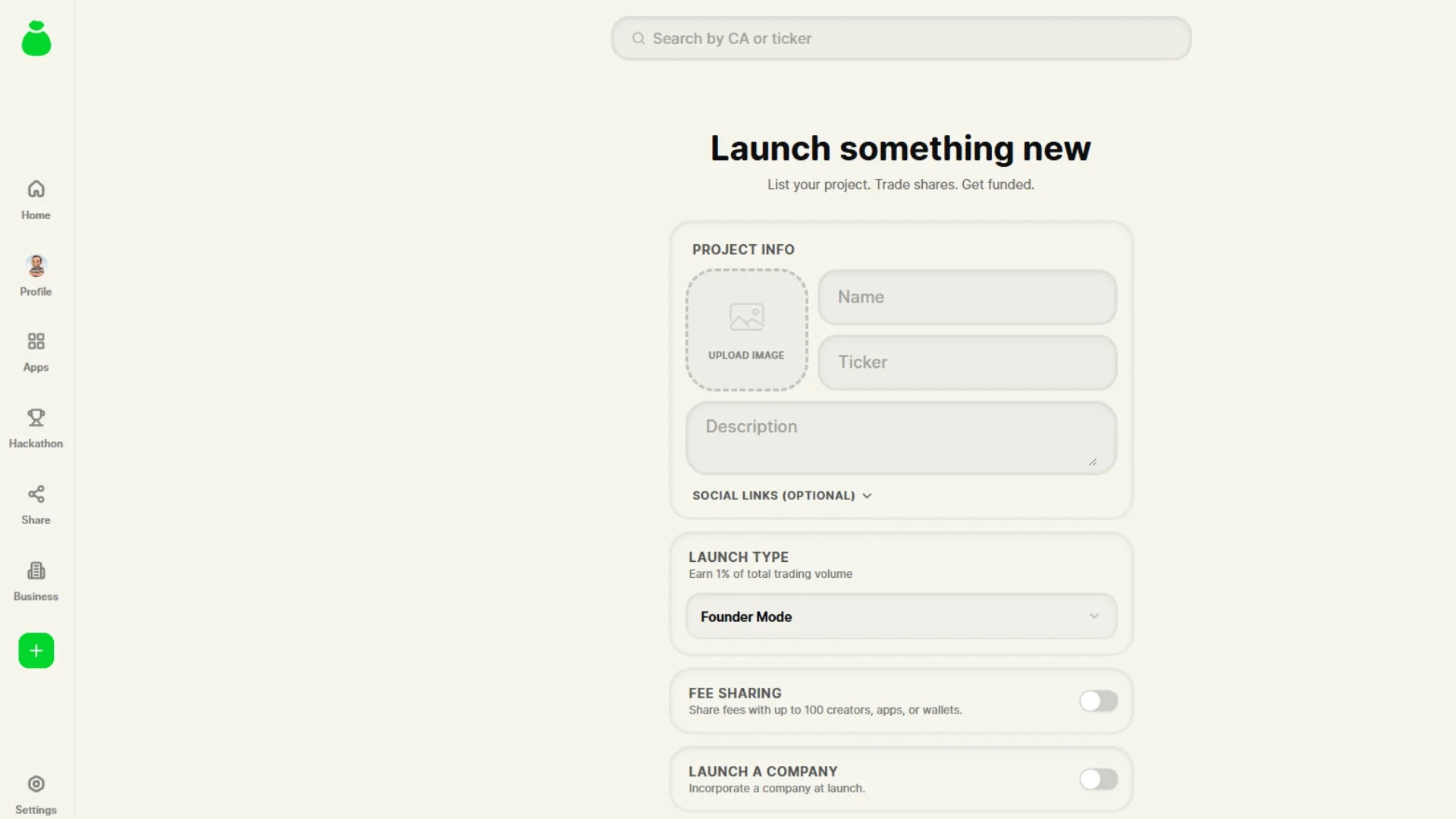
- Log in: unlike other launchpads, you’ll need to verify your account through X, TikTok, GitHub, or Kick.
- Fund your wallet or import your own: when you create an account, a wallet is automatically assigned to you. You can also import your own under “settings > my wallets > import”.
- Click “new project”: once you have enough funds to cover the gas fee, you’re ready to create your meme coin on Bags.
- Customize your token: add an image, name, ticker, description, and all the details that will define your coin.
- Click “launch”: the gas fee gets deducted from your balance and your meme coin goes live in seconds.
Before your meme coin goes live, you can place a bundle or initial buy using your assigned wallet. But you only get one shot at this, so be careful not to buy too much or you’ll spook potential buyers. And if you try to split a single buy across multiple wallets, a sniper bot has almost certainly already beaten you to it.
Instead, we recommend using a bundler bot.
The Better Option: Use a bundler on Bags
If your goal isn’t just to create the token but to launch with stronger distribution right from the start, the bundler is the way to go.
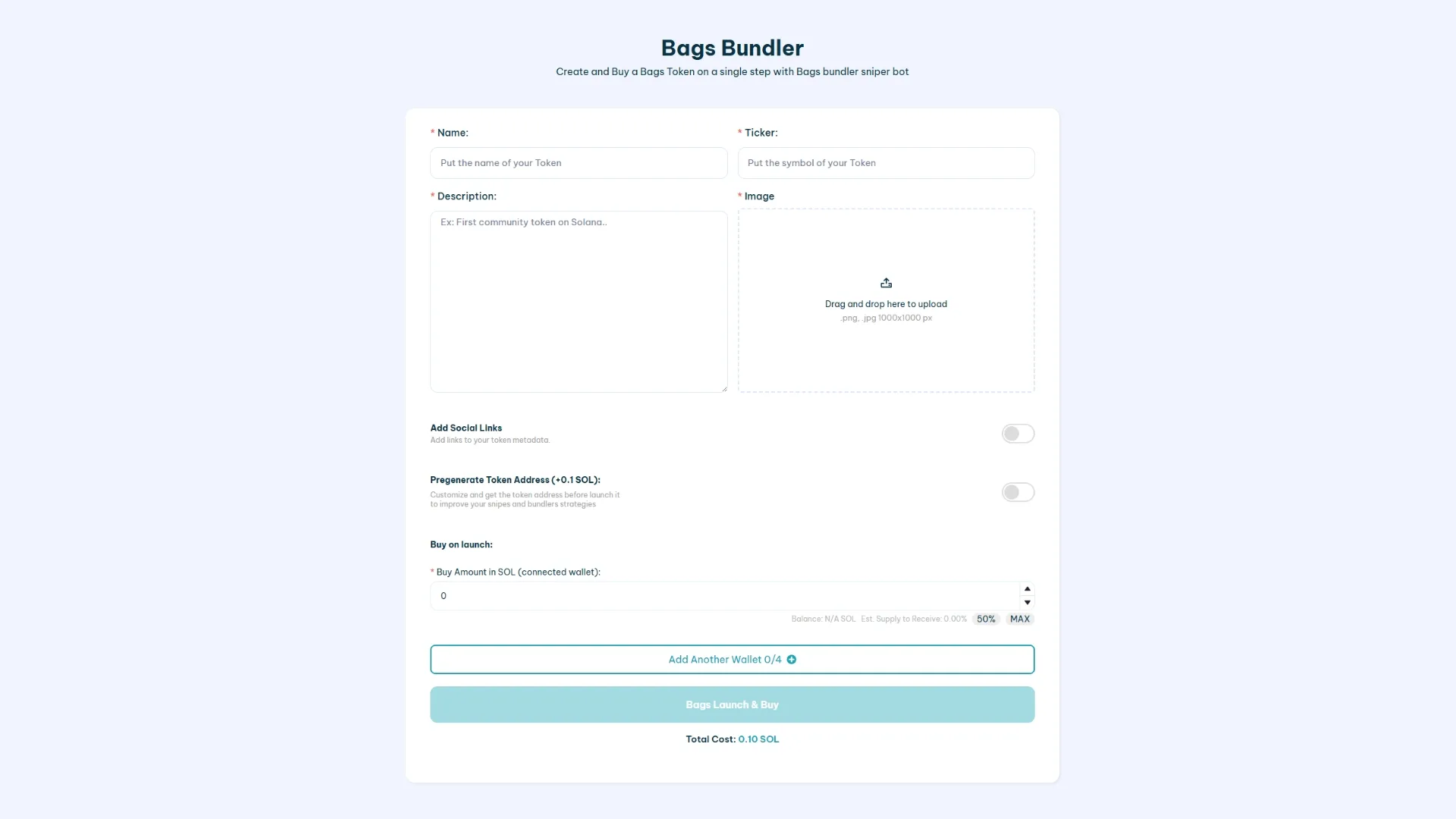
With the Bundler for Bags.fm, you can set up a launch where:
- The token goes live and an initial buy executes instantly.
- That buy gets split across multiple wallets instead of concentrating everything in one.
- You can assign wallets different roles: dev/ops, marketing, rewards, operational liquidity, and more.
The process is straightforward. Just head to the tool, configure your token, and add the wallets you want included in the initial bundle. Confirm the transaction and your memecoin will appear on Bags with an initial buy already in.
Want to learn more about this tool? Check out our guide to using the bundler bot for Bags.
When Does It Make Sense to Use the bundler?
The bundler is a particularly strong fit if:
- You want to avoid launching the token with a single wallet visibly dominating the supply.
- You’re concerned about bots and snipers in the opening seconds and want to launch with a coordinated buy-in.
- You already have a distribution strategy (X, Telegram, memes, collabs) and need the token to look active from day one.
Launching a token on Bags.fm: Traditional Method vs. Bundler Bot
If you want to launch fast and keep full control, the traditional method gets the job done. If you want to start with a stronger structure right out of the gate, the bundler is the more practical choice. Here’s a breakdown of the key differences between both approaches:
| Traditional way | Bundler Bot by Smithii |
| You can only do one instant buy with the dev wallet | You can do an initial buy with 4+1 wallets |
| You get more config options (like “Launch Type” and “Fee Sharing”) | Launches in “Founder Mode” with 1% fee to the dev wallet |
| You only pay the gas fee | Costs 0.1 SOL + gas fee |
What to Do After Launch
Regardless of which method you use to launch your meme coin, the next step is to build a community and get more people buying your meme coin. Without volume, no one will trust your project.
That’s why I recommend running a volume bot alongside your marketing strategy. Whether you’re posting on socials, running a Discord server, or using any other channel to drive visibility to your meme coin, it all compounds.
This way, you can drive organic traffic and even hit trending.
If you’re interested, check out our volume bot guide for Bags.fm.
FAQ
Smithii offers multiple bundler bots for other launchpads, so we already have deep experience building these kinds of tools. Below, I’ve put together the most frequently asked questions on this topic, with a clear answer to each one.
If you have a question or suggestion, leave it in the comments or get in touch with support.
Can I launch a bundler on Bags.fm without writing any code?
Yes, you can do it using the “Bags Bundler” tool available in the dApp of Smithii.
What’s the difference between launching on Bags and using a bundler?
The traditional launch gives you more control over settings like “Launch Type” and “Fee Sharing”. The bundler is optimized for speed, with instant buying and multi-wallet distribution right out of the gate.
Why does initial wallet distribution matter?
Because it shapes how the token is perceived: supply concentrated in a single wallet tends to raise red flags and erode trust right from launch.
Is it safe to use the Bags Bundler on Smithii?
Yes, the dApp from Smithii Tools has been audited, and we offer 24/7 support whenever you need it.
Conclusion
Launching a memecoin on Bags.fm is straightforward when you use the native creator, especially if you need to fine-tune settings like “Launch Type” and “Fee Sharing”. But if you want to optimize your launch from day one, the stronger move is usually deploying with a Bundler for Bags.fm.
Which one you go with depends on your plan and what you want to prioritize. The bundler is designed to spread holdings across multiple wallets and execute an instant initial buy.
And if the challenge is low organic volume, pairing your launch with a Bags Volume Bot can help sustain activity while you do the work that actually drives a launch: community, content, and execution.
Content creator and SEO contributor at Smithii. Systems Engineering student and crypto-tech enthusiast.



