
HOW TO TAKE A SNAPSHOT OF NFT HOLDERS IN 3 STEPS
If you have an NFT collection and want to take a snapshot of your holders, this post is for you. We’ll walk you through it in just 3 simple steps, and you can do the whole process without coding.
Choose Your Blockchain
Before we start the step-by-step tutorial, let’s cover what a snapshot on NFT actually is and what you can use it for.
WHAT IS A SNAPSHOT FOR NFT HOLDERS
A snapshot, as the name suggests, is a “capture” of the wallets holding NFTs from a specific collection. In other words, a snapshot on NFT is a list of wallets holding certain NFTs.
This lets us offer different solutions and utilities, which we’ll cover next.
WHAT DATA DO WE GET FROM A SNAPSHOT OF NFT HOLDERS
When you run a snapshot, you will of course get the list of wallets holding a NFT collection. Depending on the tool you use to run that snapshot, though, you may also get extra data.
The most common extra data you can get includes the NFT held by each wallet and the ID of the NFT owned by that wallet, all delivered in CSV format so it is easier to analyze and use.
That said, the most common output is simply a JSON file with the wallets and the number of NFTs each one holds.
MOST COMMON USES FOR A SNAPSHOT NFT
When we talk about Snapshot, the first thing that comes to mind is running a airdrop. And in practice, that is the most common use case: you run a snapshot and then reward your holders with a airdrop, whether through revenue sharing, distributing a token, or sending NFTs.
It is also common to run a snapshot to grant access to a presale or whitelist.
No more waiting. Let’s get into it and start the step-by-step tutorial for running a Snapshot of NFT holders.
Want to outpace your competitors?
Join our newsletter and get weekly Blockchain insights built for NFT creators.

Snapshot Ethereum
HOW TO GET SNAPSHOT HOLDERS NFT ETHEREUM
First, we need to know which NFT collection on Ethereum we want to run the snapshot for. It can be either ERC721 or ERC1155. Once that is clear, we can start the 3 steps, and in a few minutes your snapshot will be ready.
1. CONTRACT ADDRESS OF THE NFT COLLECTION
The first step is to find the address of the NFT collection smart contract and copy it.
To find it, go to Opensea (this also works with other marketplaces) and search for the NFT collection you want to create the snapshot for.
Once you’re on the collection page, open any NFT. Then scroll down to the “details” section. Open the dropdown and click the “contract address”.
This will open the etherscan page. From there, simply copy the address shown to the right of “contract”.


2. TAKE A SNAPSHOT ETHEREUM
Once you have the Address, paste it into the Smithii tool to create a Snapshot of NFT holders from Ethereum, then press Take Snapshot.

3. EXPORT AND USE SNAPSHOT
Once the snapshot is complete, the tool will open a new page with every wallet holding our NFT collection.
On this page, we will see the snapshot with the wallets and a search bar that lets us find a specific wallet. We will also see buttons that let us copy all wallets, export them as a txt file, share the snapshot with a link, and even create a Merkle tree.
Snapshot Solana
HOW TO DO SNAPSHOT FOR NFT HOLDERS ON SOLANA
If we want to do a snapshot for NFT holders on Solana, we first need to be clear on which NFT collection we want to target. It can follow either the Metaplex protocol or Magic Eden’s Open Creator Protocol. This 3-step tutorial works for both, so let’s get into it.
1. GET THE CREATOR ADDRESS FOR SNAPSHOT NFT
To run a snapshot of the holders of a NFT Collection on Solana, you first need its Creator Address, meaning the address that identifies your NFT Collection.
If you prefer video, we have that available too:
Start by finding the ID of any NFT that belongs to the collection you want to run the snapshot on. You have two options:
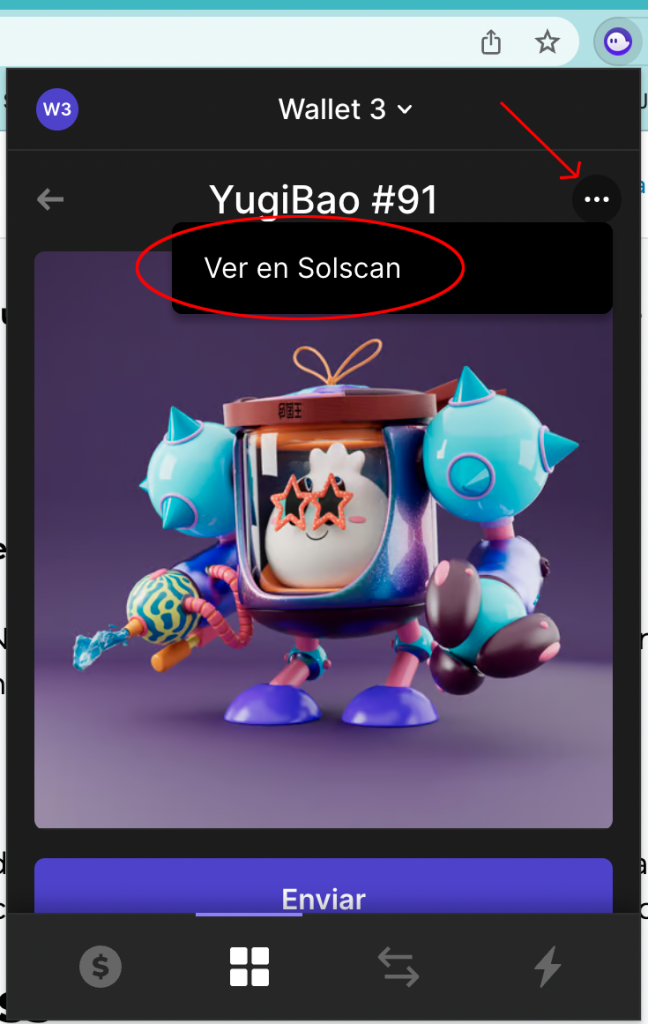
1. Through your wallet: open the NFT inside your wallet. Click the three dots in the top right, then click “View on Solscan”.
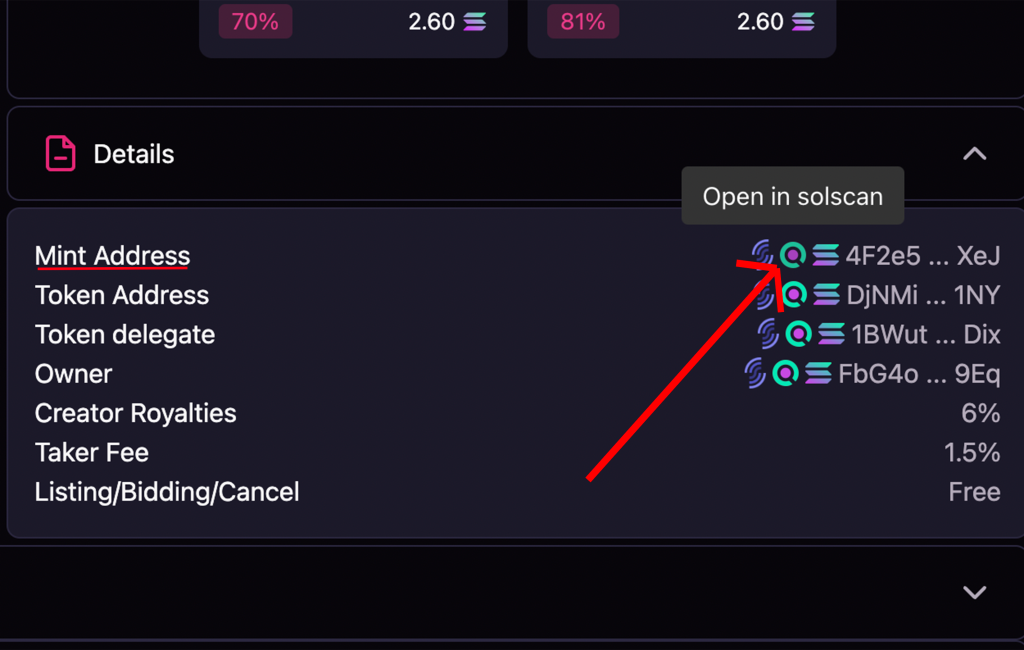
2. Through Magic Eden: open the NFT on Magic Eden and scroll down to the “details” section. There, click the Solscan logo next to “Mint Address”.
Once you are on Solscan, click the “Creators” dropdown. Then click the first address that appears, which should show 0%.
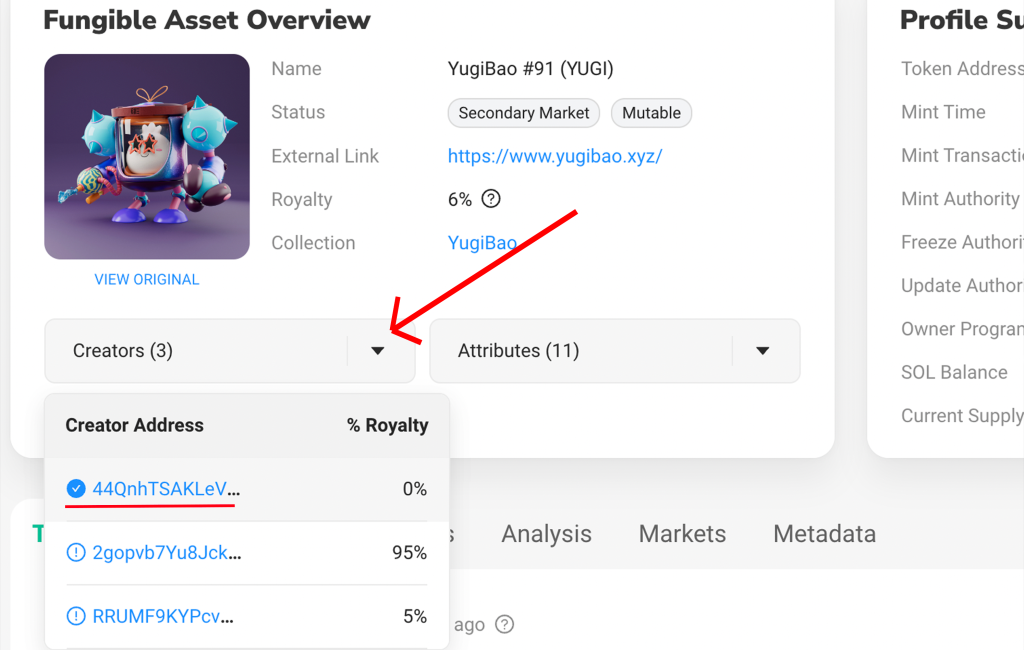
This address is the collection ID for NFT. It will open in Solscan, and you need to copy it.

Once you’ve copied the ID, we’ll go straight into running the Snapshot.
2. RUN THE SNAPSHOT SOLANA
After copying the Creator Address, the next step is to use another tool that will run the snapshot for us.
Just open our tool, “Solana Snapshot NFT” (https://tools.smithii.io/snapshot/solana).
There, we can run the Snapshot and get the holder list in just a few minutes, for only 0.1 SOL.
Once we’re on the site, we’ll connect our wallet, paste the Creator Address, and click “Take Snapshot.”
This will open the transaction in our Wallet, where we’ll pay the 0.1 SOL fee. Once approved, the process will start to get the Snapshot.

Once that is done, you just need to wait for the process to finish.
3. EXPORT AND USE SNAPSHOT
Once the snapshot is complete, the tool will automatically open the holder list so you can copy it or export it as a CSV.
With that CSV, you can use the data however you need: run an Airdrop on Solana, track how your NFT collection is distributed, and more.
Snapshot Base
HOW TO GET SNAPSHOT HOLDERS FROM NFT BASE
The first thing you need to know is which NFT collection on Base you want to run the snapshot on. It can be either ERC721 or ERC1155. Once that is clear, you can start the 3-step process, and in a few minutes your snapshot will be ready.
1. NFT COLLECTION CONTRACT ADDRESS
First, find the address for the smart contract in the NFT collection and copy it.
To find it, go to Opensea (the same flow works on other marketplaces) and search for the NFT collection you want to use for the snapshot.

Once you are on the collection page, open any NFT. Then scroll down to the “details” section. Open the dropdown and click the “contract address”.
This will open the BaseScan page. From there, just copy the “contract” address.

2. CREATE SNAPSHOT BASE
Once you have the Address, paste it into the Smithii tool to run a Snapshot of NFT holders on Base, then click Take Snapshot.

3. EXPORT AND USE SNAPSHOT
Once the snapshot is complete, the tool will open a new page with every wallet holding our NFT collection.
On this page, we’ll see the snapshot with the wallets and a search bar to find a specific wallet. We’ll also see buttons that let us copy all wallets, export them as a txt file, share the snapshot through a link, and even create a merkle tree.
Snapshot Polygon
HOW TO GET SNAPSHOT HOLDERS NFT POLYGON
First, decide which NFT collection on Polygon you want to run the snapshot for. It does not matter whether it is ERC721 or ERC1155. Once that is clear, follow these 3 steps and your snapshot will be ready in a few minutes.
1. NFT COLLECTION ADDRESS
The first step is to find the NFT collection address and copy it.
To find the address, go to Opensea and search for the NFT collection you want to run the snapshot for. You can also do this on other marketplaces.
On the collection page, open any NFT. Inside that NFT, scroll until you find the “details” section. Open the dropdown and click the link to the right of “contract address”.
That link will take you to polygonscan, where you will copy the address shown under “contract”.


2. TAKE A SNAPSHOT POLYGON
Once you have the address, paste it into the Smithii tool to take a Snapshot of NFT holders on Polygon and hit Take Snapshot.

Once that is done, all you have to do is wait for the result.
3. EXPORT AND USE SNAPSHOT
Once the snapshot is complete, the tool will open a new tab with the list of wallets holding the NFT collection we want to analyze.
On this page, you can view the full snapshot and also use a search bar to look up specific wallets, copy wallet addresses, export them as a TXT file, share the snapshot through a link, and even create a Merkle tree.
Snapshot Avalanche
HOW TO MAKE A SNAPSHOT OF NFT HOLDERS ON AVALANCHE
If you want to create a snapshot of NFT holders on Avalanche, follow these simple steps:
1. CONTRACT ADDRESS OF THE NFT COLLECTION
First, find the smart contract address for the NFT collection. To do that, go to OpenSea or Joepegs (the most used marketplaces on Avalanche) and search for the collection.

Next:
- Select any NFT in the collection.
- Find the NFT details section and click the “Contract Address” link.
- This will take you to ArbiScan or SnowTrace, where you can copy the contract address.

2. Take a SNAPSHOT AVALANCHE
With the address copied, open the Smithii snapshot tool on Avalanche and paste it into the right field. Then click “Take Snapshot.”

3. Export and Use the SNAPSHOT
Once the snapshot is complete, you’ll get a page with the full wallet list. You can export the data as a CSV, share it with a link, or even generate a Merkle tree.
Snapshot Binance Smart Chain (BSC)
How to Get SNAPSHOT Holders on NFT BNB
If your NFT collection is on Binance Smart Chain, follow this process:
1. CONTRACT ADDRESS FOR THE NFT COLLECTION
Find the contract by opening the Binance NFT marketplace, or another well-known marketplace like Element, then select any NFT from the collection.

At the top right, you’ll see the BSCScan logo. Click it and you’ll be taken to the collection data. From there, copy the contract address.

2. TAKE A SNAPSHOT BNB
Paste the contract address into the Smithii tool for Binance Smart Chain snapshots and click “Take Snapshot.”

3. EXPORT AND USE SNAPSHOT
The tool will show the holders list and give you several export format options.
Snapshot Blast
How to Get SNAPSHOT Holders on NFT Blast
If you are working with Blast, follow this process:
1. Collection NFT Contract Address
Go to a Blast-compatible marketplace, such as OpenSea, and select the NFT collection.

Then:
- Open the details menu (the 3 dots on the right) and click View on BlastScan
- Copy the “Contract Address.” link

2. TAKE A BLAST SNAPSHOT
Use the Smithii tool to snapshot nft Blast. Connect your wallet, paste the address, and click “Take Snapshot.”

3. EXPORT AND USE THE SNAPSHOT
Once you complete the snapshot, you’ll get the holder list plus tools to export the data in the format you need.
Snapshot Arbitrum
HOW TO GET SNAPSHOT HOLDERS ON NFT ARBITRUM
Arbitrum lets you take quick snapshots with these steps:
1. CONTRACT ADDRESS FOR THE NFT COLLECTION
Go to marketplaces like Stratos or TofuNFT and search for the collection.

Next:
- Click Details, then “View on ArbiScan”
- Copy the contract address

2. CREATE A SNAPSHOT ARBITRUM
Open the Smithii tool to take Arbitrum Snapshots, paste the contract address, and click “Take Snapshot.”

3. EXPORT AND USE SNAPSHOT
The tool will open the wallet list, where you can export it, share it, or use it based on your goals.
Snapshot Cardano
HOW TO CREATE A SNAPSHOT OF NFT HOLDERS ON CARDANO
Before creating the snapshot, you need to know which Cardano NFT collection you want to run the snapshot on. Once that is clear, follow these 3 simple steps. In just a few minutes, your snapshot will be ready!
1. POLICY ID OF THE NFT COLLECTION
The first step is to get the Policy ID for your NFT collection and copy it.
To find it, go to JPG Store (you can do the same on other marketplaces) and search for the NFT collection you want to run the snapshot on.
Once you’re on the collection page, you can open any NFT in that collection. Right below the NFT name, you’ll see the “Policy ID” field, which you need to copy.

2. CREATE CARDANO SNAPSHOT
After copying the Policy ID for the NFT, the next step is to use a tool that handles the snapshot. For Cardano, we recommend using nmkr.io.
To use the tool, you need to create an account. Start by going to their website and clicking the button in the top-right corner that says “Start for Free“.

This opens a signup form that you need to complete before you can access the platform’s features. Fill it out to continue.

Once you sign up, you’ll see a dashboard like the one in the screenshot. Go to the Policy Snapshot section on the left.

To finish, just paste the Policy ID into the “Enter policyid” field and click the “search” button.

One very useful thing about NMKR’s snapshot tool is that it shows which NFT are staked and which ones are not.
3. EXPORT AND USE SNAPSHOT
After a few seconds, the tool will return all the NFT in our collection, along with the corresponding wallet that owns each one, and whether it is currently staked or not.
Scroll down and you’ll see the “export addresses” button, so you can use the snapshot however you want.
Want to Outpace Your Competitors?
Join our newsletter and get weekly Blockchain updates built for NFT creators.
CONCLUSION
Now that you know how to create a snapshot from the NFT holders in your collection, you have no excuse. It’s time to unlock your full potential and take your NFT collection to the top!

CEO & Co-Founder at Smithii. Building on Solana since 2021 and sharing playbooks from the trenches. Also founder of Lince after years investing in DeFi.



