

How to Find a Token Contract Address: Updated Beginner’s Guide
If you’re not sure how to find the Contract Address of a Token on the blockchain, don’t worry. In this quick guide we’ll walk you through how to get it, plus a few verification tips so you can be sure you found exactly what you were looking for.
Let’s not drag out the intro any further and get straight to it.
First, what is the Contract Address of a token?
The Token Contract Address is a unique address that points to a specific token. It’s basically a string of letters and numbers that identifies a token on the blockchain, lets you verify its authenticity, add it to your wallet, or run transactions with it.
This term is mostly used with ERC-20 tokens, the Ethereum standard that’s also compatible with other networks (Base, BNB Chain, and other EVM chains). On Solana, the address of a token is called the mint address. You can follow this guide if you want to locate the ‘contract address’ (or its equivalent) of a token on Solana, but we also have a guide for finding the mint address on Solana if you’d rather use the specific one.
How to Get the Token Contract Address if the token Is in Your wallet
With that out of the way, let’s get straight into how to find the token contract address on any blockchain, as long as your wallet already holds these tokens. There’s a quick way to check it directly from the wallet itself, like this.
If it’s a token you’re holding in your wallet, the fastest way is to check right inside the app.
While I’ll walk you through how to copy the token contract address using the wallet from MetaMask, most wallets follow the same steps. So all you need to do is this:
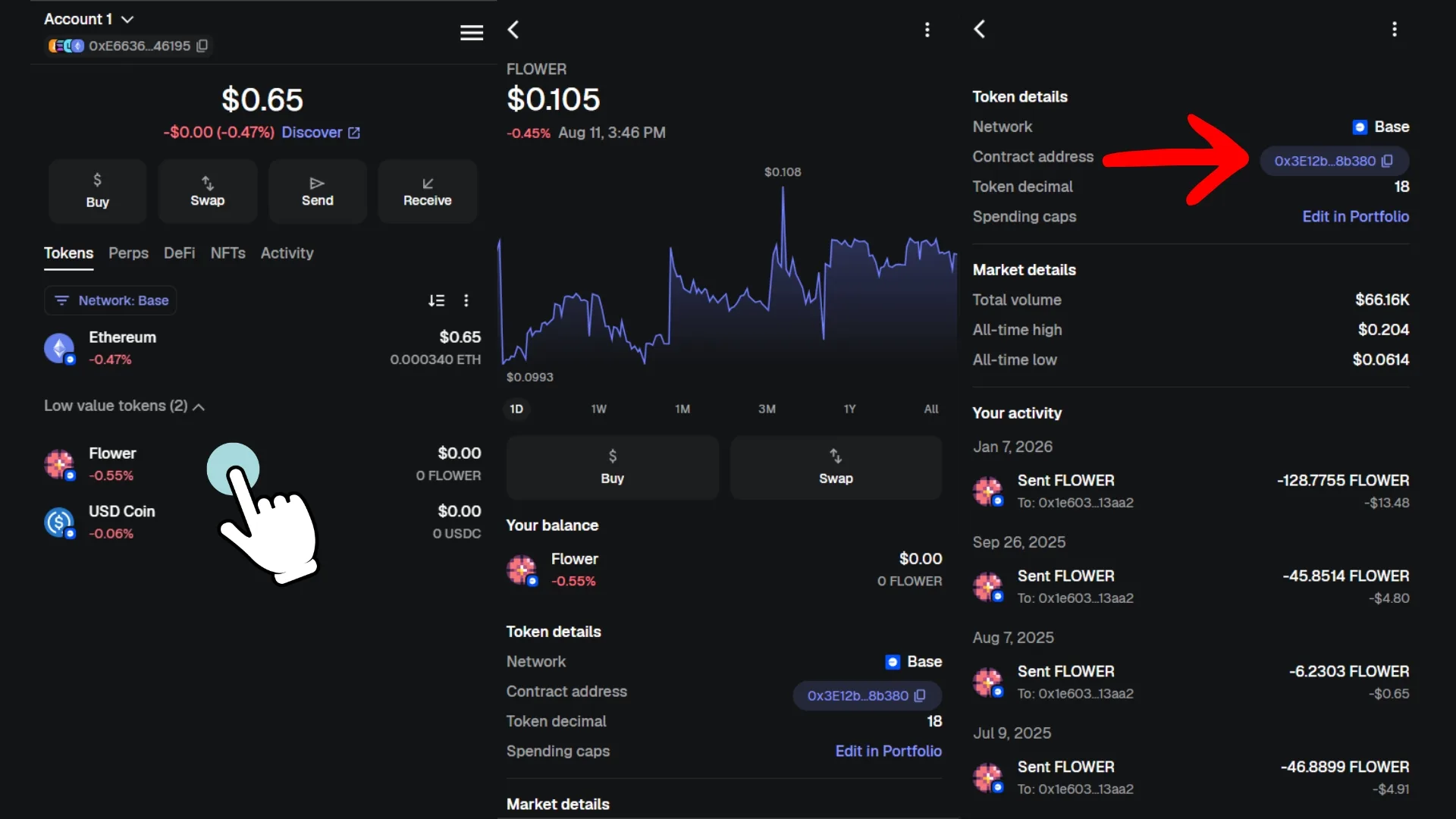
- Open MetaMask and go to the ‘Tokens‘ tab. There you’ll see the tokens sitting in your wallet, but make sure to expand the ‘Low value tokens’ section in case you don’t see it right away.
- Pick the token whose contract you want to look up.
- Look for the section labeled ‘Contract Address’ and you’ll already see part of the token contract address. Clicking it will copy the full address and open it in the scanner for that network.
Getting the token contract address from a blockchain explorer or scanner
Block explorers like Etherscan, BscScan or Polygonscan store data on ERC-20 tokens and their equivalents on other networks. To find the contract address of a token, follow these steps:
- Head to the explorer for the token’s network (the best-known ones are Etherscan, BscScan, BaseScan, Polygonscan, ArbiScan, or BlockScout on Robinhood).
- Search for the token you want using its name or symbol.
- The contract address will be clearly displayed on the token’s page.
Below I’ll show you how to do it specifically on Etherscan, but the process carries over to every other scanner on any blockchain.
How to use an explorer or scanner to find the token address
If your token is Ethereum, we head to Etherscan and, in the top right, we search for the token by name or symbol. Once we find the token, we click it and can pull the Token Contract Address. It’s important to verify the token is legit, since several can share the same metadata. But we’ll cover that later on.
The step-by-step goes like this:
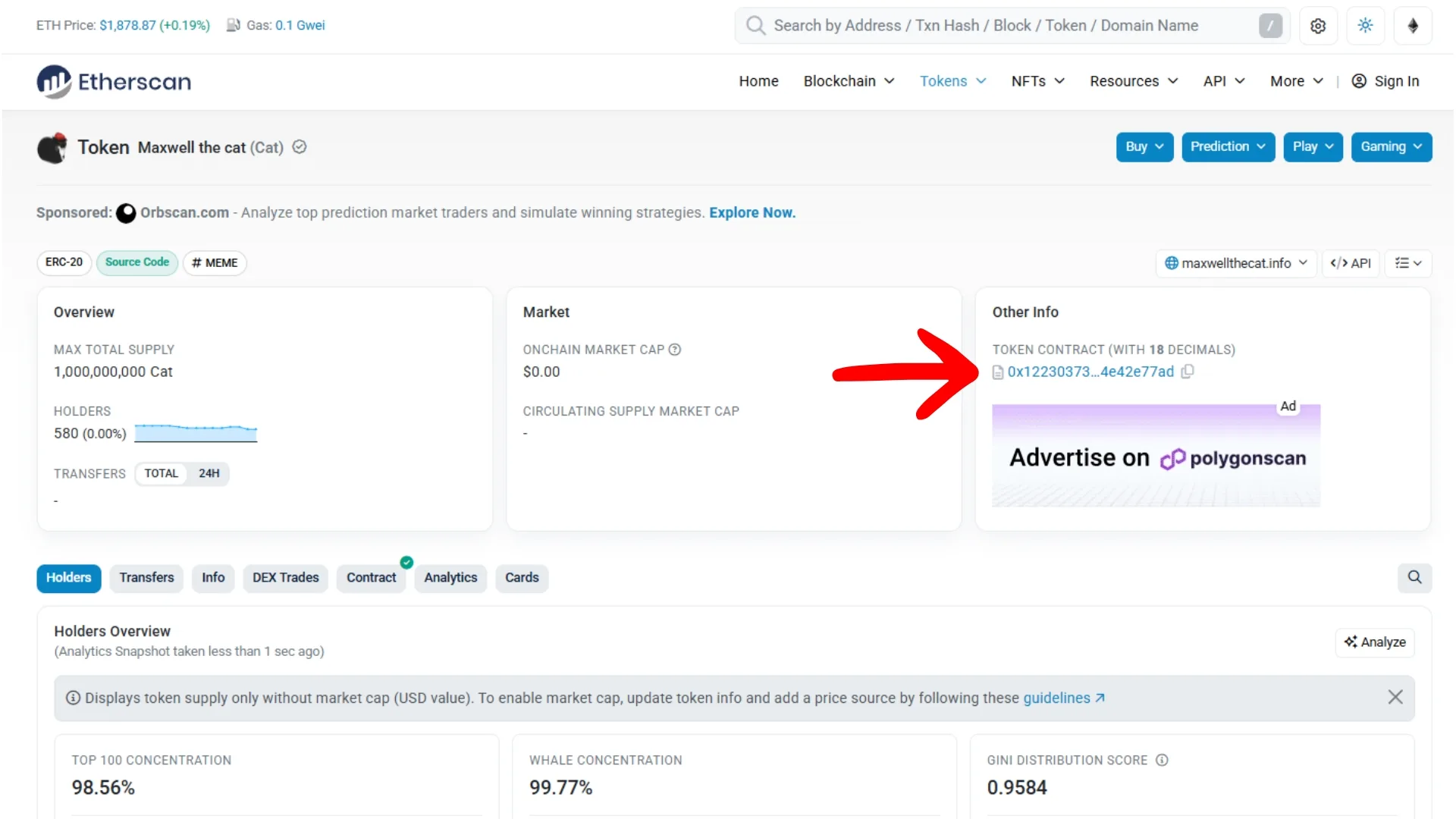
- Click on the search bar and type the name of the token you’re potentially looking for.
- Click on the token we found and review its details.
- Grab the ‘Token Contract’ from the ‘Other Info’ section. From here you can cross-check for verification.
Using token listing sites to get the address
The last way to get the token address of any asset is through token listing platforms, such as CoinGecko and CoinMarketCap. That said, unlike the explorers we covered earlier, these platforms don’t list every token on their corresponding network.
That’s because they basically only show tokens that are actively traded or whose devs have requested indexing. If you’re interested, we have a guide on how to get listed on CoinGecko and another step-by-step for indexing on CoinMarketCap.
This method for getting the token contract address you need has two key things to keep in mind:
- If it’s a token with heavy activity, you’ll find the official one faster than using an explorer or your own wallet. That’s because these platforms usually filter out fake tokens or obvious copies.
- If the token you’re looking for isn’t active, you probably won’t find it, so you’ll need to fall back on the explorer (the previous section).
With that covered, let’s move on to the step-by-step for finding the token on the network you need:

- Head to CoinGecko or CoinMarkeTCap and use the search bar.
- Type the name of the token you’re looking for.
- You’ll see the token contract address under ‘Info’, along with the blockchain the token belongs to.
How to verify a token’s contract address before buying
When you create a token on Smithii, the token is verified automatically, but that doesn’t make it legit. Verification only means the source code is published and compiles cleanly. So if you want to learn how to check whether a contract address is actually the one you’re looking for, here are a few tips.
There’s always a clone token trying to sneak in or get in the way of your search to steal your position and pull a rug. Name, image, description, and socials are metadata that can be copied easily, so they only make the token look attractive, not trustworthy.
Here are the tips to verify that the token you found is actually the official one (you can also share this list with your community so they know how to make sure they’re transacting with your real token):
- Match the token contract address posted on official channels against the one you found: don’t rely too much on the prefix and suffix, since tools like vanity address generators let you pre-generate a string that matches whatever combo you want. In order, the first thing I’d check is the official site, then official docs, then the official social account, and lastly the explorer.
- Cross-check with old transactions (TXID or transaction hash): if you’re looking for the contract address of a token you previously held in your wallet, your best move is to find the transaction where you sent or received it and grab the contract address from there.
- Confirm you’re searching on the right blockchain: search ‘Shiba Inu’ on any network and you’ll see why picking the right one matters. Copies are everywhere, so it’s better to double-check this simple but critical detail.
FAQ
Finally, I’ve put together a list of common questions people ask when they’re learning about token contract addresses. I’ve gathered them in this section and answered each one.
Can a Contract Address change?
No. A contract address is recorded on a blockchain and, by nature, blockchain records are immutable. So a contract address can never change. That said, a project can migrate its token to a new contract, which will have a different Contract Address.
Do all cryptocurrencies have a contract address?
No. A blockchain’s native coin doesn’t necessarily have a contract address. The concept only applies to tokens created on a blockchain. Other native tokens, like Solana or Ethereum, aren’t structured as an ERC-20 or a standard SPL, since they have behaviors unique to their ecosystem.
What’s the difference between a Contract Address and a wallet address?
Contract addresses identify smart contracts for programs or apps on the blockchain. A wallet address is used to identify users who can transfer or store crypto.
Where do I find the Contract Address of a token?
You can find the contract address from your own wallet, using an explorer (scanner on each blockchain) or a token listing site (like CoinGecko or CoinMarketCap). These are the most accessible places to find the contract address, and we walked through the guide for each method above.
I’ve got the Contract Address, now what?
Once you’ve found your token’s contract address, you can run a token snapshot to pull a list of holders for that token, for example. You can also use the rug checker on Smithii (by Solana) to see if there are any red flags you should worry about.
Conclusion
Now that you know how to find the token contract address of any token on whatever blockchain you use, I hope you’re aware of all the solid info you can dig up to figure out whether an asset is actually worth it, or just a flash in the pan.
Over at Smithii Tools we’ve also redesigned the experience so you can pick a token you hold in your wallet and skip the copy-paste of the contract address altogether.
Don’t forget we have everything you need to create, boost, and maintain your token or web3 project at Smithii Tools.

Industrial Engineer turned Solana trader. Marketing at Smithii and contributor to the $SHRIMP memecoin launch.




good