

HOW TO USE LAUNCHMYNFT: FULL TUTORIAL
If you want to create your collection through LaunchMyNFT, this post is for you. In this tutorial, we’ll break down EVERY single detail you need to know to use LaunchMyNFT.
Choose your blockchain to see the step-by-step tutorial
Before we start the step-by-step tutorial, let’s look at what you can do with LaunchMyNFT, along with its pros and cons when launching your collection on the platform, plus a few key factors to keep in mind before minting.
WHAT IS LAUNCHMYNFT
LaunchMyNFT is a self-service Launchpad that lets any user create their own Mint without coding across multiple blockchains and at almost no cost.
It is, without question, the go-to platform for NFT “Degen” projects and “Free Mints”. Hundreds of scam NFT are also created there every day, which means it does not give us the visibility or credibility we could get on other launchpads.
IS LAUNCHMYNFT WORTH IT?
Using LaunchMyNFT has a strong upside, but like anything, it also has a downside. Let’s break both down and see whether it is worth it to mint on their platform.
✅ LAUNCHMYNFT BENEFITS
Reliable mint performance
Create a Mint without coding
Very Low Cost
Customizable Mint
❌ LAUNCHMYNFT CONS
Hurts Credibility
Less visible than other launchpad
Fee Required
No Marketing Support
What do you think? Is it worth using LaunchMyNFT, or is it better to consider other options? If you think so, let’s get straight to it!
3 KEY THINGS TO KNOW ABOUT LAUNCHMYNFT
Before launching your NFT collection on LaunchMyNFT, you need to understand these factors.
1. THERE ARE NO REQUIREMENTS
As we mentioned earlier, any user can create their NFT on LaunchMyNFT, no exceptions. There are no requirements to meet. Just follow the steps we’ll cover below and your mint will be live.
2. YOU CAN CREATE NFTs WITH RARITY
LaunchMyNFT has its own randomization system, which lets us generate our NFT with their corresponding rarity. We can also simply upload the final artwork and make the NFT traitless.
3. IT IS THE LEAST PRESTIGIOUS OPTION, BUT IT WORKS
We need to be clear about where we’re running our mint. LaunchMyNFT is a place where all kinds of collections are created, which means we may send a signal we do not actually want.
There are other interesting launchpad options, but LaunchMyNFT gives us speed and simplicity at virtually no cost, so it simply works.
LOOKING AT OTHER OPTIONS?
Choose the Blockchain your project is on and we’ll show you the best launchpads for it.
Want to outrank your competitors?
Join our newsletter and get weekly Blockchain updates built for NFT creators.

LaunchMyNFT Polygon
HOW TO MINT ON LAUNCHMYNFT POLYGON
Running a Polygon mint on LaunchMyNFT with Matic is more common than you might think. After the FAQ, we’ll walk through how to create your collection on this platform step by step.
LAUNCHMYNFT POLYGON FAQ
IS LAUNCHMYNFT POLYGON RECOMMENDED?
If you want to create an NFT collection on Polygon, LaunchMyNFT is a great option, especially if you don’t have programming experience. Especially if the mint price is low or directly 0.
LAUNCHMYNFT POLYGON FEES?
Creating a collection on LaunchMyNFT Polygon has two costs:
1. Deploying the mint costs between $0.3 and $1
2. LaunchMyNFT fee is 2.5%, plus 1.5% if mint price is over 3 Matic.
LaunchMyNFT also charges a small extra fee to buyers if mint price is below 3 Matic.
CAN I CREATE A POLYGON WHITELIST ON LAUNCHMYNFT?
Yes, you can create a whitelist with the wallets you choose so they can mint before everyone else and at the price you set.
WILL I RECEIVE THE MINT FUNDS IN MATIC?
You’ll receive the mint funds after claiming on the mint page. Note that 2.5% will be deducted as their Fee.
WILL MY COLLECTION BE ON OPENSEA?
Yes, when your collection starts to mint it will appear directly on Opensea Polygon.
1. CREATE A POLYGON COLLECTION ON LAUNCHMYNFT
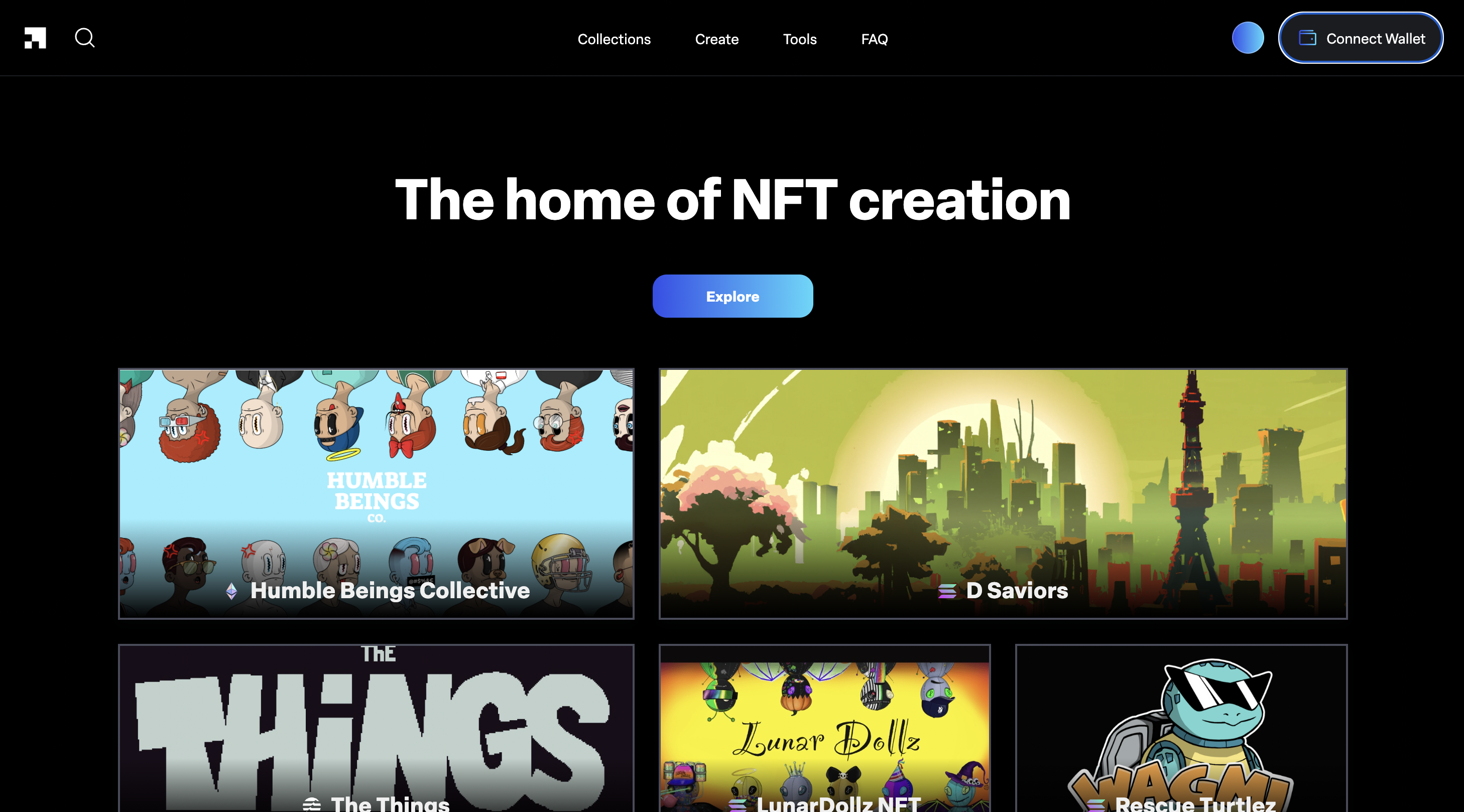
We start the process directly on launchmynft.io. From there, we connect our wallet using the button in the top right, then click “Create” in the main menu.
This brings us to our first decision: are we creating the collection with the final images, or are we going to generate our NFT from their layers (traits)?
The process is identical. The only difference is that there will be one extra step if we choose to generate our NFT. Pick the option that best fits your NFT collection.
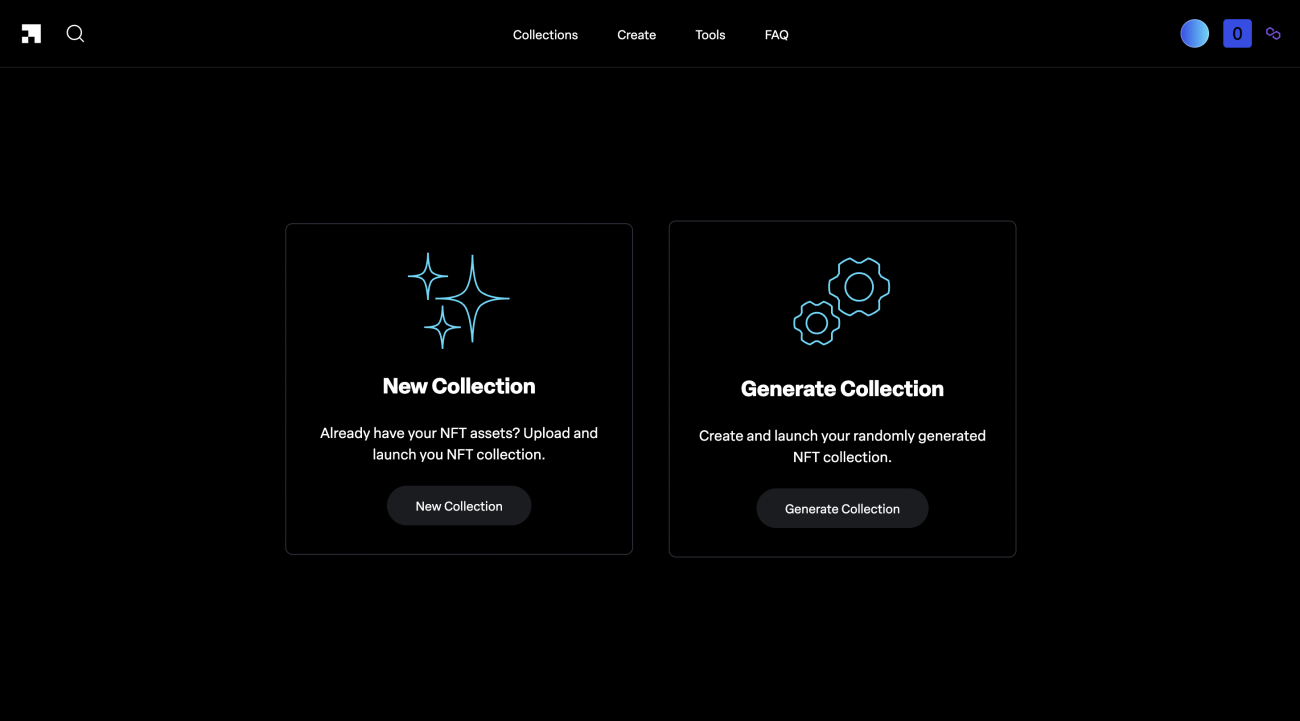
After selecting it, click the “sign in” button and sign a transaction in your wallet (free).
2. NFT POLYGON LaunchMyNFT Details
In this step, we need to enter the information for our NFT collection mint. Keep in mind that many of these details cannot be changed later.
Start by entering the name of the “smart contract“. This is usually the same as the collection name, but without spaces. Then add the name of your NFT collection and the collection symbol.
Next, choose from 3 options:
- Launch later: lets you schedule the mint date so it starts at a later time.
- Enforced Royalties: makes buyers pay the royalty percentage you set, instead of making it optional.
- Whitelist: lets you create a private list of wallets that can mint before the public mint opens.
After selecting the options that work best for us , enter the name again. This time, it is the name the NFT will use, along with their description.
Finish by setting the mint price and the number of mints per user, for both the public mint and the whitelist mint (if you enabled it earlier). Move to the next step by clicking the button “next“.

3. LAUNCHMYNFT COLLECTION GENERATOR (OPTIONAL)
In this section, you need to upload a folder with all the layers that will make up your NFT.
The folder should be organized like this:
- Collection Folder
- Trait Name Folder (Head)
- Rarity Name Folder (legendary)
- Layers for this rarity within this trait
- Rarity Name Folder (legendary)
- Trait Name Folder (Head)
You can download a sample file to use as a reference by clicking “Download example input folder”.

After uploading the file, you need to set how many NFTs you want to generate. You can also choose the order of the layers and the rarity percentage, then preview the results before moving on.
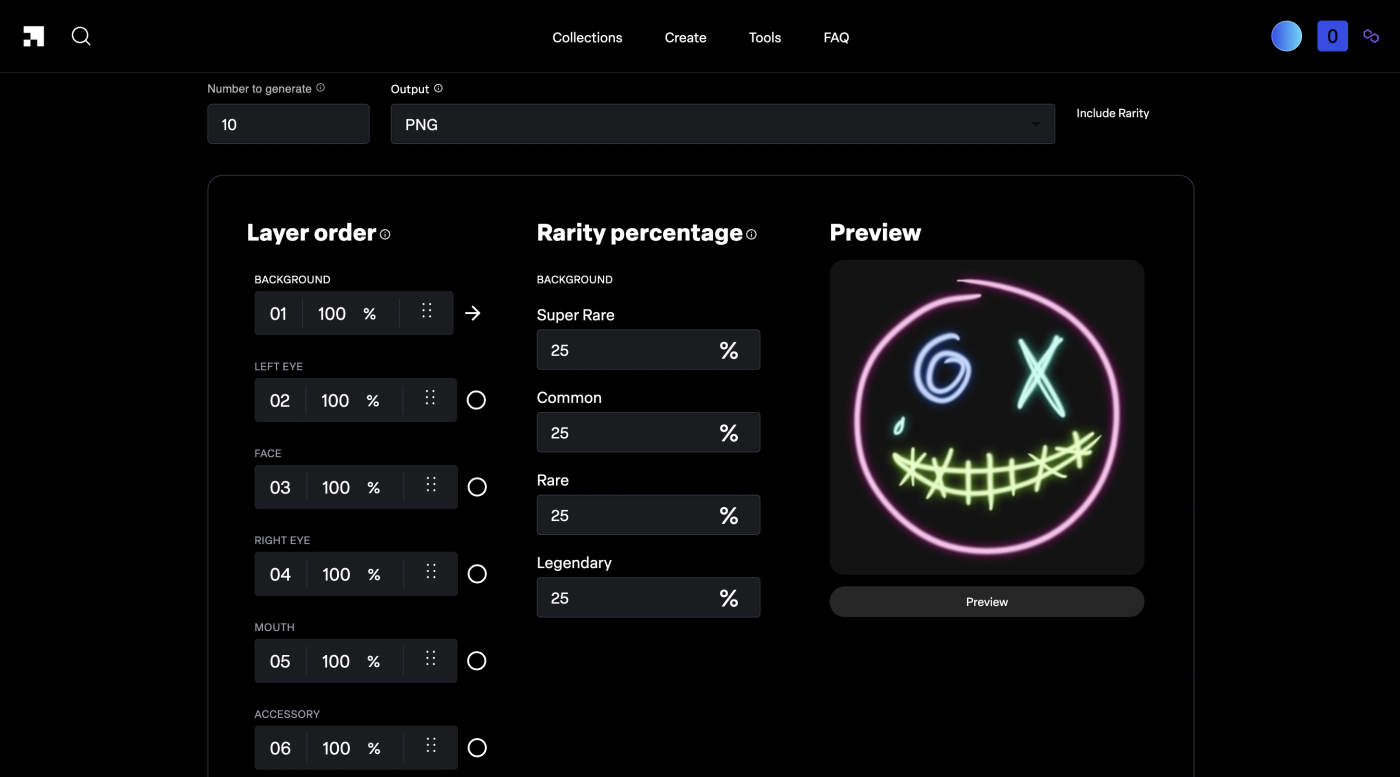
Click Generate, then choose where you want to save the final NFT images and metadata. The “output” file will download with everything inside.
4. UPLOAD POLYGON NFT TO LAUNCHMYNFT
In this step, we just need to choose whether we want the NFT to mint in order or randomly (1, 2, 3… or 5, 8, 4…) and upload the images for our NFT plus the matching metadata, if we have it.
If we only upload the images, we can manually add the attributes and traits for the NFT (metadata).
Once everything is ready, click the Continue button, and the creation of our NFT will begin.

5. DEPLOY POLYGON COLLECTION ON LAUNCHMYNFT
In this step, we simply need to confirm the upload of our NFT to the Blockchain.
So we also need to confirm a transaction costing less than $1 in MATIC.
6. MINT YOUR NFT COLLECTION ON POLYGON LAUNCHMYNFT
We’ve already completed the full setup needed to run our own mint on LaunchMyNFT. Now we’ll see our own mint site, which we can customize with branded designs to make it more appealing.
6.1. EDIT YOUR POLYGON MINT PAGE ON LAUNCHMYNFT
To make changes, go to your mint page, click the three lines in the top-left corner, then click “Manage”.
From here, you can view your mint smart contract, withdraw the funds you collect, connect your Twitter so it appears on the page, add your Discord link, upload a profile image and banner, and finally edit the page description.

6.2. WHITELIST YOUR POLYGON ON LAUNCHMYNFT
To access the whitelist controls, go to your mint page, click the three lines in the top left, then click “Whitelist“.
In this section, you can change the mint prices and add the list of wallets that will get whitelist access.

Once that’s done, your mint will be ready. We recommend starting your mint only when you have a large enough community for demand to exceed supply.
LaunchMyNFT Solana
HOW TO MINT ON LAUNCHMYNFT SOLANA
There are hundreds of Degen and Free Mint projects on Solana that mint through LaunchMyNFT. It’s definitely a strong option because of how easy it makes the process. So let’s get into how to do it, after covering a few FAQs.
Here we show los 5+1 Mejores Launchpad de Solana.
LAUNCHMYNFT SOLANA FAQ
IS LAUNCHMYNFT SOLANA RECOMMENDED?
LaunchMyNFT is widely used and known among Solana users. It’s recommended to a certain degree depending on the type of project and the image you want to project.
LAUNCHMYNFT SOLANA FEES?
Creating a collection on LaunchMyNFT Solana costs 2.5% of the mint, deducted automatically from each transaction. Buyers also pay a small extra fee.
CAN I CREATE A SOLANA WHITELIST ON LAUNCHMYNFT?
Yes, LaunchMyNFT lets us configure a whitelist, plus other features like Reveal, Immutability, Mandatory Royalties or Freeze.
WHEN DO I RECEIVE THE FUNDS?
Funds are sent automatically to the wallet you used to create the collection every time someone mints.
WILL MY COLLECTION BE ON MAGIC EDEN?
Yes, your collection will be automatically listed on Magic Eden and other Solana Marketplaces once minted.
1. CREATE YOUR LAUNCHMYNFT SOLANA MINT ON NFT
We’ll start the step-by-step process directly from launchmynft.io. There, we’ll connect our wallet using the button in the top-right corner, then click “Create” in the main menu.
In this step, we need to choose whether to create our mint with the final NFT artwork or generate the artwork from its layers (traits).
Either way, the process is the same. The only difference is an extra generation step if you choose that option.
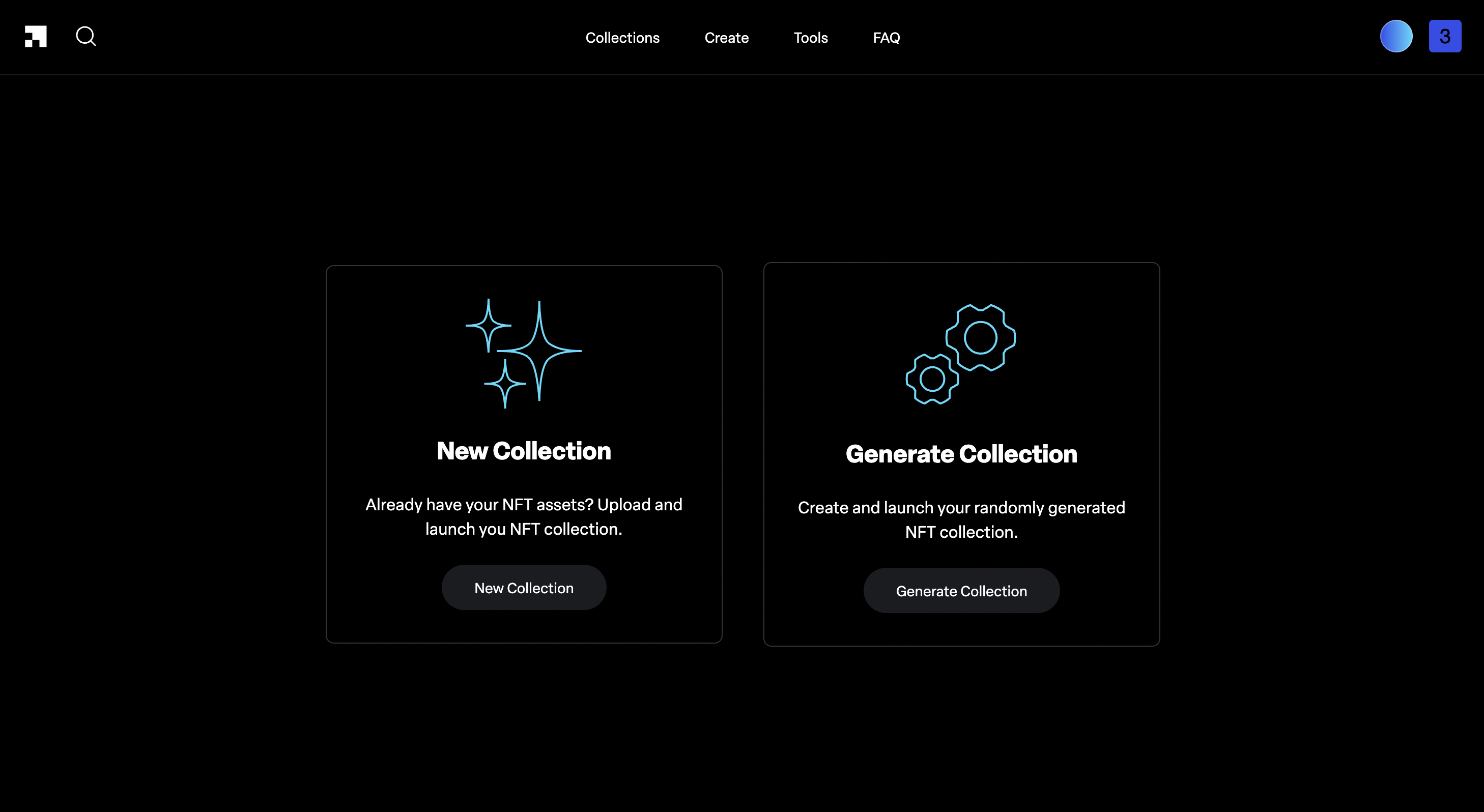
After selecting it, click “sign in” and sign the transaction in your wallet. It has no cost.
2. LaunchMyNFT SOLANA NFT Details
In the details section, you need to enter your NFT collection information. Keep in mind that you will not be able to edit these details later.
Start by entering your collection name and symbol. Then choose the mint date, which you can also update later.
Next, choose between 4 options:
- Immutable: choose whether the metadata can be updated after the mint or not.
- Reveal Later: lets you set one placeholder image for all NFT and reveal the final NFT later.
- Freeze Collection: lets us block buying and selling of our NFT until we decide otherwise.
- Enforced Royalties: makes buyers pay the royalty percentage we set, instead of leaving it optional.
After choosing the options we want, we enter the name again, this time the one the NFT will use, along with its description.
To finish, we set the mint price and royalty percentage. We can split that royalty percentage across the wallets we choose.
Move to the next section by clicking “next”.

3. LAUNCHMYNFT COLLECTION BUILDER (OPTIONAL)
In this step, you need to upload a file containing every layer that will make up your NFT.
The folder must follow this exact structure:
- Collection Folder
- Trait Name Folder (Head)
- Rarity Name Folder (legendary)
- Layers for this rarity within this trait
- Rarity Name Folder (legendary)
- Trait Name Folder (Head)
You can download the sample file as a reference by clicking “Download example input folder”.

After uploading the file, we need to enter how many NFTs we want to generate. We can also choose the layer order and the rarity percentage. Check the previews carefully to catch any mistakes before moving on.

Click Generate, then choose the folder on your computer where you want to save the images and metadata for the generated NFT. The “output” file will download with all the files inside.
4. UPLOAD SOLANA NFT TO LAUNCHMYNFT
In this next step, we’ll choose whether the NFT will be minted sequentially or at random (1, 2, 3… or 5, 8, 4…) and upload the images for our NFT along with their corresponding metadata, if we have it.
If we only upload the images, we can manually add the attributes and traits for the NFT (metadata).
Once everything is ready, just click the Continue button and your NFT will start being created.
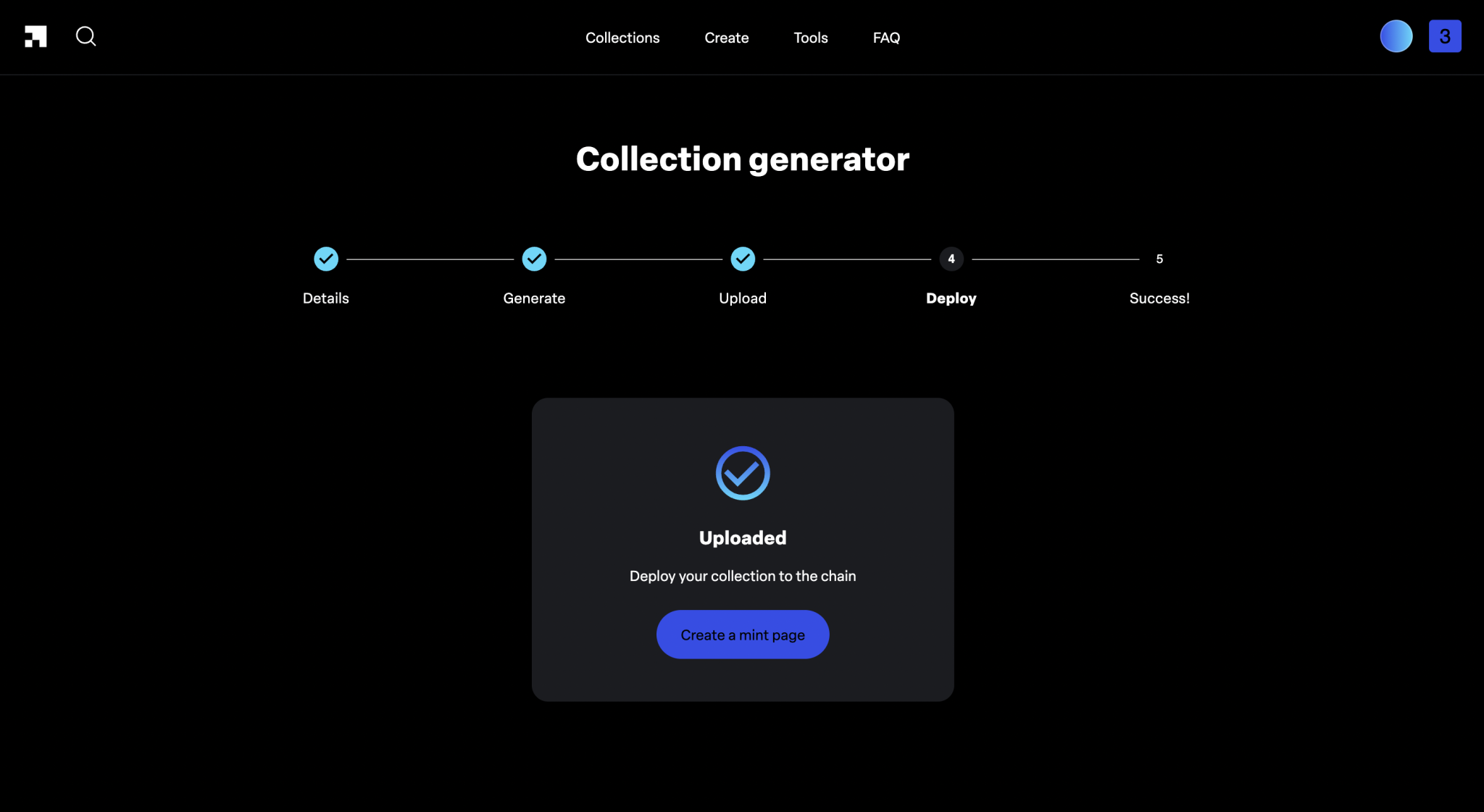
5. DEPLOY YOUR SOLANA COLLECTION ON LAUNCHMYNFT
In this step, we confirm the deploy of the NFT on the Blockchain.
We need to confirm the transaction in SOL, with a cost under $1.
6. MINT YOUR NFT COLLECTION WITH SOLANA ON LAUNCHMYNFT
After the previous steps, we have completed the setup for our mint on LaunchMyNFT. We can now view our mint page, which we can also edit to match our branding.
6.1. EDIT YOUR SOLANA MINT PAGE IN LAUNCHMYNFT
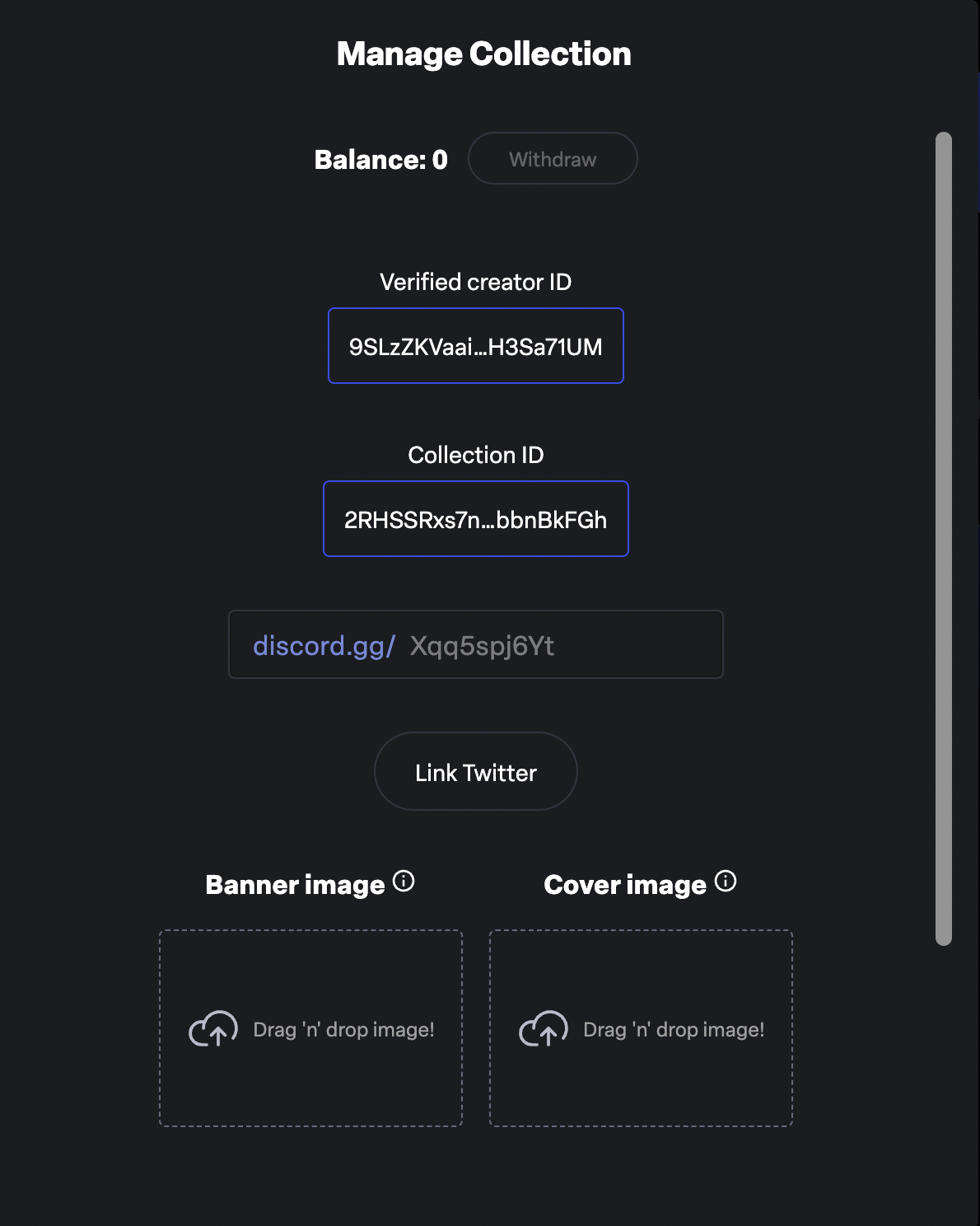
To make changes, go to your mint page and click the three lines in the top-left corner, then click “Manage”.
From here, you can view your collection ID, connect your Twitter so it shows on the page, add your Discord link, upload a profile image and banner, and edit the description displayed on the page.
6.2. SOLANA WHITELIST IN LAUNCHMYNFT
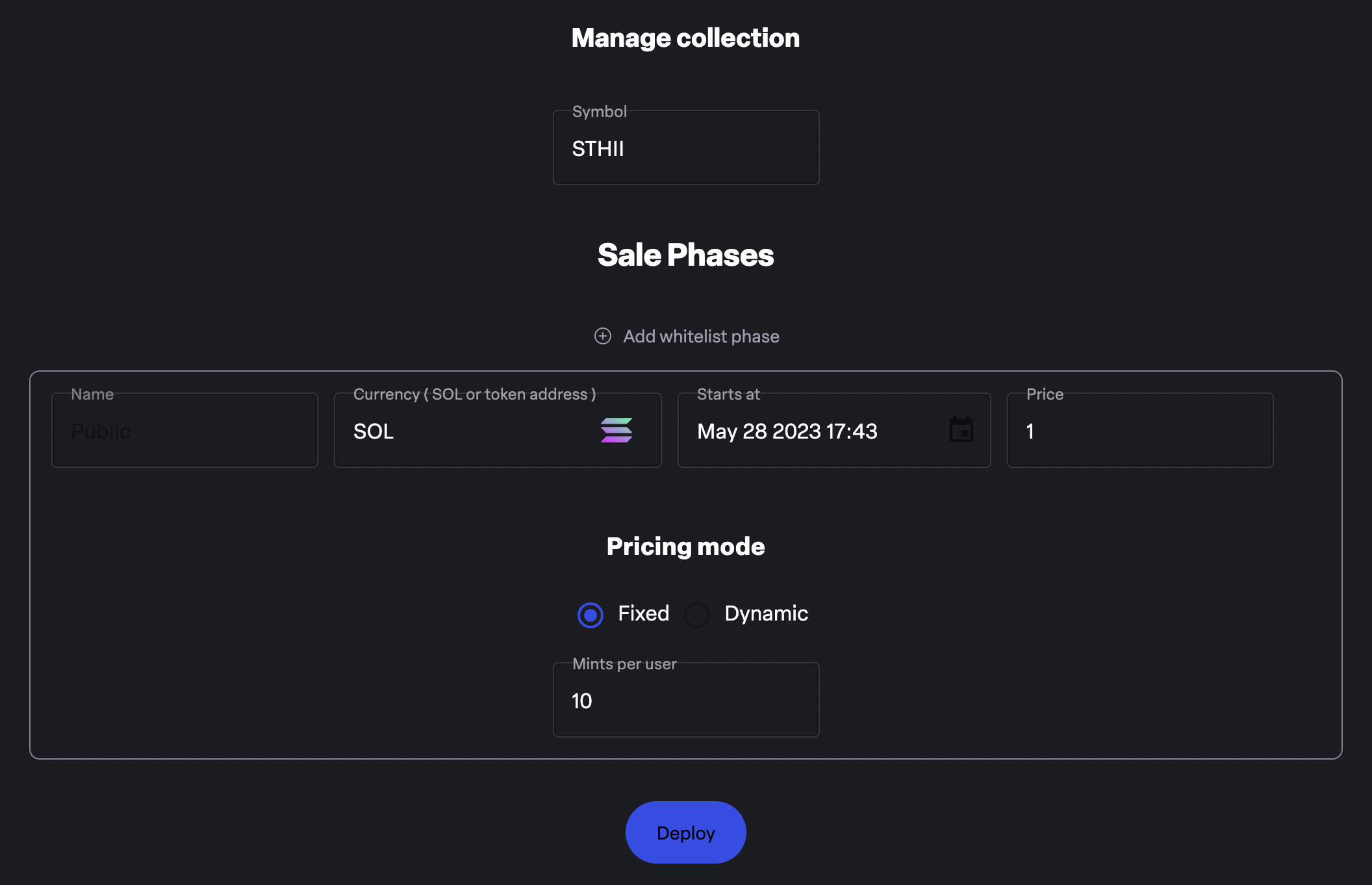
To manage whitelist settings, go to your mint page, click the three lines in the top-left corner, then click “Sale Phases”.
In this section, you can add whitelist phases, set which wallets can mint, define the price, and more.
6.3. LAUNCHMYNFT EXTRAS ON SOLANA
Beyond the two options we covered earlier, LaunchMyNFT lets us add more NFTs, burn the remaining supply to reduce it, copy the hash of our NFTs so we can add the collection to different marketplaces, and finally set up staking pretty easily.
Once that is done, our mint on Solana will be ready. We recommend launching your mint only once you already have a community, so you can create “scarcity“.
LaunchMyNFT SUI
HOW TO MINT ON LAUNCHMYNFT SUI
SUI really stands out for its NFT collections, and LaunchMyNFT can definitely be a solid place to create your mint if you do not have coding experience, with costs that are practically 0.
LAUNCHMYNFT SUI FAQ
IS MINTING A SUI COLLECTION ON LAUNCHMYNFT RECOMMENDED?
LaunchMyNFT is well-known among SUI users. It can be a good option for your NFT project, although it depends on the type of collection you want to create.
LAUNCHMYNFT SUI FEES?
Creating a collection on LaunchMyNFT SUI costs 2.5% of the mint, deducted automatically from each transaction. Plus a small variable gas fee.
CAN I CREATE A SUI WHITELIST ON LAUNCHMYNFT?
Yes, LaunchMyNFT lets us configure a whitelist so the wallets you select can mint before other users and with a price of your choice.
WHEN DO I RECEIVE THE FUNDS?
Funds are sent automatically to the SUI wallet you used to create the collection every time someone mints.
WILL MY COLLECTION BE ON BLUE MOVE?
Yes, your collection will be automatically listed on Blue Move and other SUI Marketplaces once minted.
1. CREATE A SUI COLLECTION ON LAUNCHMYNFT
Start the step-by-step process from launchmynft.io. Here, connect your wallet using the button in the top right, then click “Create” in the main menu.
You will sign a transaction to log in and start the step-by-step process.
2. NFT SUI DETAILS ON LAUNCHMYNFT
In this section, enter the information for your NFT collection. Keep in mind that you will not be able to edit these details later.
Start by entering the name of your collection. Then choose the mint date (you can also change it later).
After the date, enter the name again, this time the one your NFT will use, along with two descriptions: one for the collection and one for the NFT.
Finish by setting the mint price. Move to the next section by clicking “next“.
3. UPLOAD SUI NFT TO LAUNCHMYNFT
In this next step, upload the artwork for your NFT and its matching metadata (if you have it).
Once everything is ready, click the Create a mint page button. The creation of your NFT will then begin.
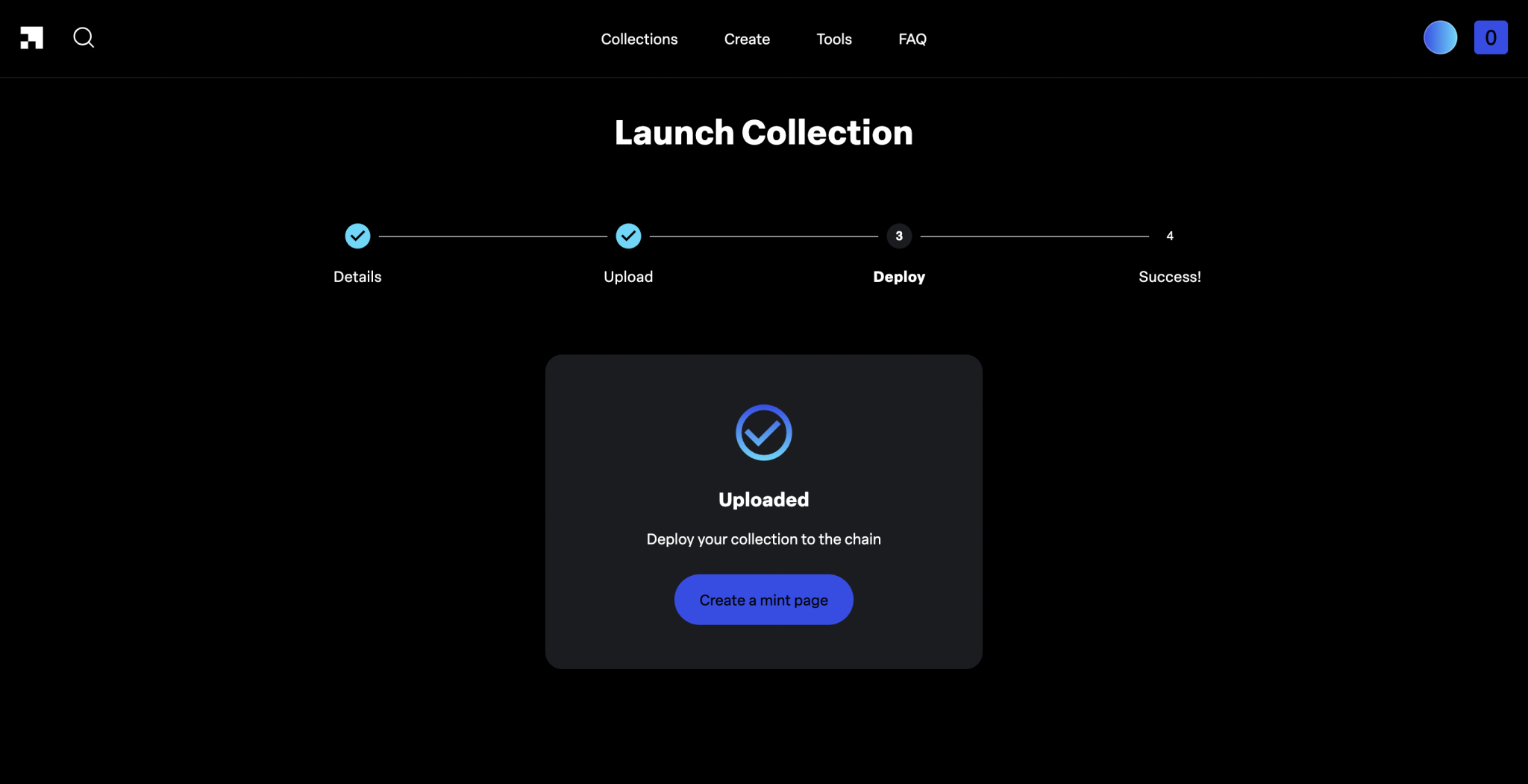
4. DEPLOY SUI COLLECTION ON LAUNCHMYNFT
In this step, we confirm the transaction to deploy the NFT on the Blockchain.
We need to confirm the transaction, with a cost under 1$ in SUI.
5. MINT NFT COLLECTION ON SUI WITH LAUNCHMYNFT
After the previous steps, we have finished creating our SUI mint on LaunchMyNFT. We will see our mint page, which we can also edit to match our branding.
5.1. EDIT SUI MINT PAGE ON LAUNCHMYNFT
To make changes, go to your mint page and click the three lines in the top-left corner, then select “Manage”.
From here, you can connect your Twitter so it shows on the page, add your Discord link, upload a profile image and banner, and edit the description displayed on the page.
5.2. SUI LAUNCHMYNFT WHITELIST
To access the whitelist controls, go to your mint page, click the three lines in the top-left corner, then click “Whitelist“. From there, you can manage it easily.
Once that is done, our SUI mint will be ready. We recommend launching your mint only once you have a reasonably sized community, so there is enough demand from the start.
LaunchMyNFT Ethereum
HOW TO MINT ON LAUNCHMYNFT ETHEREUM
There are plenty of projects minting their Ethereum collection on LaunchMyNFT, mainly because it is easy to use, requires no coding, and keeps costs very low. Let’s walk through how to create our eth mint on the platform step by step.
LAUNCHMYNFT ETHEREUM FAQ
IS LAUNCHMYNFT ETHEREUM RECOMMENDED?
If you want to mint on Ethereum and don’t want to spend too much on developers or other launchpads, this is undoubtedly a very good option.
LAUNCHMYNFT ETHEREUM FEES?
Creating a collection on LaunchMyNFT Ethereum has two costs:
1. Deploying the mint costs between $0.3 and $1
2. LaunchMyNFT fee is 2.5%.
CAN I CREATE AN ETHEREUM WHITELIST ON LAUNCHMYNFT?
Yes, you can create a whitelist so the chosen wallets can mint before everyone else and at the price you select.
WILL I RECEIVE THE MINT FUNDS IN ETH?
You’ll receive the mint funds after claiming on the mint page. Note that 2.5% will be deducted as their fee.
WILL MY COLLECTION BE ON OPENSEA?
Yes, when your collection starts to mint it will appear directly on Opensea Ethereum.
1. CREATE A ETHEREUM COLLECTION ON LAUNCHMYNFT
We start the tutorial directly on launchmynft.io. From there, we connect our wallet using the button in the top-right corner, then click “Create” in the main menu.
This brings us to the first choice: are we going to create the collection with the final images already prepared, or generate our NFT from their layers (traits)?
The process is exactly the same. The only difference is the extra step added when we choose that option.
After selecting it, we need to click the “sign in” button and sign a transaction in our wallet (no cost).
2. LaunchMyNFT NFT POLYGON Details
In this section, we’ll enter the information for our NFT collection for the mint. Keep in mind that much of this data cannot be changed.
Start by entering the name of the “smart contract”. It is usually the same as the collection name, but without spaces. Then add the name of your NFT and the collection symbol.
Next, choose from 3 options:
- Launch later: lets you schedule the mint date so it starts at a different time.
- Enforced Royalties: makes buyers pay the royalty percentage you set, instead of leaving it optional.
- Whitelist: lets you create a private list of wallets allowed to mint before the public mint opens.
After selecting the options that fit your launch, enter the name again, this time for the NFT, along with its description.
Finish by setting the mint price and the number of mints per user, both for the public mint and the whitelist mint (if you enabled it earlier). Move to the next step by clicking the “next” button.

3. LAUNCHMYNFT COLLECTION GENERATOR (OPTIONAL)
In this section, you need to upload a folder with all the layers that will make up your NFT.
The folder must be organized like this:
- Collection Folder
- Trait Name Folder (Head)
- Rarity Name Folder (legendary)
- Layers for this rarity within this trait
- Rarity Name Folder (legendary)
- Trait Name Folder (Head)
You can download a sample file to use as a reference by clicking “Download example input folder”.

After uploading the file, you need to enter the number of NFTs to generate. You can also set the layer order and rarity percentage, then preview the output before moving forward.

Click Generate, then choose where to save the final NFT images and metadata. An “output” file will download with everything inside.
4. UPLOAD ETHEREUM NFT TO LAUNCHMYNFT
In this step, just choose whether you want the NFT to be minted in order or at random (1, 2, 3… or 5, 8, 4…), then upload the images for your NFT and their matching metadata (if you have it).
If you only upload the images, you can add the NFT attributes and traits (metadata) manually.
Once everything is ready, click the Continue button, and the creation of your NFT will begin.

5. DEPLOY ETHEREUM COLLECTION ON LAUNCHMYNFT
In this step, we simply need to deploy our NFT to the Blockchain.
You will also need to confirm a transaction costing less than $1 in ETH.
6. Mint a NFT Collection ETHEREUM LaunchMyNFT
We’ve now completed everything required to set up our own mint on LaunchMyNFT. Next, we’ll see our own mint site, which we can customize with our brand designs to make it more appealing.
6.1. Edit Mint Page ETHEREUM LaunchMyNFT
To access the customization options, go to your mint page, click the three lines in the top-left corner, then click “Manage”.
Here we can view our mint’s smart contract, withdraw the funds we receive, link our Twitter so it appears on the page, add our Discord link, upload a profile image and banner, and finally edit the description shown on the page.
6.2. Whitelist ETHEREUM LaunchMyNFT
Go to the whitelist controls from your mint page. Click the three lines in the top-left corner, then click “Whitelist“.
In this section, you can change the mint prices and add the list of wallets that will get whitelist access.
Once that is done, your mint will be ready. We recommend starting your mint only when you have a large enough community for demand to exceed supply.
Want to Outperform Your Competitors?
Join our newsletter and get weekly Blockchain news built for NFT creators.
CONCLUSION
LaunchMyNFT is a launchpad worth keeping on your radar for its flexibility, no matter which blockchain you are building on. It gives us a safer mint setup while helping us save time and money compared with building our own mint or looking for another launchpad.
Weigh your options , and if you go with LaunchMyNFT, focus on marketing so you can hit that hard-earned sold out.
Thanks for reading, and good luck with your project!

CEO & Co-Founder at Smithii. Building on Solana since 2021 and sharing playbooks from the trenches. Also founder of Lince after years investing in DeFi.



