

HOW TO LIST YOUR SOLANA TOKEN ON JUPITER AGGREGATOR
If you have a token on Solana and want anyone to be able to buy and sell it on Jupiter (jup.ag), this post is for you. We’ll show you how to list your token on Jupiter in just 5+1 steps.
If you prefer the video version, here you go:
If you do not have your token yet, here we explain how to create a Solana token.
LIST YOUR TOKEN ON JUPITER STEP BY STEP
To list our token on Jupiter, we first need to create a liquidity pool, since Jupiter aggregates different DEXs so users can swap through its interface.
CREATE LIQUIDITY POOL SOLANA
To create a liquidity pool, you’ll need to “Revoke Freeze Authority” for your token. To do it, go to this page, scroll down, select your token, and complete the process. The cost is only 0.1 SOL.
Now let’s move on to the dApp for Smithii. With “Create Liquidity Pool“, you can do it very quickly. Go to https://tools.smithii.io/liquidity-pool/solana and you’ll see this screen:

This tool lets us create our liquidity pool on Raydium through a user-friendly interface and starting from just 1 SOL (up to 3,5 SOL, depending on the settings you choose).
- Go to Create Liquidity Pool ( https://tools.smithii.io/liquidity-pool/solana ) and connect your wallet to use the tool.
- Select the “Base Token” (the token you created that does not have market value yet).
- Select the “Quote Token ” (a token with market value, usually SOL or USDC).
- Set the “Min Order Size” (the minimum number of tokens users will be able to buy).
- Set the “Tick Size” (the smallest amount your token price can move by).*
- Set the advanced options: Event Queue Length, Request Queue Lenght, and Orderbook Lenght (only if you want to use a cheap Market ID, starting from 0,4 SOL).**
- Set the token amount and the amount of SOL/USDC you want to add.
- Set the launch date (optional)
- Click “Create Liquidity Pool” and approve the 3 transactions.
It will take a bit to complete, and then you’ll see the market ID and the liquidity pool address. Save them, since you may need those addresses later.
*Use this table as a reference for Min Order Size and Tick Size:

**Under “advanced options” you can adjust the size of your OpenBook Market. Here are the inputs I recommend for 3 different sizes:
0.4 SOL:
- Event queue size: 128
- Request queue size: 63
- Orderbook size: 201
SOL: 1.5
- Event queue size: 1400
- Request queue size: 63
- Orderbook size: 450
SOL: 2.8
- Event queue size: 2978
- Request queue size: 63
- Orderbook size: 909
ADD TOKEN TO JUPITER
To get our Token listed on Jupiter, we need to go to its GitHub and submit a Pull Request with our Token details. If you have never done this before, no worries. We will walk you through it step by step.
First, go to https://github.com/jup-ag/token-list.
Here you will see the Jupiter repository. To continue, click “Fork”. A new page will open, then click “Create Fork”.
Next, you will see your own copy of the repository. To continue, click “Code“, then “Codespace“, and then “Create Codespace“.
A code interface will open. From there, go to “validated-token.csv”, scroll to the bottom of the token list, and add yours using this order: name, symbol, token address, decimals, logo URL, true.
Once that is done, in the left panel you will see the commit icon with a one on it. Click it, then in the commit button dropdown, select “commit and pull request”.
A section will open where you can add comments. Type: validate token. Click the checkmark in the top-right corner and the pull request will start.
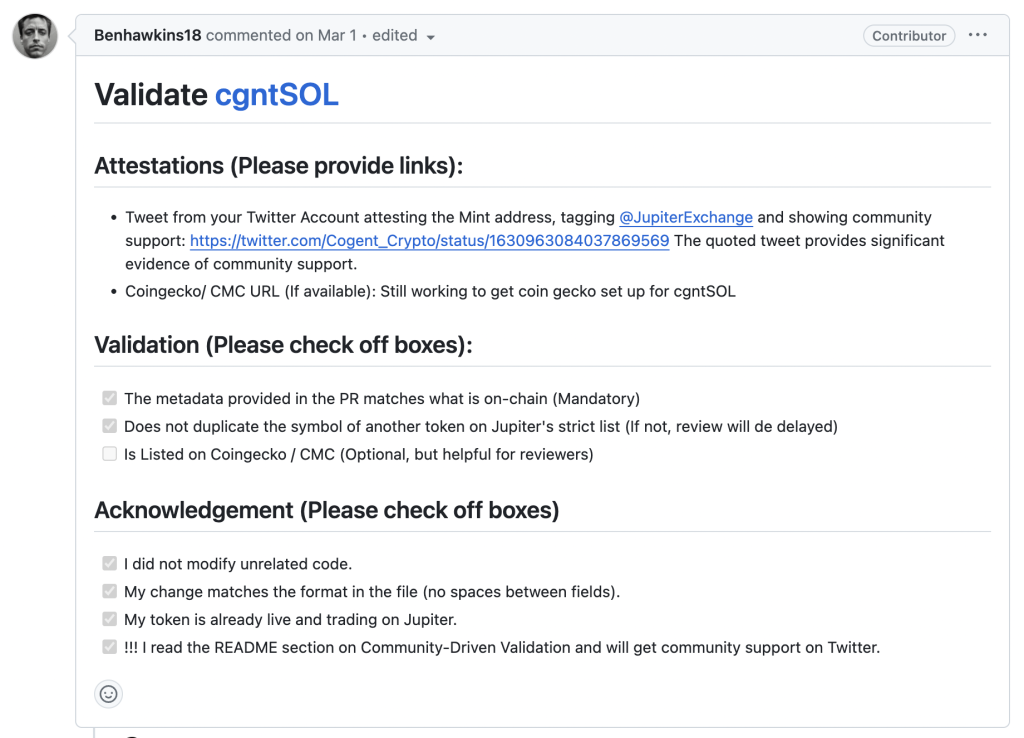
In that pull request, enter the information they ask you to replace from their template.
FAQ: Listing TOKEN on JUPITER
IS IT WORTH LISTING MY TOKEN ON JUPITER?
Jupiter is one of the most used exchanges on Solana. If you really want to make the most of your token, being on Jupiter will help a lot.
HOW MUCH DOES IT COST TO LIST MY TOKEN ON JUPITER?
Getting your token listed on Jupiter is completely free. But you’ll need to have created your token and a liquidity pool first — about 3.5 SOL in cost.
CAN I CREATE A LIQUIDITY POOL ON JUPITER?
Jupiter doesn’t have its own liquidity pools yet. You can have your token on Jupiter, but you’ll need to create your Liquidity Pool on another DEX. We recommend Raydium.
Don’t launch your liquidity pool before you know this
Get the 5 secrets big players use to launch a liquidity pool


CEO & Co-Founder at Smithii. Building on Solana since 2021 and sharing playbooks from the trenches. Also founder of Lince after years investing in DeFi.



