Pons Bundler Bot: Pons पर multiple wallets के साथ अपना token launch करें
Pons Bundler Bot वो tool है जिसकी आपको ज़रूरत है अगर आप Robinhood Chain पर launchpad Pons से एक token launch करने जा रहे हैं और नहीं चाहते कि बाहर के sniper bots आपसे पहले पहली खरीदारी उठा ले जाएं। bundler token की creation और initial buy को एक ही block में execute करता है, जितनी wallets आप चाहें उतनी के साथ, वो भी सिर्फ एक operation से।
Logic simple है: जैसे ही आपका token network पर आता है, bots सुन रहे होते हैं और आपसे पहले खरीद लेते हैं। अगर आप order flow में आने वाली पहली wallets खुद control करते हैं, तो launch की rules बदल जाती हैं। Supply reserve करें, project wallets को assign करें और ensure करें कि पहली candle कोई बुरा surprise न हो।
इस गाइड में हम बताएंगे Pons Bundler Bot क्या है, Robinhood Chain पर Pons में यह कैसे fit होता है, step by step इसे कैसे use करें, किन situations में यह real advantage देता है और launch के तुरंत बाद activity बनाए रखने के लिए क्या करें।
अगर आप video tutorial prefer करते हैं, तो यहाँ देखें कि Pons में bundler कैसे use करते हैं:
Pons क्या है और आपको bundler की ज़रूरत क्यों है?
Pons एक launchpad है tokens के लिए, जो Robinhood Chain पर चलता है। Logic वही है जो Solana पर Pump.fun का है या BNB Chain पर Four Meme का: एक dedicated platform जहाँ आप कुछ clicks में अपना token create करते हैं और bonding और liquidity का flow built-in है।
फर्क यह है कि launch के समय opportunity window बदल जाती है। एक नए network पर एक नए launchpad में, आपके token के पहले blocks market की initial perception तय करते हैं। अगर कोई बाहरी bot supply का पहला 5% सस्ते में उठा ले, तो आपका chart हरे से शुरू होता है, लेकिन वो wallet आपका token dump करेगा और seconds में सारी trust खत्म हो जाएगी।
दूसरी तरफ, अगर उन पहली खरीदों को आप खुद bundler से control करते हैं, तो कहानी बिल्कुल अलग होती है।
अगर आप अभी तक इस network से familiar नहीं हैं, तो launch से पहले पूरा context समझने के लिए हमारी गाइड Robinhood blockchain क्या है पढ़ें।
Pons Bundler Bot क्या है और यह कैसे काम करता है?
Smithii का Pons Bundler Bot एक ऐसा tool है जो कई operations को एक ही atomic transaction में group करता है। Practically कहें तो, यह token की creation और खरीद को multiple wallets से एक ही block में होने देता है, बिना bots को बीच में घुसने का मौका दिए।
Mechanics simple है: token upload करें, define करें कि bundle में कितनी wallets खरीदेंगी और हर एक कितना, फिर sign करें। बाकी tool handle करता है। न code लिखने की ज़रूरत है न manually contracts deploy करने की।
bundler के key points ये हैं:
- Atomic execution: creation + purchases एक ही block में।
- Multiple wallets simultaneously: bundle को कई addresses में split कर सकते हैं ताकि initial supply distribute हो और एक ही wallet में concentration न हो।
- Private keys store नहीं होतीं: जो extra wallets की keys आप add करते हैं, वो सिर्फ transaction sign करने के लिए use होती हैं। Tool उन्हें save नहीं करता।
- Full EVM compatibility: Robinhood Chain पर run होने के कारण (जो Arbitrum Orbit use करता है), आप standard wallets (MetaMask, Rabby) और किसी भी L2 जैसा ही flow use कर सकते हैं।
हमारी Pons launcher पर token कैसे launch करें guide में हमने आपको कुछ tips दिए हैं जिनसे आप एक creator के तौर पर अपनी profile बेहतर बना सकते हैं।
Pons Bundler Bot को step by step कैसे use करें
सबसे पहले आपको bundler बनाने की tool खोलनी है, वो भी तब जब आपने अपनी coin के concepts और personalization पहले से तय कर लिए हों। इसके बाद ये steps follow करें:
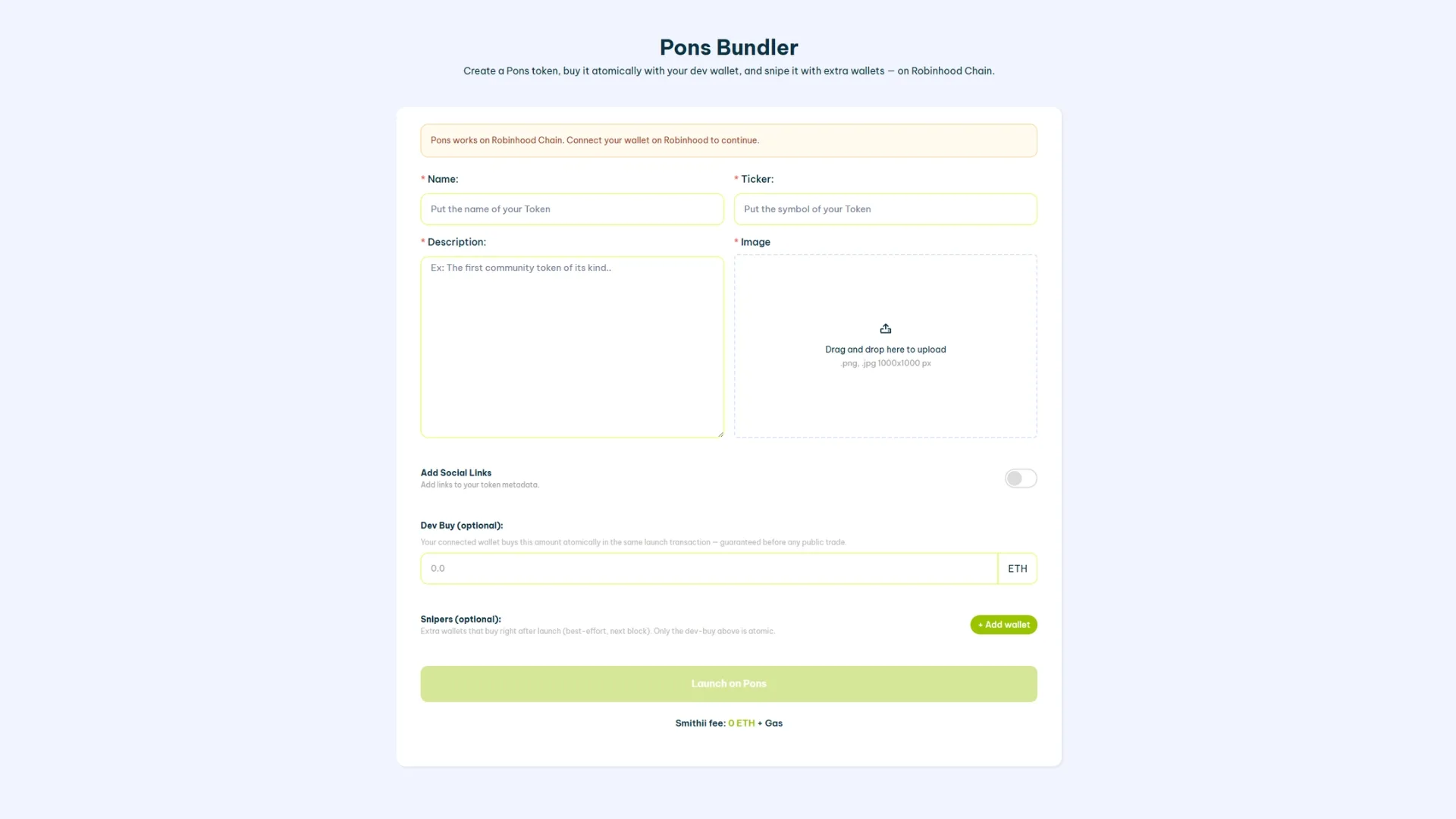
- अपनी main wallet connect करें: MetaMask या कोई भी EVM compatible wallet use करें जो Robinhood Chain (वो network जिस पर Pons चलता है) को support करती हो। यही wallet token की deployer बनेगी और main transaction sign करेगी।
- token की identity set करें: नाम, ticker, image और description. अगर ये एक meme coin है, तो ticker छोटा, यादगार होना चाहिए और network पर पहले से मौजूद किसी project से match नहीं होना चाहिए।
- Deployer wallet की initial buy define करें: creation वाले उसी block में अपना ही token खरीदने के लिए आप कितना ETH use करने वाले हैं। यही on-chain दिखने वाली पहली खरीदारी होगी।
- Bundle में अतिरिक्त wallets add करें: हर extra wallet के लिए, आप उसकी private key paste करते हैं (वो कहीं store नहीं होती) और तय करते हैं कि वो कितना खरीदेगी। Project की, team की wallets में supply distribute करने के लिए या future payments के लिए reserve रखने के लिए ideal है।
- Summary check करें और “Launch on Pons” पर click करें: आप transaction sign करते हैं और tool creation + सारी buys एक ही block में execute कर देती है।
नतीजा: आपका token market में उन wallets को already assigned initial buys के साथ entry करता है जिन्हें आप control करते हैं। बाहर के sniper bots जब पहुंचते हैं, तो उन्हें एक virgin token नहीं मिलता, बल्कि एक ऐसा token मिलता है जिसमें initial activity पहले से set हो चुकी है।
Bundle में कितनी wallets use करना सही रहता है?
वैसे तो आप 20 अलग-अलग wallets तक use कर सकते हैं, लेकिन wallets की संख्या आपकी strategy पर depend करती है। मान लीजिए, अगर आप initial buy को इसलिए बांटना चाहते हैं ताकि आपके पास वो tokens हों जो आप airdrops करने के लिए या अपनी community को किसी और तरीके से reward करने के लिए use कर सकें, तो उस wallet को treasury से अलग रखना बेहतर है। इसका असर bundler की cost पर नहीं पड़ता, जो 0.01 ETH + gas fees है जो कि नाममात्र हैं।
वो scenarios जहां bundler आपको असली advantage देता है
Pons Bundler Bot हर case में useful नहीं होता। ये वो scenarios हैं जहां ये साफ फर्क डालता है:
- नई meme coin का launch: bundle ये सुनिश्चित करता है कि पहली visible खरीदारी आपकी हो। बाहर के sniper bots को एक ऐसा token दिखता है जिसमें initial volume है, न कि एक कोरा कागज।
- Manual allocations use किए बिना team के लिए supply reserve रखना: initial bundle के ज़रिए distribute करना deployer से बाद में transfers करने के मुकाबले ज़्यादा discreet होता है।
- शुरुआत में organic activity simulate करना: एक ही block में कई wallets से खरीदारी होने से chart एक अकेली बड़ी खरीदारी की तुलना में ज़्यादा साफ दिखता है।
- उसी flow में token creation को combine करना: आपको पहले token create करके फिर bots से पहले उसे खरीदने की कोशिश नहीं करनी पड़ती। सब कुछ एक साथ हो जाता है।
अगर आप एक meme coin launch करने जा रहे हैं, तो bundle में उतरने से पहले general framework समझने के लिए हमारा Robinhood Chain पर meme coin कैसे create करें tutorial ज़रूर देखें।
Launch के बाद क्या करें: activity को ज़िंदा रखना
Bundle आपको एक अच्छा पहला block तो दे देता है, लेकिन असली काम तब शुरू होता है जब token market में आ चुका होता है। अगर launch के बाद कोई activity नहीं है, तो DEX screeners आपको featured sections में list नहीं करेंगे और organic traders आप तक नहीं पहुंचेंगे। यहीं chain की अगली कड़ी काम आती है।
Volume और visibility बनाए रखने के लिए दो complementary रास्ते हैं:
- Volume Bot: controlled transactions generate करता है ताकि token DEX screeners की ranking में active बना रहे। ये post-launch के लिए natural tool है।
- Target wallets पर Airdrop: network की active addresses पर supply seed करने से holders का base और contract का incoming traffic बढ़ता है।
Bundle के बाद अगला logical step है on-chain activity बनाए रखने के लिए Pons Volume Bot को activate करना।
Pons Bundler Bot पर FAQ
क्या Pons Bundler Bot use करना safe है?
Extra wallets की जो private keys आप paste करते हैं, वो सिर्फ उसी session में bundle transaction को sign करने के लिए इस्तेमाल होती हैं. Server पर कुछ भी store नहीं होता. फिर भी, best practice यही है कि launch के लिए specially नई wallets बनाकर use करें, ना कि पुराने funds वाली या आपकी identity से linked wallets.
क्या मैं token को सीधे bundler से create कर सकता हूं?
हां. bundler इसी तरह design किया गया है कि creation और buys एक ही flow में हो जाएं. आपको contract को अलग से पहले deploy करने की जरूरत नहीं है. अगर आप bundle के बिना सिर्फ token create करना चाहते हैं, तो Robinhood Chain पर token create करने की guide देख सकते हैं.
क्या Pons Bundler Bot sniper bots को 100% रोक देता है?
100% नहीं रोकता, लेकिन पूरा equation बदल देता है. जो bots दूसरे block में buy करते हैं वो अब भी दिखेंगे, पर वो पहले नहीं होंगे. bundler का असली competitive edge atomic execution है, external bots का पूरा safaya नहीं.
bundler use करने का कितना खर्च आता है?
Cost इस पर depend करती है कि आप bundle में कितनी wallets add करते हैं और उस moment पर Robinhood Chain का gas fee क्या है. यह Arbitrum Orbit पर एक L3 है, इसलिए gas Ethereum mainnet के मुकाबले काफी कम रहता है. Sign करने से पहले exact amount tool के interface में check करें.
क्या मैं बाद में bundle sell कर सकता हूं?
bundler का standard flow launch के moment के लिए बना है (creation + buy). अगर बाद में कई wallets से sells coordinate करना चाहते हैं, तो वो एक अलग operation है और उसके लिए अलग strategy चाहिए. सारी sells को एक ही block में execute करना सही नहीं है, क्योंकि price पर impact और market perception दोनों बहुत sharp हो जाएंगे.
निष्कर्ष
Pons Bundler Bot वो tool है जो आपको Pons पर अपने token के पहले blocks control करने देता है, वो भी बिना किस्मत के भरोसे और बिना पहला buy किसी external sniper के हवाले किए. Creation और bundle buy एक ही block में, wallets पूरी तरह आपके control में और flow एकदम simple: connect करें, configure करें, sign करें और execute करें.
Launch तो सिर्फ step one है. token market में आने के बाद, post-launch activity ही तय करती है कि आपका project grow करेगा या ठंडा पड़ जाएगा. यहीं पर Volume Bot और airdrop की strategy bundle के natural complement बन जाते हैं.
अगर launch coordinate करने के साथ-साथ आप ये भी चाहते हैं कि bundle की wallets explorer में deployer से disconnected रहें, तो देखें कि Robinhood Chain पर on-chain tracking कैसे तोड़ें.