

Pons Bundler Bot: Launch Your token with Multiple Wallets on Pons
The Pons Bundler Bot is the tool you need if you’re about to launch a token with the launchpad Pons on Robinhood Chain and don’t want external sniper bots to grab the first buys ahead of you. The bundler deploys the token and executes the initial buy in the same block, across as many wallets as you want, all in a single operation.
The logic is straightforward: the moment your token hits the network, bots are already listening and buying before you can react. Control the first wallets in the order flow and you change the rules of the launch. You reserve supply, allocate to project wallets, and make sure the first candle isn’t an ugly surprise.
This guide covers what the Pons Bundler Bot is, how it fits into Pons on Robinhood Chain, how to use it step by step, which scenarios give you a real edge, and what to do right after launch to keep the momentum going.
If you prefer a video walkthrough, here’s how to use the bundler on Pons:
What Is Pons and Why Do You Need a bundler?
Pons is a launchpad for tokens built on Robinhood Chain. Same concept as Pump.fun on Solana or Four Meme on BNB Chain: a dedicated platform where you create your token in a few clicks, with bonding and liquidity baked in.
What changes is the launch window. On a young launchpad running on an equally young network, the first blocks of your token set the market’s first impression. If an external bot grabs the first 5% of the supply cheap, your chart opens green, but that wallet will dump your token and kill all confidence in seconds.
On the flip side, if you control those first buys with a bundler, the story looks very different.
If you’re new to the network, start with our guide on what the Robinhood blockchain is to get the full picture before you launch.
What Is the Pons Bundler Bot and How Does It Work?
The Pons Bundler Bot by Smithii is a tool that groups multiple operations into a single atomic transaction. In practice, it lets the token creation and buys from multiple wallets happen in the same block, with no gap for bots to slip in between.
The mechanics are simple: configure the token, set how many wallets will buy in the bundle and how much each one gets, then sign. The tool handles the rest. No code required, no manual contract deployment.
Here are the key features of the bundler:
- Atomic execution: creation + buys in the same block.
- Multiple simultaneous wallets: split the bundle across multiple addresses to distribute the initial supply and avoid concentrating it in a single wallet.
- Private keys not stored: the keys for any extra wallets you add are only used to sign the transaction. The tool does not save them.
- Full EVM compatibility: running on Robinhood Chain (which uses Arbitrum Orbit under the hood), you can use any standard wallet (MetaMask, Rabby) and the same flow as any L2.
In our guide on how to launch a token on the Pons launcher we share a few tips to sharpen your profile as a creator.
How to use the Pons Bundler Bot step by step
The first thing to do is open the tool to create a bundler, once you’ve locked in the concept and the branding of your coin. From there, follow these steps:
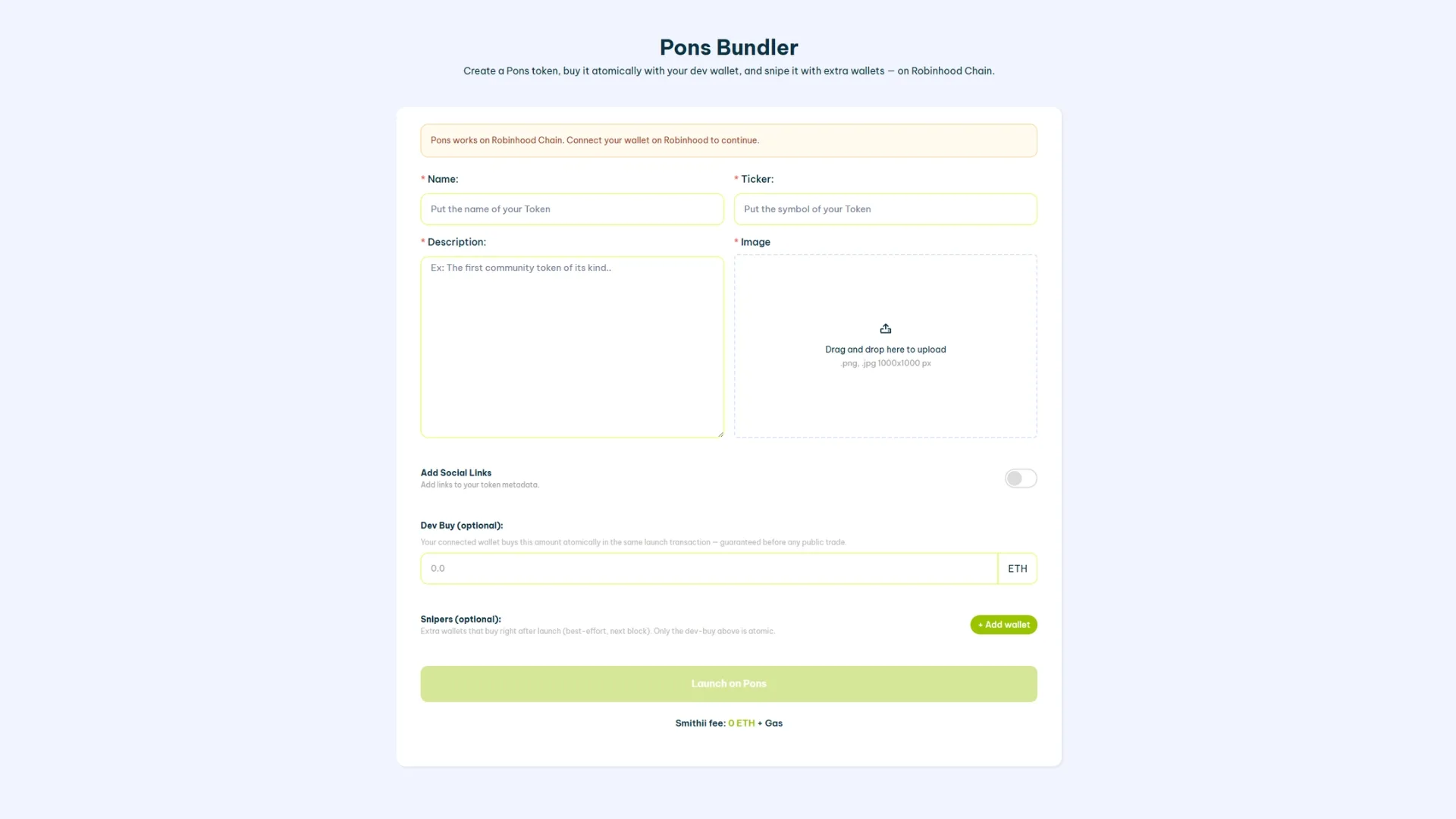
- Connect your main wallet: use MetaMask or any EVM wallet compatible with Robinhood Chain (the network Pons runs on). This wallet will be the deployer of the token and will sign the main transaction.
- Set up the token identity: name, ticker, image and description. If it’s a meme coin, the ticker should be short, memorable, and not clash with projects already live on the network.
- Define the initial buy from the deployer wallet: how much ETH you’ll spend to buy your own token in the same block it’s created. This is the first buy visible on-chain.
- Add extra wallets to the bundle: for each additional wallet, you paste its private key (it’s not stored) and set the amount it will buy. Ideal for spreading supply across project wallets, team wallets, or reserves for future payouts.
- Review the summary and click ‘Launch on Pons’: sign the transaction and the tool executes creation plus every buy in the same block.
The result: your token hits the market with initial buys already allocated to wallets you control. When external sniper bots show up, they no longer see a fresh token but one with baseline activity already in place.
How many wallets should you use in the bundle?
You can use up to 20 different wallets, but the exact count depends on your strategy. If, for example, you want to split the initial buy so you have tokens ready to run airdrops or reward your community another way, it’s smart to keep that wallet separate from the treasury. This doesn’t affect the cost of the bundler, which is 0.01 ETH + gas fees, which are minimal.
Scenarios where the bundler gives you a real edge
The Pons Bundler Bot isn’t useful in every case. These are the scenarios where it makes a clear difference:
- Launching a new meme coin: the bundle guarantees that the first visible buy is yours. External sniper bots see a token with initial volume instead of a blank slate.
- Reserving supply for the team without manual allocations: distributing through the initial bundle is more discreet than sending transfers later from the deployer.
- Simulating organic activity from the start: several wallets buying in the same block produce a cleaner chart than one large buy.
- Pairing it with token creation in the same flow: you don’t have to deploy the token first and then try to buy it before the bots do. Everything happens together.
If you’re about to launch a meme coin, check out our tutorial on how to create a meme coin on Robinhood Chain first to get the full picture before diving into the bundle.
What to do after the launch: keep the activity alive
The bundle sets you up with a solid first block, but the real work starts once the token is out on the market. If there’s no activity after the launch, DEX screeners won’t list you in the featured sections and organic traders won’t find you. That’s where the next link in the chain comes in.
To keep volume and visibility going there are two complementary paths:
- Volume Bot: generates controlled transactions to keep the token active in DEX screener rankings. It’s the natural tool for post-launch.
- Airdrop to target wallets: seeding supply into active addresses on the network grows your holder base and drives more incoming traffic to the contract.
The logical next step after the bundle is firing up the Pons Volume Bot to keep on-chain activity going.
FAQ about the Pons Bundler Bot
Is it safe to use the Pons Bundler Bot?
The private keys from the extra wallets you paste are only used to sign the bundle transaction during the session. They’re never stored on the server. Even so, best practice is to use fresh wallets created specifically for the launch, not wallets with historical funds or ones linked to your identity.
Can I create the token directly from the bundler?
Yes. The bundler is designed to group creation and buys into a single flow. You don’t need to deploy the contract separately beforehand. If all you want is to create the token without a bundle, check the guide to creating token on Robinhood Chain.
Does the Pons Bundler Bot block sniper bots 100%?
It doesn’t block them 100%, but it changes the equation. Bots buying in the second block still show up, but they’re no longer first. The competitive edge of the bundler is atomic execution, not the total elimination of outside bots.
How much does using the bundler cost?
The cost depends on how many wallets you add to the bundle and the gas fee on Robinhood Chain at that moment. Since it’s an L3 on top of Arbitrum Orbit, gas is substantially lower than on Ethereum mainnet. Check the exact amount in the tool’s interface before signing.
Can I do a bundle sell afterwards?
The standard bundler flow is built for the launch moment (creation + buy). If you want to coordinate sells from multiple wallets afterwards, that’s a different operation and needs its own strategy. Firing all the sells in the same block isn’t a good idea because the price impact and market perception would be too harsh.
Conclusion
The Pons Bundler Bot is the tool you need to control the first blocks of your token on Pons without relying on luck or handing the first buy to an outside sniper. Creation and bundle buy in the same block, wallets under your control, and a simple flow: connect, configure, sign, and execute.
The launch is step one. Once the token is live on the market, post-launch activity is what decides whether your project grows or fades. That’s where the Volume Bot and your airdrop strategy become the natural companion to the bundle.
If, on top of coordinating the launch, you also want to keep the bundle wallets disconnected from the deployer on the explorer, check out how to break on-chain tracking on Robinhood Chain.

Content creator and SEO contributor at Smithii. Systems Engineering student and crypto-tech enthusiast.



