





How to Create a meme coin on Robinhood Chain (No Code, 1 Minute)
If you want to know how to create a meme coin on Robinhood Chain, you’re early, and being early is half the game in meme coins. Robinhood Chain launched on July 1, 2026 as an Arbitrum Orbit L2 that settles on Ethereum, is 100% EVM-compatible, uses ETH for gas, and has Uniswap and UniswapX live from day one.
Bottom line: a brand-new chain with barely any tokens on it yet and wide-open territory for the next community coin. This guide walks you through launching your own meme coin without writing a single line of code, plus locking it down with Anti-Bot and Anti-Whale protection before it hits the market.
How Much Does It Cost to Create a meme coin on Robinhood Chain
Hiring a developer to write and deploy the smart contract for a token typically runs 200 USD or more. That’s where Smithii comes in: its online tools open up the crypto ecosystem to anyone. Creating your meme coin with the Token Creator costs just 0.03 ETH plus a small amount of ETH for gas, takes under a minute, and you don’t write a single line of code.
How to Create a meme coin on Robinhood Chain, Step by Step
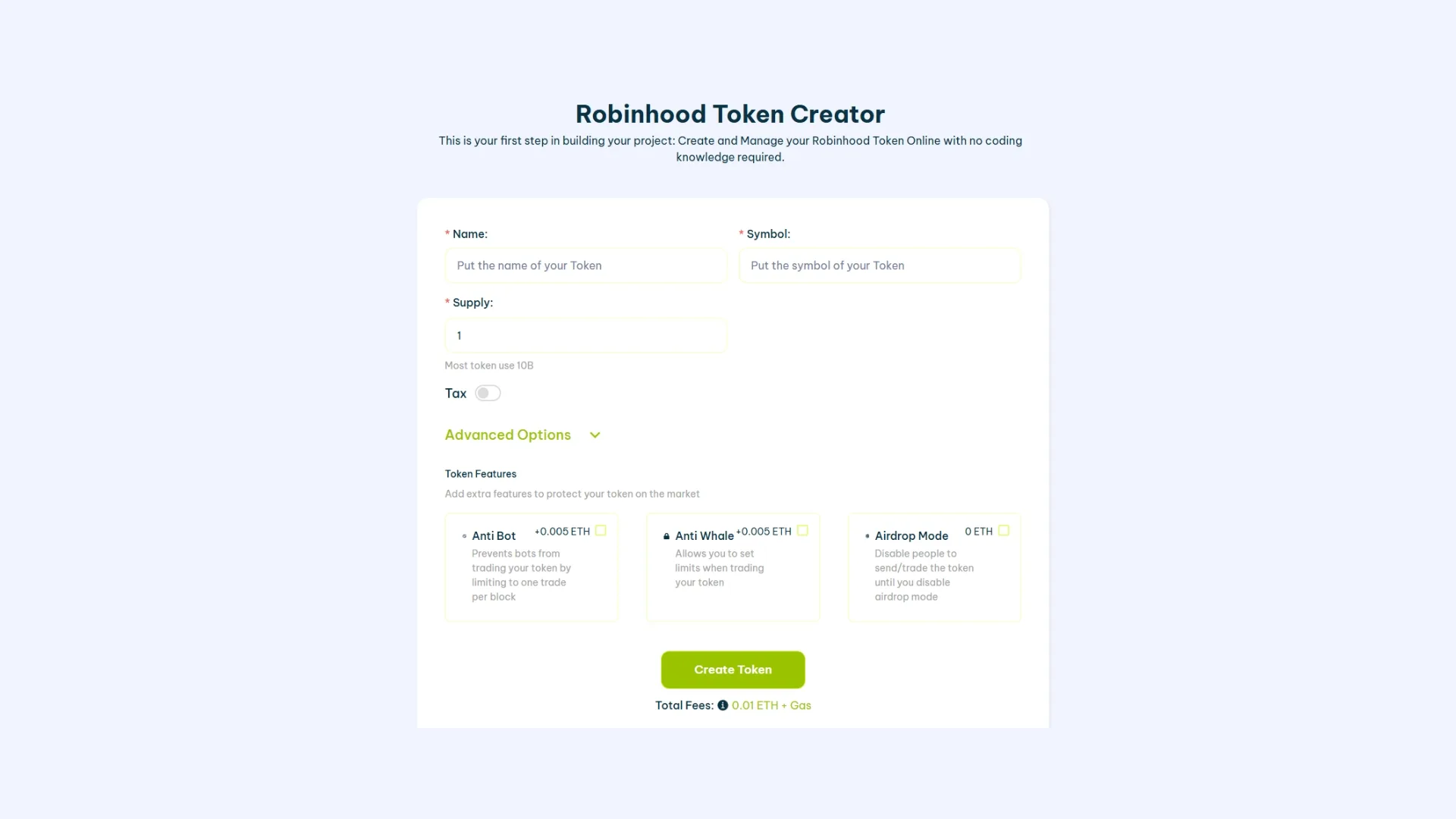
- Open the tool: go to the Token Creator for Robinhood Chain and make sure Robinhood Chain is selected.
- Connect your wallet: use any EVM wallet like MetaMask and add the Robinhood Chain network. You’ll need ETH in your wallet for gas.
- Name your meme coin: pick something that fits the meme concept, something people will keep repeating.
- Set your ticker: your symbol, up to 8 characters, unique and easy to remember.
- Choose your supply: 1B is the standard for a meme coin, though you can use whatever fits your narrative.
- Optional, set up taxes: add a buy/sell tax if your tokenomics calls for it.
- Optional, advanced features: enable distribution, Anti-Bot, Anti-Whale, and airdrop mode (more on the protection below).
- Click ‘Create Token’ and confirm the transaction in your wallet. The fee is 0.03 ETH plus gas.
Within seconds your meme coin is minted straight to your wallet, giving you the full supply and ownership. You can verify the deployment on Robinhood Chain’s explorer, Blockscout, by searching your new contract address. That’s it, your token is live on Robinhood Chain.
Launch Protection: Anti-Bot and Anti-Whale on Robinhood Chain
The fastest way to wreck your meme coin launch is letting snipers and whales in ahead of your community. sniper bots buy in the first block and dump on real buyers, and a single whale can swallow a massive chunk of the supply and control the price. Smithii builds both protections directly into the creation flow so you can enable them before you even add liquidity.
Anti-Bot
Anti-Bot blocks sniper bots from front-running your first block and dumping on your community. Enabling it costs 0.01 ETH and gets you a clean, fair open instead of a launch that bots rug in seconds.
Anti-Whale
Anti-Whale caps how much any single wallet can hold or buy, so no address can hoard your supply or tank the chart. It also costs 0.01 ETH and keeps holder distribution spread out, which is exactly what a healthy meme coin community looks like. Enable both in the creator’s advanced section and your token is covered before it ever goes live. Your token stays safe from snipers and whales.
You might also like: How to create a token on Robinhood Chain
What to Do After Launching Your meme coin
Minting the token is just the start. To give your meme coin the best shot, have these next moves ready:
- Airdrop your community: reward early holders and seed distribution by running a airdrop of ERC-20 tokens on Robinhood Chain with Smithii’s Multisender, which sends tokens to thousands of wallets in one click for just 0.0001 ETH.
- Add a logo and socials: a coin without an identity gets ignored, so add a logo and social links to your Robinhood Chain token before you start promoting it.
- Explore the network: Start with what Robinhood Chain is to get a handle on the ecosystem you’re launching into.
Frequently Asked Questions
How do I create a meme coin on Robinhood Chain without coding?
Open Smithii’s Robinhood Chain Token Creator, connect your wallet, set your name, ticker, and supply, then click ‘Create Token’. Your ERC-20 meme coin deploys in about a minute, no coding required, for 0.03 ETH.
How much does it cost to create a meme coin on Robinhood Chain?
The Token Creator fee is 0.03 ETH (around $35 USD) plus a small amount of ETH for gas. Anti-Bot and Anti-Whale protection each cost 0.01 ETH if you choose to enable them.
What token does Robinhood Chain use for gas?
Robinhood Chain uses ETH as its native gas token. It’s an Arbitrum Orbit L2 that settles on Ethereum and is 100% EVM-compatible, with chainId 4663.
How do I protect my meme coin from bots and whales?
Enable Anti-Bot and Anti-Whale in the advanced section of the Token Creator before you launch. Anti-Bot blocks first-block snipers and Anti-Whale caps how much a single wallet can hold, keeping distribution fair.
Where can I view my meme coin on-chain?
Look up your contract address on Robinhood Chain’s explorer, Blockscout, at robinhoodchain.blockscout.com. Note that Etherscan doesn’t support Robinhood Chain, so use Blockscout to view your token and transactions.
Conclusion
You now know how to create a meme coin on Robinhood Chain in about a minute, no code required, and how to protect your launch with Anti-Bot and Anti-Whale so bots and whales can’t ruin it. Robinhood Chain is brand new, the field is wide open, and community coins that get in early have the most room to run. Launch your meme coin, lock it down, and get it in front of your community. Want more Robinhood Chain guides in your inbox? Join the Smithii newsletter and build with the all-in-one solution for web3 projects.
The Complete Robinhood Chain Toolkit
Everything you need to launch and grow a project on Robinhood Chain, no code required, powered by Smithii:
- Get started: What is Robinhood Chain · best wallets
- Create and launch: create a token · create a meme coin · create a liquidity pool
- Distribute: run a airdrop of tokens · airdrop and testnet guide
- Manage and verify: add logo and socials · verify your contract · view holder list
- Grow: volume bot · market maker
- Flap volume bot · Trench volume bot · Bankr volume bot

CEO & Co-Founder at Smithii. Building on Solana since 2021 and sharing playbooks from the trenches. Also founder of Lince after years investing in DeFi.



