

pump.fun creator fees: how they work, how much you earn, and how to claim them
pump.fun creator fees are the slice of every trade on your token that goes straight to your wallet for launching it. The platform rebranded them as creator rewards, but both names mean the same thing.
The shift from 2024 is fundamental. Back then, launching a token meant your only way to make money was dumping your own supply, with everything that implied for the trust of whoever was buying from you. Since May 2025 you earn from the volume your token generates, not from getting rid of it.
In this guide I break down how pump.fun rewards work for devs, what your wallet actually collects, how to claim them step by step, and what to do when you’ve got tokens spread across multiple launchpads and multiple wallets.
What pump.fun creator fees are
Creator fees are a percentage of every buy and every sell of your token that the contract automatically routes to the wallet that created it. You don’t have to claim trade by trade: they pile up and you decide when to withdraw.
They apply to every coin that was on the bonding curve or on PumpSwap from May 13, 2025 onward. If you launched before that date and the token is still active, it also generates rewards for the creators.
If you want to launch your memecoin on pump.fun and give it the best shot at real volume, check out our guide to promoting a memecoin
How much the creator takes in each token phase
Here’s the detail almost no one gets right: the percentage isn’t fixed. It shifts depending on the phase your token is in and, once graduated, on its market cap. These are the numbers the platform itself publishes.
| Phase | Total fee | Creator’s cut | Protocol’s cut |
|---|---|---|---|
| Bonding curve | 1,25% | 0,30% | 0,95% |
| Canonical PumpSwap, first tier | 1,25% | 0,30% | 0,93% |
| Canonical PumpSwap, remaining tiers | From 1.20% down to 0.30% | From 0.95% down to 0.05% | 0,05% |
| PumpSwap, non-canonical pool | 0,30% | 0% | 0,05% |
While the token is on the bonding curve you pocket 0.30% of every trade, and that tier is flat. It’s the phase where the percentage most clearly works in your favor.
When it graduates to a canonical PumpSwap pool, something almost nobody talks about happens. In the first tier, up to 420 SOL market cap, you still earn 0.30%. But the moment you cross that line, your cut jumps to 0.95%, which is the highest point on the entire curve.
From there it steps down as market cap grows, all the way to 0.05% once the token crosses 98,240 SOL. The total fee scales down alongside it, from 1.20% to 0.30%.
In short, your best percentage hits right after graduation, with the token still taking off. When it shrinks, it’s because it’s being applied to much larger volume, so 0.05% of a token with massive volume generates more rewards than a more ‘static’ token, even if the Pump.fun creator fee sits at 0.95%.
Worth noting: custom pools don’t generate creator fees the way graduated token pools do. The ones created outside the official circuit give the creator a flat zero. There the split goes to the LP and the protocol.
To understand exactly what changes when you move from one phase to another, check the differences between pump.fun and PumpSwap
What wallet charges and how ownership gets transferred
Fees pile up in the wallet that signed the creation of the token. Not the one you have connected right now, not the team’s: that specific one. It’s the detail that causes the most headaches, so get it straight before you launch.
The typical setup is launching with a bundler or a burner wallet to keep the main one out of sight. It works, but the rewards from that token stay tied to that wallet, and if you lose it or recycle it, you lose access to everything sitting there.
Since the January 2026 update there are two ways out. The first is splitting the fees from a single token across up to 10 wallets, built for teams that want to divide revenue without moving it by hand. The second is transferring ownership of the coin to another address, along with the option to revoke the update authority.
The practical upshot is that a dev with any track record ends up collecting across several addresses at once. Handy for organizing things and a pain when it’s time to claim, which is exactly the problem we’re getting into below.
If you launch with several wallets, check first how the bundler bot for pump.fun works
How to claim your creator rewards on pump.fun
The flow inside pump.fun is short and costs nothing beyond Solana gas. You can claim as many times as you want, no minimum, no waiting period, because the split is automatic and onchain.
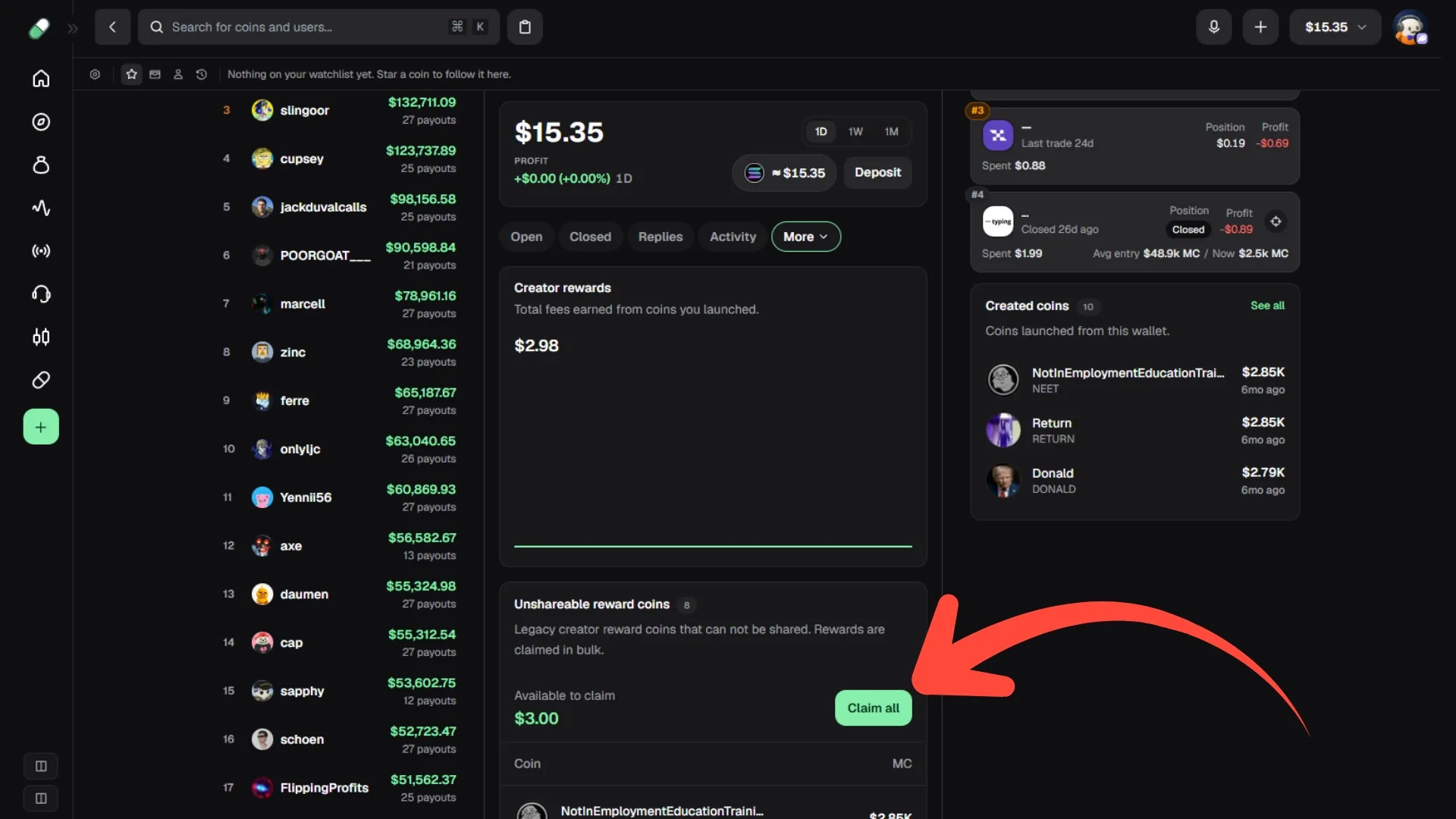
With the wallet connected, here are the steps:
- Go to pump.fun and click your profile. If you were set as the fee recipient or if you created the wallet, you’ll be able to claim the fees.
- Click ‘More’ and then ‘Creator rewards’. Here you’ll see a full history of what you’ve earned over time.
- Click ‘Claim all’ and confirm the transaction.
Depending on whether you created a token on pump.fun using USDT or SOL, you’ll receive the amount in the wallet. It’s a fast, direct method, but if you have several wallets or use more than one launchpad, you’ve got a problem.
You have to jump from wallet to wallet claiming fees on launchpad and launchpad. Forget it if you’re also launching across multiple chains. Same as Pump.fun, each platform has its own model for rewarding creators, so you can’t just ignore the creator fees piling up, because the payout can be substantial.
That’s exactly why we built a proper solution for devs who want to claim every accumulated fee in a single click.
How to claim fees from multiple launchpads at once
Do the math for a dev with two years in the game. Fifteen tokens spread across pump.fun, LaunchLab, Bags and a couple on Raydium, collecting across three or four different wallets because some launched with bundler and others raw, plus a foot in EVM since Clanker and the rest started paying out too.
That’s dozens of claimable positions. Each with its own interface, its own connected wallet and its own signature. The yield is there and it’s real, but there’s no single place to see it all, so in practice you check in every once in a while and let it ride.
The Claim Creator Fees from Smithii pulls everything you have pending on each platform into one panel and lets you claim it in a single shot, with one wallet or several at once. It covers eight platforms on Solana (pump.fun, PumpSwap, LaunchLab and Bonk, Raydium, Orca, Meteora, Bags and Printr) and six on EVM (Pons, Uniswap, Flap, hood.fun, Trench and Clanker). When you open it you’ll see an interface like this:
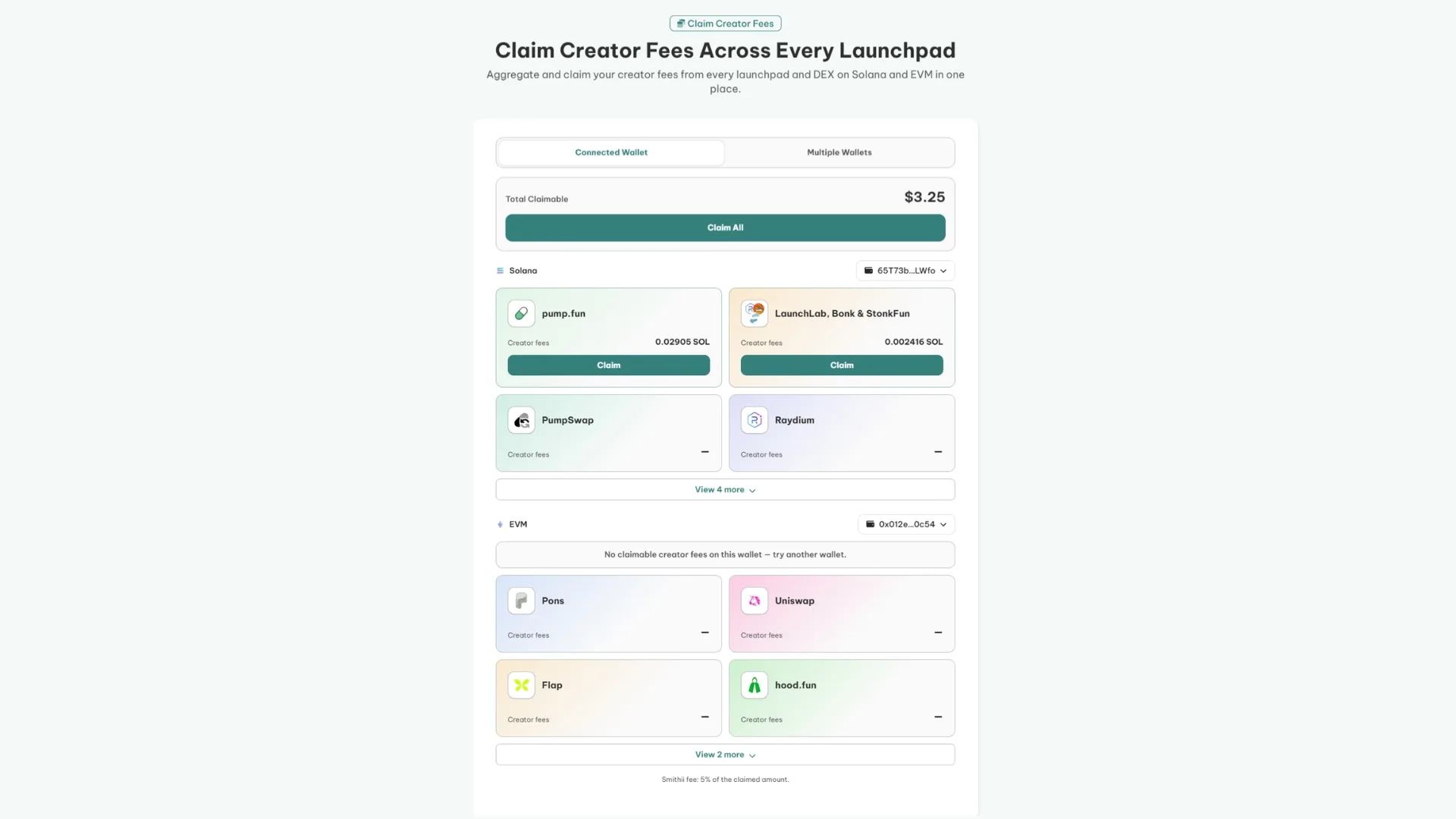
If you have the wallets you launched with identified, here’s the flow:
- Pick the network: Solana or EVM, each with its own list of supported platforms.
- Connect the wallet in the Connected Wallet tab, or switch to Multiple Wallets if you launched from several addresses and want to claim from all of them in a single click.
- Review what’s pending on each launchpad. If you’d rather, you can claim from each one separately.
- Claim and confirm the transaction. You’ll receive the creator fees from Pump.fun and any other launchpad you used in the destination wallet.
The interesting part isn’t so much saving clicks as seeing the total. When your income is scattered across fourteen places it’s easy to have no clue what it adds up to, and that number is what tells you whether the creator fee is actually worth it.
Creator fees on other launchpads
pump.fun documents its split in detail, but it’s not the only platform paying out. Quick heads-up before the table: not every platform publishes its creator share, and where there’s no official figure, checking the interface itself beats trusting a secondhand number.
| Platform | What the creator gets |
|---|---|
| pump.fun | 0.30% on bonding curve; 0.95% down to 0.05% once graduated, based on market cap |
| PumpSwap | Depends on whether the pool graduated from Pumpfun. 0% on a freshly created pool |
| Clanker | 40% of the 1% swap fee; 80% on deploys via its Farcaster bot |
| LetsBonk and LaunchLab | A share of the 1% per-trade fee, no public percentage |
| Bags, Orca, Meteora, Raydium | They pay creators, but no official figure is published |
Clanker fees
It’s the most transparent option on the EVM side. It charges a 1% swap fee and sends 40% to the creator, which works out to 0.4% of volume. If the deploy came through its Farcaster bot instead of the web, the creator’s cut jumps to 80% of the rewards.
LetsBonk and LaunchLab fees
Every trade carries a 1% fee split across dev pools, validators, and BONK buybacks, and the creator gets a slice of what flows into the bonding curve. The platform doesn’t publish the exact percentage, so the number that actually matters is the one in your dashboard.
If you’re deciding where to launch, compare the pros and cons of the main launchpads first
FAQ
What are pump.fun creator rewards?
They’re the portion of the fee on every buy and sell of your token that the contract routes to the wallet that created it. Same concept pump.fun used to call creator fees: the platform changed the name, not how it works. They pile up on their own and you claim them whenever.
How do creator rewards work on pump.fun?
Every trade of your token pays a fee, and part of it goes straight to your wallet automatically and onchain. While the token is still on the bonding curve, your cut is 0.30%. Once it graduates to a canonical PumpSwap pool, it climbs to 0.95% as soon as you cross 420 SOL in market cap, and from there it drops in tiers down to 0.05%.
How do I claim my creator rewards on pump.fun?
Connect the wallet that receives the fees on pump.fun, whether you’re the token creator or an assigned recipient. Go to your profile, open ‘More’ and then ‘Creator rewards’, where you can see the full history of what you’ve earned, and hit ‘Claim all’ to pull everything at once. You can do it as often as you want, no minimum and no waiting period.
What percentage does the creator get on pump.fun?
0.30% of every trade while the token is still on the bonding curve, out of a total 1.25% fee. Once graduated to a canonical PumpSwap pool, the creator’s share hits 0.95% in the lower market cap tiers and tapers down to 0.05% in the highest ones. On non-canonical pools the creator gets nothing.
Can I claim fees from multiple launchpads at once?
Yes. Each platform has its own claim panel, so doing it by hand means going one by one and wallet by wallet. With Smithii’s Claim Creator Fees, you see what’s pending across fourteen Solana and EVM platforms in one place and claim it all in a single move, with one wallet or several.
Conclusion
Creator fees changed the math on launching a token. It stopped being a bet on selling your own supply and turned into a revenue stream tied to volume, which is exactly the incentive that matters to whoever buys from you.
What hasn’t sorted itself out is the operational side. The more tokens you launch, the more scattered your earnings get, and you eventually hit a point where you don’t even know how much you have pending. It’s worth checking in every so often, if only to know the number. If you want to dig into the exact percentages by tier, they’re in the pump.fun fee documentation.

Content creator and SEO contributor at Smithii. Systems Engineering student and crypto-tech enthusiast.



