

How to bundle on Arc: launch a token and buy from multiple wallets in the same block
Knowing how to bundle on Arc lets you push the first buy into the same block and split it across several wallets. If your initial buy doesn’t ride in the same transaction that creates the token, anyone can front-run you; and if you split the buys by hand across fifteen wallets, by the time you sign the fifth one the price looks nothing like the first.
Bundling on long.supply is one of the fastest and most efficient ways to split an initial buy across several wallets, shield yourself from sniper bots, and stop the top holder from being the same dev wallet. In this post I’ll walk you through how to bundle in just a few steps. Let’s get into it.
How to bundle on Arc step by step
The long.supply Bundler by Smithii bundles the token metadata, the pair asset, your initial buy, and up to twenty additional wallets that will execute the buy order into a single form. The private keys for those wallets are processed in your browser and never leave it. This is the interface you’ll see, and the steps to follow:
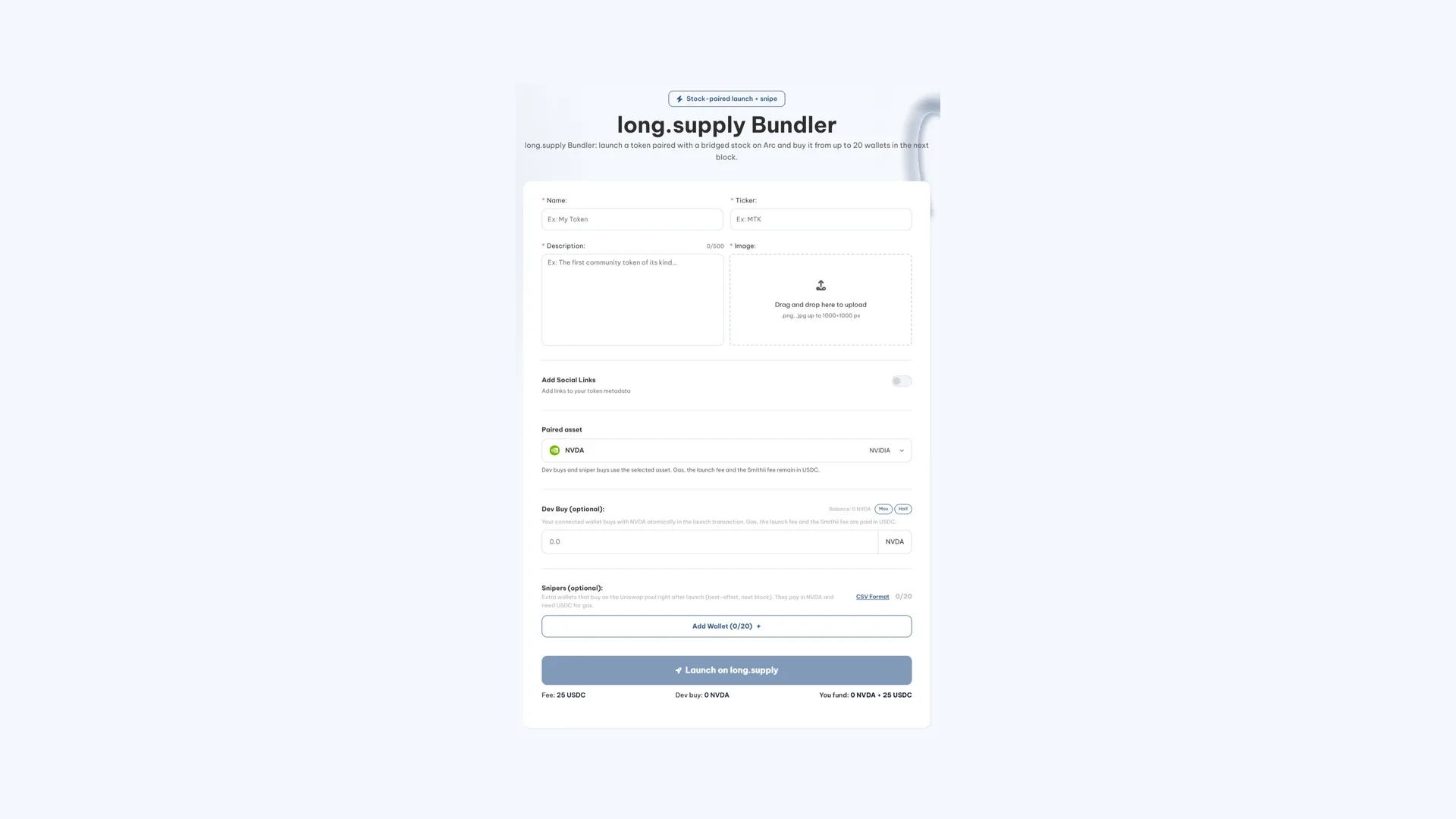
- Connect your Arc wallet. That address will be listed as the token creator.
- Fill in the token identity: name, ticker, description of up to 500 characters, and image in PNG or JPG at a maximum of 1000×1000 pixels.
- Enable the social links if you want to embed the project’s website, Telegram, or X account in the metadata.
- Pick the pair asset: either a tokenized stock supported by the platform or a token already launched on it.
- Set your dev buy in that same asset. It’s the first buy of the token and executes atomically with the creation.
- Add up to twenty wallets for the initial bundle, each with its private key and the amount it will spend. All of them need funds to cover gas.
- Hit the ‘launch on long.supply’ button and sign the transaction. Everything else runs automatically.
Why launching a token paired with a stock on Arc changes everything
This is the part you have to understand before touching anything, because it changes the whole logistics. long.supply brings tokenized stocks from Robinhood Chain over to Arc and lets you launch tokens paired against one of them in a locked Uniswap v3 pool. NVIDIA, Circle, Tesla, and the SPY index are among the ones available.
The practical consequence is that the pool only accepts that asset. A token launched against NVDA is bought with NVDA and sold back for NVDA. There’s no way to enter with USDC directly, so before launching you need to hold the tokenized stock and have it distributed across the wallets that will be buying.
It’s worth clearly separating the two currencies involved, because it’s the classic rookie mistake here. Buys and sells are denominated in the stock; fees and gas are in USDC. Your creator wallet needs both at once, and each sniper wallet does too. You get USDC by bridging from another chain; the tokenized stock is bridged inside the platform itself.
If what you want is a regular token trading against the dollar, this isn’t the way to do it: for that there’s the ERC-20 token creator on Arc, which doesn’t route through any launchpad.
How to buy from multiple wallets after launch
The bundler covers minute one. For what comes after, there’s a separate tool, the Bundle Buy from long.supply, which buys an already-launched token from up to twenty-five wallets, five more than the launch supports. Each one supplies its private key and the amount it will spend.
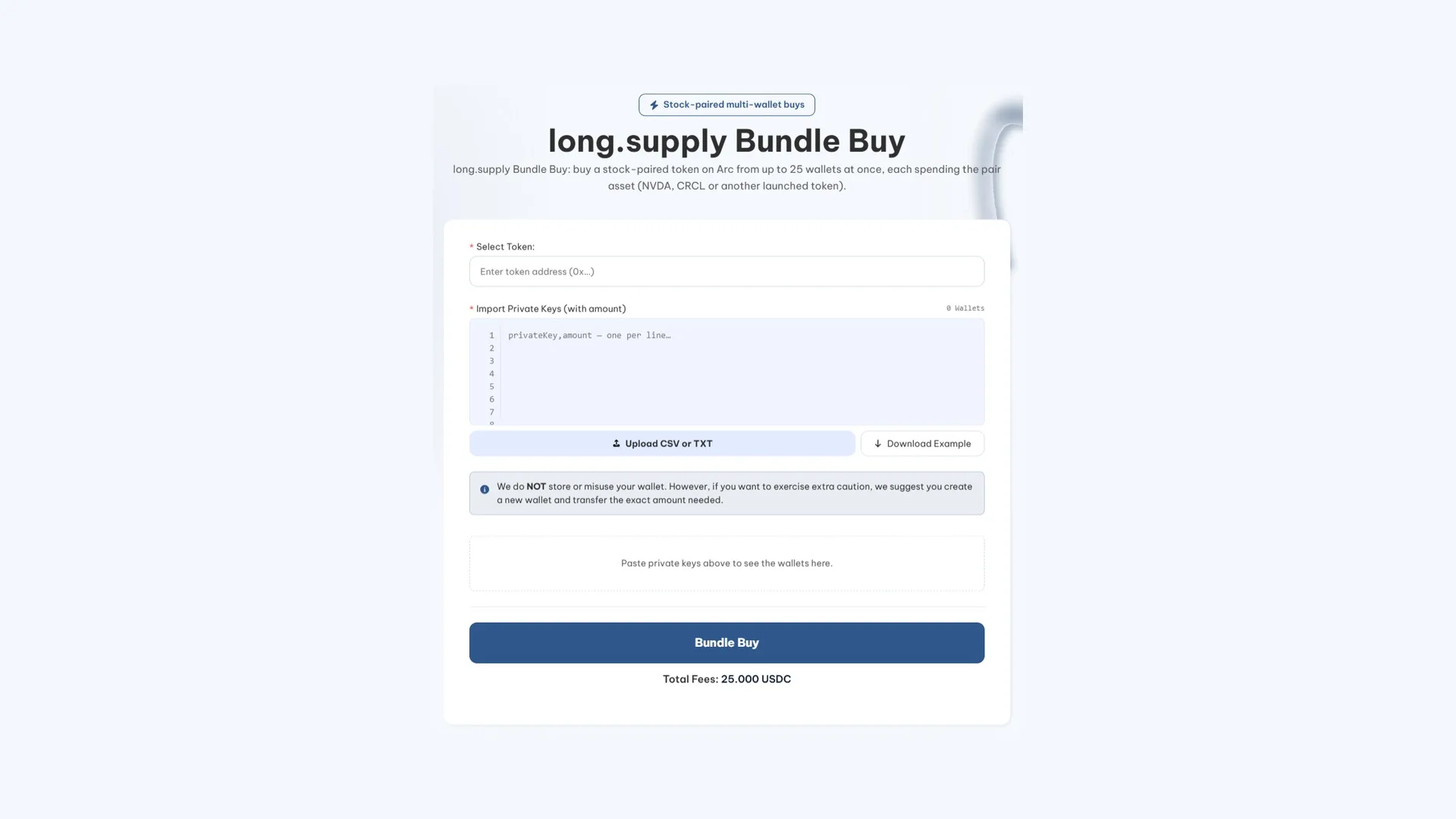
Here’s how the batch buy is set up:
- Connect the wallet that will pay the flat fee, which is charged once per batch.
- Enter the token address on the network. The tool reads the pair asset directly from the chain, so you can’t fund the wallets with the wrong stock.
- Import the private keys for the buyer wallets, pasting them one per line or uploading a file.
- Assign each wallet what it’s going to spend, always expressed in the pair asset.
- Check the resulting table: each row needs that amount plus a bit of USDC for gas.
- Fire the buy and accept the fee. The wallets send their orders in parallel and usually land in the same block or the next one.
How to sell and get the pair asset back
The exit works the same way in reverse, using long.supply’s Bundle Sell. The difference is how you set the amount: here you don’t punch in wallet figures per wallet, you set a percentage of the balance that applies to all of them.
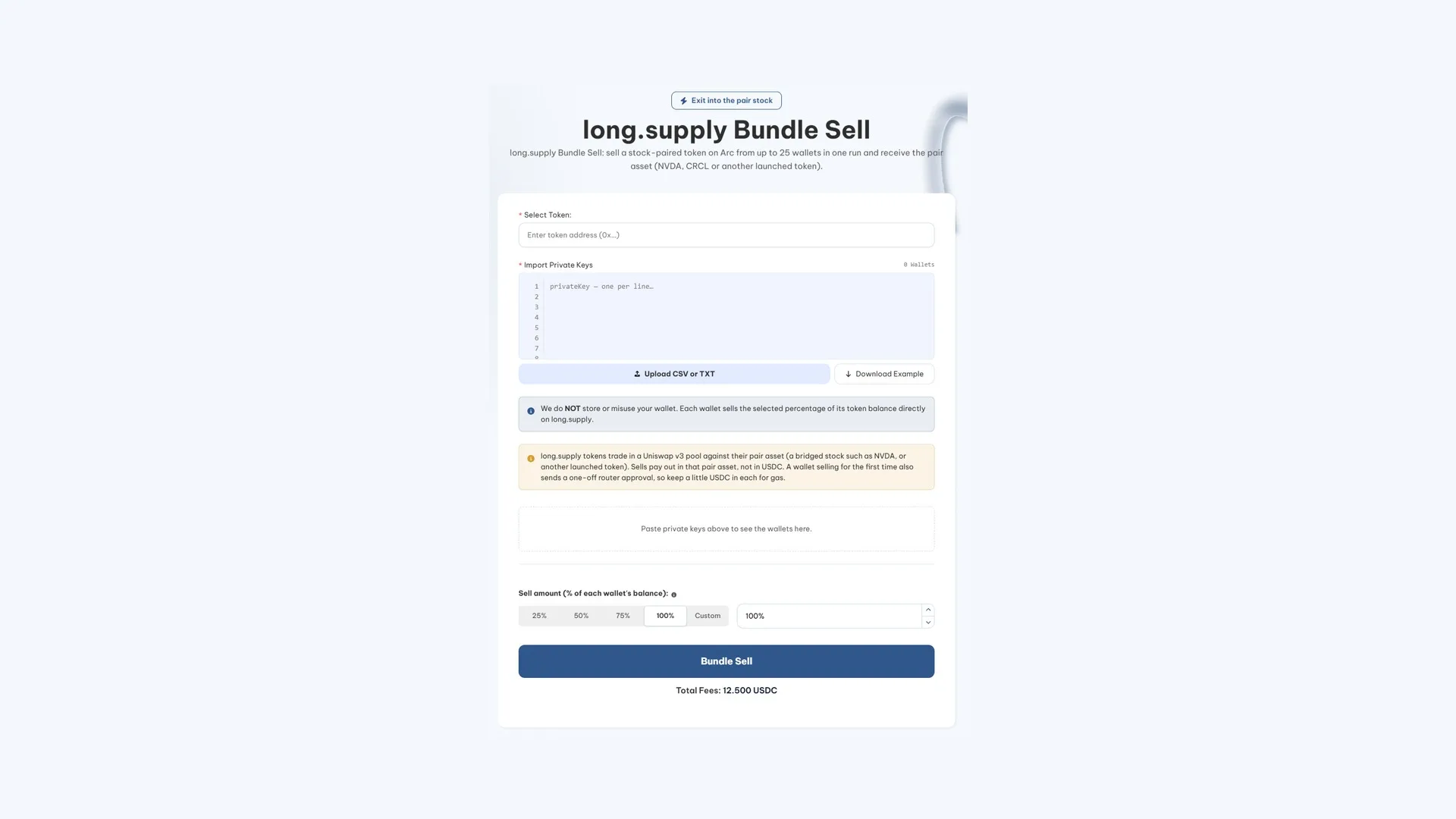
Six steps again:
- Connect the wallet that covers the batch fee.
- Paste the token address you’re going to sell.
- Import the keys of the wallets holding that token.
- Pick what percentage each one sells: a quarter, half, three quarters, everything, or whatever number you decide.
- Check the table. Wallets with no balance drop out on their own, and the rest need a bit of USDC for gas.
- Fire the sell. All of them go out in parallel and the proceeds land in the pair asset, never in USDC.
That last point is what trips up first-time sellers. If the token was trading against a tokenized Circle share, what you get back are units of that share. To convert them into the underlying, you have to send them back through the same bridge they came in on.
What each of the three operations costs
All three tools charge a flat fee per execution, regardless of how many wallets you throw into the batch:
| Operation | Fee | You also fund |
|---|---|---|
| Launch | 25 USDC | The launchpad fee, your initial buy, and each sniper’s buy |
| Bundle buy | 25 USDC | What each wallet spends plus its own gas |
| Bundle sell | 12.5 USDC | Just gas per wallet |
Selling costs half of what the other two run, for an obvious reason: there’s nothing to fund beyond gas, since you’re supplying the asset as tokens and what comes out of the trade is money flowing in.
There’s a small cost worth planning for. Each wallet approves the router once before its first trade, and that approval burns gas separately. It’s pocket change, but if you prep twenty-five wallets with just enough for a swap, they’ll come up short.
The checks that run before you get charged
Trading from twenty-five wallets multiplies the ways to mess up by twenty-five, so all three tools filter before spending:
- Every wallet is checked and simulated before any fee gets charged. The ones short on balance or gas get dropped with a reason, instead of failing halfway through the batch.
- The pair’s asset is read from the contract, not picked by you when buying, which kills off the mistake of funding wallets with the wrong stock at the root.
- Every sell carries a floor 20% below the quoted price. If the trade would execute below that, it reverts instead of draining you into a thin pool.
- Private keys never leave the browser. They’re not stored or sent to any server, across all three tools.
Even so, the sensible move is the same one that always applies when you have to paste a private key somewhere: use wallets created for this purpose and only send them what they’re going to spend.
FAQ
How many wallets does the long.supply bundler on Arc support?
Twenty snipers on launch, and twenty-five on batch buy and batch sell. The gap exists because at launch those buys have to fit into the block right after the token is created.
Why are the amounts in NVDA and not USDC?
Because the token trades against the asset it launched with, and the pool won’t take anything else. If the pair is a tokenized stock, that stock is the currency for every buy and every sell. The USDC is reserved for fees and network gas.
What happens if a wallet is short on funds?
It gets dropped from the batch with an explicit reason and the rest keep going. The check runs before the fee gets charged, so a poorly funded list doesn’t cost you the batch fee. The only thing that wallet will have burned is the gas for its approval, if it managed to send one.
Are my private keys stored anywhere?
No. They’re processed locally in your browser and never stored or transmitted to any server. That said, the prudent move is to use wallets created for the occasion and only move the amount they’ll actually need into them.
Can I sell only part of what the wallets hold?
Yes. You pick a percentage and it applies equally to all of them: a quarter, half, three quarters, everything, or a custom figure. Each wallet sells that share of its own balance, so the split holds even if they’re carrying different amounts.
Can I manage the token after launching it?
Tokens created from a launchpad follow that launchpad’s rules, which aren’t the same as an ERC-20 you deploy yourself. If what you want is a contract you control, with taxes and limits adjustable from the token management panel on Arc, the standalone creator is the way.
Conclusion
The three pieces cover the full cycle of a token paired with a stock: born with the creator’s buy already inside, grown through coordinated buys from multiple addresses, and exited through the same door you came in.
What actually decides whether the operation goes well is the prep work upfront, and it almost always comes down to the same thing: having the tokenized stock spread out before you start and enough USDC in each wallet for gas. The automatic checks will flag what’s missing, but being warned in time isn’t the same as making it to the block you were aiming for.”}

Content creator and SEO contributor at Smithii. Systems Engineering student and crypto-tech enthusiast.



