

How to use a volume bot on Tolly: give your token activity from launch
The first few minutes after launching on Tolly decide whether your token shows up on screeners or gets buried under everything else, and knowing how to use a volume bot on Tolly lets you fill that gap with real trades. Since Tolly creates the pool the moment the token is born, you can start generating activity without waiting for any graduation.
In this post I’ll walk you through why a Tolly token supports volume from minute one, how to set up the Tolly Volume Bot for Smithii, how to fit it into a launch plan, and the mistakes that cost the most money. Let’s get into it.
Why Tolly supports volume from the start
On most launchpads, a token spends its first hours on a bonding curve and only turns into a proper pool once it raises enough. Running a volume bot at that stage makes no sense, because there’s no market yet to push activity into.
Tolly works the other way around. Its contract mints a fixed supply and drops it into a Uniswap V3-style pool against USDC, with a 1% fee and locked liquidity, inside the launch transaction itself. From the first block there’s a market to trade against, and that’s exactly what a volume bot needs.
If you haven’t launched yet, start with how to launch a token on Tolly with your first buy included.
How to use a volume bot on Tolly step by step
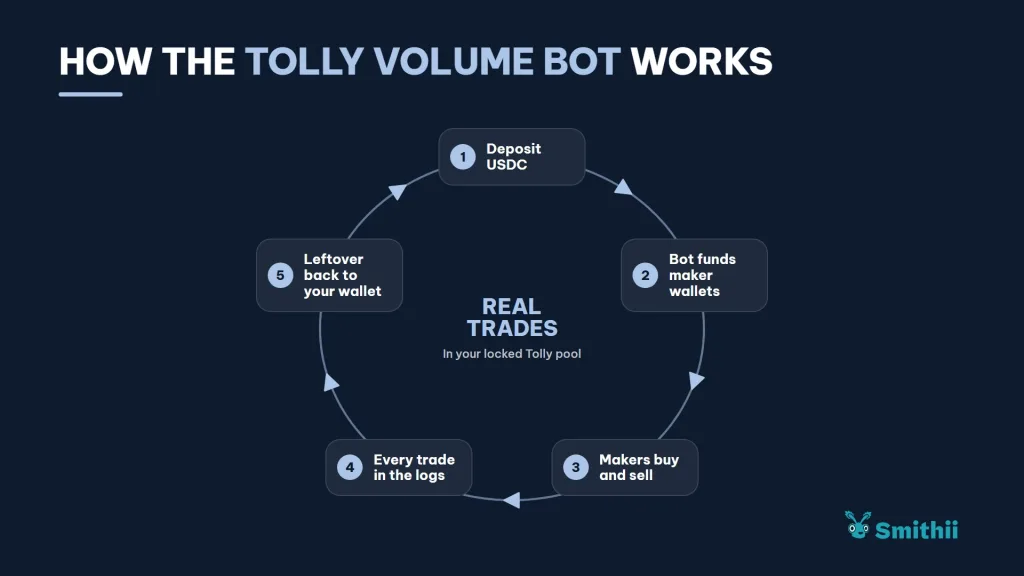
The Tolly Volume Bot for Smithii is a tool that spreads real buys and sells of your token across a fleet of maker wallets, funded from your deposit, and returns whatever is left when it’s done. Every trade lands in your token’s locked pool and you can watch them live. This is the tool’s screen:
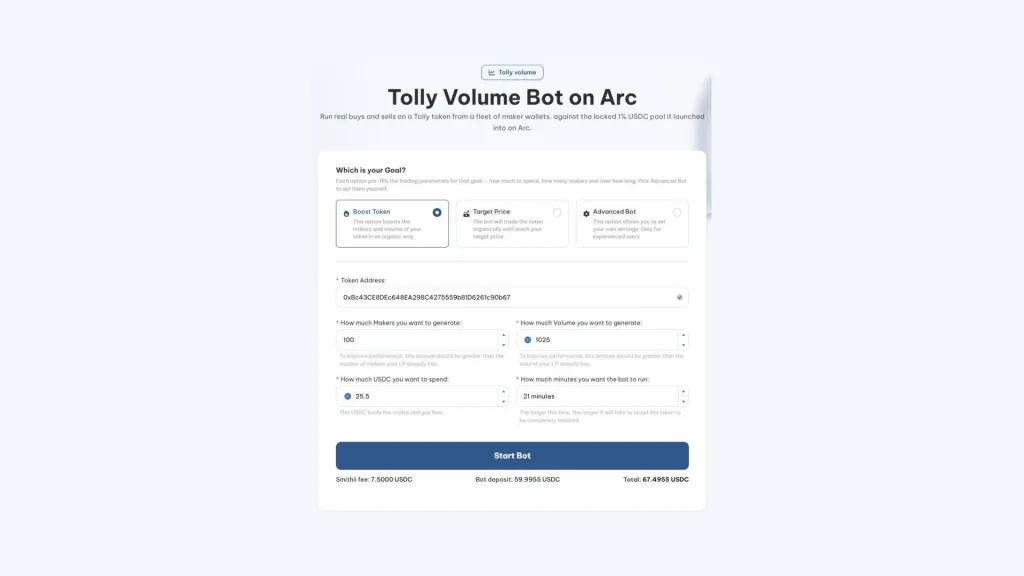
With your token already launched on Tolly and USDC in your wallet, here’s the process:
- Connect your wallet on Arc: with USDC for the fee and for the operating deposit.
- Paste your Tolly token address: the tool runs on its USDC pool.
- Pick the execution goal: push volume, move toward a target price, or configure the advanced bot.
- Set the makers and the budget: the cost estimate updates as you tweak the values.
- Sign the two approvals: one for the Smithii fee and another for the deposit the bot splits across the maker wallets.
- Watch the logs: every trade shows up below the form as the makers buy and sell.
Once both transactions are approved, the execution runs on its own. Every log line links out to the Arc explorer, and you can stop it any time with the Stop button.
The 3% cap and the maker wallets
For the first five minutes after launch, Tolly stops any single wallet from ending up with more than 3% of the supply. Maker buys are small and each wallet sells what it buys, so in practice the cap doesn’t get in the way, and it drops off once the window closes.
Which goal to pick for your Tolly token
The three goals in the form preset the execution parameters for you, and each one fits a different situation for the token:
| Goal | What it’s for | When it fits on Tolly |
|---|---|---|
| Boost Token | Adds volume and makers in a distributed way | During the first hours, so the pair shows up on the screeners |
| Target Price | Trades until it pushes the token close to the price you set | When you want the chart to reclaim a specific level |
| Advanced Bot | Lets you set budget, makers and minutes manually | If you already know how your pair reacts and want to fine-tune |
If this is your first run, start with Boost Token on a moderate budget. It gives you a baseline for how your pool reacts, and with that data your next run in advanced mode will be dialed in much tighter.
A three-phase launch plan on Tolly
The volume bot performs best when it’s part of a plan, not a last-minute reaction. A sequence that fits well with how Tolly works is this:
| Phase | What you do | Tool |
|---|---|---|
| Launch | You create the token, make your initial buy and your snipers come in | Tolly Bundler |
| First hours | You generate activity so screeners pick up the pair | Tolly Volume Bot |
| Ongoing management | Buy or sell from multiple wallets whenever you need to | Tolly Bundle Buy and Bundle Sell |
The key is coordinating the execution of your coin promotion plan. If the token announcement drops once the bot has already built up some history, anyone landing on your post sees a chart with movement instead of a brand-new pair with zero trades.
What a run on a Tolly token costs
Everything is paid in USDC, which on Arc is also the token for gas, so the cost you see before approving is the cost you pay. If you’re short on USDC on Arc, you can bring it over with a bridge. It breaks down into three parts:
- Smithii fee: 7.5 USDC per 100 makers, the same as Arc’s general volume bot.
- Operating deposit: funds the maker wallets and covers their gas. Whatever isn’t spent returns to the wallet you connected once the run finishes.
- Pool fee: the 1% that the Tolly pool charges on every buy and every sell, same as for any other trader.
That’s why the real cost of a run depends mostly on the volume you generate: the more trading happens, the more pool fees get eaten out of the deposit.
Common mistakes when running a volume bot on Tolly
- Burning the whole budget in the first hour: a short, intense run leaves an isolated spike on the chart. Spreading activity over time looks far more natural.
- Mistaking volume for holders: maker wallets buy and sell within the same run, so they don’t hold onto the token.
- Firing it off without any communication behind it: the bot gets you discovered, but if nobody knows what the project is, interest fades the moment it stops.
- Not checking the log: the panel tells you in real time whether trades are going as expected. If they’re not, stop the run and adjust.
None of these mistakes are technical, which is why they’re easy to avoid if you keep them in mind before approving.
For a token that isn’t on Tolly, check out how to generate volume for any token on Arc.
FAQ
Can I use the volume bot right after launching on Tolly?
Yes. Tolly opens the USDC pool in the same transaction that creates the token, so there’s no curve to wait on and no pool to spin up before your first run.
Does the 3% cap affect maker wallets?
Only in the first five minutes, when no wallet can hold more than 3% of the supply. Maker buys are small by design, so they rarely get anywhere near the cap, and it drops off after that window anyway.
How much does the Tolly volume bot cost?
Smithii charges 7.5 USDC per 100 makers, the same as the standard Arc volume bot. On top of that there’s the operating deposit that covers trades and gas, and whatever isn’t spent goes back to your wallet.
Who gets the 1% fee on every trade?
It goes to the Tolly pool itself, not Smithii. It’s the same fee any buyer or seller of the token pays.
How do I stop a run?
Hit the Stop button on the logs panel, right below the form. The trades that already went through stay on-chain, and the remaining balance returns to your wallet. The history tab keeps a record of your past runs.
Final thoughts
With everything you’ve seen about running a volume bot on Tolly, you’re set to bring real activity to your token from the very first block, taking advantage of the USDC pool being live from launch, with the full dollar cost shown before you approve. The logs let you check every trade and stop whenever you want.
Slot it into a plan alongside your launch and your communication. The bot pulls eyes in for a few hours; what turns those eyes into holders is the project they find when they arrive.

Content creator and SEO contributor at Smithii. Systems Engineering student and crypto-tech enthusiast.



