

How to add liquidity on TRON: give your SunSwap pair depth without moving your TRC-20’s price
If every buy of your token sends the chart flying and every sell tanks it, the problem isn’t demand, it’s depth, and learning how to add liquidity on TRON is how you fix it. With more depth in the pool, your holders buy and sell with less slippage, the chart stops jumping around and the pair looks more credible to anyone showing up for the first time.
In this guide I’ll walk you through the process using the Smithii Liquidity Adder for TRON, how much liquidity actually makes sense to add based on the buy sizes you’re expecting, and what the operation costs in Energy. Let’s jump straight into the step by step.
How to add liquidity on TRON step by step
The Smithii Liquidity Adder for TRON is a tool that lets you top up an existing SunSwap V2 pair without touching the DEX interface or working out the ratio by hand. You type how much you want to add on one side and the other side adjusts automatically to the current pool ratio. When you open it you’ll see this screen and you can follow these steps:
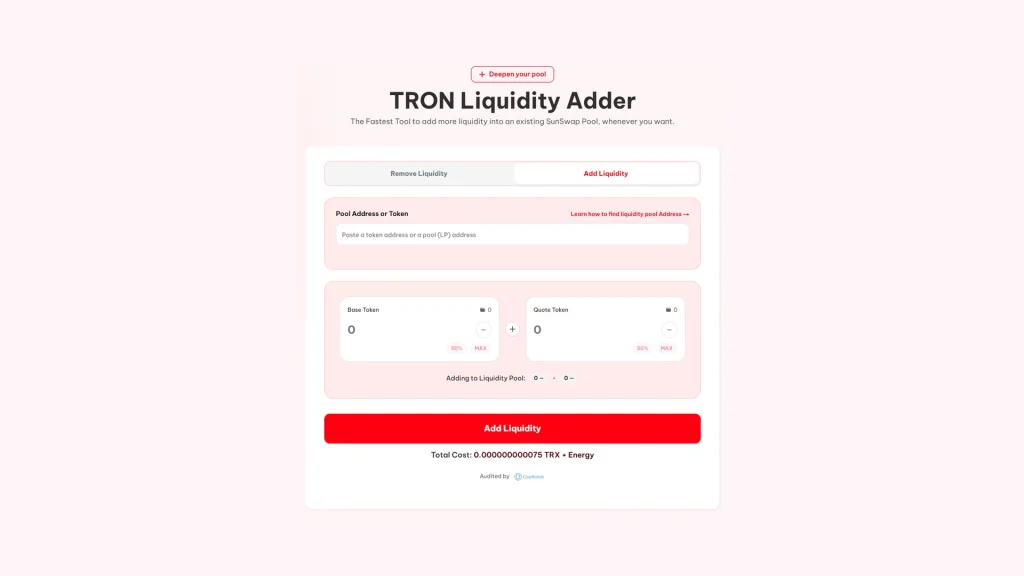
- Connect TronLink: with the wallet holding the token and the TRX or stablecoin you’re going to add, on TRON Mainnet.
- Paste the token or the pool address: in Pool Address or Token, and the tool finds the SunSwap V2 pair.
- Enter the amount on one of the two sides: Base Token or Quote Token; the other adjusts automatically to the current pool ratio.
- Review the summary: under Adding to Liquidity Pool you’ll see the exact amounts going in on each side.
- Hit Add Liquidity and sign: TronLink will ask you to sign the fee, the token approvals and the deposit.
Once it confirms, the liquidity is already part of the pool and your LP tokens show up in the wallet. If you pick the wrong pair, the tool simply won’t find the pool and nothing gets sent, so you can safely test with the token address.
Token or pool address: what to paste
The field accepts both. If you paste your TRC-20 address, the tool looks up its pair on SunSwap V2. If the token has multiple pairs, say one against TRX and one against USDT, the safest move is to paste the pool address directly, which you can grab from TronScan or from the pair page on any screener.
Why you don’t pick the price when adding liquidity
The pool price is set by the ratio between its two reserves. If you added more on one side than the other, you’d effectively be buying or selling at the same time, and the router would correct it at your expense. That’s why the tool fills in the second amount for you and your contribution goes in exactly at market price.
How much liquidity to add to your SunSwap pool
The useful question isn’t how much you can add, but how much you want the price to move on a normal buy. In a constant product pool like SunSwap V2, the impact of a buy depends on its size relative to the TRX reserve. This is the rough impact of a 1,000 TRX buy, before swap fees:
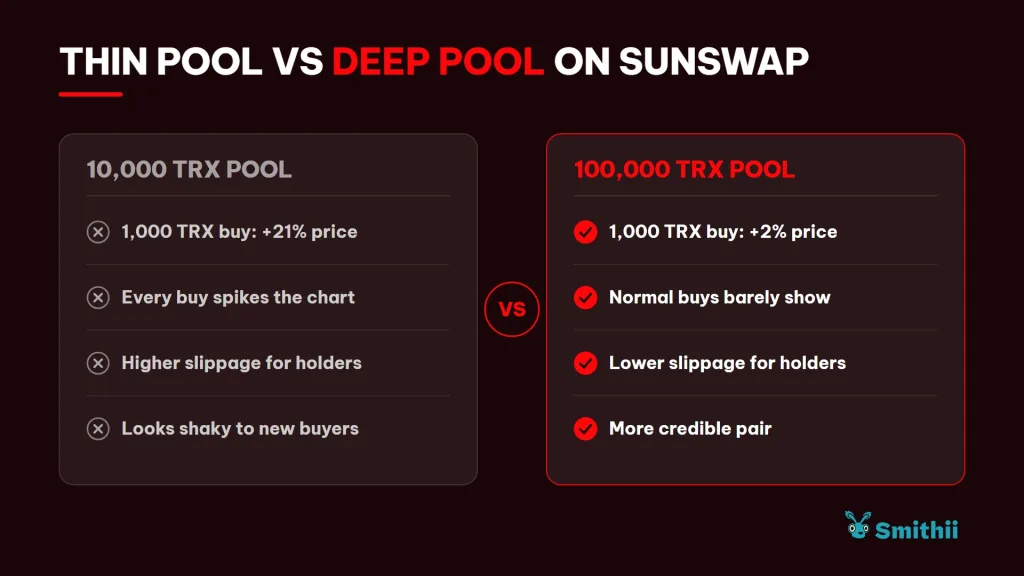
The practical rule is to think about your community’s typical buy and size the pool so that buy doesn’t shake it. If you can’t get there in one shot, you can add in multiple rounds as the project grows: each later contribution goes in at the price at that moment.
If you don’t have a pair yet, start by creating the liquidity pool for your token on TRON and setting its launch price.
When it actually makes sense to reinforce your pool on TRON
Adding liquidity ties up capital, so it’s not something you do out of habit. These are the moments where it usually pays off:
- Before a campaign or announcement: if you’re expecting a wave of buys, a thin pool turns each one into a chart spike right when the most eyes are on it.
- When your holder count grows: more holders means more small sells, and each one lands lighter with a bigger reserve behind it.
- After a large sell: if a sizeable wallet has exited, reinforcing the pool keeps the price from being at the mercy of the next one.
- When opening a second pair: if you add a pair against USDT alongside the TRX one, start with a modest contribution and scale it up once you see where the volume is coming in.
There’s one case where you should tread carefully: adding a lot of liquidity only to pull it out shortly after. Pool moves are public on TronScan, and a quick in-and-out reads as a maneuver, not as support for the project. If you’re going to reinforce the pair, do it planning to leave it there.
If you’re not sure how much token and TRX to use, check out our guide on how much liquidity should I add to my token.
Energy and approvals when adding liquidity on TRON
On TRON you don’t pay gas like you would on an EVM network. Every transaction consumes Bandwidth and Energy, and if your account doesn’t have enough resources, the network burns TRX to cover them. Adding liquidity means several transactions in a row, so it helps to know what they are:
- The Smithii fee: a TRX transfer, which only uses Bandwidth.
- The approvals: one per TRC-20 going into the pool, so the router can move it. If the pair is against TRX, you only approve your token.
- The deposit: the call to the SunSwap router, which is the one that burns the most Energy.
TronLink shows you the resources each signature needs before you confirm it. If you plan to operate often, freezing TRX to get Energy works out cheaper than burning it on every transaction.
How much it costs to add liquidity on TRON with Smithii
The fee is 75 TRX per operation, plus the Energy and Bandwidth consumed by the network. On top of that, the tool protects the deposit with a slippage margin of 20% and a 20-minute deadline: if the pool price moves more than that while you’re signing, the transaction gets rejected instead of adding at a price you weren’t expecting.
What you deposit isn’t a cost. It stays in the pool under your name, earns a cut of the fees from every swap, and you can pull it out whenever you want with the Liquidity Remover, subject to the usual pool variations as the price moves.
When you want to pull funds out, here’s how to remove liquidity on TRON and receive TRX in your wallet.
FAQ
How much does it cost to add liquidity on TRON with Smithii?
The fee is 75 TRX, plus the Energy and Bandwidth the transactions consume. What you put into the pool isn’t a cost: it’s still yours in the form of LP tokens.
Does my token price change when I add liquidity?
No, because you deposit both sides in the ratio the pool already has. What changes is the depth: from that point on, the same buy moves the price less.
What do I get in return for the liquidity?
SunSwap V2 LP tokens, which represent your share of the pool. Keep them in the same wallet: they’re what you’ll need if you ever want to withdraw that liquidity.
Can I add liquidity to a pool I didn’t create?
Yes. Any wallet can contribute to an existing SunSwap V2 pair. You’ll get your own LP tokens and a cut of the swap fees proportional to what you add.
Do I need WTRX to add liquidity to a pair against TRX?
No. If the pair is against WTRX, you contribute TRX directly from your balance and the tool uses the router path that wraps it along the way.
Conclusion
Once you know how to add liquidity on TRON, you can strengthen your SunSwap pair without touching its price and decide the depth based on the buys you’re expecting, not by eye. The tool calculates the ratio for you and lets you see the exact amounts before you sign.
A deep pool doesn’t guarantee the token will pump, but it does make every trade look reasonable, and that’s the first thing anyone thinking about buying checks.

Content creator and SEO contributor at Smithii. Systems Engineering student and crypto-tech enthusiast.



