









How to launch a token on Argus: create your memecoin on Arc with up to 20 different wallets
Knowing how to launch a token on Argus lets you ship a token on Arc with a creator tax, a target bond valuation, and coordinated buys from the very first block. With the Bundler you create the token, make your first buy in the same transaction, and queue up to 20 wallets that come in right when the opening window closes.
In this guide I’ll walk you through what Argus is and what makes it different, the step-by-step launch flow, what runs atomically and what doesn’t, how to buy and sell afterward from multiple wallets, and what each operation costs. Let’s get straight into it.
What Argus is and what sets it apart on Arc
Argus is a launchpad on Arc, the network where gas is paid in USDC. There’s no bonding curve to graduate from: every launch spins up the token together with a Uniswap V4 pool with a hook, and Argus calls these deployments Portals. The pool charges 1% and tracks whether the token has hit the bond valuation set at launch.
Unlike creating a token from scratch on Arc, here you only need to focus on making a memorable coin. liquidity pool isn’t a concern, since you don’t need any funds of your own for your token to be tradable from the very first second.
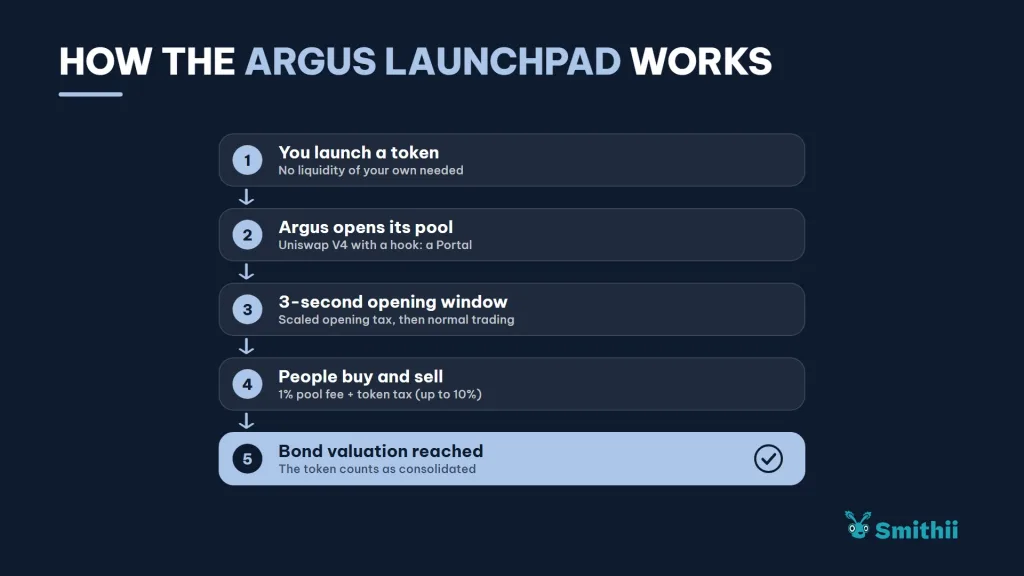
Three things set it apart from the rest of the launchpads on the network:
- Every token has two valuations: the initial one, which the first buyer gets in at, and the bond valuation, which marks when the token is considered consolidated.
- The token can carry a tax: the protocol supports up to 10% on buys and sells, split between creator, burn, dividends, and liquidity.
- There’s an opening window: during the first three seconds after launch a tiered opening tax applies before trading switches to normal conditions.
The reason you need a Bundler is that keeping snipers out is a critical process, since anyone can grab a solid chunk of tokens from the very first second and dump on your project right when you need to grow the most. Spreading the supply across holders from second zero is key.
If you’re comparing launchpads on the network, also check out how to bundle on Arc with long.supply, which runs on different logic, or how to launch on Tolly, tax-free and with locked liquidity.
How to launch a token on Argus step by step
The Argus Bundler by Smithii is a tool that lets you launch your token on Argus, buy in the same transaction, and coordinate up to 20 snipers from the same interface. Under the button you’ll see the fee, your dev buy, and the total you’re putting in before you sign anything. When you open the tool, you’ll find the launch form:
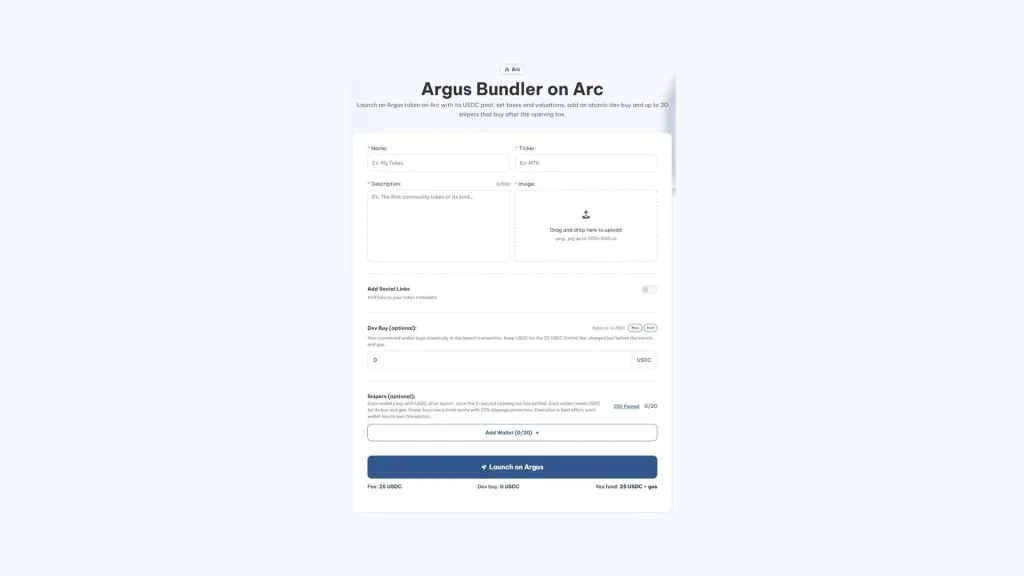
Have ready the token image and details, the USDC for your dev buy, and the private keys for the sniper wallets, each one funded with USDC for its buy and gas. Then:
- Connect your wallet on Arc: it will be the creator of the token and the one that pays the Smithii fee.
- Fill in the token identity: name, ticker, description, and image, plus website, X, and Telegram if you want.
- Turn on the social links if you have them: website, X, and Telegram get saved into the token metadata.
- Set up the dev buy and the snipers: an amount in USDC for your own buy and up to 20 imported wallets, each with its own amount.
- Approve, pay, and launch: the USDC approval for the dev buy, the 25 USDC fee, and the launch transaction.
- Track the snipers: each wallet buys the moment the opening window closes, and its result shows up with a link to the explorer.
If you refresh the page halfway through, the confirmed token and the launch transaction are preserved, so a reload will never launch twice. And the fee doesn’t get charged twice for the same launch either.
The parameters your token ships with
| Parameter | Value in launches with the Bundler |
|---|---|
| Supply | 1 billion tokens |
| Initial valuation | 2,500 USDC |
| Bond valuation | 45,000 USDC |
| Buy and sell tax | 3% each |
| Tax distribution | 100% to the creator, in USDC |
The form doesn’t let you change them, so factor them in when planning your launch: the first buyer enters at a 2,500 USDC valuation, every buy and sell pays a 3% that goes to the creator wallet, and the token hits bond once it reaches a 45,000 USDC valuation.
What runs atomically and what doesn’t
Getting this distinction right saves you from surprises on launch day. Your dev buy sits inside the same transaction that creates the token and its pool, so the token never exists on-chain without your buy: if anything fails, it all fails together.
Snipers work differently. Smithii waits for the three-second opening window to close, pulls a fresh price for each wallet, and fires the buys one after another, each with a minimum token amount calculated with 20% slippage. That way none of them pays the opening tax, only the regular tax and the pool fee.
- A sniper can fail because of slippage or insufficient balance, and that doesn’t roll back the launch or the other buys.
- The Priority option checks more often whether the window has closed. It doesn’t bump the gas price.
- Each wallet pays its own way: its buy and its gas in USDC, with no extra Smithii fee per sniper.
A note on transparency: the sniper wallets are yours, and what they’re buying is team supply. Spell it out in your launch comms, along with the planned distribution, so no one has to figure it out on the explorer themselves.
Learn how to send private transactions on Arc using Mixoor.
Buying and selling from multiple wallets on Argus
After launch, the suite ships with two tools to operate the same token from multiple wallets. Both first resolve which Portal the token belongs to and which asset its pool trades against, which on new launches is USDC.
- Argus Bundle Buy: buy from up to 20 wallets, which you import with their private key and amount on each line or by uploading a CSV. Every buy is quoted with the tax and pool fee in plain sight, the price is good for 60 seconds and gets rechecked before signing. Approvals are exact: first to Permit2 and then to the Argus router.
- Argus Bundle Sell: for the wallets you import with their private key, you don’t specify a token amount but a single percentage of their balance (25, 50, 75, 100% or whatever you type) applied to all of them. The only one that accepts an exact amount is the connected wallet, in the Token amount to sell field. You see the sell tax, the 1% fee, and the minimum each will receive, and the proceeds come back in the pool’s asset.
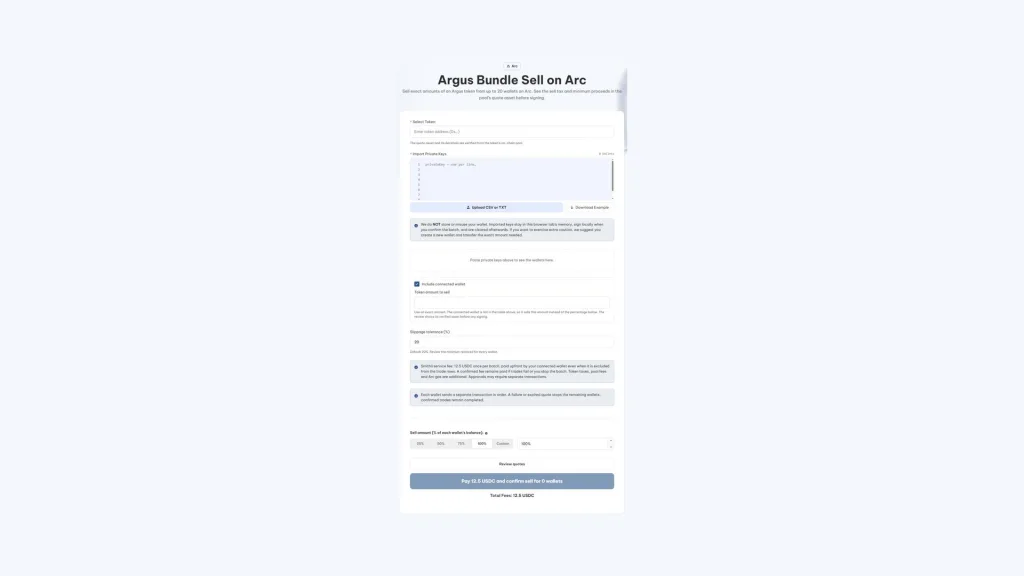
In both tools, operations go out one per wallet and in order. If one fails or its price expires, the rest halts so you can review the batch, and if it was an expiry you can resume without paying the fee again.
How much it costs to launch and operate on Argus with Smithii
| Operation | Smithii fee | Plus |
|---|---|---|
| Launch with Bundler | 25 USDC | Gas on USDC plus your dev buy |
| Bundle Buy | 25 USDC per batch | Buy tax plus 1% of the pool |
| Bundle Sell | 12.5 USDC per batch | Sell tax plus 1% of the pool |
Everything is paid in USDC, same as Arc gas. The launch fee is requested after simulating the exact transaction and before you sign it, and you’re never charged twice for the same launch.
FAQ
What is Argus on Arc?
It’s an Arc launchpad (argus.world) that deploys each token alongside a Uniswap V4 pool with a hook, custom logic attached to the pool. Argus calls these deployments Portals, and new launches price against USDC.
Are the dev buy and the snipers atomic?
The dev buy is: it runs inside the launch transaction. Snipers aren’t: they’re separate transactions that fire after the opening window, so one can fail without affecting the launch or the others.
How much does it cost to launch a token on Argus with Smithii?
The fee is 25 USDC per launch, with no surcharge for sniper. On top of that you pay Arc gas in USDC and the USDC for your dev buy, and each wallet sniper covers its own buy and gas.
Where does the tax from an Argus token go?
On launches with Bundler, 100% of the tax goes to the creator and is paid in USDC. The Argus protocol also supports splitting it between burn, dividends, and liquidity, and claiming that revenue isn’t part of Smithii yet.
Are the snipers’ private keys stored?
No. The keys sign in your browser, and the log that lets you recover a launch after reloading the page only stores addresses, statuses, and transaction hashes.
Final thoughts
Once you know how to launch a token on Argus, you’re able to create your Portal with a creator tax and a target bond valuation, lock in your buy inside the launch transaction, and coordinate up to 20 snipers that come in after the opening window. Bundle Buy and Bundle Sell round out the cycle so you can operate afterwards from multiple wallets.
Keep the launch’s fixed parameters in mind and communicate clearly how much supply the team holds. With snipers and a creator tax, transparency is what sets a serious launch apart from the rest.

Content creator and SEO contributor at Smithii. Systems Engineering student and crypto-tech enthusiast.



