

How to Get a Holder List on Solana in 3 Steps
If you have a project on Solana or you are planning to launch one, your main goal is probably to get it noticed. Knowing how to get a list of token holders on Solana is essential. In practical terms, that means identifying people who hold a token, memecoin, or NFT on Solana, making them your target audience because they already share a similar interest. If they liked a certain token or NFT, there is a real chance they may be interested in yours too.
There are plenty of marketing moves you can use to grow your project’s reach and awareness, but one of the most common, and often hard to skip, is running an airdrop. That means giving away part of your token or NFT supply to multiple wallets, or using it as a reward. To do that, you’ll need a holder list, either from a project similar to yours or from your own project if you want to reward existing holders.
This process is known as a “Snapshot.” For example, you could pull the holder list for $WIF and then run an airdrop of your new token to those wallets. Or you could get a snapshot of DeGods holders and promote your NFT to that community.
How to Get a List of Token Holders on Solana, Step by Step
To get our list of token holders on Solana, we’ll use the dApp called “Snapshot Token Holders” (https://tools.smithii.io/snapshot-token/solana) from Smithii Tools. It lets you do it for a fee of 0.2 SOL, and you’ll see an interface like this:

- Go to Snapshot Token Holders and connect your wallet
- Fill in “Token Address” by selecting your wallet’s token.
- Click “Take Snapshot“, confirm the transaction, and wait a few seconds.
Once the process is complete, you’ll have a full list of the wallets holding the selected token. You can copy these addresses manually or download them as a CSV to make analysis easier and use them in marketing strategies like the airdrops mentioned above.
If you prefer video, here’s a tutorial showing how to do it:
How to Get a List of NFT Holders on Solana, Step by Step
To create a snapshot of the holders of a NFT Collection on Solana, you’ll first need its Creator Address, meaning the address that identifies your NFT Collection.
Again, if you prefer video, we’ve got that available too:
Start by finding the ID of any NFT that belongs to the collection you want to create the snapshot for. You have two options:
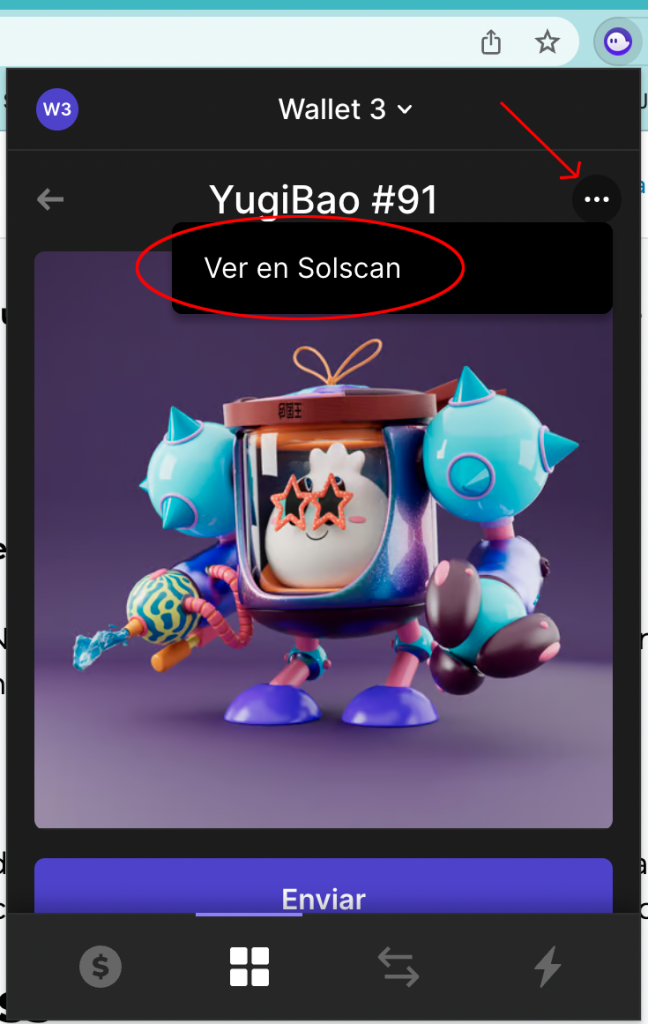
1. Through your wallet: open the NFT inside your wallet. Click the three dots in the top right, then click “View on Solscan”.
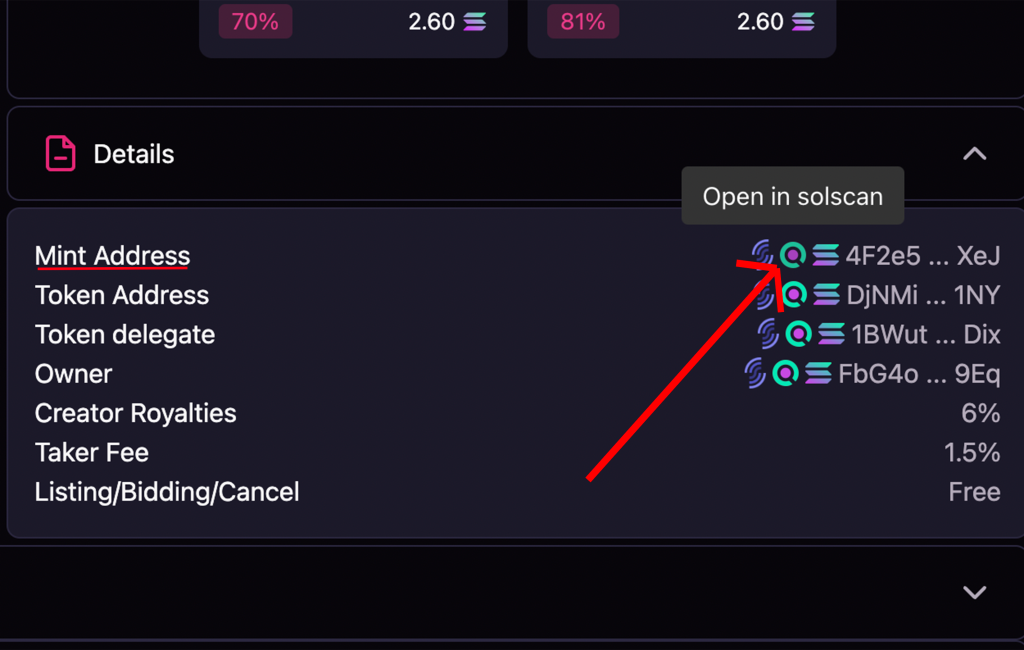
2. Through Magic Eden: open the NFT on Magic Eden and scroll down to the “details” section. There, click the Solscan logo next to “Mint Address”.
3. Once you are on Solscan, click the “Creators” dropdown. Then click the first address that appears, which will show 0%.
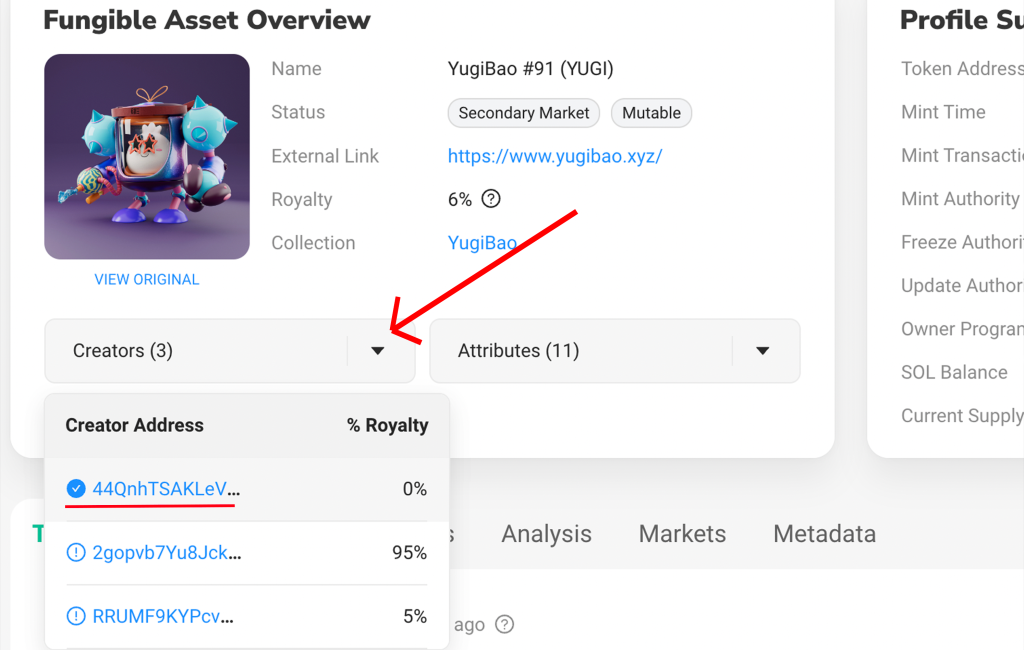
4. This address is the NFT collection ID. It will open in Solscan, and we need to copy it.

After copying the Creator Address, the next step is to use another tool that will generate the snapshot for us. Just open our tool “Solana Snapshot NFT” (https://tools.smithii.io/snapshot/solana).
There you can generate the Snapshot and get the holder list in just a few minutes, for only 0.2 SOL.

- Open Snapshot NFT Holders and connect your wallet
- Fill in “Creator Address”, the one you copied earlier.
- Click “Take Snapshot”, confirm the transaction, and wait a few seconds.
Once that is done, wait for the process to finish.
Ya tienes tu Solana holder list, es momento de hacer un airdrop con Solana Token Multisender
Final thoughts on getting a holder list on Solana
You get plenty of benefits from running a snapshot for a token or NFT, whether you are handling airdrops, making reward distribution fairer, enabling governance participation, and more.
The advantage of using smithii’s online dApp is that you do not need coding skills, and you can get it done quickly and affordably for just 0.2 SOL.
Want to beat your competitors?
Join our newsletter and get weekly Blockchain updates built for NFT creators.


Crypto writer focused on the Web3 space. Former contributor to the Smithii editorial team.



