
How to use a volume bot on Stonk.fun to farm makers and real volume
If your token is already live and the chart has flatlined, learning how to use a volume bot on Stonk.fun is the most direct way to get screeners showing it again. The bot splits buys and sells across many different wallets, so your meme coin racks up makers, visible volume, and an activity history that gives confidence to the traders landing on it later.
In this post I’ll show you exactly what the bot does with a Stonk.fun token, how to set it up step by step, how much it costs, and what the limits are. Let’s dive in.
What a volume bot does with a Stonk.fun meme coin
A maker is a single wallet that trades against your token. The bot spins up temporary wallets, funds them from your deposit, and each one buys and sells, so the volume per run is roughly the buy amount per maker multiplied by two and then by the number of makers. Everything happens on-chain, so DexScreener, Birdeye, and DexTools pick it up as real activity.
With Stonk.fun tokens there are three details the bot handles before charging you a cent:
- Works with any pair, including coins trading against a tokenized stock instead of SOL. The bot routes through Jupiter, so it checks that your token has a route before kicking off. A freshly deployed pool can take anywhere from 30 seconds to 10 minutes to get indexed.
- Reads the Token-2022 standard on Stonk.fun. If your coin is a ‘reward coin’ with a transfer tax, the quote picks up that percentage and adds it to the cost.
- Blocks dangerous tokens: if the buy or sell tax goes above 30% or the token is a honeypot, it won’t let you pay.
How to use a volume bot on Stonk.fun step by step
The Smithii Volume Bot for Stonk.fun lets you generate makers and volume on your token with a single signature, no coding and no manual wallet juggling. You pick how much you want to move and over what timeframe, and the bot does the rest while you watch the activity live. Here’s the screen you’ll land on:
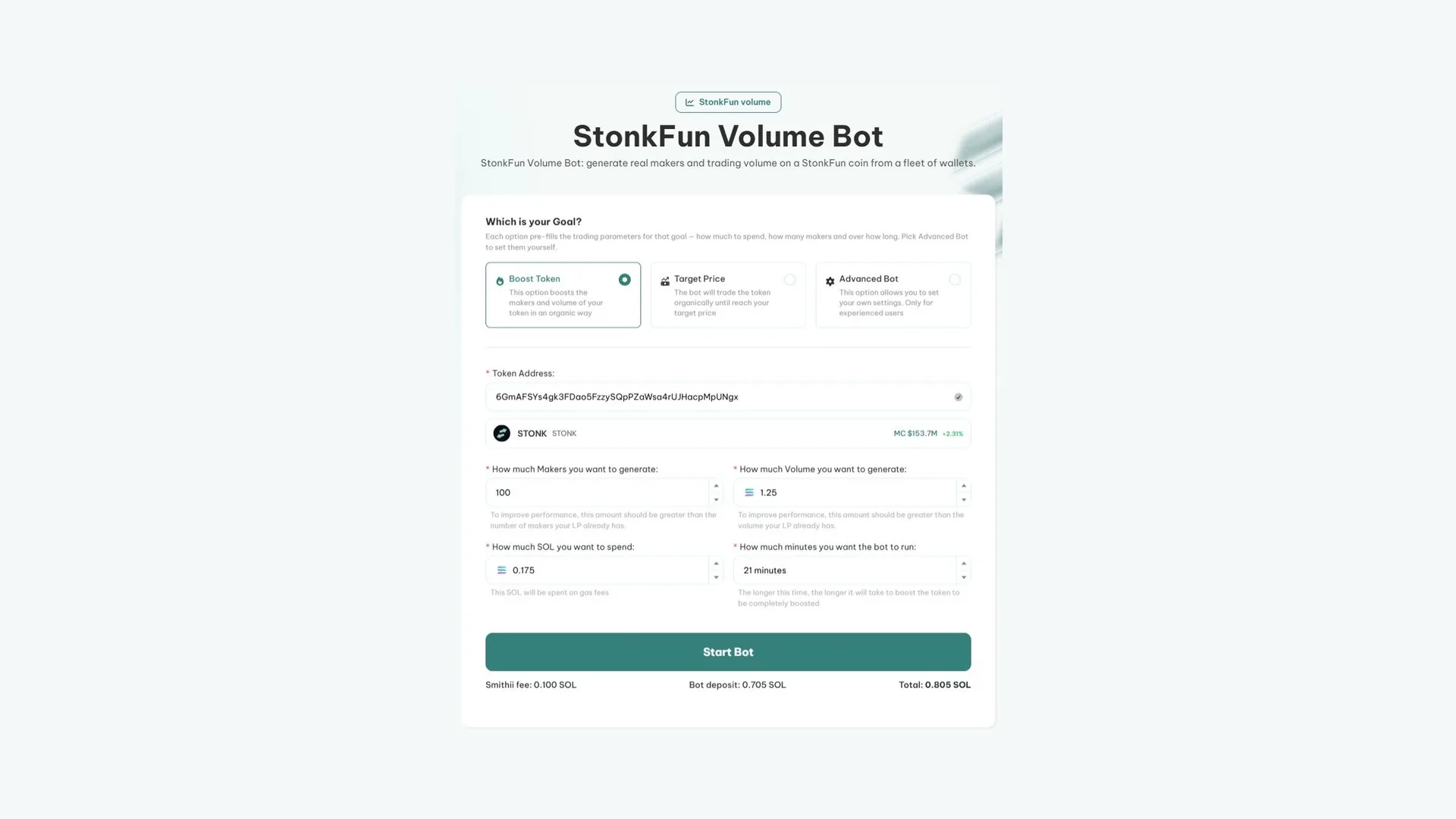
If your token already has a route on Jupiter and you’ve got enough SOL for the deposit and the fee, do this:
- Connect your Solana wallet and paste the token address. If the service doesn’t pick it up right away, the form retries every few seconds and won’t let you pay until it reads it.
- Pick your goal: Boost Token, Target Price, or Advanced Bot (I’ll break down each one just below).
- Set makers, SOL to spend, and minutes. The fields are linked: change one and the others recalculate.
- Check the quote: you’ll see the Smithii fee, the bot deposit, and the total. If the quote doesn’t match the current values, the pay button stays locked.
- Hit Start Bot and sign a single transaction, which covers both the fee and the deposit.
- Track progress in the logs panel: every operation shows up live and you can shut the bot down with Stop whenever you want.
If you reload the page mid-run, the panel comes back with its Stop button intact. And if you paid but the bot never fired up because of a network hiccup, the site auto-retries with the same signature for 10 minutes, without charging you twice.
Boost Token, Target Price, and Advanced Bot: which mode to pick
- Boost Token spreads volume and makers across the full window, with no specific price target. It supports anywhere from 10 to 30,000 makers. On the defaults (100 makers, 21 minutes, and a 0.175 SOL budget) it generates about 1.25 SOL in volume.
- Target Price buys more than it sells to push the price up by a set percentage, from 1% to 100%. Each maker buys 0.002 SOL. The tool itself warns that the result may not be exact, since price also depends on liquidity and other traders.
- Advanced Bot is for anyone already familiar with the bot: you set a buy range per order, the seconds between transactions (minimum 6), and whether the tokens get sold automatically (Auto Sell), sent to your wallets (Return to Wallet), or sold in stages, up to 4.
Boosting a meme coin on Stonk.fun: how much it costs
The Smithii fee is 0.1 SOL per 100 makers, rounded up: 1 to 100 makers costs 0.1 SOL, 101 to 200 costs 0.2 SOL, and 250 makers runs you 0.3 SOL. That fee is non-refundable, even if you stop the bot early.
What does come back is the operating deposit. That’s your money: it funds the maker buys, the rent on their temporary accounts, and the gas for each operation. When the run ends or you hit Stop, any unspent SOL goes back to your wallet. The spent portion covers DEX fees, gas, and the spread between buy and sell.
| Item | Who charges it | Refundable? |
|---|---|---|
| Smithii fee (0.1 SOL per 100 makers) | Smithii | No |
| Operating deposit | Nobody: it funds the bot’s operations | Yes, whatever isn’t spent |
| Pool fees and gas | The DEX and the Solana network | No |
How to generate volume on Stonk.fun without burning through your deposit
The bot does exactly what you tell it to, so the gap between a solid result and a wasted deposit comes down to your setup:
- Check liquidity before you start. In a thin pool, the bot’s own orders push the price around and the chart can end up looking worse than if you’d never run it.
- Start with Boost Token and a small number of makers to see how your token reacts, then scale up once you know how the pool behaves.
- Give the execution room to breathe. Spreading makers across more minutes leaves steadier activity on the screeners than a five-minute spike.
- Pair it with real promotion. The bot keeps your token visible; actual buyers come from the community, from X, or from Telegram.
If you haven’t launched your token yet, start with our guide on launching a meme coin on Stonk.fun and come back here once you have the contract address.
What a volume bot can’t do for your token
Worth setting expectations straight before you pay:
- It doesn’t guarantee trending or price pumps. It generates real activity, but the rest is up to the market.
- Volume isn’t free: every trade pays pool fees, gas, and slippage, and that eats into your deposit.
- There’s temporary custody involved: while the execution is running, your deposit sits in a bot service account and in the makers’ temporary wallets. The bot doesn’t touch your private keys, and whatever’s left comes back to your wallet when it finishes.
To give that activity someone to attract, combine the bot with the tactics from our guide on how to promote a meme coin.
FAQ
How much does using the volume bot on Stonk.fun cost?
The Smithii fee is 0.1 SOL per 100 makers, rounded up. On top of that you put down an operating deposit that funds the trades, and whatever isn’t spent gets refunded.
Does it work with Stonk.fun tokens paired against tokenized stocks?
Yes. The bot trades through Jupiter routes, so it works for any Stonk.fun coin that has a route, whatever the pair. If the pool is brand new, give it a few minutes for Jupiter to index it.
What happens if I stop the bot before it finishes?
It stops right then, the leftover SOL from the deposit returns to the wallet that funded it, and the trades already executed stay on-chain. The Smithii fee isn’t refunded.
Does the volume bot push up the price of my meme coin?
In Boost, the Token isn’t aiming for a specific price, just activity. Target Price buys more than it sells to push the price up by a set percentage, but the outcome depends on liquidity and the other traders, so it’s not a guarantee.
Final thoughts
Now that you know how to use a volume bot on Stonk.fun, you can pick the mode that fits your goal, work out what you’ll pay, and clearly separate the fee from the deposit you get back.
The bot works best on top of a solid launch. If you’re planning to reinforce buys or exit a position across multiple wallets, the bundler bot on Stonk.fun guide covers the launch, Bundle Buy, and Bundle Sell.

Content creator and SEO contributor at Smithii. Systems Engineering student and crypto-tech enthusiast.