










How to create a Token on Sui and get it trading on Cetus
To create a token on Sui the hard way, you have to write a Move package, publish it, and wire up the coin type yourself. The short path skips all of that and hands you the same asset, published under your own wallet.
Sui isn’t an EVM chain with different gas. Its contracts are written in Move and assets behave differently, which is actually good news in one very specific way: your logo, description and links live with the token itself instead of getting registered on an explorer weeks later.
Here are the fields that matter, the optional actions, what you pay in SUI, and how the coin makes it to a market.
If you’d rather watch it, this tutorial walks through the whole process:
How to create a token on Sui step by step
Everything happens inside the Sui Token Creator by Smithii. Have a funded Sui wallet ready, along with a logo and a one-liner that describes the project.
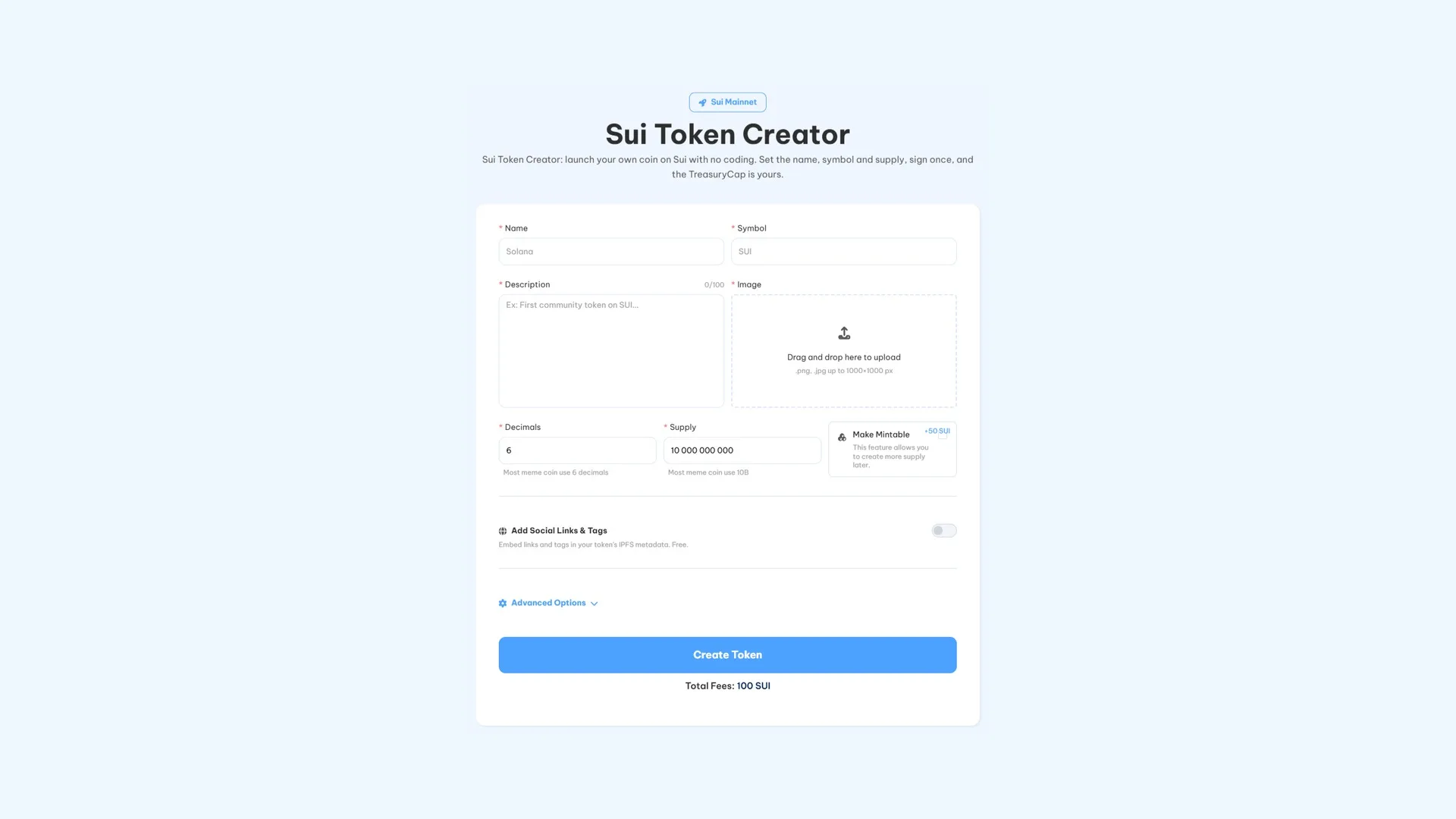
- Connect your Sui wallet. It’ll receive the supply and whatever authority you leave active in the config.
- Enter the name and symbol. The ticker is capped at 8 characters and both get stored with the token.
- Write the description. This field has no EVM equivalent, so don’t skip it. Keep it short and specific.
- Upload the image. PNG or JPG, around 1000×1000.
- Pick decimals and supply. Six decimals is standard on Sui, and the supply is minted at creation.
- Review the optional actions before confirming. We cover them below.
- Create the Token and approve from your wallet.
As soon as the transaction confirms, the coin is live on Sui and the supply is distributed according to the config you picked.
How each field works
Name and symbol
These are the public face of the coin, what shows up on Sui explorers and on the DEX where it’ll end up trading. Keep the ticker short, memorable, and make sure it isn’t already taken, because that’s what people are going to type and search for.
Description
Sui stores it with the token, so it deserves a lot more than a placeholder. Explain what the coin is for in one clear sentence instead of stuffing the field with adjectives.
Decimals
On Sui, six is the standard and covers pretty much every case. Only change it if your tokenomics genuinely need different precision.
Supply
The total minted at creation and the backbone of your tokenomics. Plan the distribution before picking the number: what goes to liquidity, what goes to the team, and what’s reserved for airdrops and rewards.
Image
Design something that reads well at small sizes, because that’s how it’ll show up in wallets and on charts. On a meme coin the image does most of the marketing, so treat it like the asset it is.
The four optional actions
Sui has a smaller, chain-native set of extras than the EVM creators. None of them are required, and each one is billed separately.
- Modify Creator Information (25 SUI). Replaces the creator data attached to the coin, which defaults to Smithii, with your project’s name and website. Worth it if you want the token to show up branded on explorers.
- Multi-Wallet Supply Distribution (25 SUI). Splits the supply across several wallets during creation instead of dumping the whole allocation into one, which is how the tokenomics should look on day one.
- Create a Liquidity Pool (25 SUI). Spins up the pool through Smithii. Whatever you put in is your own capital and sits apart from this fee.
- Make Mintable (50 SUI). Lets you mint more supply later. This option changes your trust model, so be upfront about why more will need to be minted down the line and who controls it.

How much it costs in SUI
Creation costs 100 SUI and covers the base flow on Sui mainnet. The four optional actions are billed on top, so a simple coin runs you the base fee and nothing else. The assets you put into a liquidity pool are your capital, not a fee.
Getting the coin onto a Sui DEX
Publishing a coin doesn’t create a market for it. Until there’s liquidity, the supply just sits in your wallet.
Cetus and Turbos Finance are where most of the tokens on Sui trade. A pool pairs your coin against SUI, a stablecoin, or another supported asset, and the ratio you deposit sets the opening price. Depth determines how much a normal trade moves the price, so size the pool around what you actually expect. Our guide on how to create a liquidity pool on Sui walks through the setup.

Once it’s live
- Distribute to your community without hundreds of manual sends: how to run a airdrop on Sui.
- Keep the pair active once you’ve got holders, with the Sui volume bot.
- Request listings, free in both cases: CoinMarketCap and CoinGecko.
Launching a meme coin? How to create a meme coin on Sui covers that route with the priorities in the right order.
Custody and control
The wallet you connect signs and holds everything. It receives the supply and any authority the setup leaves in place, and no part of the flow asks you for a seed phrase or a private key.
Not having to write Move doesn’t take the design responsibility off your shoulders. Whether the coin can mint more supply, how it’s distributed, and what the creator information says are all still your calls, and every one of them is public.
FAQ
How much does it cost to create a token on Sui?
100 SUI covers the base creation flow. Optional actions are billed separately: 25 SUI each for the creator information, the multi-wallet distribution and the liquidity pool, and 50 SUI to make the token mintable.
Do I need to know Move?
No. Publishing a coin on Sui usually means writing and publishing a Move package. The tool handles that part, you supply the parameters and your wallet signs.
Why does Sui require an image and a description?
Because on Sui they belong to the token. The logo and description are stored alongside it instead of being filed separately on an explorer, which is why they’re part of creation rather than an afterthought.
How many decimals should I use?
Six is the standard choice on Sui and works for most projects. Pick a different value only if your tokenomics genuinely calls for it.
Where can my Sui token trade?
Cetus and Turbos Finance are the usual venues. You’ll need a liquidity pool pairing your token against SUI, a stablecoin, or another compatible asset before anyone can buy it.
Should I make the token mintable?
Only if you have a reason you can share publicly. Mintable means the supply can grow after launch, and holders will price that in whether you bring it up or not.
Wrapping up
Sui works differently from EVM chains, and here that almost always plays in your favor: the branding travels with the coin and publishing is a single approval instead of a full Move project.
The decisions that stay in your hands are the ones worth your time. Whether Make Mintable earns its spot, how the supply is distributed, what creator info people actually see, and how deep the first pool launches, and none of this is decided by any tool for you.
With your Sui token created, the rest of the path lives in the definitive guide for devs on Sui, a complete, phase-by-phase walkthrough that goes from wallet all the way to liquidity on Cetus.

Industrial Engineer turned Solana trader. Marketing at Smithii and contributor to the $SHRIMP memecoin launch.



