

HOW TO LIST A NFT COLLECTION ON MAGIC EDEN IN 3 STEPS
If you’ve created or are about to create your NFT collection, you’ll need to list it on Magic Eden. It’s a key step for its growth, thanks to the thousands of active users the marketplace gets every day.
If you prefer the video version , you can jump straight to YouTube:
Remember that listing your collection does not create your NFT directly on-chain. You still need to mint them. If you want to mint your collection on Magic Eden, you’ll need to be accepted into the Magic Eden Launchpad.
That means you can list pre-mint (although it will not appear on the marketplace until you mint and send Magic Eden the “Hash List“) or post-mint (your collection will be available for sale if you are accepted).
At the end of the day, it is another showcase you can use to attract more investors and grow. Before we start the step-by-step tutorial on how to list your NFT collection on Magic Eden, let’s cover a few important concepts around it. With that out of the way, let’s get started!

WHAT IS MAGIC EDEN?
Magic Eden is one of the most influential marketplaces in the NFT space. Although it supports NFT collections across several blockchains, Solana is its strongest market and where it holds the biggest share.
Besides being a marketplace, Magic Eden also has a launchpad, a calendar for upcoming collections, auctions, instant sales, and more.
WHAT DOES IT MEAN TO LIST NFTs ON MAGIC EDEN?
Listing our collection on a marketplace, whether Magic Eden or another one, means allowing the holders of the collection to put their NFT up for sale inside that marketplace, so other users can buy them.
It also lets us earn royalties on buy-sell transactions from our collection.
HOW MUCH DOES IT COST TO LIST NFT ON MAGIC EDEN
Before we get into the full process, we need to clarify how much it costs to list an NFT collection on Magic Eden.
The answer is simple: listing our NFT on Magic Eden is completely free. We do not pay anything. Magic Eden simply takes a percentage of each buy-sell transaction, which is currently 1.5%.

HOW LONG DOES MAGIC EDEN TAKE TO REVIEW OUR LISTING
Timing is variable and depends on demand at that moment. They give us a 48 to 72 hour window, but in our experience they usually review the listing or changes within 24 hours.
That does not mean they will accept it, since they can reject us. We will go through the options later.
WHAT YOU NEED TO LIST A COLLECTION ON MAGIC EDEN
You do not need much. Just have the final details of your collection ready, the hash list if you have already minted (we explain how to get it below), 100 Twitter followers, and 5 minutes for us to show you how it works.
Either way, we will walk you through how to get the information requested during the process, so there is nothing to worry about.
WHY LIST YOUR NFT COLLECTION ON MAGIC EDEN
There are plenty of reasons to list our NFT collection on Magic Eden. Having it on the marketplace gives us visibility, supports trading for the collection, and generates royalties for us. These are the reasons if you have already minted your collection.
But if you have not minted yet, there are even more. On top of the benefits above, you can get listed in the “Drop Calendar” section, and once we mint, we will only need to add the hash list to get our NFT verified on the marketplace.
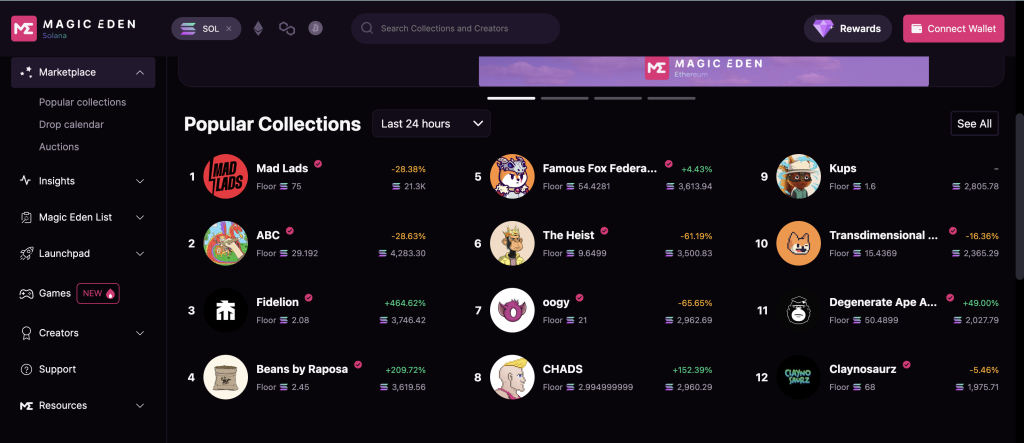
That said, you should know that if your NFT collection on Solana is created using Metaplex standards, it will automatically be available on all marketplaces (Magic Eden, Opensea, Hyperspace, etc.). The catch is that it will not be verified. But if we list our collection on Magic Eden, it will be verified.
HOW TO VERIFY A NFT COLLECTION ON MAGIC EDEN
If your collection is on Magic Eden but doesn’t show up in search and doesn’t have its own URL, it has not been verified yet.
To verify it, you will need to follow the same process we are about to walk through for listing your collection on Magic Eden. Just make sure you follow the tutorial as a project that has already minted.
Want to Outrank Your Competitors?
Join our newsletter and get weekly Blockchain updates built for NFT creators.

HOW TO LIST AN NFT COLLECTION ON MAGIC EDEN
Let’s jump straight into the listing process for our NFT on Magic Eden through its website, magiceden.io.
1. OPEN THE MAGIC EDEN CREATORS HUB
To start, just open the “Creators” section in the left menu and click “Apply for Listing”.
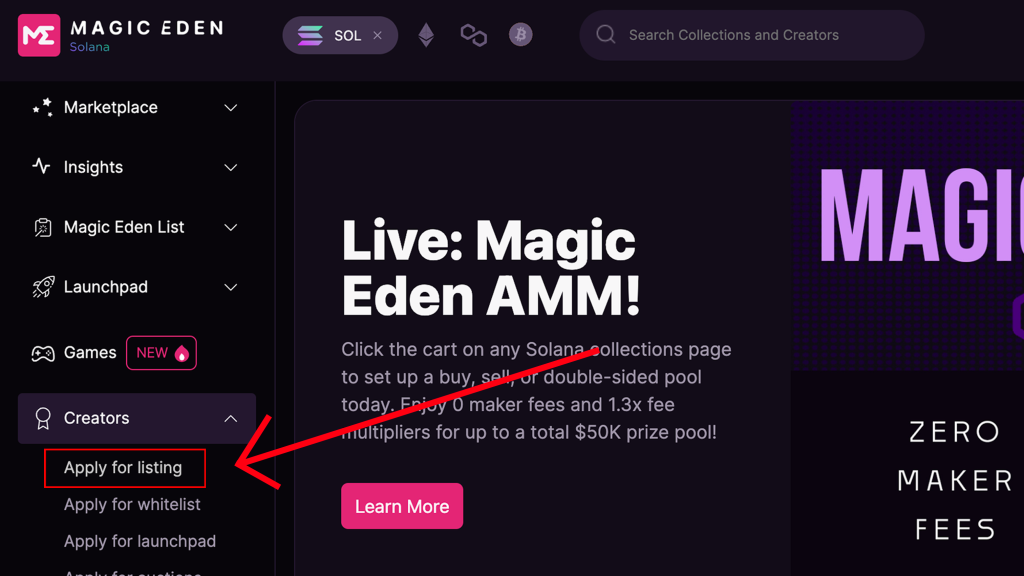
This will open Magic Eden’s Creators Hub, the creator dashboard where we can log in and list the collection. To log in, enter your email address, then click the “Log in to creators” button inside the email they send you.
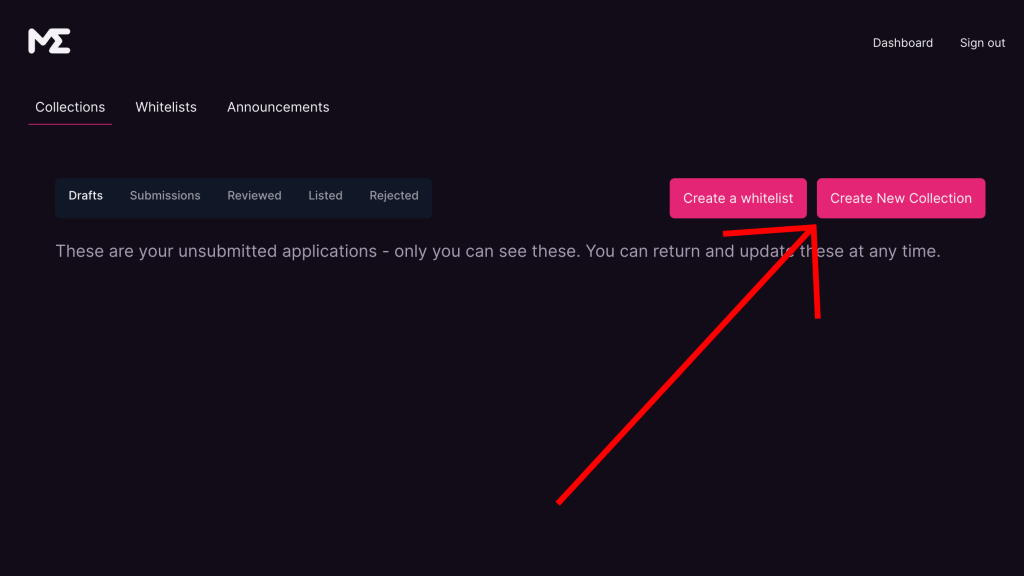
Inside the Creators Hub, you will see several sections you should know about.

1.1. DRAFTS – CREATORS HUB
Drafts are where Magic Eden saves applications you started but have not completed yet. A draft is created so you can come back and finish it later.
1.2. SUBMISSIONS – CREATORS HUB
Submissions refers to your listing applications. In this section, you will see the applications you have submitted but that have not yet been reviewed by the Magic Eden team.
Once it has been reviewed, it will move into one of the following sections.
1.3. REVIEWED – CREATORS HUB
If our collection appears in the reviewed section, it means the Magic Eden team has checked our pre-mint request and approved it. It is not listed yet because we have not minted it (Magic Eden understands this when we do not add the hash list to our request), so it remains pre-approved.
Once we have completed the mint and have our hash list, we can go back, add it, and our collection will be listed automatically.
1.4. LISTED – CREATORS HUB
If your project is here, you are in good shape. Magic Eden has reviewed your project, approved it, and it is now live on the marketplace.
1.5. REJECTED – CREATORS HUB
The Rejected section is the one you do not want to end up in. Our request will appear there when Magic Eden rejects it. That said, do not worry. You can apply again after making the right changes.
2. ADD YOUR NFT COLLECTION DETAILS
Inside the Creators Hub, start by “creating the NFT collection” for the listing. Click the “Create a New Collection” button to do it.
A new page will open with the different steps and required information. Let’s get started.
2.1. INTRODUCTION – APPLY FOR LISTING
In the first section, called “Introduction“, you need to specify which blockchain your collection belongs to. Magic Eden currently supports listing Solana collections, since collections on its other available blockchains are listed automatically.
You also need to confirm whether you created the artwork for the collection or whether you have the license to use it.
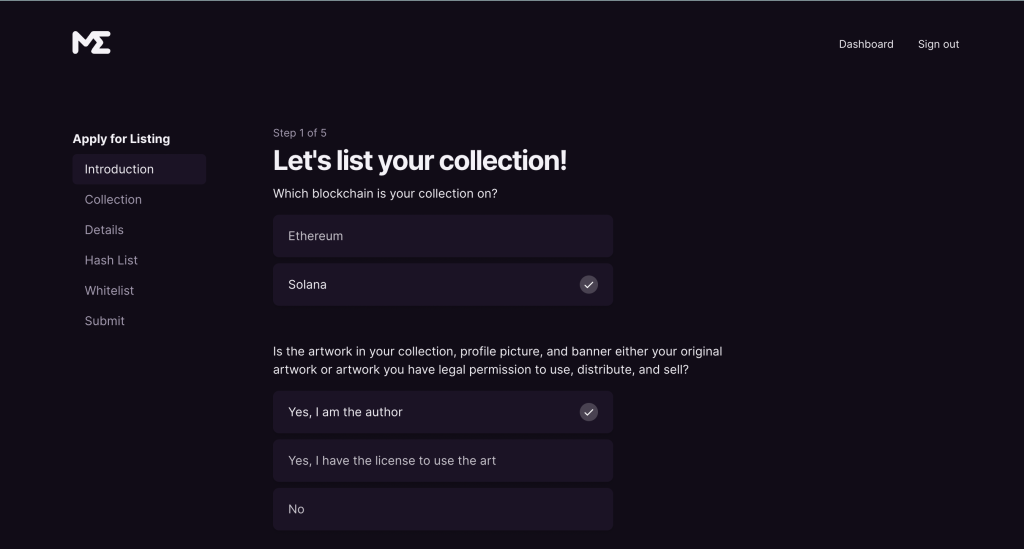
From here, there are two paths. If you have not minted yet, you can simply continue and ignore the next part. But if you have already minted, you can complete the listing automatically as long as your collection follows Metaplex standards.

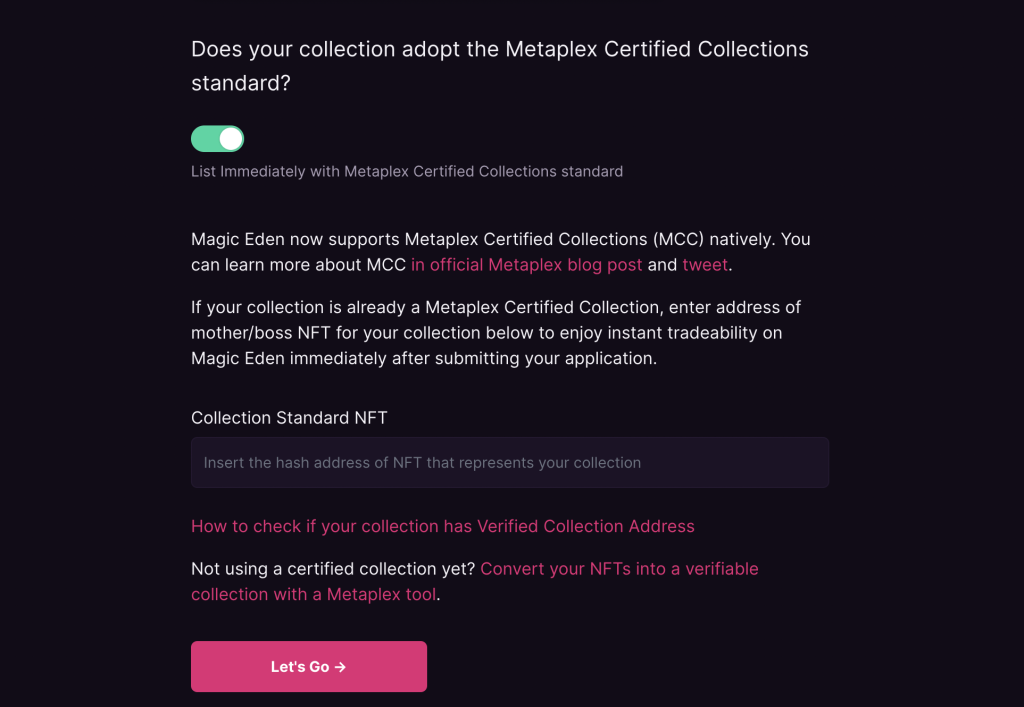
If you have any doubts, follow the steps in section 2.1.1 to verify it. If not, just click the “Let’s Go” button at the very bottom.
2.1.1. MY COLLECTION FOLLOWS METAPLEX STANDARDS
If you have already minted, it is easy to check whether your collection follows Metaplex standards and, if it does, get the verified address you need to complete the listing.
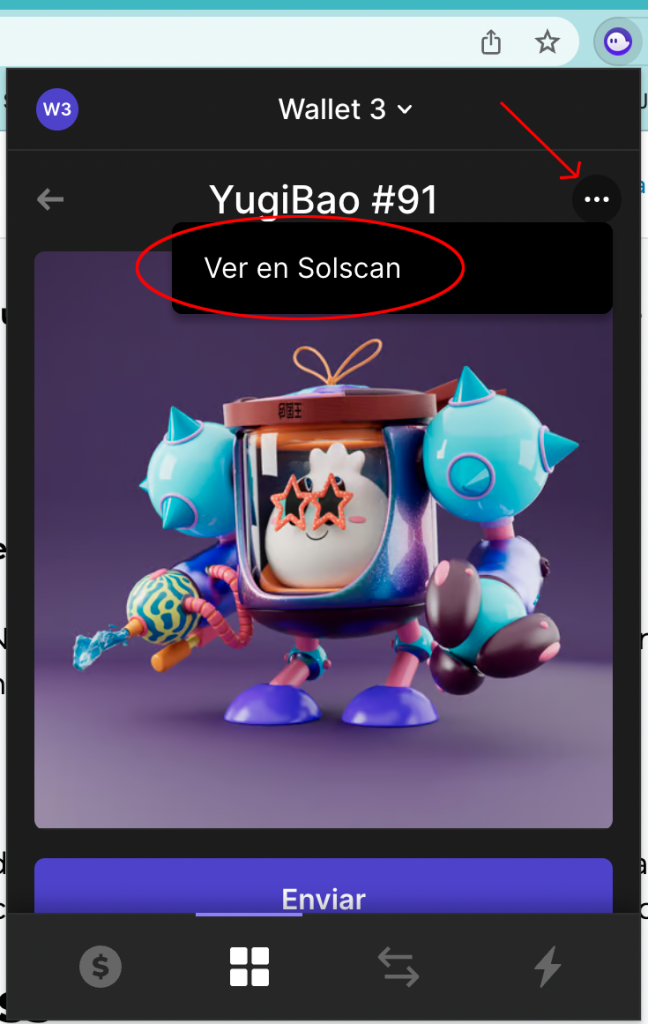
Just open Solscan for one of the NFT in your collection. You can do this from the three dots in the top-right corner when viewing the NFT in your wallet.
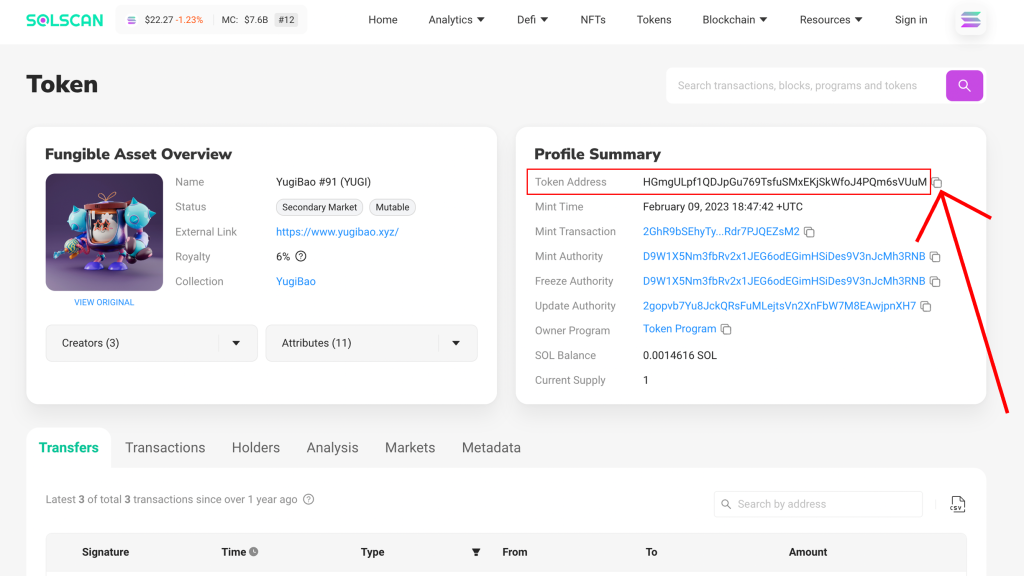
Copy the address shown to the right of “Token Address” and paste it into the search bar on Solana Explorer.
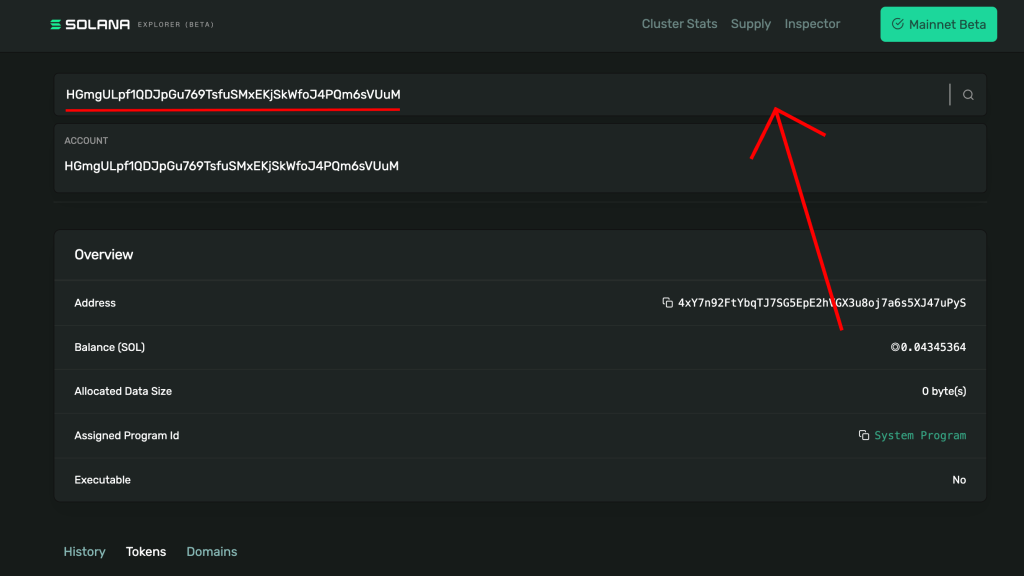
If your collection follows Metaplex standards, you will see the “Verified Collection Address” section. Copy that address and paste it into the “Collection Standard NFT” field on Magic Eden. You will see it after enabling the toggle that says “Does your collection adopt the Metaplex Certified Collections Standard?”.
If you do not see that section, do not worry. You can still list your collection by continuing with the tutorial.
2.2. COLLECTION – APPLY FOR LISTING
In this section, you only need to enter the Collection Name and symbol.
The symbol is basically the term that will appear in the URL for your collection on the marketplace. If you entered “SMITHII“, the URL would be: magiceden.io/marketplace/SMITHII.

Continue after clicking “Save & Proceed”.
2.3. DETAILS – APPLY FOR LISTING
Next, add more information about your collection. In this case, enter the description that will appear on the collection page (we recommend keeping it short while making it clear what your NFT collection is about).
Next is the profile picture. Make it as eye-catching as possible. Using an image of a NFT from your collection can be a good option if you do not have a logo.

Then, select whether your art is a derivative of any other existing NFT collection.
Next up is the collection category. Right now, this is pretty irrelevant.
To wrap up this section, we need to add the social links. You’ll need to link your Twitter account, which must have at least 100 followers, add your discord link, and include a web page if you have one. Having one is highly recommended.

2.3. HASH LIST – APPLY FOR LISTING
Now we move into the final part of the tutorial. Since it’s a longer section, we’ll treat it as a full step.
3. NFT COLLECTION HASH LIST
Here you’ll have two options: pre-mint or post-mint. In other words, you can either have the project reviewed in advance and only send the hash list once you mint, or you can list the collection for sale.
After covering both options, we’ll show you how to get the hash list for your NFT.
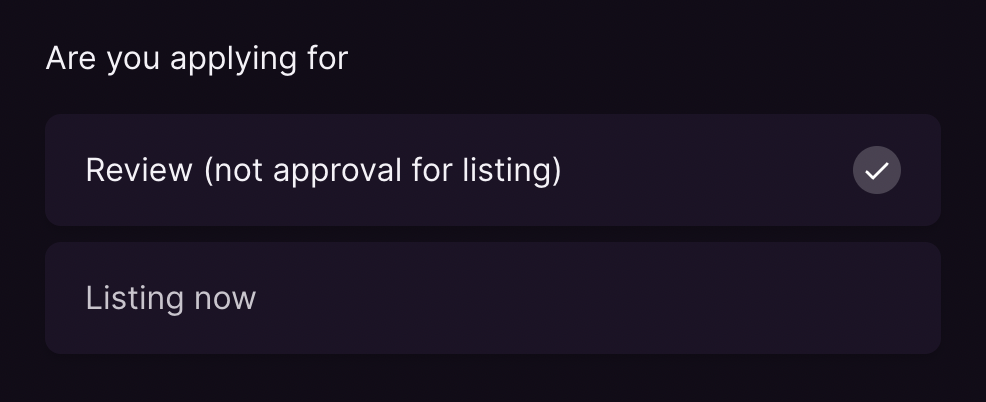
3.1. REVIEW (PRE-MINT)
If you want Magic Eden to review your project and leave it in a “pre-approval” stage until you mint, choose this option. Here, you only need to enter your collection supply and estimated mint date. This is highly recommended, since your project will appear in the marketplace’s upcoming drops section.
3.2. LISTING NOW (ALREADY MINTED)
If you have already completed your mint, select “Listing now” to finish creating your NFT on Magic Eden.
From there, you only need to enter the supply and paste the hash list or mint list for your collection.
3.3. HOW TO GET A NFT COLLECTION HASH LIST
To list a NFT Collection on Magic Eden, you will need its hash list, meaning the list of mint identifiers for every NFT that belongs to the collection.
Start by finding the ID of any NFT from the collection you want to list. Through your wallet, open the NFT inside your wallet. Click the 3 dots in the top-right corner, then click “View on Solscan”.
Once you are on Solscan, click the “Creators” dropdown. Then click the first address that appears, which should show 0%.
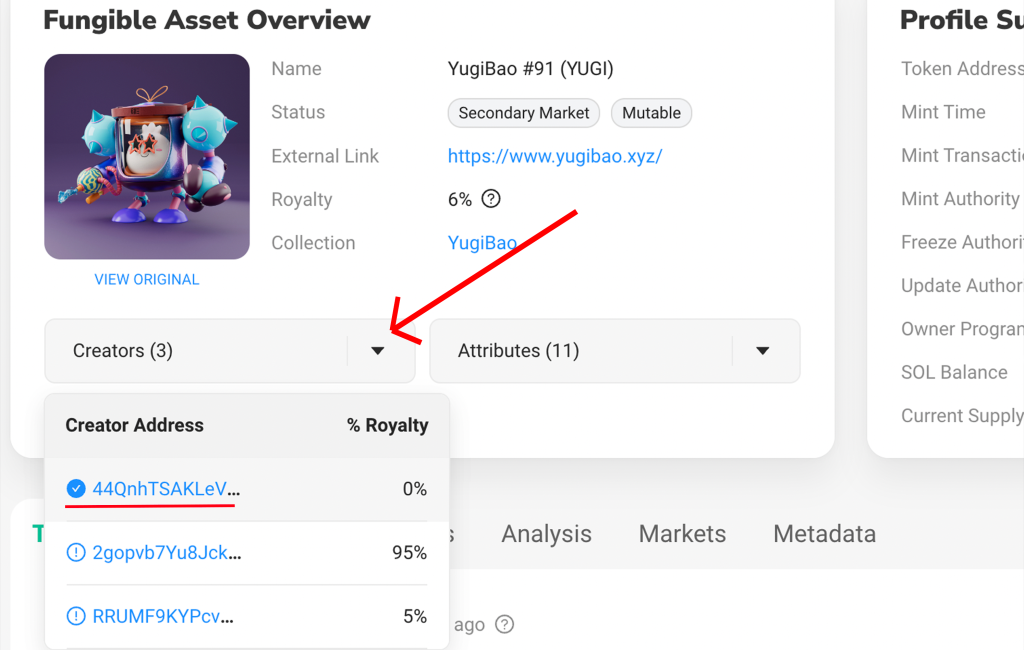
This address is the NFT collection ID. It will open inside Solscan, and you need to copy it.

After copying the ID, go to Magic Eden’s “Hash List Finder” tool. Paste the ID into the main field and click “Get Hash List“. Remember to check the Open Creator Protocol option if you are using that protocol.

Now we wait for the tool to generate the full hash list.
Once the process is complete, copy the entire hash list from start to finish. Make sure you do not leave anything out.
Finally, paste it into the matching hash list section in Magic Eden Creators Hub.
REVIEW AND FINISH
After you click Review, the final section where you complete the listing will open. Just check that all the information shown is correct, then click “Submit” to finish the process.
Want to Outperform Your Competitors?
Join our newsletter and get weekly Blockchain news built for NFT creators.
CONCLUSION
Getting listed on Magic Eden is relatively simple and fast, which makes it practically a must given the upside it gives you.
Now that you know the full process, it’s your turn to make it happen and help your NFT collection stand out!

CEO & Co-Founder at Smithii. Building on Solana since 2021 and sharing playbooks from the trenches. Also founder of Lince after years investing in DeFi.



