

How to renounce ownership of a token on TRON: what you give up and when to do it
If people are asking whether you’ll renounce ownership on TRON, or you want to lock the contract so nobody can touch it, here’s how to renounce ownership of a token on TRON. It’s a one-click move that only costs gas, and anyone thinking about buying your token checks it before they even look at the chart.
You do it from the Token Manager on Smithii, which bundles every contract action into a single screen. Below you’ll find the step-by-step, and after that, what you should be clear on before signing: which levers you lose and why there’s no going back.
In this guide we walk you through the process. Let’s get into it.
What the owner of a TRC-20 contract actually is
The owner is the address the contract recognizes as authorized to execute privileged functions. By default, it’s the wallet that deployed the token.
What that address can actually do depends on which features you enabled when you created the contract. If you deployed a basic TRC-20, the owner has barely any power. If you turned on extra properties, each one came with its own lever, and all of them sit under that same address.
Renouncing means reassigning that address to one nobody controls. The contract keeps working exactly the same for anyone using the token: it transfers, buys and sells just like before. What goes away is your ability to step in.
Want to deploy your own contract on TRON? Here’s how to create a TRC-20 token.
How to renounce ownership of a token on TRON step by step
The action lives in the Token Manager by Smithii for TRON, the panel that brings ownership, supply, fees and restrictions of your token together on one screen. It has a helpful touch: it reads the owner on-chain and grays out anything your wallet can’t sign, so it won’t let you attempt actions that will fail. When you select your token, you’ll see something like this:
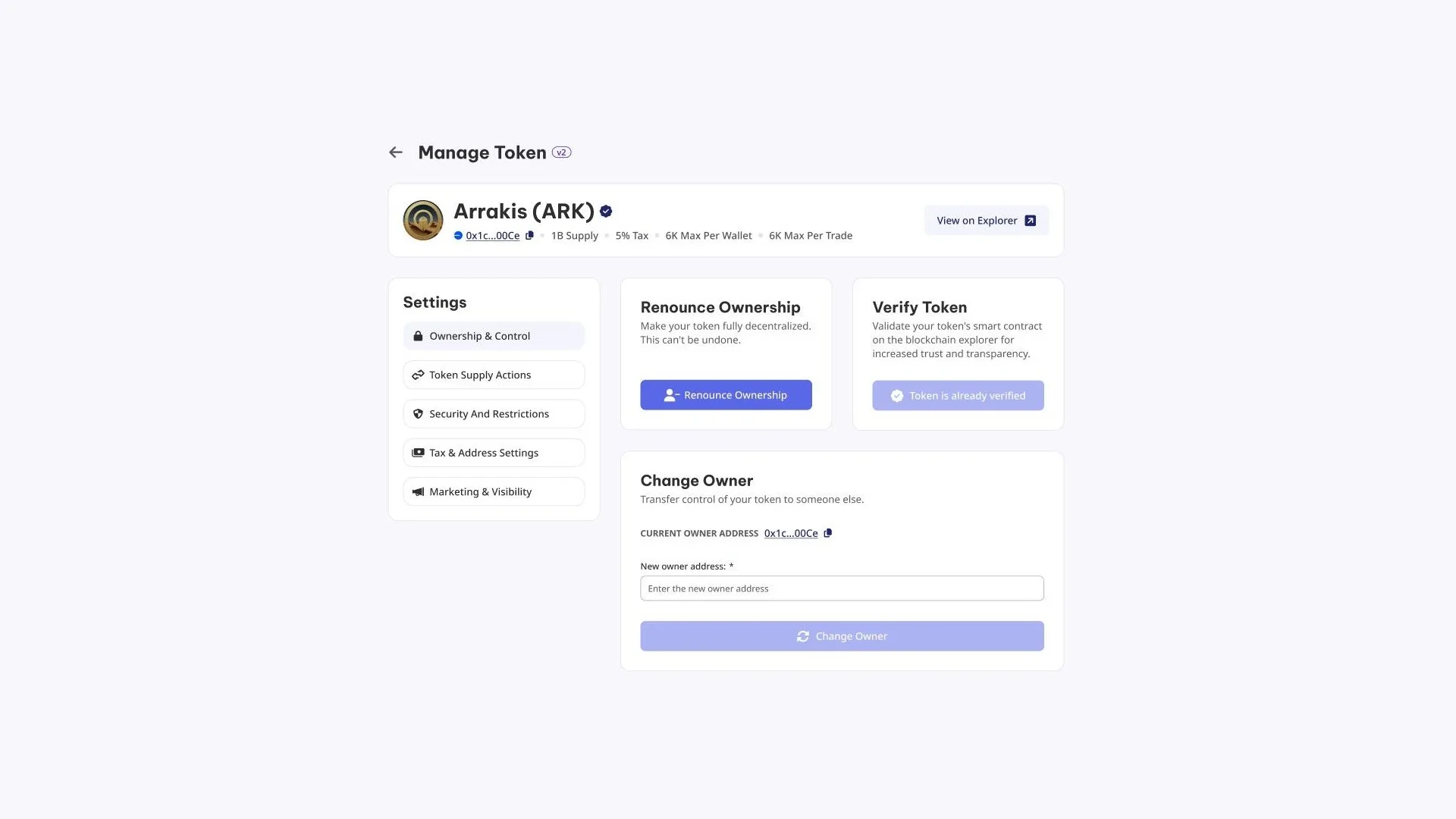
With the owner wallet connected, the process goes like this:
- Connect the wallet listed as owner. If you connect a different one, the panel will show the actions grayed out.
- Select the token you want to manage in the Token Address field.
- Open Ownership & Control, the first section in the side settings menu.
- Review the token summary shown at the top: supply, fee and current limits. Those are the values that are about to get locked in.
- Hit Renounce Ownership and sign the transaction. The panel itself warns you it can’t be undone.
Step four is the one that saves the operation: once signed, those values are final. If you’re not entirely sure what you’ll lose the ability to do in your specific case, read the next section before you click.
Once you’ve renounced, check how scanners read your TRC-20 on rug pull: the owner control check is one of the heaviest items in the report.
What levers you lose when you renounce
It depends on how your token is set up. Here’s the mapping between what you enabled at creation and what you can no longer do:
| Active feature | What you can no longer do | How much it matters |
|---|---|---|
| Mintable | Mint new supply | This is exactly the power the market wants to see you hand over |
| Pausable | Halt transfers | You lose the emergency brake if an exploit hits |
| Blacklist | Block specific addresses | You won’t be able to stop a bot that’s already trading |
| Transaction Fee | Change the percentage or the wallet that collects it | The fee is frozen at whatever value it has that day |
| Anti whale, Anti Bot | Adjust trading limits | The caps stay locked at their current values forever |
The Transaction Fee row is the one that burns people the most. It’s the only feature you can reconfigure after creating the token, so plenty of people leave it on a placeholder value planning to tune it later. Renouncing turns that temporary setting into a permanent one.
And if your token doesn’t have any of these features enabled, renouncing doesn’t actually take anything away from you. In that case it’s a purely communicative move, and that’s exactly why it’s easy to do early.
Transferring control as an alternative
Renouncing isn’t the only way out. The same panel has a Change Owner option, which transfers ownership to another address instead of wiping it.
It fits two specific scenarios. First, when you deployed from a hot wallet and want to move control to a cold wallet or a team multisig. Second, when the project changes hands and you actually need to hand over the keys.
It’s reversible as long as you keep the new address, so it covers the case where you want to reduce risk without closing doors. A multisig is also a reasonable answer to distrust: ‘the dev can mint’ is not the same thing as ‘three team signatures are required to mint’.
How much it costs to renounce ownership of a token on TRON and when to do it
Renouncing is a basic panel action, so you only pay the gas for the transaction on-chain. There’s no tool fee. On TRON that means whatever Energy the contract call consumes, which is a small amount.
The expensive part isn’t the operation, it’s the timing. The order that makes sense:
- Lock in the config: final tax, final limits, final supply minted.
- Create the pair and let it run for a few days. That’s when the issues you might need to fix actually show up.
- Verify the contract on the explorer, right from the same panel, so anyone can read the code.
- Renounce and announce it, linking the transaction on TronScan.
Renouncing on day one looks great and leaves your token with zero room to fix anything exactly when you need that room the most. Renouncing once there’s nothing left to tweak costs the same and doesn’t tie your hands too early.
Renouncing ownership is a big step for signaling safety, but another step toward reaching more people is using the airdrop tool from TRON.
FAQ
How much does it cost to renounce ownership on TRON?
Just the network gas. It’s a basic action in the Token Manager and the tool charges no fee, so all you pay is the Energy the transaction burns on TRON, a small amount compared to deploying the contract.
Can ownership be recovered later?
No. Ownership moves to an address nobody controls and there’s no function to reverse it. It’s irreversible by design: if you could undo it, it wouldn’t work as a guarantee for the community. If you want to lower the risk without closing the door, use Change Owner instead of renouncing.
Does my token stop working after renouncing?
No. The token transfers, buys, and sells exactly the same as before. The only thing that changes is that nobody can run the contract’s privileged functions anymore, like minting more supply or changing trading limits.
Is renouncing the same as locking liquidity?
No, and people mix them up a lot. Renouncing affects the token contract and who can modify it. Locking liquidity affects the pool’s funds and whether you can pull them out. They’re two separate guarantees and a project can have one without the other.
Conclusion
Renouncing is cheap, fast, and permanent, and that combo is exactly what makes it dangerous when done out of habit. The useful question isn’t whether to do it, but whether there’s really nothing left to adjust.
Once the answer is no, sign it and post it with the transaction link. While the answer is still yes, Change Owner to a multisig gives you most of the trust without taking away your room to maneuver.
On Arc, renouncing is signed from a panel that also handles taxes, trading limits, and address lists: it’s all covered in the token manager on Arc guide.

Content creator and SEO contributor at Smithii. Systems Engineering student and crypto-tech enthusiast.



