
How to take a holders snapshot on NEAR: the wallet list of any token or NFT collection in CSV
If you’re planning to reward your community, prepare an allowlist or just want to know who holds your token, learning how to take a holders snapshot on NEAR is the first step. In seconds you get the full list of accounts holding a token or a NFT, ready to download as CSV or turn straight into a airdrop.
In this guide I’ll walk you through what a snapshot is for on NEAR, how to pull one from a token and from an NFT collection using the Smithii tool, what the list includes and what it leaves out, and how much it costs. Let’s get into it.
What a holders snapshot is and what it’s for on NEAR
A snapshot is a point-in-time photo of how an asset is distributed, with every account that holds it and its balance. On NEAR it has a nice edge over other networks: many of those accounts are human-readable names like alice.near or a Telegram username, so the list is easy to scan at a glance.
The most common use cases for a dev are these:
- Airdrops to holders: distribute a new token to people who hold another one, or to anyone who owns a NFT from your collection.
- Allowlists: give priority access to a sale or a mint to people who are already part of the project.
- Migrations: if you relaunch a token, the list lets you hand each holder back what they had.
- Distribution analysis: check whether a handful of wallets are sitting on too much supply before making decisions.
None of these use cases require holders to do anything or to give you permission. The balances for any token are on-chain and visible to everyone. What the tool brings to the table is pulling them together, cleaning them up and handing them to you in a format you can actually use without hitting an explorer’s API or writing a script. That’s also why it works for studying tokens that aren’t yours, for example the token of a project whose community you want to collaborate with.
How to take a snapshot of holders on NEAR for a token
The Token Snapshot de Smithii for NEAR is a tool that lets you export every account holding a NEP-141 token without writing code or hitting an explorer’s API. It suggests the hottest tokens of the moment and lets you paste any other one in. Once you’re inside the tool, here’s what you’ll see:
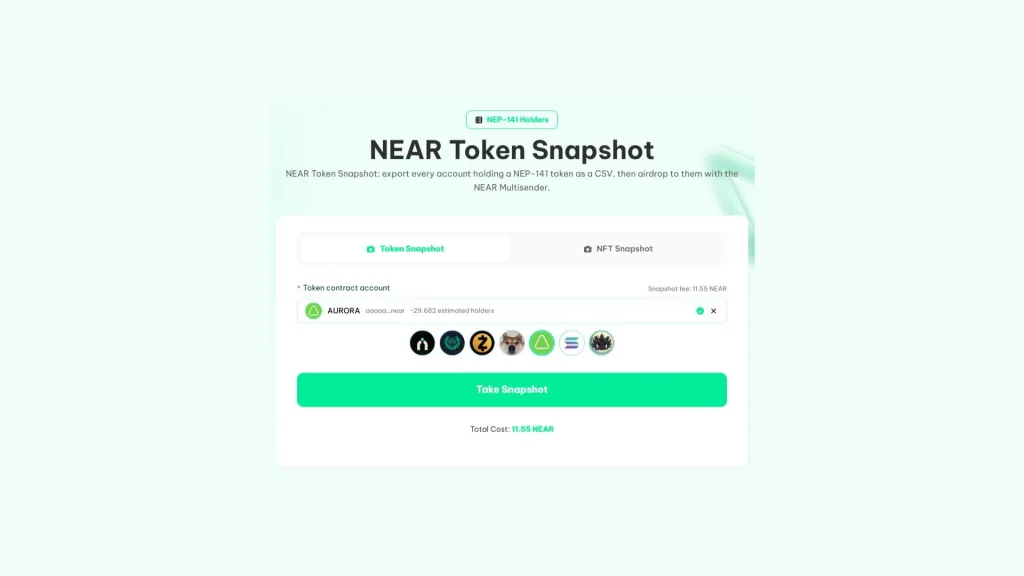
If you have the token account handy and 11.55 NEAR for the fee, the flow is this:
- Connect your NEAR wallet: HOT, Meteor or any option from the selector.
- Pick the token: click one of the trending tokens or paste its account, for example token.rhealab.near.
- Hit Take Snapshot: the tool checks the number of holders and asks you to approve the fee.
- Download or reuse the list: as CSV or TXT, or send it straight to the NEAR Multisender.
Before charging you anything, the tool reads how many holders the token has and shows an estimate next to its name. If it goes over the limit, it tells you before payment, so you never pay for a list that can’t be built.
How to pull the holders of a NEAR NFT collection
The same tool has a second tab, the NFT Snapshot for NEAR, which works with collections on the NEP-171 standard. Instead of balances, it hands back the accounts holding at least one NFT from the collection. When you open it you’ll see the collection selector:
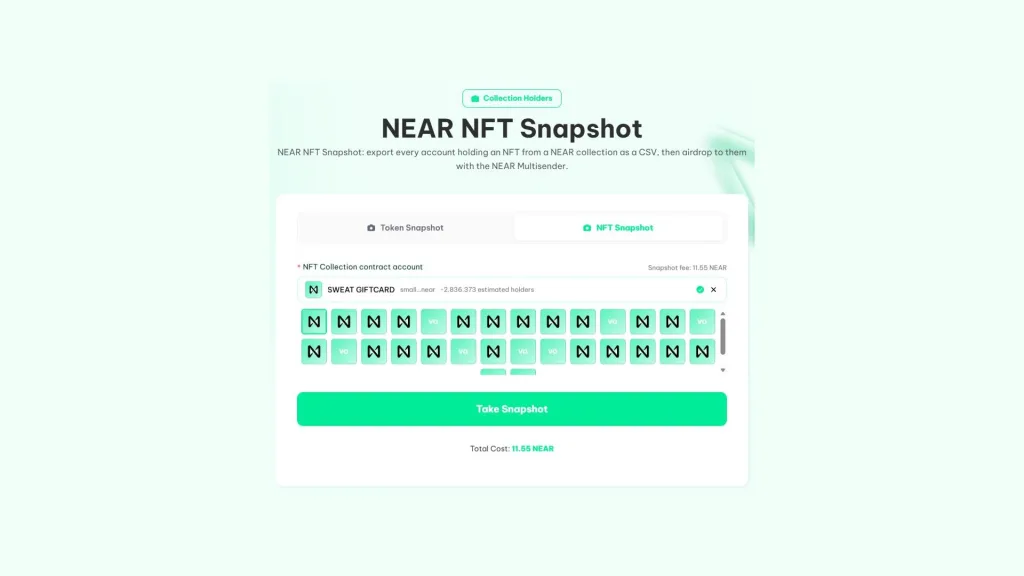
It works exactly the same as with tokens. You pick an active collection or paste its contract account, like asac.near, hit Take Snapshot, approve the 11.55 NEAR and download the list or send it to the multisender. The collections showing up in the selector are the ones with the most transfers that day, along with their holder count.
What the holder list includes and what it leaves out
The list comes from the data indexed by NearBlocks and the tool cleans it up before handing it over. Accounts with a zero balance and the token’s own account are removed, because they add nothing to a distribution.
What does stay in are the contract accounts that hold a balance, like Rhea pools or a DAO’s treasury. They’re real holders in technical terms, but they’re not people, so review the list before using it in a airdrop and decide whether you want to include them.
The case of reflection tokens
With reflection tokens, balances grow on their own with every transfer and the indexer can lag behind. For tokens created with Smithii, the tool reads the balance of the largest holders directly from the chain again, so the figures at the top of the list match reality.
When to take the snapshot of your token on NEAR
The moment you snap the photo decides who gets rewarded. If you announce the date ahead of time, you pull in last-minute buyers who’ll dump the moment they get the reward, and also people who split their balance across many accounts to claim multiple times.
There are three simple ways to prevent this without overcomplicating the campaign:
- Take the snapshot before announcing the airdrop: that way the list reflects who was already there, not who showed up for the reward.
- Combine two snapshots: take one today and another a few weeks later, and only reward accounts that appear in both. It’s a direct way to reward holders who actually stick around.
- Set a minimum balance: accounts with token amounts are usually dust or someone trying to multiply their cut, so filtering them out cuts the noise.
No rule wipes out abuse entirely, but a well-filtered list spreads the token among holders who stay, which is what any project running these campaigns actually wants.
How much a snapshot costs on NEAR and what happens if something goes wrong
| snapshot type | What it checks | Limit | Fee |
|---|---|---|---|
| Token Snapshot | Accounts holding a NEP-141 token | 5,000 holders | 11.55 NEAR |
| NFT Snapshot | Accounts holding at least one NFT from a NEP-171 collection | 5,000 holders | 11.55 NEAR |
Payment is protected on both ends. If the token is too big, you know before paying. And if you pay but the list doesn’t load, the payment stays saved for a day for that token and that wallet, so you can retry the snapshot without a second charge.
From snapshot to airdrop with no steps in between
The usual move after a snapshot is to distribute something to those accounts. With Smithii you don’t need to download the file and upload it again, because a single click loads the holders into the NEAR Multisender, which also registers the accounts that need it in your token.
A typical example is rewarding holders of a collection with your project’s token. You run the NFT Snapshot, send the list to the multisender, pick an equal amount for everyone, and within minutes every holder has their reward.
Here’s the full process to run a airdrop on NEAR with account registration included.
Snapshots also stay in your history. You can download an old one again or compare two dates to see how your token distribution has shifted after a campaign.
FAQ
How much does a holder snapshot on NEAR cost?
Each snapshot costs 11.55 NEAR, whether it’s for a token or a NFT collection, plus a bit of gas. The fee is paid to Smithii before the list is built.
Which tokens and collections can I query?
Any NEP-141 token and any NEP-171 collection on NEAR mainnet with up to 5,000 holders. If the token or collection goes over that limit, the tool rejects it before you pay.
What happens if the list doesn’t load after I pay?
Your payment is saved for one day for that token and that wallet. Run the snapshot again and you won’t be charged a second time.
Does the snapshot include wallets with zero balance?
No. Zero-balance accounts and the token’s own account are left out of the list. Contract accounts holding a balance, like pools, do show up, and it’s worth reviewing them before a airdrop.
Can I rerun a snapshot I did days ago?
Yes. Snapshots are saved in your history and you can download or reuse them later, for example to compare how the distribution shifted between two dates.
Final thoughts
Once you know how to run a holder snapshot on NEAR, you can turn any token or collection into a list of accounts ready for a airdrop, an allowlist, or an analysis. The tool checks the size before charging and filters out empty balances for you.
Review contract accounts before distributing and take advantage of the connection with the multisender. With that, going from list to distribution is instant.

Content creator and SEO contributor at Smithii. Systems Engineering student and crypto-tech enthusiast.



