
How to run a airdrop on NEAR: pick the receiving wallets, which token they’ll get and how much goes to each one
If you need to distribute a token across a lot of wallets, learning how to run a airdrop on NEAR saves you hours of manual transfers and a headache you don’t get on other networks. With a solid batch send you can reward your community, pay your team or airdrop holders of a collection in minutes and with a single payment.
In this guide I’ll show you why a airdrop on NEAR has one extra step, how to run one with the Multisender from Smithii, and what it’ll cost you based on the size of your list. Let’s get into it.
The extra step a airdrop has on NEAR
On an EVM network you can push a token to any wallet even if it’s never held one. Not on NEAR. A NEP-141 token can only hold a balance for accounts that are registered with it, and that registration happens via a small deposit that pays for the storage slot, following the network’s storage management standard.
If you fire off a manual transfer to an unregistered account, it fails. That’s why a airdrop on NEAR involves two operations per recipient, register and transfer, and doing that by hand for hundreds of accounts isn’t realistic. The multisender checks which accounts are already registered and only tacks on the deposit (around 0.002 NEAR) for the ones that need it.
Which accounts can receive your token
NEAR has two account types and the tool handles both. Named accounts, like alice.near or bob.tg, have to already exist on-chain, and the multisender flags any that don’t so you don’t ship tokens to a dead address. Implicit accounts, the 64-character hex ones, are valid even if they’ve never been used, since they’re derived straight from a public key.
How to run a airdrop on NEAR step by step
The Multisender from Smithii for NEAR is a tool that lets you send any NEP-141 token to up to 1,000 accounts in batches, with no code and account registration handled automatically. You can paste the list, upload a file, or pull the holders of another token or an NFT collection. Once you’re in the interface, you’ll see something like this:
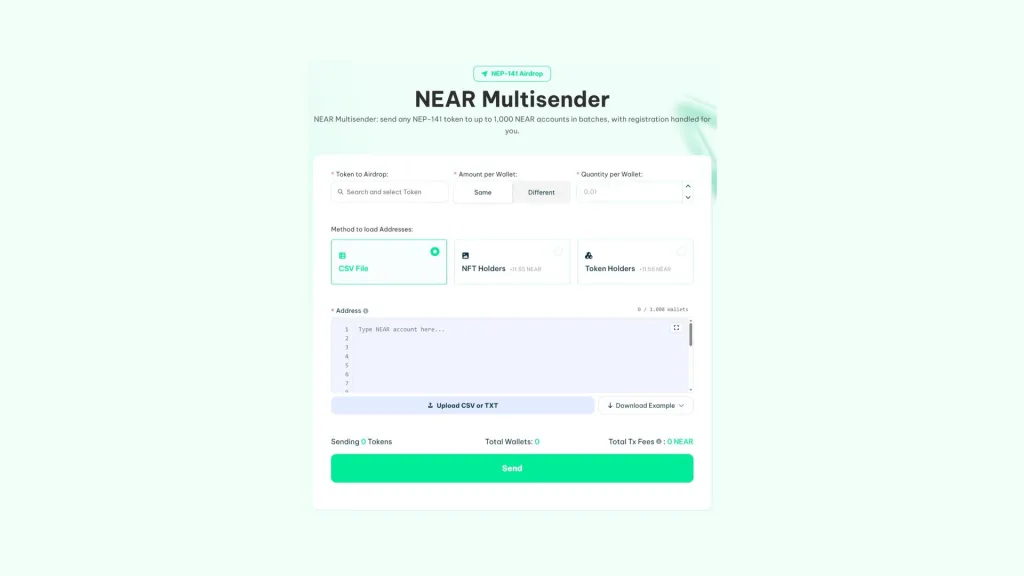
If you already have the token in your wallet and enough NEAR to cover the fee and the registrations, follow these steps:
- Connect your NEAR wallet: the one holding the tokens you’re going to distribute.
- Pick the token: select it from your wallet or paste the contract account.
- Set the amount: the same for every wallet (Same) or a different one per line (Different).
- Load the accounts: paste them, upload a CSV or TXT, or pull holders from a token or an NFT collection.
- Hit Send and approve the payment: the fee goes to Smithii before the transfers kick off.
Each batch runs through a single contract, so it either lands in full or not at all. If one fails, your payment is kept and the Resume button pushes out the remaining batches without charging you again. It’s that simple, and if any account on your list doesn’t exist, the interface flags it before you pay.
Three ways to load your wallet list
The most direct option is to paste the accounts or upload a CSV or TXT. To send the same amount to everyone, one account per line is enough; for different amounts, each line carries the account and the amount separated by a comma, like alice.near,12. The tool itself ships a sample file you can download.
The other two options load the list for you. NFT Holders pulls the accounts that hold at least one NFT from a collection and Token Holders pulls the ones holding a balance of a token, both at 11.55 NEAR. They’re the backbone of airdrops to holders, since you don’t have to export or clean any list.
If you’d rather review the list before sending, here’s how to pull a holder snapshot on NEAR and download the list as a CSV.
What a airdrop on NEAR with Smithii costs
The fee is calculated in blocks of 10 wallets: 0.68 NEAR per block started, which works out to 0.068 NEAR per account. It’s paid in a single transaction to Smithii before the first batch goes out.
| Wallets on the list | Blocks of 10 | Smithii fee |
|---|---|---|
| 10 | 1 | 0.68 NEAR |
| 45 | 5 | 3.40 NEAR |
| 100 | 10 | 6.80 NEAR |
| 500 | 50 | 34 NEAR |
| 1.000 | 100 | 68 NEAR |
On top of that fee, you cover the network costs straight from your wallet. These are the registration deposit of around 0.002 NEAR per account not already registered in the token, plus a bit of gas per batch. If your list is made of holders of your own token, most will already be registered and that cost drops significantly.
How to prep the wallet list before sending
The tool validates every account, but it doesn’t decide for you who deserves to receive the token. That call depends on your goal, and it’s worth settling before you upload anything.
- Strip out contract accounts: if you’re pulling from a snapshot, you’ll see accounts like v2.ref-finance.near, which is the Rhea contract. Sending them tokens rewards no one, since they’re pools and not people.
- Remove duplicates: if you merge several lists, the same account can show up twice and get double the allocation.
- Set a minimum: in a holder airdrop, a minimum balance filters out dust accounts that never actually interact with the project.
- Run a small test: a first send to two or three of your own accounts confirms the format and the result before the big distribution.
If the drop is for your team or your earliest investors, the amount per line matters more than the list itself. Build the two-column CSV in a spreadsheet, double-check the total matches what you want to distribute, and upload it as is.
Common mistakes when running a token on NEAR
Almost every issue with a airdrop can be dodged by reviewing the list and your balance before hitting the button. These are the most frequent slip-ups.
- Misspelled named accounts: one wrong letter points to an account that doesn’t exist. The tool flags them, but it’s better to fix them in your original list.
- Running short on NEAR: beyond the fee, you need to cover registrations and gas for each batch. Leave some margin in the wallet.
- Mixing up units: the amount per wallet is written in tokens, not NEAR. Check the total shown in the summary before sending.
- Lists over 1,000 accounts: split them into multiple sends. Each one is paid for and tracked separately.
If you don’t have a token yet, start by launching your token on NEAR with a single signature and distribute it afterwards from the same wallet.
Before you fire off any distribution, think about the goal too. A well-planned airdrop attracts holders who stick around, while a poorly designed one just triggers sell pressure the moment tokens land. Our guide on why run a token airdrop lays out the criteria to make that call.
FAQ
How many wallets can I include in a NEAR airdrop?
Up to 1,000 accounts per send. The tool groups them into batches of 50 so no single transaction hits the network’s limits. If your list runs longer, split it across multiple sends.
Why do some accounts need a deposit?
Because a NEP-141 token only holds balances for accounts registered with it, and registering pays for the space that balance takes on the network. The multisender checks each account and adds the deposit, around 0.002 NEAR, only where it’s missing.
What happens if a batch fails?
Each batch hits a single contract, so it either lands in full or not at all: a failed batch sends zero token. Your payment stays intact, and the Resume button retries the pending batches without charging you again.
Can I send a different amount to each wallet?
Yes. Pick Different and type the amount next to each account, separated by a comma, or upload a CSV with two columns, one for the accounts and one for the amounts.
Can I distribute my token to the holders of a NEAR NFT collection?
Yes. In the upload method you pick NFT Holders or Token Holders, the snapshot runs for 11.55 NEAR, and the list drops straight into the multisender with nothing to download or paste.
Wrapping up
Once you know how to run an airdrop on NEAR, you can send a token to hundreds of accounts without worrying about registration, which is exactly what makes manual sends on this network a pain. The tool checks accounts, adds any missing deposits, and resumes batches without charging twice.
Review the list, leave enough NEAR for registrations, and pick your recipients carefully. With that handled, the whole distribution comes down to one payment and a few signatures.

Content creator and SEO contributor at Smithii. Systems Engineering student and crypto-tech enthusiast.



