

Sol Incinerator alternative: how to burn tokens on Solana and cut your project’s supply
If you’ve launched a token on Solana and you’re looking for an Sol Incinerator alternative to burn part of its supply, here’s what you need. The Smithii Incinerator lets you destroy tokens and reclaim the SOL from their accounts inside the same suite you used to create the token, distribute the airdrop or open the pool, without jumping to another platform. It works for cutting your project’s supply, for recurring burns as part of a buyback strategy and, on the side, for clearing spam tokens out of your wallet.
In this guide I’ll walk you through exactly what happens when you burn a token on Solana, how to use Smithii’s Incinerator step by step, and how it fits into the rest of your token’s lifecycle. Let’s get into it.
What happens when you burn a token on Solana
Burning a token doesn’t mean sending it somewhere. On Solana it’s done through a burn instruction that destroys the units and subtracts the amount from the total supply, so anyone can verify on the explorer that the token’s supply has dropped. For a project it’s an easy signal to verify, because the transaction is recorded with its amount and date.
There’s a second effect most people don’t know about. Every token held in a wallet lives in an associated token account, and the network requires a SOL deposit to keep it open. That deposit is called rent and it’s not a fee, because it’s returned in full to whoever closes the account. The Incinerator burns the balance and closes the account in the same operation, so on top of shrinking the supply you also get that SOL back.
Why a dev reduces the supply of their own token
Cutting supply is a way to return value to holders without distributing anything. If project funds are used to buy back tokens on the market and then burn them, every token still in circulation represents a bigger slice of the total. Done regularly and with the transaction published, it builds trust, because the community can verify each burn on their own.
It’s also useful for fixing an initial supply that’s too large or for pulling unused team tokens out of circulation. In all three cases what matters is the same thing: the reduction has to be visible and irreversible.
If you want to turn burns into an actual project policy, here’s how to plan a staged buyback and burn.
How to use the Sol Incinerator alternative by Smithii
The Token Incinerator by Smithii for Solana is a tool that lets you burn the tokens you pick and reclaim the SOL from their accounts with a single signature. It shows you the tokens you hold with a balance, calculates how much SOL you’ll get back before you sign, and runs everything from your own wallet. When you open the interface you’ll see something like this:
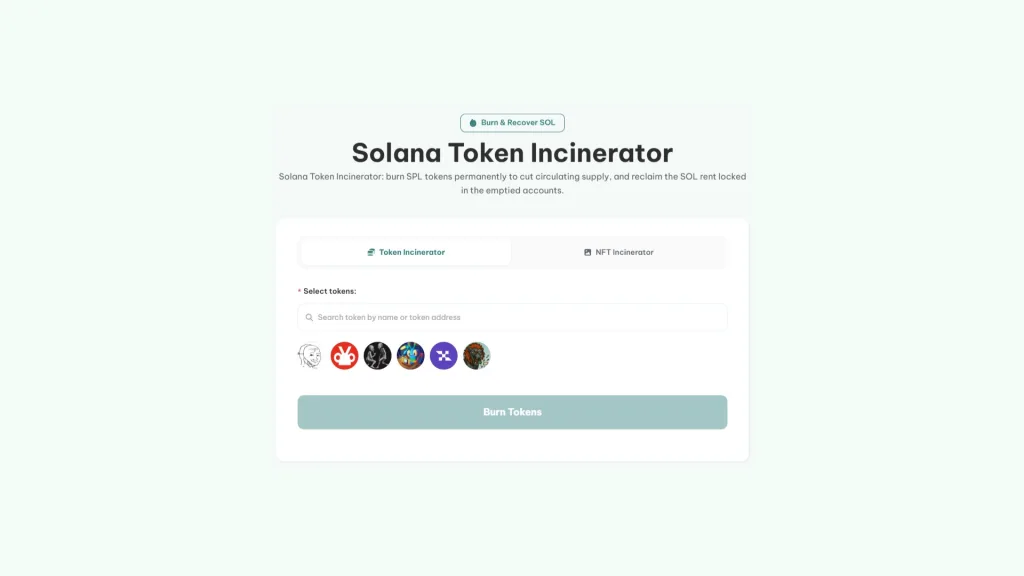
The tool burns the entire balance of each token you select. If you only want to burn part of the supply, send that amount beforehand to a dedicated wallet and connect that wallet. With that set, do this:
- Connect your wallet: the tool reads the tokens you hold with a balance and lists them.
- Select the tokens: tick one or several, or search by name or contract address.
- Review the estimated SOL: this is what you’ll get back when the accounts for those tokens are closed.
- Hit Burn Tokens and sign: the supply drops and the SOL lands back in your wallet as soon as the transaction confirms.
Each transaction processes up to four accounts, so with twelve tokens selected you’ll sign three times. If the same token is spread across several accounts in your wallet, all of them get burned and closed. And if a transaction fails midway, the previous ones still go through and the tool tells you with a message like ‘ced’2 of 3 burn batches succeeded’.
Under the hood, each transaction does three things at once. It burns the tokens, closes the account, and sends the fee to Smithii, and it does so atomically: either all three complete or none runs. That way you never end up with the tokens burned and no SOL back. Your tokens never touch Smithii either, because everything is signed by your wallet.
Make the supply reduction permanent
Burning tokens lowers the supply, but if your token still has the mint authority, whoever holds it can mint again and undo the whole thing in a single transaction. For the community to trust the burn, the logical move is to revoke that authority with Smithii’s Revoke Mint Authority. From that point on supply can only go down.
If you’ve never done it before, check out which authorities a token on Solana has and when to revoke each one.
Burning an NFT with NFT’s Smithii Incinerator
For NFTs there’s a separate tool, the NFT Incinerator by Smithii, which works one at a time and from the mint address. When you burn an NFT several accounts close at once: the token account, the metadata account, and the edition account, which is why you reclaim more SOL than with a fungible token. The interface looks like this:
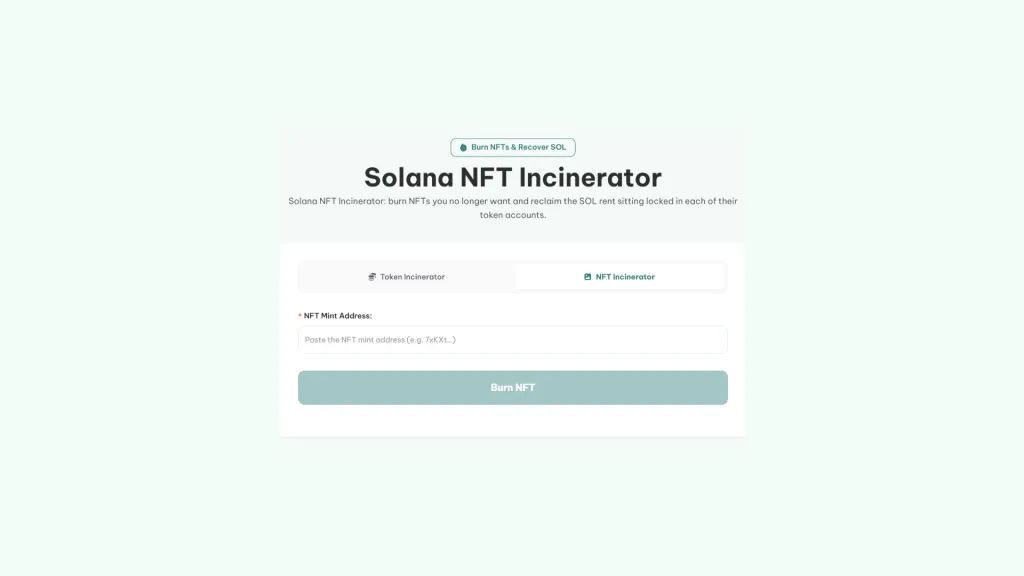
You paste the mint address, the tool shows you a preview of the NFT so you can confirm it’s the right one, and you sign. If the NFT isn’t in your wallet, it warns you and won’t let you continue. It supports standard Metaplex NFTs, editions, and programmable NFTs (pNFT).
Your token’s full lifecycle in the same suite
The real edge of burning with Smithii isn’t the burn itself, it’s where it happens. The Incinerator is part of the same suite you use for the rest of the project, with the same wallet connected and the same interface, so every stage of the token is managed from a single place.
- Create the token: the Token Creator deploys your SPL with no code, setting name, symbol, image, and initial supply.
- Open the market: with the liquidity pool creator you spin up the pool and set the launch price.
- Distribute the supply: the Token Multisender sends the airdrop to many wallets in just a few transactions.
- Lock up the team allocation: the Token Vesting releases those tokens in stages.
- Lock the supply: revoke the mint authority so no one can issue more.
- Shrink the supply: the Token Incinerator burns whatever you buy back or have left over.
For a dev, that means fewer platform jumps and a clean, consistent history. Creation, airdrop, lock, and burn all come from the same wallets and the same tools, something any holder can follow on the explorer without having to dig through every contract you signed to run your project.
If you don’t have a token yet, start with our guide to creating a token on Solana without writing code.
How much SOL you get back when burning tokens on Solana
No upfront payment, no flat fee. Smithii keeps 20% of the SOL you recover and charges it in the same burn transaction, so if nothing is recovered, nothing is charged. You just need a bit of SOL in the wallet to cover the network fee.
Until recently, each standard token account held around 0.00204 SOL. That number is dropping thanks to proposal SIMD-0437, which cuts storage cost by 90% across five phases. The first two hit mainnet in September 2026 and make new accounts 27% cheaper, down to about 0.0015 SOL, and the next three are scheduled for November.
The key thing here is that an account holds on to the deposit it was opened with. Tokens you stacked up before the reduction still keep their 0.00204 SOL, and when you close them you recover that full amount. Accounts opened from now on will hold less and less, so the SOL worth recovering is mostly sitting in older accounts.
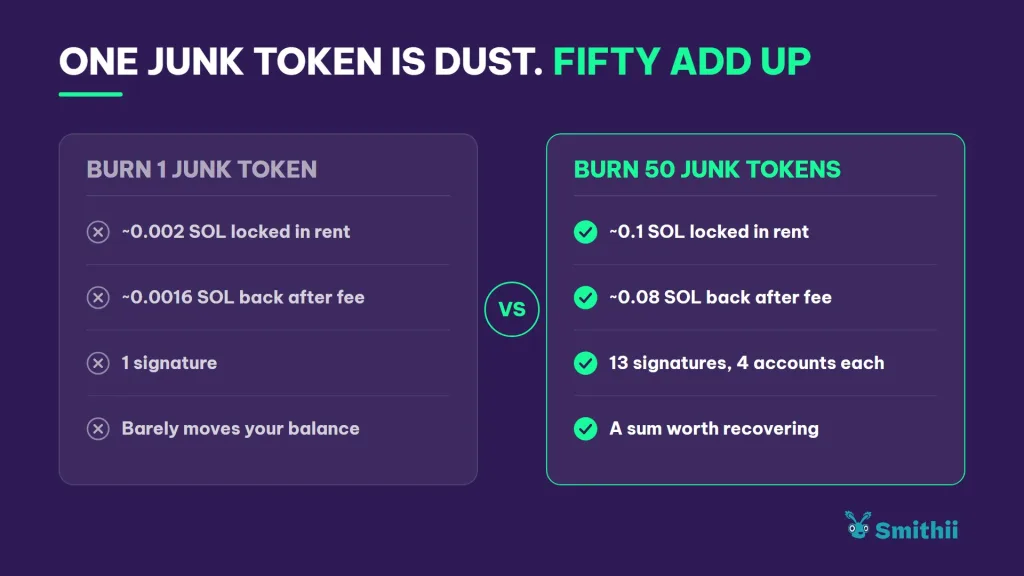
For example, 50 tokens in older accounts means about 0.1 SOL of rent locked up. Burning them with Smithii returns around 0.08 SOL across thirteen signatures, since each transaction groups four accounts. Token-2022 accounts with extensions can hold slightly more rent, and the tool always calculates with each account’s real balance, not a fixed number.
What to check before burning tokens on Solana
A burn is irreversible, so it’s worth reviewing your selection before signing. Four quick checks will save you from most mistakes.
- Confirm the amount before connecting: the full balance gets burned, so leave only what you want to destroy in the wallet.
- Check the value of each token: some airdrops that look like spam actually have real liquidity. Look up the contract on an explorer before marking it.
- Don’t open the websites of spam tokens: many of them have a link in the name asking you to sign to claim a supposed reward. Burning them from the tool is safe; interacting with that site is not.
- Keep in mind that it doesn’t close empty accounts: accounts with a zero balance don’t show up in the list, because the Incinerator only works with tokens you still hold.
With those checks done, burning tokens on Solana comes down to selecting, reviewing the estimated SOL, and signing.
FAQ
What alternative to Sol Incinerator can I use to shrink my token supply?
The Token Incinerator by Smithii. It burns the full balance of the tokens you pick, closes their accounts in the same transaction, and returns 80% of the rent. Since it lives in the same suite as the Token Creator, you can burn part of your project’s supply without leaving the tools you built it with.
Does burning tokens reduce the total supply on Solana?
Yes. The burn uses an instruction that destroys the units and subtracts the amount from the total supply, and the change can be verified on any explorer. To make the reduction permanent, also revoke the token’s mint authority.
Can I burn only part of my tokens?
Not directly, since the tool burns the full balance of each selected token. The workaround is to send the exact amount you want to burn to a separate wallet and connect that wallet to the Incinerator.
Can I recover the SOL from an empty account with Smithii?
No. The Smithii Incinerator only works with tokens you still hold, so accounts with a zero balance don’t show up on the list and won’t get closed. For now, Smithii doesn’t offer a separate tool for that case.
Can you burn compressed NFTs with Smithii?
No. The NFT Incinerator supports standard Metaplex NFTs, editions, and programmable NFTs, but not compressed NFTs or Metaplex Core assets. A compressed NFT doesn’t have a token account with rent either, so there would be no SOL to reclaim.
How much does the Smithii Incinerator cost?
There’s no upfront payment or flat fee. Smithii takes 20% of the SOL you reclaim and charges it in the same burn transaction. If nothing is recovered, nothing is charged, and you only need a bit of SOL to cover the network fee.
Final thoughts
Once you know how the Smithii Incinerator works, you can cut your token’s supply and reclaim the SOL locked in its accounts with a single signature, knowing in advance exactly how much lands back in your wallet. If you also revoke the mint authority, that reduction becomes permanent.
What sets it apart as an alternative to the Sol Incinerator is that it’s not a standalone tool. It lives inside the same suite where you create, launch, distribute, and lock your token, so everything you need as a dev stays within one ecosystem.

Content creator and SEO contributor at Smithii. Systems Engineering student and crypto-tech enthusiast.



