

wNEAR: What It Is, Why NEAR DEX Use It, and How to Convert NEAR Into wNEAR and Back
If you’ve tried to add liquidity or use a DeFi dApp on NEAR, you’ve probably run into wNEAR, the version of NEAR that contracts actually understand. Knowing what it is and when you need it saves you unnecessary fees and lets you move around Rhea and the rest of the network without hitting walls.
In this guide I’ll break down the difference between NEAR and wNEAR, why it exists, how to convert one into the other using the Smithii tool, and when you don’t need to convert anything at all. Let’s get into it.
What wNEAR Is and How It Differs From NEAR
Native NEAR is your account balance: you use it to pay gas, storage, and basic transfers. It’s not a token contract, so it doesn’t follow the NEP-141 standard that every other token on the network uses. wNEAR is that exact same value, wrapped into a NEP-141 token issued by the wrap.near contract.
The conversion is always 1:1. When you wrap, the contract holds your NEAR and mints the same amount of wNEAR. When you unwrap, it burns your wNEAR and gives the NEAR back. That’s why both are always worth the same.
| NEAR | wNEAR | |
|---|---|---|
| What it is | Your account’s native balance | A NEP-141 token backed 1:1 |
| Where it lives | In your own account | In the wrap.near contract |
| Pays for gas and storage | Yes | No |
| Can be deposited into a DEX or contract | Not directly | Yes |
| How tokens are priced on Rhea | No | Yes, pools are TOKEN/wNEAR |
Why NEAR DEX run on wNEAR
On NEAR, contracts receive tokens through a standard call, ft_transfer_call, which only exists on NEP-141 tokens. That way a DEX can treat every asset the same, without a special case for native NEAR. That’s why Rhea pools pair every token with wNEAR instead of NEAR.
For a dev this has a practical consequence. If you’re going to interact with DeFi contracts by hand, you need wNEAR in the wallet. If you use tools that handle it for you, the conversion happens inside the flow and you don’t even see it.
How to convert NEAR into wNEAR step by step
The NEAR Wrapper by Smithii is a tool that lets you convert NEAR to wNEAR and wNEAR to NEAR, 1:1, from your wallet, no code required. If your account isn’t registered yet on wrap.near, add the registration deposit so the full amount gets wrapped. Once you’re in you’ll see something like this:
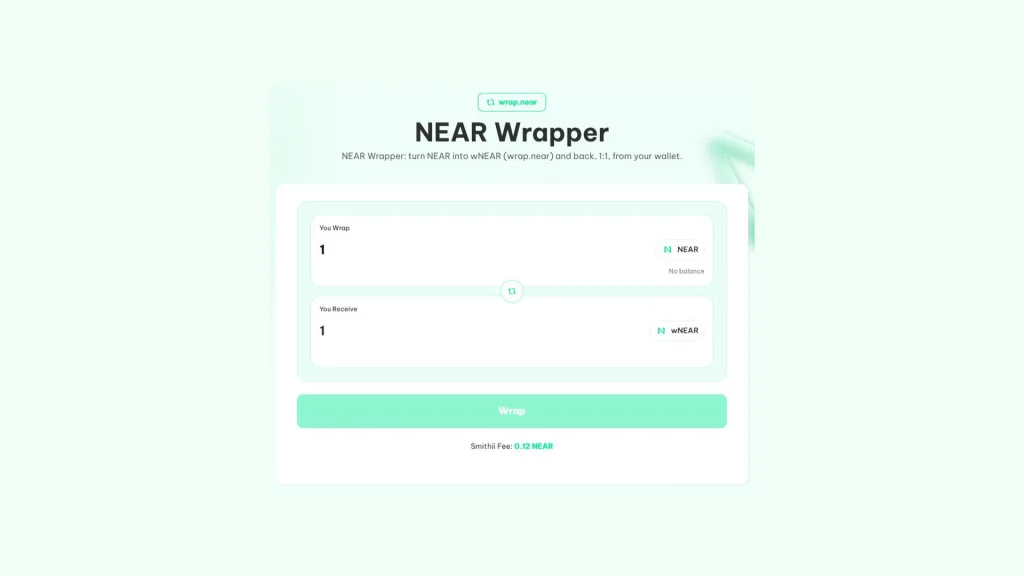
If you have the NEAR you want to convert plus a little extra for the fee and gas, do this:
- Connect your NEAR wallet: HOT, Meteor, or any option in the selector.
- Enter how much NEAR you want to convert in the You Wrap field. The You Receive field shows the same amount in wNEAR.
- Hit Wrap and approve the fee: 0.12 NEAR goes to Smithii.
- Approve the conversion: wNEAR lands in your wallet in a few seconds.
wNEAR shows up in your wallet like any other token. If the conversion fails, you won’t be charged the fee again on the next attempt.
How to reverse the conversion and get your NEAR back
The reverse process happens on the same screen. Hit the swap button between the two fields so wNEAR sits on top and NEAR on the bottom, enter the amount, and approve. The contract burns your wNEAR and returns the same NEAR to your wallet.
When you don’t need to convert anything
Most of the time you don’t have to do the wrap yourself. Tools that work with Rhea convert the NEAR for you inside their own flow:
- Create a pool: the pool creator converts your NEAR into wNEAR before depositing it.
- Add liquidity: the NEAR you enter is converted as part of the same process.
- Remove liquidity: you get native NEAR back, because the tool unwraps it on the way out.
- Generate volume: each account in the volume bot handles its own conversion before trading.
Wrapping separately in those cases just adds an extra fee and one more step. The wrapper makes sense when you plan to use wNEAR outside those tools, for example in a DeFi protocol or in a contract of your own.
If what you want is to open the market for your token, head straight to create a liquidity pool on NEAR, which already handles the conversion.
How much it costs to convert NEAR to wNEAR
The Smithii fee is 0.12 NEAR per conversion, both for wrap and unwrap, plus network gas. The first time your account uses wrap.near, a registration deposit of 0.00125 NEAR is added. It pays for your balance’s storage space in the contract and isn’t charged again on later conversions.
Always leave some NEAR unconverted. Gas is only paid with native NEAR, and a wallet without NEAR can’t sign any transaction, not even the one that reverses the conversion.
Common mistakes when using wNEAR
wNEAR is simple, but there are four slip-ups that keep happening and are a pain to undo:
- Trusting the token name: anyone can create a token called wNEAR. The real one is issued by the wrap.near account, so always check the contract before buying or accepting a payment.
- Sending it to an unregistered account: like any NEP-141, wNEAR only reaches accounts registered on wrap.near. If the recipient has never used it, the transfer needs their registration deposit.
- Depositing it on an exchange that expects NEAR: many exchanges only credit native NEAR. Before sending, unwrap it or check which format they accept.
- Converting your entire balance: without native NEAR you can’t pay gas, not even to recover your NEAR.
If the last one happens to you, the fix is to send a bit of NEAR to that wallet from another account and then unwrap. That’s why, whenever you convert, you should always leave some NEAR untouched.
What having wNEAR in your wallet is good for
Outside the tools that handle it for you, wNEAR is how you use your NEAR inside any contract on the network. These are the most common use cases:
- DeFi on Rhea: deposit it as collateral in their lending market or provide liquidity manually.
- Your own contracts: if your project receives NEAR payments inside a contract, you’ll normally work with wNEAR.
- Project accounting: holding the treasury in wNEAR keeps it in the same format as the rest of the tokens you handle.
FAQ
What is wNEAR?
wNEAR is NEAR in token NEP-141 format, minted by the wrap.near contract with 1:1 backing. DEX like Rhea run on wNEAR, not native NEAR.
Is wNEAR worth the same as NEAR?
Yes. Every wNEAR is backed by one NEAR locked in the contract, and you can always swap it back 1:1, so the value is identical.
How much does it cost to convert NEAR into wNEAR with Smithii?
The fee is 0.12 NEAR plus network gas. The first time your account interacts with wrap.near, a one-time 0.00125 NEAR storage deposit is added.
Do I need wNEAR to launch a liquidity pool on NEAR?
No. The Smithii liquidity tools wrap your NEAR into wNEAR automatically during the flow, and when you pull liquidity out, you get it back already unwrapped into NEAR.
Can I pay gas with wNEAR?
No. NEAR gas and storage are always paid with native NEAR. That’s why it pays to keep some NEAR unwrapped in your wallet instead of converting your entire balance.
Final thoughts
Once you know what wNEAR is, you can decide when you actually need it and when you don’t. It’s the same NEAR in token format, convertible 1:1 both ways, and it’s what DEX and on-chain contracts actually use.
If you’re launching or managing liquidity for your token, the Smithii tooling handles the wrapping for you. If you’re using DeFi on your own, the wrapper gets it done in a single signature. Just always keep some NEAR aside for gas.

Content creator and SEO contributor at Smithii. Systems Engineering student and crypto-tech enthusiast.



