

How to create a liquidity pool on NEAR: open your token market on Rhea and set its launch price
A token with no pool can be held and transferred, but nobody can buy it. That’s why knowing how to create a liquidity pool on NEAR is the step that turns a contract into a tradable asset. Once the pool is live, your token has a price, can be bought and sold on Rhea, and starts showing up on trackers as soon as someone trades it.
In this guide I’ll walk you through how pools work on Rhea, the full process using the Smithii tool, how to pick the launch price for your token, and what it costs. Let’s get into it.
What Rhea is and how a pool works on NEAR
Rhea Finance is the main DEX on NEAR. It launched in March 2025 from the merger of Ref Finance, the network’s go-to AMM since 2021, and Burrow, its lending market.
A Rhea pool pairs your token with wNEAR, the NEP-141 version of NEAR, because native NEAR isn’t a token contract and can’t be deposited as one. Each pool gets an identifier, the pool ID, which is what you’ll use later to add or remove liquidity.
Rhea also has one quirk worth knowing about: every account holds an internal balance inside the DEX. Tokens are deposited into that balance first, and from there they go into the pool. If something breaks mid-way, nothing is lost; it just sits in your Rhea balance.
If you want a clear breakdown of the difference between NEAR and its token version, check out what wNEAR is and when you need it.
How to create a liquidity pool on NEAR step by step
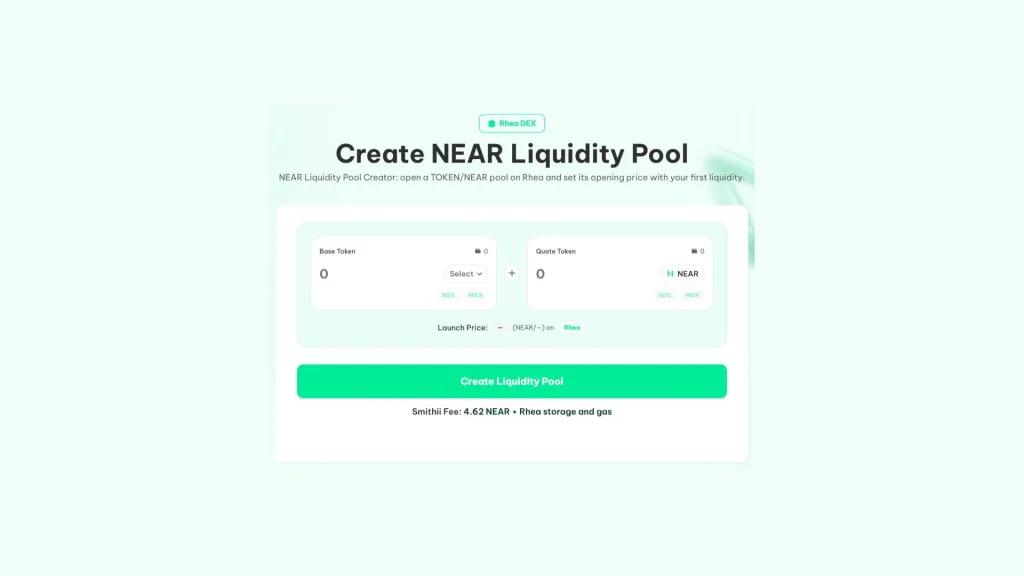
The Liquidity Pool Creator by Smithii for NEAR is a tool that lets you open a TOKEN/NEAR pool on Rhea in just a few steps, no code required. You pick the token, enter how much you’re putting in on each side, and that ratio becomes the launch price. You’ll find an interface like the one in the image below:
If you already have your token in your wallet and the NEAR you plan to add plus around 5 NEAR for the fee and deposits, follow these steps:
- Connect your NEAR wallet: the one holding the token and the NEAR you’re going to add.
- Pick the Base Token and Quote Token: both selectors show the tokens in your wallet. The Base Token is the one you want to price, and Quote Token is what you want to pair the token with ($NEAR, the token native token).
- Enter both amounts: how many tokens and how much NEAR go into the pool.
- Check the launch price: it appears under the amounts and comes from the ratio between them.
- Hit Create Liquidity Pool: and approve the fee in your wallet.
- Approve the creation and the liquidity: the pool is created first, then your initial liquidity gets added.
Once it’s done, your token is tradable on Rhea, and the result screen gives you the direct link to the pool. If any step fails, the next attempt won’t charge the fee again.
What the tool handles under the hood
Opening a pool on Rhea by hand takes half a dozen operations in the right order, and the tool chains them for you. It registers your account and the token on Rhea, pays the token storage for the DEX contract, wraps your NEAR into wNEAR, creates the pool, deposits both tokens, and adds the liquidity.
Before charging anything, it also checks that your token isn’t paused and doesn’t have an anti-whale limit that would block the deposit. And if the token has transfer fees, liquidity is calculated from what Rhea actually receives, not from what leaves your wallet.
How to pick the launch price for your token
The initial price isn’t typed into any field; it comes from the ratio between the two amounts you put in. If you add 1,000,000 tokens and 100 NEAR, each token starts at 0.0001 NEAR. Multiply that price by the total supply and you get the valuation your project launches at.
| Tokens in the pool | NEAR in the pool | Starting price per token | Valuation at 1,000M supply |
|---|---|---|---|
| 1.000.000 | 100 | 0.0001 NEAR | 100,000 NEAR |
| 10.000.000 | 100 | 0.00001 NEAR | 10,000 NEAR |
| 10.000.000 | 500 | 0.00005 NEAR | 50,000 NEAR |
The other call is how much depth you give the pool. With too little NEAR, any buy swings the price hard and the chart loses credibility. With more NEAR, small buys barely move it and buyers trust it more. There’s no magic number, but there’s a useful rule: the pool has to absorb the buys you expect in the first few days without the price going parabolic.
Finally, decide how much of the supply goes into the pool and how much stays out. Buyers check where the rest sits: if a single wallet holds most of the tokens outside the pool, they read it as sell-pressure risk. The usual move is to explain that split publicly and back it with a airdrop to the community or a vesting schedule for the team, so anyone can verify it on the explorer.
Check our article on how much liquidity you should add to your token if you’re not sure where to start.
How much it costs to open a pool on Rhea with Smithii
The Smithii fee is 4.62 NEAR and you pay it just once, before creating the pool. Rhea holds small storage deposits for registering your account and the token, which together stay well below 0.05 NEAR and are mostly refunded, and each step burns a bit of gas.
The NEAR and tokens you contribute aren’t an expense. They’re still yours as pool shares, held in your Rhea account, and you can get them back whenever you pull liquidity, with the usual variations any pool has depending on how the price moves.
Why your pool still isn’t showing up on Rhea or DexScreener
It’s the most common question right after creating it. Rhea and DexScreener only list new pools once they have activity, so a freshly created pool may not appear in their listings even though it exists and works fine. Through the direct link the tool gives you, anyone can buy from minute one.
As soon as the first buy or sell happens, the pool starts getting indexed. If you want the token to show activity from the start, a volume bot generates real trades from many different accounts.
Here’s how to generate volume for a token on NEAR with real trades on Rhea.
If your token has tax, create the pool before renouncing
Tokens with a transfer fee charge it when they move to or from Rhea too. While you’re still the owner, your wallet is exempt from those fees, so it’s worth creating the pool and adding the initial liquidity before renouncing ownership of the token.
FAQ
How much does it cost to create a liquidity pool on NEAR?
The Smithii fee is 4.62 NEAR. On top of that, there are small Rhea storage deposits that together stay well below 0.05 NEAR and are mostly refunded, plus network gas. The NEAR you add as liquidity isn’t a cost; it stays yours as pool shares.
Can I pair my token with something other than NEAR?
Not with this tool. Every pool it creates is TOKEN/NEAR, which is how the vast majority of tokens trade on Rhea.
What happens if a step gets stuck halfway?
Rhea keeps an internal balance per account, so any tokens it already received are waiting for you there. Hit Create again to finish the pool with them, without paying the fee a second time, or withdraw them to your wallet from app.rhea.finance.
Why isn’t my pool showing up on Rhea or DexScreener?
Because both only list new pools once they have activity. Your pool exists and is tradeable from the moment it’s created, and the result screen gives you the direct link.
Where do my pool shares end up?
In your own Rhea account, not in Smithii. You can top them up or withdraw them whenever you want, from Rhea or with Smithii’s liquidity tools for NEAR.
Wrapping up
Once you know how to create a liquidity pool on NEAR, you can bring your token to market on Rhea in a single flow, with no account signups or manual NEAR conversions. You set the starting price through the ratio of what you deposit, so give it a few minutes of thought before you sign.
From here you can add more liquidity to your NEAR pool as the project grows and push the first trades through so it shows up on the trackers. Everything runs from the same suite and the same wallet.

Content creator and SEO contributor at Smithii. Systems Engineering student and crypto-tech enthusiast.



