












How to Create a BEP20 Token on BNB Chain, the Network You Also Know as BSC
If you are trying to create a BEP20 token and the terminology is already annoying you, start here: BNB Chain, Binance Smart Chain and BSC are the same network, and BEP20 is the token standard that runs on it. One thing, three names, and every guide uses a different one.
With that settled, the deployment is genuinely simple. No Solidity, no compiler, no developer. What deserves your attention is the configuration, because several options can only be set at creation and every one of them is readable by anyone.
Below: what BEP20 is, the deployment step by step, what each option does, what you pay in BNB and how to reach PancakeSwap.
Prefer video? This walkthrough covers the process from start to finish:
BEP20, BSC and BNB Chain in plain terms
BEP20 is the fungible-token standard on BNB Smart Chain. It follows ERC20 conventions closely, which is exactly why Ethereum-style wallets and tooling work here with almost no adaptation, and a large part of why the ecosystem grew as quickly as it did. If you want the full comparison, ERC20 vs BEP20 sets them side by side.
One trap worth avoiding: BEP20 is not BEP2. BEP2 belongs to the legacy Binance Chain, a separate and much older thing. Anything involving smart contracts or PancakeSwap liquidity means BEP20 on BNB Smart Chain.
Projects choose this network for a specific combination rather than one headline: EVM contracts they already understand, transaction costs low enough not to shape user behaviour, near-universal wallet support, BscScan for verification and PancakeSwap as a mature venue for liquidity, all in front of a large retail audience.
What you need before you start
- A wallet on BNB Smart Chain. MetaMask, Rabby, Coinbase Wallet, anything EVM.
- BNB in that wallet for the creator fee and gas.
- Name, ticker and supply decided. Everything else is chosen in the tool.
How to create a BEP20 token step by step
The tool is the Binance Token Creator from Smithii.
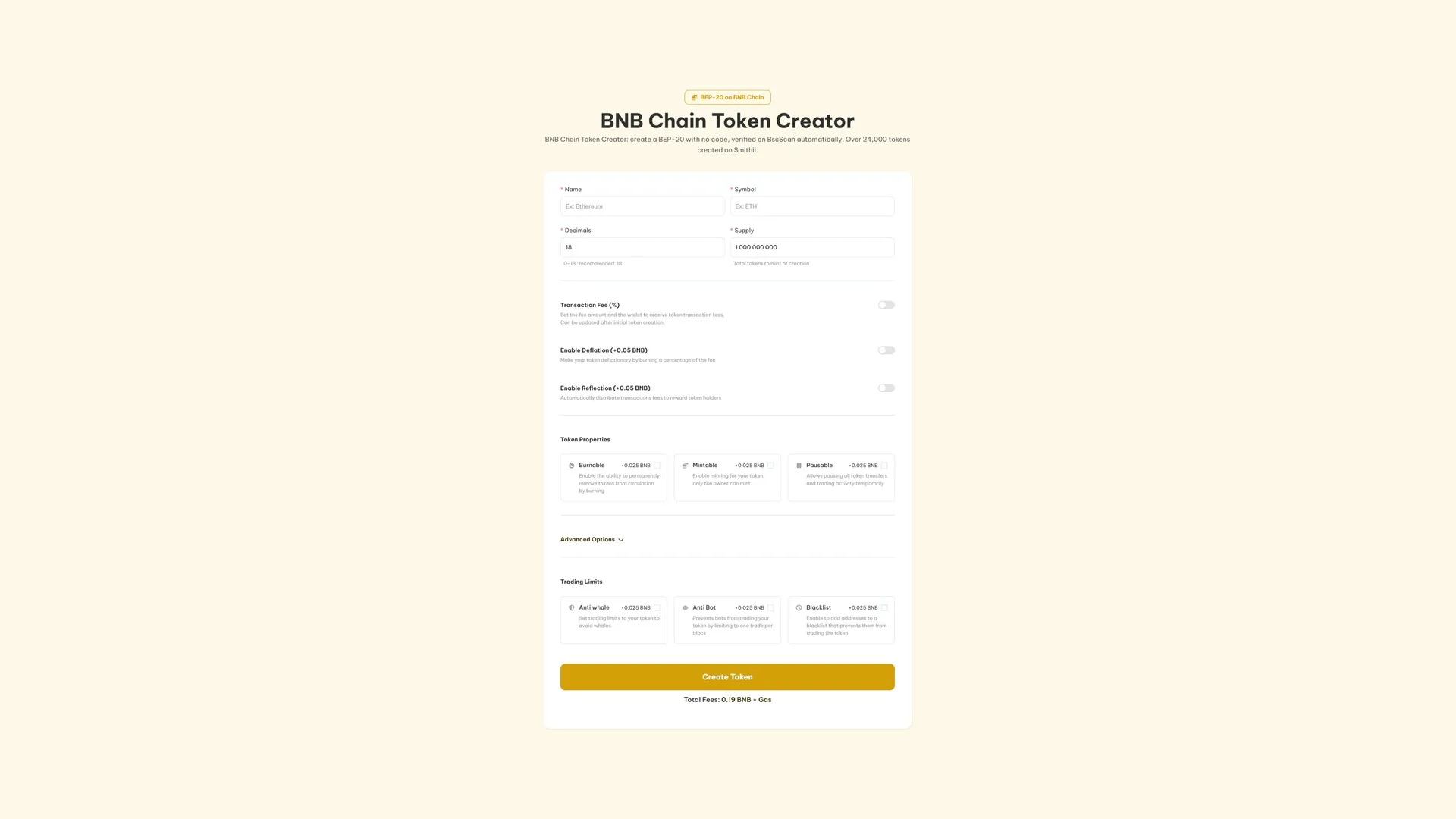
- Connect your wallet and confirm the network selector reads BNB Smart Chain.
- Enter the name and symbol. Choose the ticker deliberately, it is the short identity traders will use.
- Set decimals and supply. Eighteen decimals is the convention here, and the supply is minted once into your wallet.
- Enable whichever features the launch calls for. Each is broken down below.
- Click Create Token, read the BNB total and sign.
Verification on BscScan runs automatically, so anyone can read the contract straight away using nothing but the address. Our guide to finding a token contract address covers where to get it.
Every option, and when it earns its place
All of these are optional and all of them are visible on-chain. Switch on what your token and distribution plan genuinely need, because a longer feature list is not a trust signal.
- Transaction Fee (free). Skims a percentage off each buy and sell, split across as many as 10 wallets. Costs nothing extra and the percentage stays adjustable afterwards.
- Deflation (0.05 BNB). Burns part of that fee on every trade, so supply falls as volume rises.
- Reflection (0.05 BNB). Pays part of it to holders automatically, above a minimum balance you choose.
- Burnable (0.025 BNB). Removes tokens from circulation on demand, which is what announced burns require.
- Mintable (0.025 BNB). Keeps the door open to more supply, owner only. Leave it off if your pitch is a hard cap.
- Pausable (0.025 BNB). Halts every transfer and trade while you deal with a problem.
- Anti-Whale (0.025 BNB). Caps trade size, spacing and total holdings per wallet for a set number of days.
- Anti-Bot (0.025 BNB). Limits the token to one trade per block, which breaks sniping at the open.
- Blacklist (0.025 BNB). Cuts named addresses out of trading once you have identified them.
- Multi-Wallet Distribution (0.01 BNB). Splits the supply across up to 10 wallets during creation.
- DEXTools socials and banner (0.5 BNB). Publishes links, logo and banner to DEXTools from the tool.
- Create a liquidity pool (0.025 BNB). Opens the pool in the same run, showing the opening price before you sign.
If your token can mint, pause, tax, blacklist or throttle trading, say so before somebody finds it on BscScan and says it for you.
What it costs in BNB
Creation is 0.19 BNB plus network gas. Options are priced individually on top, which means a plain BEP20 pays the flat fee and nothing more. The tool shows the running total before you approve, and that is the number that counts.
Opening a market on PancakeSwap
A fresh BEP20 has an address and no price. Nothing has traded, so nothing has valued it.
PancakeSwap is where most BNB Chain liquidity lives. Pair the token against BNB, USDT or another supported asset, and remember that the ratio you deposit sets the opening price while the depth decides how far a normal buy moves it. Our guide on creating a BNB token liquidity pool covers the setup, and removing liquidity on PancakeSwap covers the exit.
After the launch
- Distribute at scale rather than one transfer at a time: sending BEP20 tokens to multiple wallets.
- Keep the pair active once holders exist, with the BSC volume bot.
- Track who holds it using a holder snapshot on Binance Smart Chain.
- Apply for listings, free on both: CoinMarketCap and CoinGecko.
Building a meme coin on this network? How to create a meme coin on Binance Smart Chain covers that with the right priorities.
Ownership and disclosure
The wallet you connect owns the contract once it deploys. The tool never takes custody and never asks for a seed phrase or private key.
The contracts behind the creator have been reviewed by external security firms. That is not the same as vouching for any individual token, so buyers should still read which permissions a given contract left switched on, and creators should make that easy rather than hard.
FAQ
What is the difference between BEP20, BSC and BNB Chain?
They are the same ecosystem described three ways. BNB Chain is the network, BSC or Binance Smart Chain is its former and still widely used name, and BEP20 is the token standard you deploy on it.
How much does it cost to create a BEP20 token?
0.19 BNB plus BNB Chain gas. Optional features start at 0.01 BNB and the tool totals your configuration before you approve.
Do I need to know Solidity?
No. The tool deploys an audited BEP20 for you, so there is nothing to compile and nothing to install.
Is BEP20 the same as BEP2?
No. BEP2 belongs to the legacy Binance Chain. For a modern smart-contract token with PancakeSwap liquidity, BEP20 on BNB Chain is the standard you want.
How is BEP20 different from ERC20?
They are close relatives. BEP20 follows ERC20 conventions, which is why Ethereum tooling works on BNB Chain with little adaptation. What changes is the network, the gas asset and where the liquidity lives.
Can I trade it right after creating it?
Not until you open a pool. A new token transfers and airdrops normally but has no price until there is liquidity behind it.
Conclusion
Getting a BEP20 on-chain is the easy part, whichever name you use for the network. The tool deploys and verifies a standard contract without Solidity, and the signing wallet keeps control from start to finish.
The weight sits after that: permissions you are willing to defend, a PancakeSwap pool sized like you mean it, and information that stays consistent everywhere it appears. A contract address is a starting line, not a strategy.

Crypto writer focused on the Web3 space. Former contributor to the Smithii editorial team.



