










How to create a BEP20 Token on BNB Chain, the network you also know as BSC
If you’re trying to create a BEP20 token and the terminology has already worn you out, start here: BNB Chain, Binance Smart Chain and BSC are the same network, and BEP20 is the token standard that runs on top of it. One thing, three names, and every guide uses a different one.
With that out of the way, the deploy is genuinely simple. No Solidity, no compiler, no developer. What does deserve your attention is the setup, because several options can only be locked in at creation time and every one of them is visible to anyone.
Coming up: what BEP20 is, the step-by-step deploy, what each option does, how much you pay in BNB, and how to make it to PancakeSwap.
Prefer video? This tutorial walks through the whole process from start to finish:
BEP20, BSC and BNB Chain explained in plain English
BEP20 is the fungible token standard on BNB Smart Chain. It follows ERC20 conventions very closely, which is exactly why wallets and tools from the Ethereum ecosystem work here with almost no adaptation, a big reason the ecosystem grew so fast. If you want the full comparison, ERC20 vs BEP20 puts them side by side.
One trap worth avoiding: BEP20 is not BEP2. BEP2 belongs to the old Binance Chain, a completely separate and much older thing. Anything involving smart contracts or liquidity on PancakeSwap means BEP20 on BNB Smart Chain.
Projects pick this network for a specific combination, not one single headline: EVM contracts they already know, transaction costs low enough not to shape user behavior, near-universal wallet support, BscScan for verification and PancakeSwap as a mature venue for liquidity, all in front of a massive retail audience.
What you need before you start
- A wallet on BNB Smart Chain. MetaMask, Rabby, Coinbase Wallet, any EVM-compatible one works. If you don’t have one yet, check out our wallet comparison for BNB Chain.
- BNB in that wallet for the creation fee and gas.
- Name, ticker and supply decided. Everything else is picked inside the tool.
How to create a BEP20 token step by step
The tool is the Smithii Binance Token Creator.
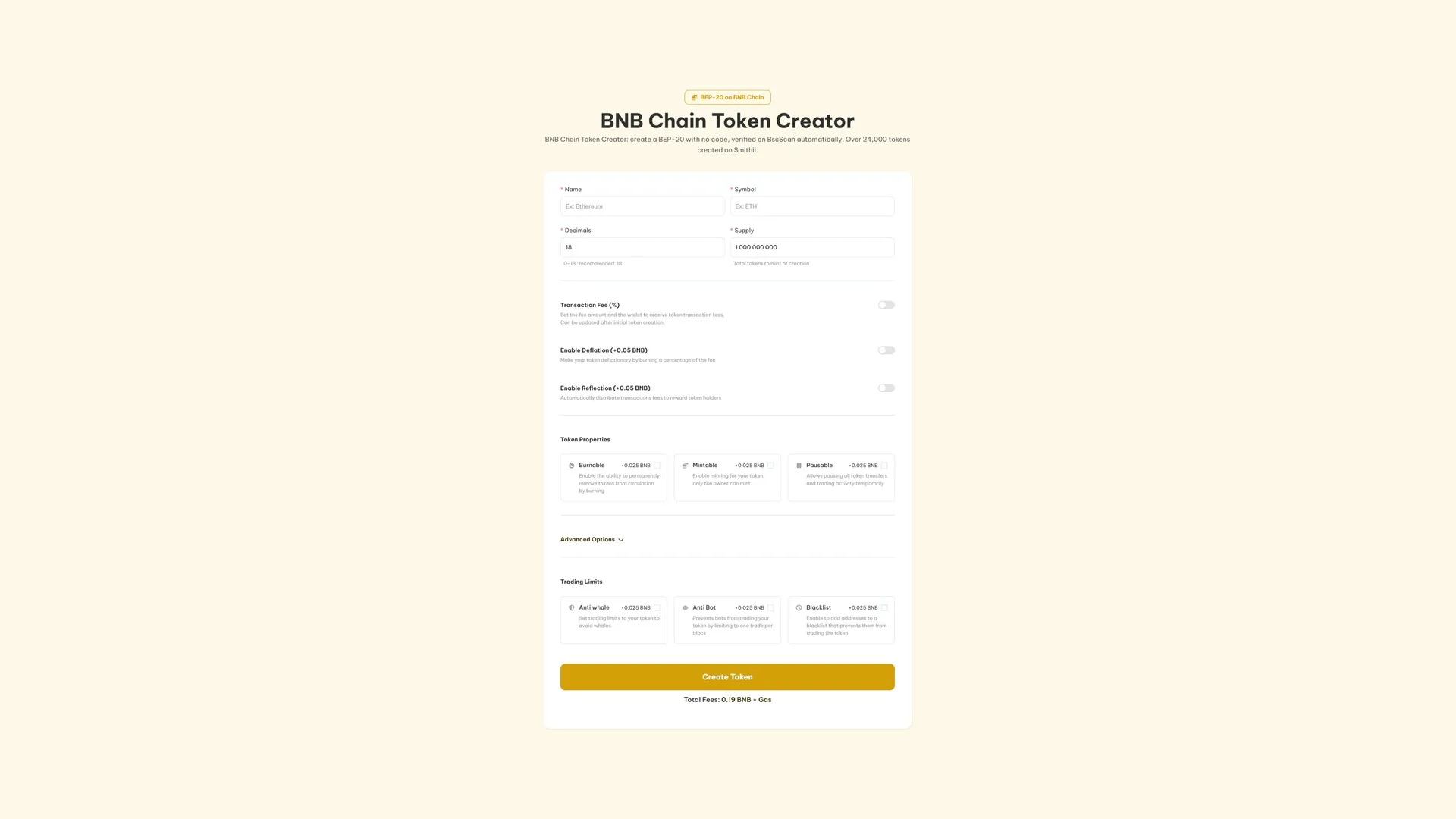
- Connect your wallet and confirm the network selector shows BNB Smart Chain.
- Enter the name and symbol. Pick the ticker carefully, it’s the short identity traders will actually use.
- Set decimals and supply. The standard here is eighteen decimals, and the supply is minted once into your wallet.
- Turn on the features your launch actually needs. Each one is broken down below.
- Click Create Token, check the total in BNB and sign.
BscScan verification runs automatically, so anyone can read the contract instantly with just the address in hand. Our guide to finding a token’s contract address shows where to grab it.
Every option, and when it earns its spot
All of them are optional and all of them are visible on-chain. Only turn on what your token and distribution plan actually need, because a long feature list isn’t a trust signal.
- Transaction Fee (free). Takes a percentage of every buy and sell, split across up to 10 wallets. Costs nothing extra and the percentage can be tweaked later.
- Deflation (0.05 BNB). Burns part of that fee on every trade, so supply drops as volume climbs.
- Reflection (0.05 BNB). Distributes part of the fee to holders automatically, above whatever minimum balance you set.
- Burnable (0.025 BNB). Lets you pull tokens out of circulation whenever you want, which is exactly what announced burns require.
- Mintable (0.025 BNB). Keeps the door open to expand supply, owner only. Leave it off if your narrative is a hard cap.
- Pausable (0.025 BNB). Freezes any transfer and trade while you sort out an issue.
- Anti-Whale (0.025 BNB). Caps trade size, the interval between operations and the total each wallet can accumulate over a set number of days.
- Anti-Bot (0.025 BNB). Restricts the token to one trade per block, which breaks any snipe attempt at the open.
- Blacklist (0.025 BNB). Blocks the addresses you’ve flagged from trading.
- Multi-Wallet Distribution (0.01 BNB). Splits the supply across up to 10 wallets during creation.
- DEXTools socials and banner (0.5 BNB). Push links, logo, and banner to DEXTools straight from the tool.
- Create a liquidity pool (0.025 BNB). Opens the pool in the same run and shows you the opening price before you sign.
If your token can mint, pause, tax, blacklist or throttle trading, say so before somebody finds it on BscScan and says it for you.
How much it costs on BNB
Creation costs 0.19 BNB plus network gas. Add-ons are billed separately, which means a basic BEP20 just pays the flat fee and that’s it. The tool shows you the running total before you approve, and that’s the number that matters.
Opening a market on PancakeSwap
A freshly minted BEP20 has an address but no price. Nothing has traded against it yet, so nothing has set its value.
PancakeSwap is where most of BNB Chain’s liquidity sits. Pair the token against BNB, USDT, or another compatible asset, and keep in mind that the ratio you deposit sets the opening price, while depth decides how much a normal buy moves it. Our guide on how to create a BNB token liquidity pool covers the setup, and how to remove liquidity on PancakeSwap covers the exit.
After the launch
- Distribute at scale instead of going transfer by transfer: send BEP20 tokens to multiple wallets.
- Keep the pair active once you’ve got holders, with the BSC volume bot.
- Track who’s holding with a snapshot holder on Binance Smart Chain.
- Request listings, free on both: CoinMarketCap and CoinGecko.
Want to set up a meme coin on this network? How to create a meme coin on Binance Smart Chain covers it with the right priorities.
Ownership and transparency
The wallet you connect is the one that owns the contract once deployed. The tool never takes custody and never asks for a seed phrase or your private key.
The contracts behind the creator have been audited by external security firms. That’s not an endorsement of any specific token, so buyers should check which permissions each contract left active, and creators should make that easy to see instead of hiding it.
FAQ
What’s the difference between BEP20, BSC, and BNB Chain?
They’re the same ecosystem seen from three angles. BNB Chain is the network, BSC or Binance Smart Chain is its former name (still used everywhere), and BEP20 is the token standard you deploy on.
How much does it cost to create a BEP20 token?
0.19 BNB plus BNB Chain gas. Optional features start at 0.01 BNB and the tool adds up your full config before you approve.
Do I need to know Solidity?
No. The tool deploys an audited BEP20 for you, so there’s nothing to compile and nothing to install.
Is BEP20 the same as BEP2?
No. BEP2 belongs to the old Binance Chain. If you want a modern token with smart contracts and liquidity on PancakeSwap, the standard you’re after is BEP20 on BNB Chain.
How is BEP20 different from ERC20?
They’re close cousins. BEP20 follows ERC20’s conventions, which is why Ethereum tooling works on BNB Chain with basically no changes. What changes is the network, the asset you pay gas in, and where the liquidity sits.
Can I trade it right after creating it?
Not until you open a pool. A freshly minted token can be transferred and used for airdrops just fine, but it has no price until there’s liquidity behind it.
Wrapping up
Getting a BEP20 on-chain is the easy part, whatever you want to call the network. The tool deploys and verifies a standard contract without you touching Solidity, and the wallet that signs stays in control from start to finish.
The real work comes after: the permissions you’re willing to defend, a properly sized PancakeSwap pool, and messaging that stays consistent everywhere it shows up. A contract address is a starting line, not a strategy.
If you want to take your BEP-20 beyond the deploy, the ultimate dev guide on BNB Chain pulls together the full process from start to finish, with a detailed walkthrough for every step.

Crypto writer focused on the Web3 space. Former contributor to the Smithii editorial team.



