

How to Create a liquidity pool on Uniswap: Step by Step, No Code Required
If you want to create a liquidity pool on Uniswap, this post is for you. We’ll show you how to create a Liquidity Pool for a Token in just 5+1 steps.
Uniswap is a decentralized exchange (DEX) built on EVM (Ethereum Virtual Machine) standards, so you can create a liquidity pool for any token ERC20 or ERC20 layer 2.
Once a token is live inside a liquidity pool on a DEX, anyone can buy and sell it.
A token ERC20 is an asset on the Ethereum blockchain, while a ERC20 Layer 2 is an asset on a blockchain that uses the ERC20 standard but adds advantages like low transaction costs, like Base, a relatively new blockchain that many see as the successor to BSC.
Either way, we’ll walk you through how to create a liquidity pool on Uniswap, whether you’re working with a token ERC20 or a token ERC20 layer 2.
How to Create a liquidity pool on Uniswap: Two Options
This is for opening a pair that doesn’t exist yet. If your pool is already live and you just want to top it up with more funds, that’s a different flow: here’s how to add liquidity to an existing Uniswap pool.
You have 2 options here: use the dApp Create Liquidity Pool from Smithii or head straight to Uniswap. Our interface is simpler and fully audited, so that’s what we recommend, but we’ll walk you through both.
To make things easier, we’ll cover how to create a liquidity pool on Uniswap for token ERC20 using Smithii, how to create a liquidity pool for token Base also with Smithii, and finally how to create a liquidity pool using the dApp from Uniswap. To keep things quick, pick the step-by-step you want to see below:
1. Create Liquidity Pool ERC20 Token on Uniswap with Smithii Tools
To create a Liquidity Pool for any token Ethereum, head over to the online tool Create Liquidity Pool on Ethereum. Make sure Ethereum is selected as the blockchain and connect your preferred wallet.
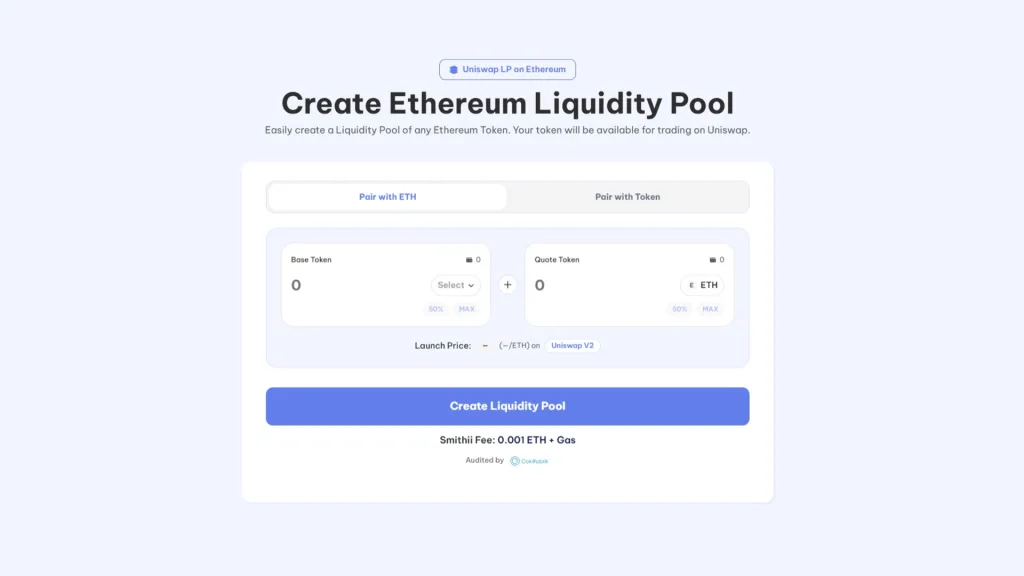
- Connect your wallet on the dApp Create Liquidity Pool on Ethereum
- Pick the ‘Base Token’ (this is the one that sets the price, usually $ETH, $USDT, $USDC, etc.)
- Pick the ‘Quote Token’. This is your token ready to hit the market.
- Add Liquidity: choose the amounts of Base Token and Quote Token to pair up. This sets the starting price of your token
- Click ‘Create Liquidity Pool’ and approve the transactions.
A few seconds later your Liquidity Pool will be live on Uniswap, where you can go check it. Creating a liquidity pool for a Ethereum on Smithii costs 0.01 ETH, which covers the fees for creating the token pair and the liquidity pool.
Si aún no tienes tu token, aquí te explicamos como crear tu propio ERC20 token sin programar
2. Create a Liquidity Pool Base Token on Uniswap
To create a Liquidity Pool for any token on Base, head over to the online Create Liquidity Pool on Base tool, make sure the Base blockchain is selected, and connect your wallet of choice.
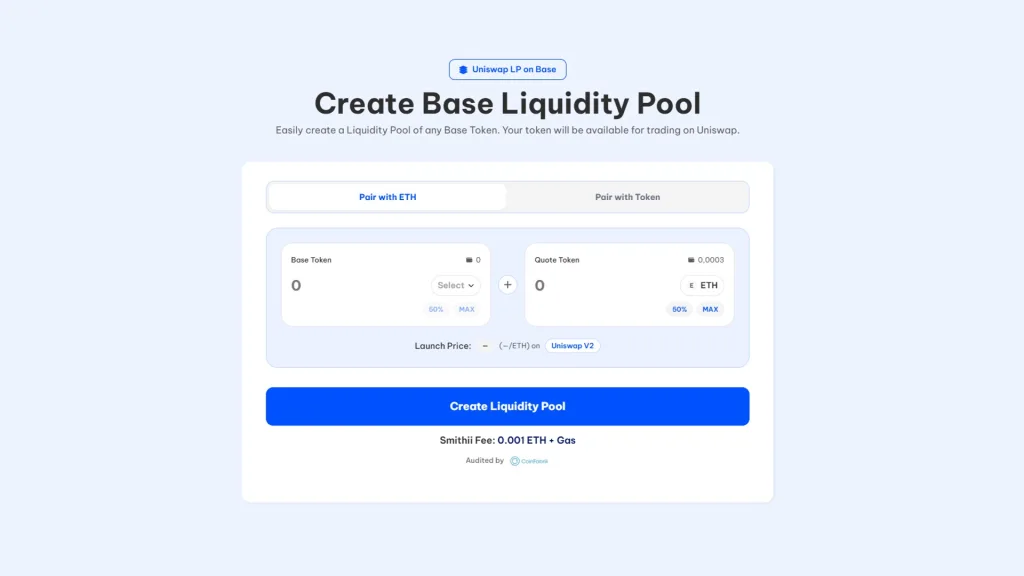
- Connect your wallet on the Create Liquidity Pool on Base dApp
- Pick the ‘Base Token’ (this is the one that sets the price, usually $WETH, $USDT, $USDC, etc.)
- Pick the ‘Quote Token’, which is your token ready to hit the market.
- Add Liquidity, choose the amounts of Base Token and Quote Token to pair. This sets the starting price of your token
- Click ‘Create Liquidity Pool’ and confirm the transactions.
A few seconds later your Liquidity Pool is live on Uniswap and you can head there to check it out. Creating a liquidity pool for a Base on Smithii costs 0.001 WETH, which covers the fees for the token pair creation and the liquidity pool.
Si aún no tienes tu token, aquí te explicamos como crear tu propio token de Base sin programar
Here are the steps to create a Liquidity Pool on Uniswap for the other blockchains, following the same format used for Ethereum and Base. Double-check the specifics for each blockchain, since fees and tokens can vary.
3. Create a Liquidity Pool Polygon Token on Uniswap
To create a Liquidity Pool for any token on Polygon, head over to the online Create Liquidity Pool on Polygon tool and follow these steps:
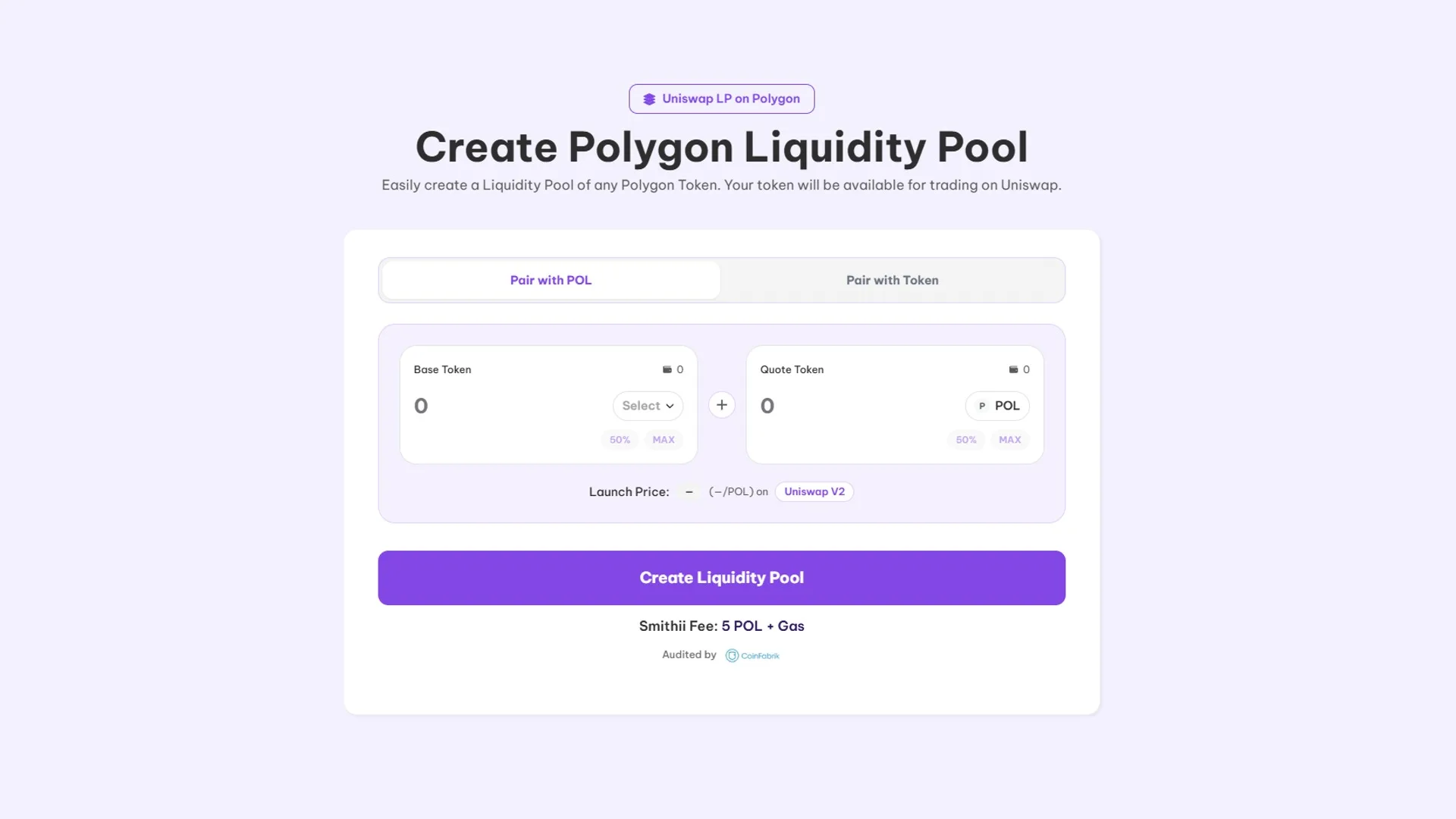
- Connect your wallet on the Create Liquidity Pool dApp on Polygon.
- Pick the ‘Base Token’ (usually $MATIC, $USDT, $USDC, etc.).
- Pick the ‘Quote Token’, which is your token ready to hit the market.
- Add the amounts of Base Token and Quote Token to set the starting price of your token.
- Click ‘Create Liquidity Pool’ and confirm the transactions.
In a few seconds your liquidity pool is live on Uniswap. Creation costs roughly 250 POL + Gas.
4. Create a Liquidity Pool Arbitrum Token on Uniswap
For a Liquidity Pool on Arbitrum, open the online Create Liquidity Pool on Arbitrum tool and follow these steps:
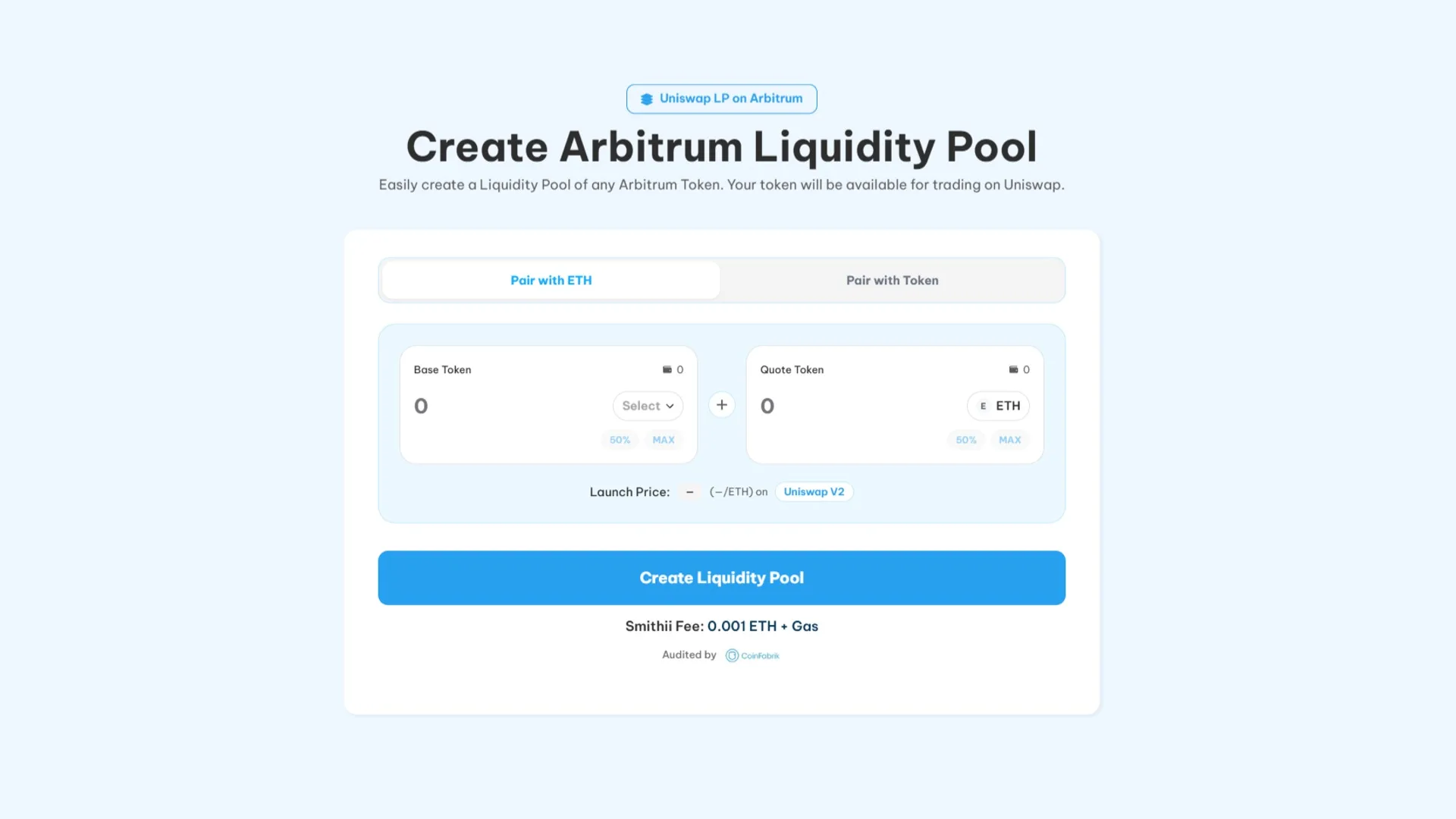
- Connect your wallet on the Create Liquidity Pool dApp on Arbitrum.
- Pick the ‘Base Token’ (usually $ETH, $USDT, $USDC, etc.).
- Pick the ‘Quote Token’ (your token for the market).
- Enter the amounts of Base Token and Quote Token to set the starting price.
- Click ‘Create Liquidity Pool’ and confirm the transactions.
Spinning up a pool on Arbitrum through Smithii runs about 0.01 ETH + Gas.
5. Create Liquidity Pool Avalanche Token on Uniswap
For Avalanche, head over to the Create Liquidity Pool on Avalanche tool and follow these steps:
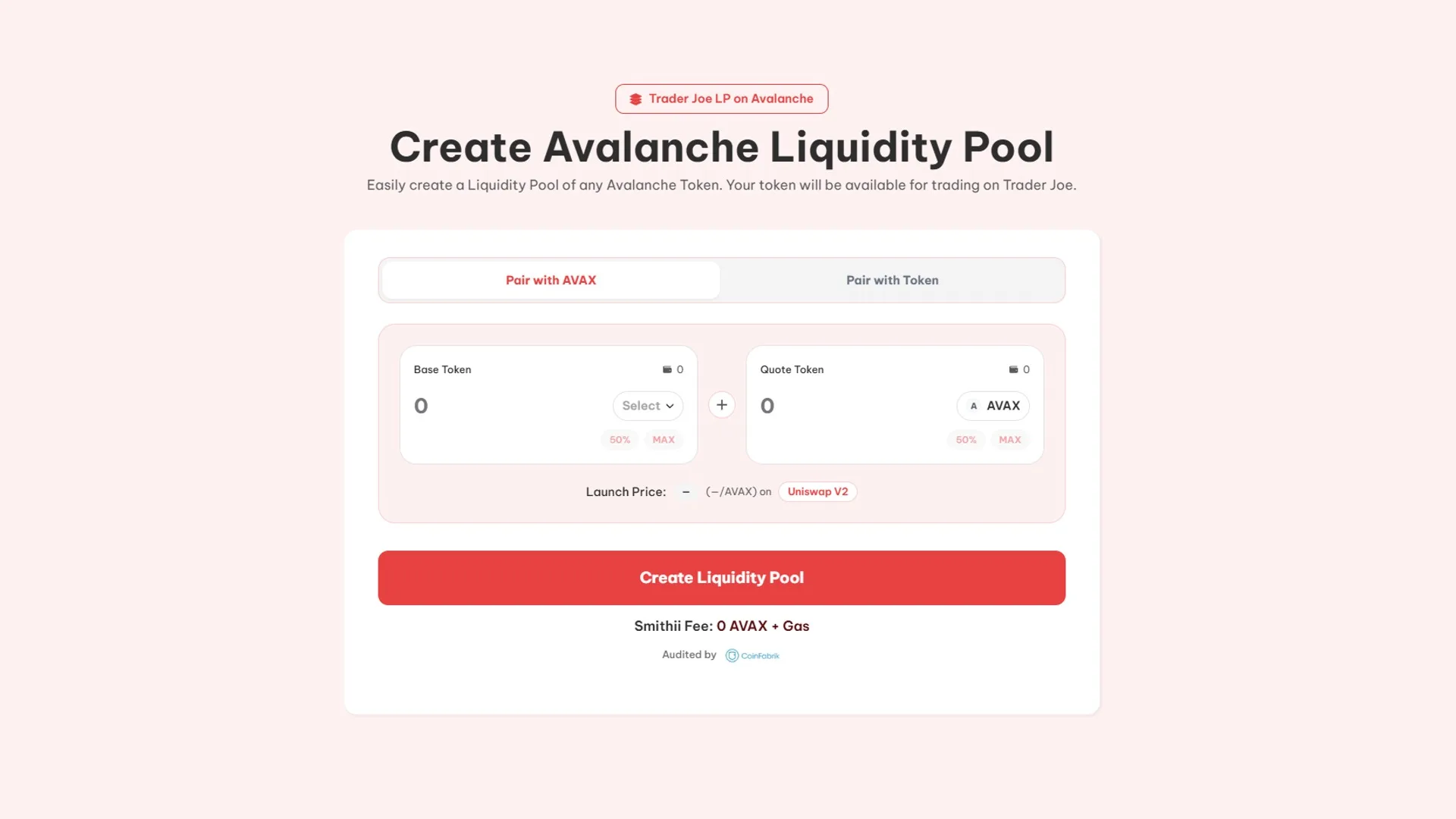
- Connect your wallet in the Create Liquidity Pool dApp on Avalanche.
- Pick the ‘Base Token’ (typically $AVAX, $USDT, $USDC, etc.).
- Pick the ‘Quote Token’ (your token for the market).
- Enter the amounts of Base Token and Quote Token to set the starting price.
- Click ‘Create Liquidity Pool’ and confirm the transactions.
Launching on Smithii costs 3 AVAX + Gas.
6. Create Liquidity Pool BNB Token on Uniswap
To create a pool on BNB Chain, head to Create Liquidity Pool on BNB Chain and follow these steps:
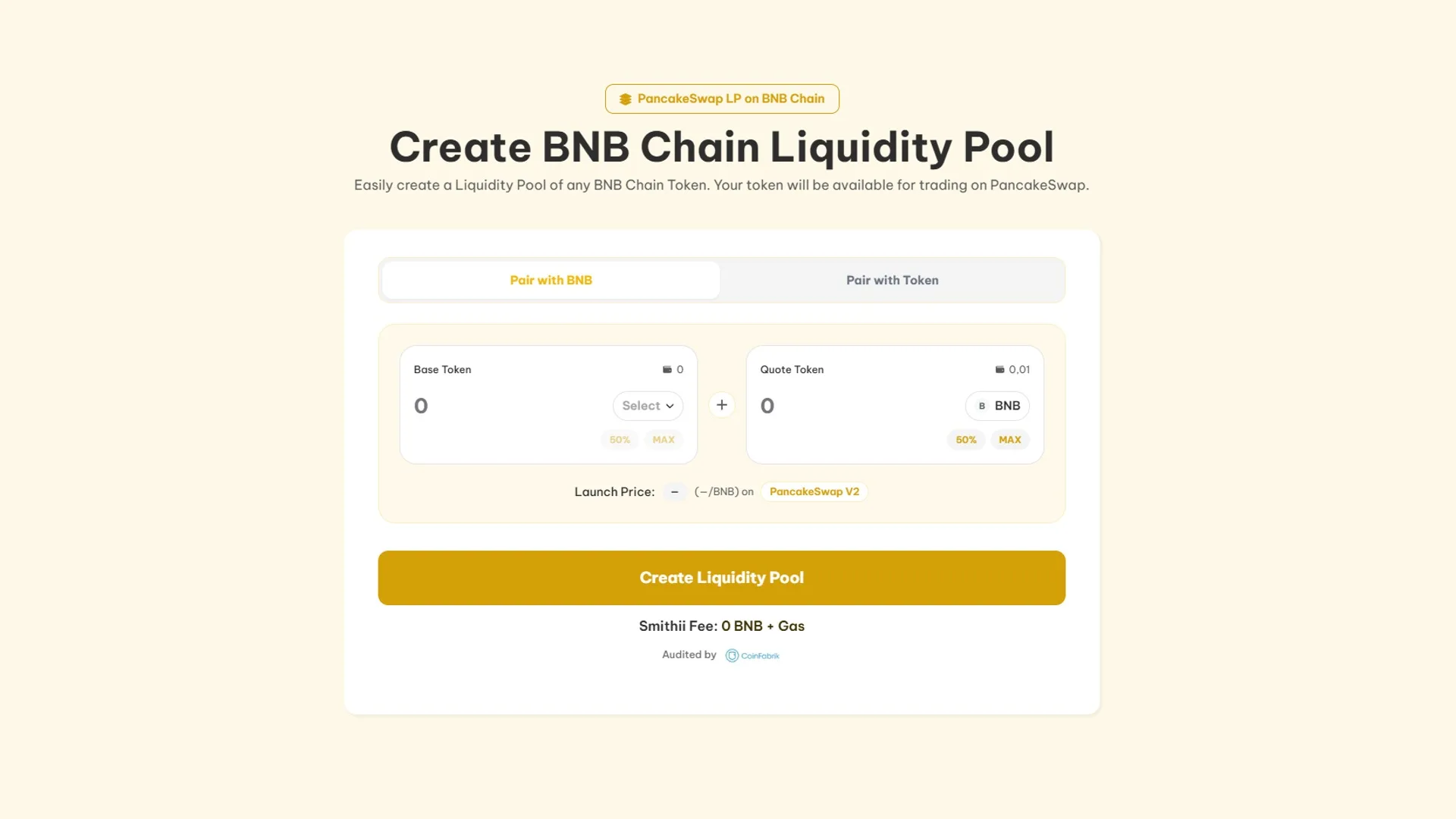
- Connect your wallet in the Create Liquidity Pool dApp on BNB.
- Pick the ‘Base Token’ (usually $BNB, $USDT, $BUSD, etc.).
- Pick the ‘Quote Token’ (your token for the market).
- Enter the amounts of Base Token and Quote Token to set the starting price.
- Click ‘Create Liquidity Pool’ and approve the transactions.
Launching on Smithii costs 0.025 BNB + Gas.
7. Create Liquidity Pool Blast Token on Uniswap
For Blast, head to Create Liquidity Pool on Blast and follow these steps:
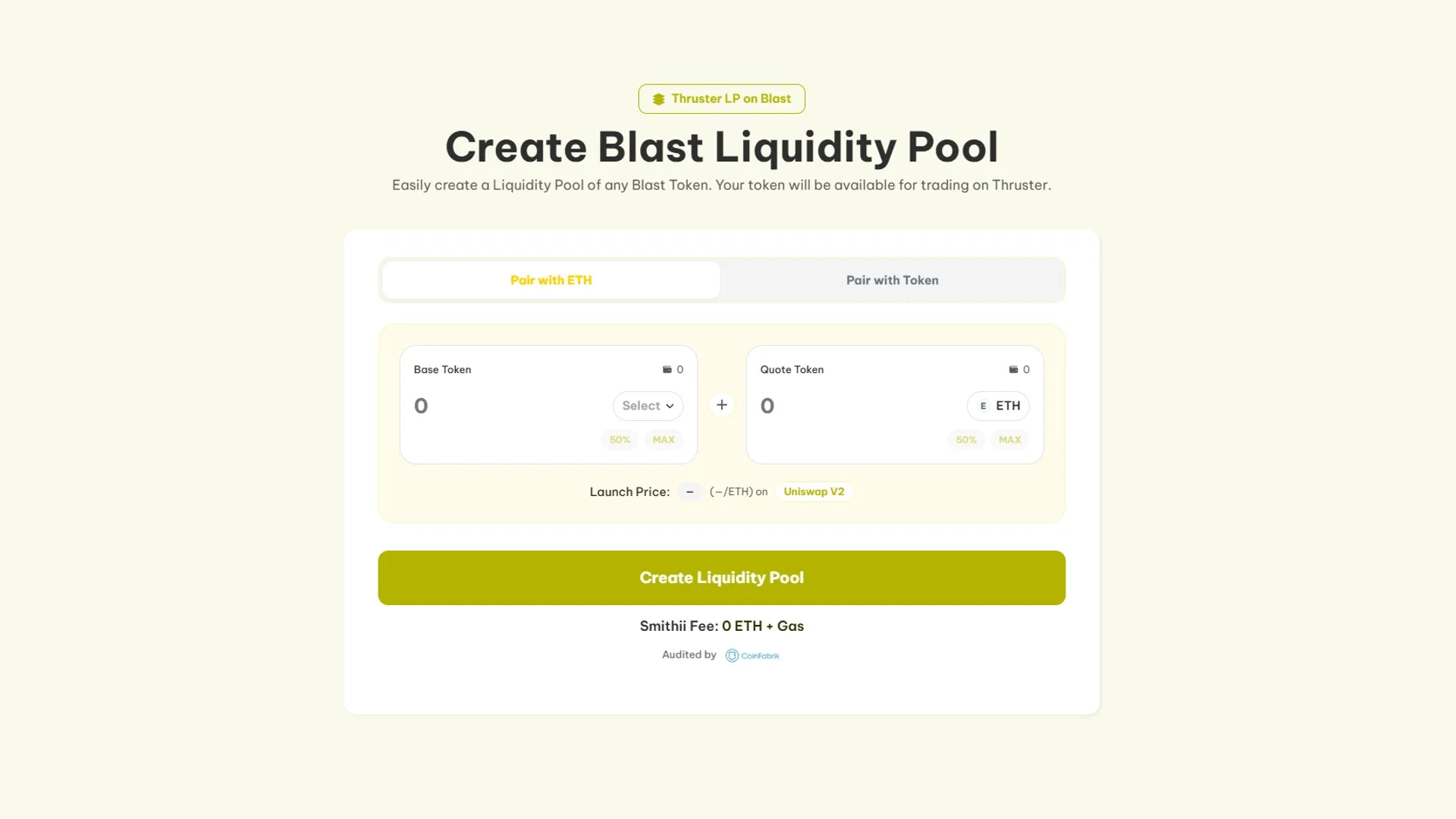
- Connect your wallet in the Create Liquidity Pool dApp on Blast.
- Pick the ‘Base Token’ (usually $BLAST, $USDT, $USDC, etc.).
- Select the ‘Quote Token‘ (your token for the market).
- Set the amounts for Base Token and Quote Token to define the starting price.
- Click ‘Create Liquidity Pool’ and confirm the transactions.
8. Create Liquidity Pool Robinhood Token on Uniswap
For Blast, head to Create Liquidity Pool on Robinhood and follow these steps:
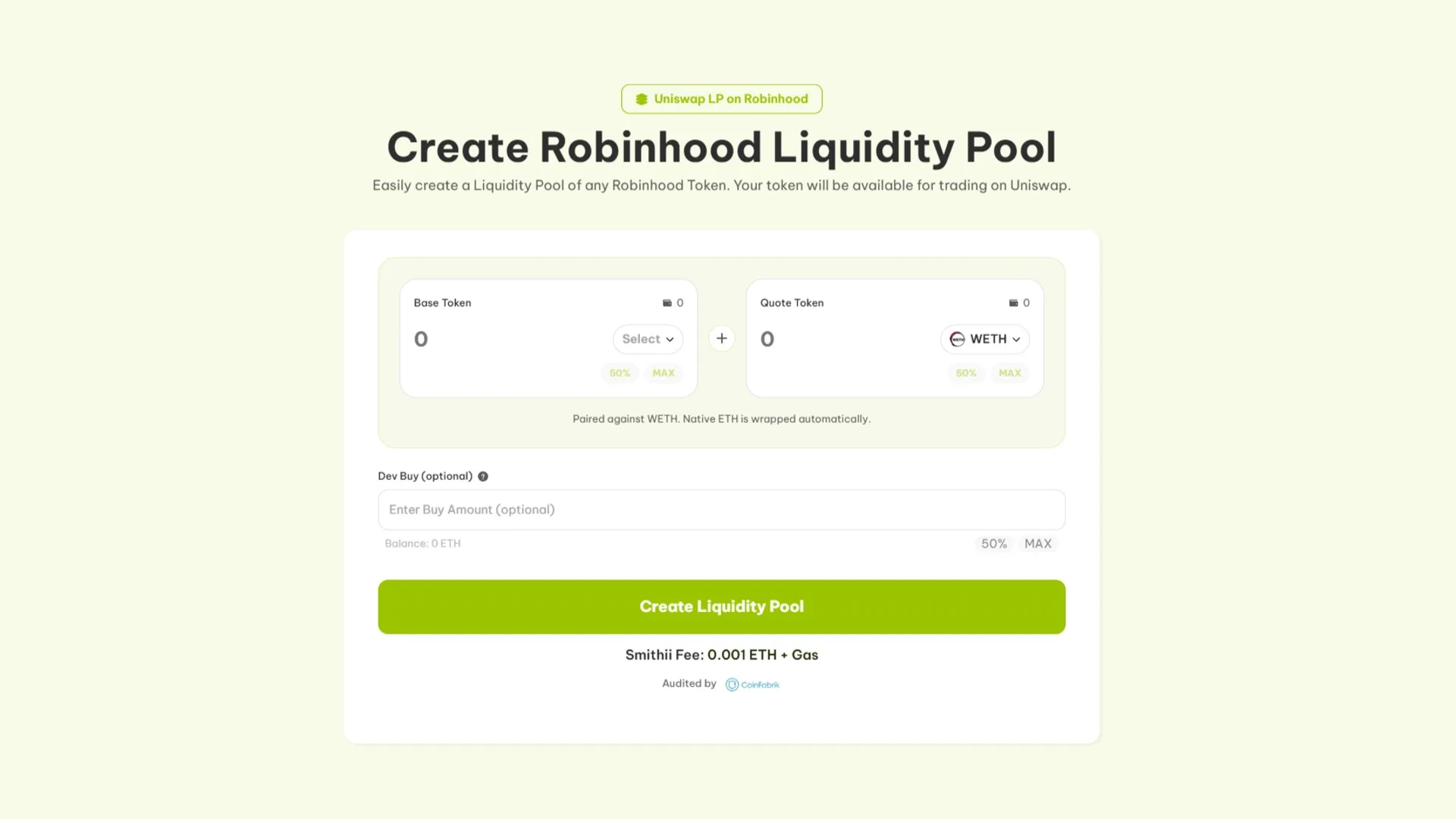
- Connect your wallet in the Create Liquidity Pool dApp on Robinhood.
- Pick the ‘Base Token’ (usually $WETH, $USDG and $USDe).
- Select the ‘Quote Token‘ (your token for the market).
- Set the amounts for Base Token and Quote Token to define the starting price.
- Click ‘Create Liquidity Pool’ and confirm the transactions.
Creating a liquidity pool on Blast with Smithii costs around 0.01 ETH + GAS.
9. Create Liquidity Pool Monad Token on Uniswap
Monad also builds its pairs on Uniswap V2, so the flow will feel familiar. Head over to Create Liquidity Pool on Monad, where the fee is 900 MON plus network gas, and follow these steps:
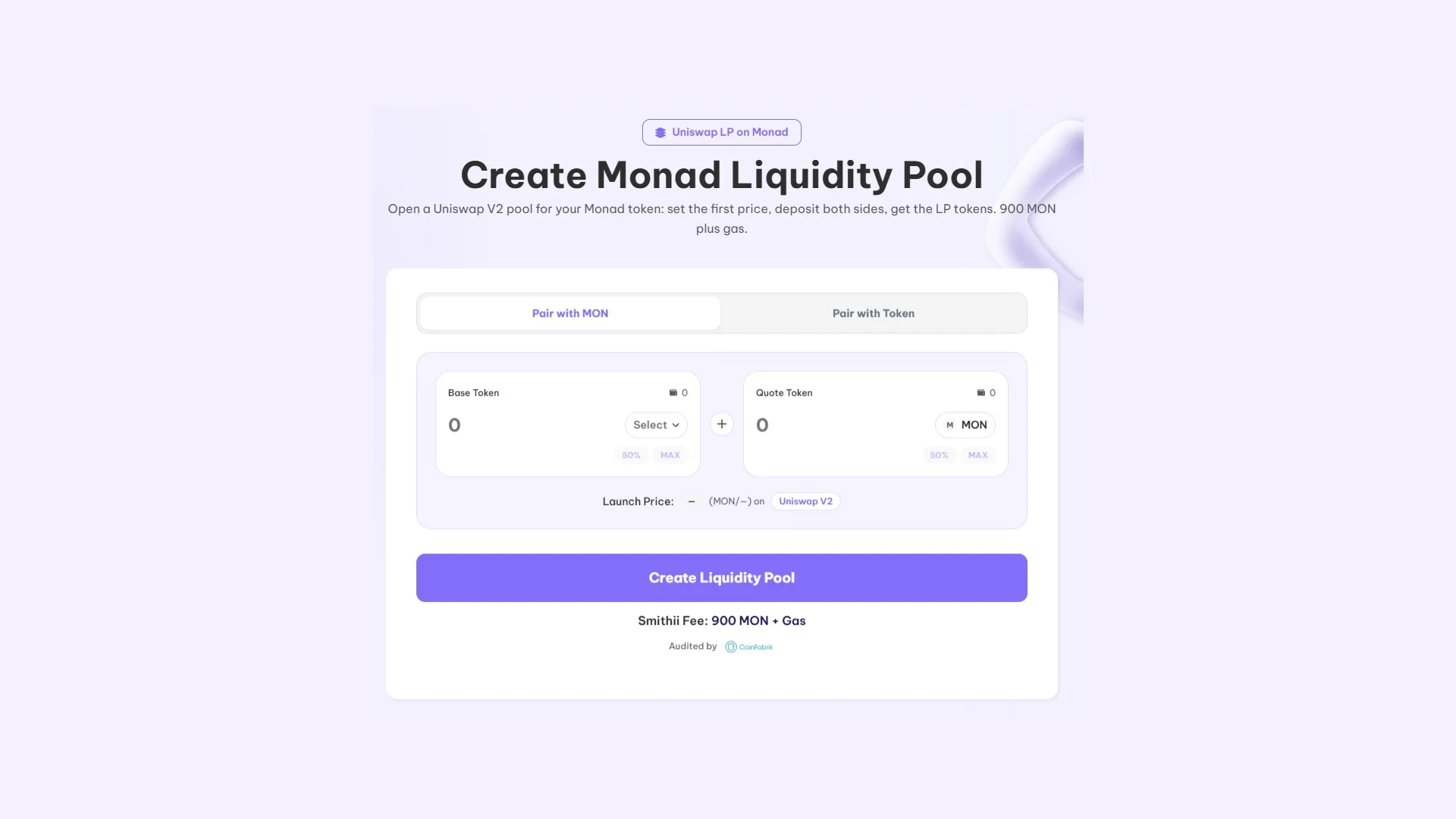
- Connect your wallet with MON for the fee and gas, plus the two assets you’re going to deposit.
- Pick what you’re pairing with. The default tab uses MON as the counterparty; the other one lets you drop in any token on the network for that side.
- Select your token under ‘Base Token’ and enter the amount for each side. Those numbers set the launch price.
- Check the ‘Launch Price’, where the tool shows you the starting price that will be locked in on Uniswap V2.
- Hit ‘Create Liquidity Pool’ and sign. The LP tokens for the new pair land in your wallet.
10. Create Liquidity Pool on Uniswap
To start creating our Liquidity Pool on any token ERC20 or ERC20 Layer 2, we go straight to the Uniswap app and connect our wallet. From the main menu you’ll see the ‘Pools’ option (remember to pick your preferred network from the dropdown in the top right).
In this section you can manage the liquidity pools you already have, and also create a new liquidity pool inside Uniswap.
So, click the ‘New Position’ button to kick off the process.

10.1 Create a Token Pair on Uniswap
To create our liquidity pool the first thing we need to do is set up a token pair. In this case we first pick the token with ‘value’ in dollars. Based on what we covered earlier I’ll go with USDT, since it’s a stablecoin.
Next, select our token. To do this, copy the token address and paste it into the search bar, then you can select it. It’s normal to see a warning message, since this is the first time a liquidity pool is being created with our token.


10.2. Pick the fee for your liquidity pool
Our next step is to choose the fee percentage that will apply to every transaction through our liquidity pool. To do this, click ‘Edit’ Fee Tier.
You’ll see 4 options to choose from. The most common and recommended one according to Uniswap is 0.3%.

10.3. Set the starting price and price range
Since this is the first time we’re creating a liquidity pool with this token pair, we need to set the starting price. That’s the price users will trade at through our liquidity pool. On top of that, we can set the price range.
As for the starting price, just enter the one you consider optimal. It’s a good idea to prepare a full tokenomics plan to follow a clear strategy.
When it comes to the price range, it’s important to stress that our liquidity pool will ONLY be active within the range we set. In other words, if the token price goes above or below the range we define, our liquidity pool will stay inactive and won’t be doing anything.
Keep in mind that the starting price has to fall within the range of prices we set.

10.4. Deposit liquidity
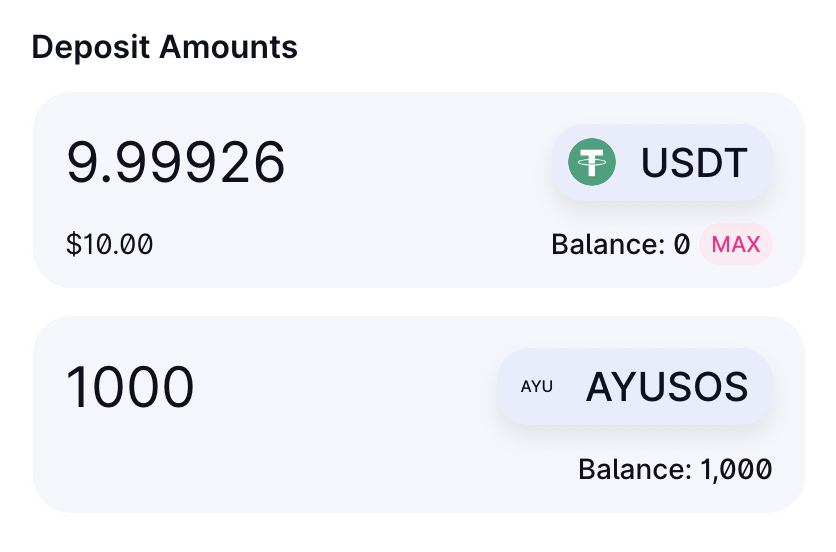
Once the price range is set, it’s time to deposit the liquidity for the token pair. We decide how much to add. Keep in mind you need to add enough for users to trade smoothly, without hitting an unreasonably low limit.
If you’re going to create a token from scratch and don’t want to add much liquidity, the most common approach is to start at a VERY low price, so the liquidity scales alongside the token price.
Want to outrun your competition?
Join our Newsletter and get weekly Blockchain news tailored to NFT creators.

Things to keep in mind when creating a liquidity pool on Uniswap
To wrap up, let’s cover some of the most common questions that come up when setting out to create a liquidity pool:
Can I create my own liquidity pool on Uniswap?
Yes, you can spin up your own liquidity pool on decentralized exchanges (DEX) like Uniswap for ERC20 and ERC20 layer 2, Raydium for Solana, or PancakeSwap for BSC. A liquidity pool lets you deposit tokens into a smart contract, making them available for other users to swap. Setting one up is straightforward and requires no coding skills, though a basic grasp of decentralized finance (DeFi) helps.
How much does it cost to create a liquidity pool on Uniswap?
The cost of creating a liquidity pool depends on the platform you pick and the blockchain it runs on. You’ll typically pay a gas fee to deploy the smart contract and add liquidity, which can range from a few dollars to several hundred depending on network congestion. On top of that, you’ll need to supply an initial amount of tokens to seed the pool.
How do you create an LP (Liquidity Pool) on Uniswap?
Creating an LP means picking a DEX (Uniswap in this case), connecting your wallet, choosing the tokens you want to pair, and depositing them into the pool. The platform walks you through each step, making sure you provide equal value on both sides. Once you confirm the transaction, your liquidity pool goes live and you receive LP tokens as proof of your contribution.
How do you create a liquidity pool smart contract?
If you have coding chops, you can build a custom smart contract for a liquidity pool in a language like Solidity for Ethereum-based projects. That said, most users stick with existing DEX platforms that ship with built-in tools for creating liquidity pools without touching a line of code, or even better, audited platforms like Smithii that offer online tools with an intuitive interface to make setting up your Liquidity Pool painless.
FAQs about creating a liquidity pool on Uniswap
What is a liquidity pool on Uniswap?
A liquidity pool on Uniswap is a pair of two tokens locked inside a smart contract that lets users swap between them without a middleman. The protocol prices trades automatically using a constant product formula (x*y=k).
How much does it cost to create a liquidity pool on Uniswap with Smithii?
Using the Create Liquidity Pool dApp from Smithii starts at 0.001 WETH plus gas on Layer 2 networks like Base or Optimism. The exact cost varies by network. On top of that, add the initial liquidity you contribute (WETH, USDC, USDT).
What’s the difference between Uniswap V2 and Uniswap V3?
Uniswap V2 spreads liquidity evenly across the entire price range and is easy to manage. Uniswap V3 lets you concentrate liquidity within specific ranges, which can multiply fees but demands more active management. For new tokens with high volatility, starting with Full Range on V3 is the way to go.
Which tokens can I pair on Uniswap?
Any token ERC20 on Ethereum and the major Layer 2s (Optimism, Arbitrum, Base, Polygon). The standard move is to pair your token with WETH, USDC, or USDT to anchor a reference price in the market.
What happens if no one buys my token after I create the pool?
The pool lives on the blockchain even if there’s no activity. The funds you added as liquidity stay in the contract and you can pull them out at any time. The token price moves based on whatever buys and sells actually happen.
Wrapping up
You now have everything you need to launch your liquidity pool. Weigh whether it’s worth it for you, and if the answer is yes… you’ve got no excuse not to take your token To The Moon!

Crypto writer focused on the Web3 space. Former contributor to the Smithii editorial team.



