

How to add liquidity on Uniswap to give your pool more depth
If you’re looking up how to add liquidity on Uniswap, it’s because your pool already exists and it’s no longer deep enough. A normal buy sends the chart flying, a sell tanks it, and the pair looks more fragile than your project actually is.
The fix isn’t rebuilding anything. It’s depositing more funds into the pool you already have, on both sides and at the current price, so the next trade moves the price a lot less.
In this guide I’ll show you how to add liquidity to any Uniswap pool across multiple chains, and what to keep in mind while doing it.
Why add liquidity to a pool that already exists
A pool’s depth decides how much the price moves with each trade. With thin liquidity, a medium-sized buy looks like a pump and a medium-sized sell looks like a rug, even when neither of them is.
That has consequences well beyond the chart. A thin pair scares off anyone checking the token with real intent to enter, punishes buyers with high slippage, and turns any normal treasury move into what reads as a signal.
The usual reasons to top up are these:
- The launch was short on funds and now the project can afford to strengthen the pair.
- The token has gone up and the initial liquidity no longer matches the size the project has now.
- You pulled liquidity at some point and want to bring the depth back to where it was.
- You’re prepping a listing or a campaign and don’t want the first wave of buys to wreck the price.
- The slippage has become a real issue and holders are complaining about what they lose on every swap.
Yes, a liquidity position earns a cut of the pair’s trading fees. But that’s not why a project reinforces its own pool, it’s a side effect. The real goal here is for the pair to hold up.
What changes and what doesn’t when you add funds
This is the part that raises the most doubts, so let’s get straight to it.
- The price doesn’t move. A deposit at the current ratio adds to both sides at once, so the proportion between them stays the same and the price sits right where it was.
- Depth does go up. The same swap that was moving the price before now moves it less, which is exactly the point.
- You get LP tokens for the deposit. They land in your wallet and act as the receipt for your share.
- Your share of the pool goes up, and so does the slice of the fees that belongs to you.
- You don’t give up custody. The tokens move from your wallet to the pool contract, and the LP tokens come back to your wallet in the same transaction.
And one thing worth being clear about from the start: you need both tokens in the pair. If you only have one, you’ll need to swap part of it for the other before depositing.
Adding liquidity is not the same as creating a pool
People mix these up constantly, and they’re two different operations.
Creating a pool means opening a pair that didn’t exist and setting the starting price yourself with the ratio of your first deposit. It’s what you do right after launching a token, when it can’t be bought yet.
Adding liquidity means depositing into a pool that’s already open, at the price the market has already set. You aren’t setting anything, you’re just reinforcing what’s there.
If your pair doesn’t exist yet, start with the other side: how to create a liquidity pool on Uniswap from scratch.
How to add liquidity on Uniswap step by step with Smithii Tools
As an example I’ll use the Ethereum Liquidity Adder by Smithii, built exactly for this: you point it at the pool, type how much you want to put in on one side, and the tool works out the other side based on the current price, so the deposit goes in at the correct ratio without you doing any math. The interface and the flow are the same on any blockchain you pick:
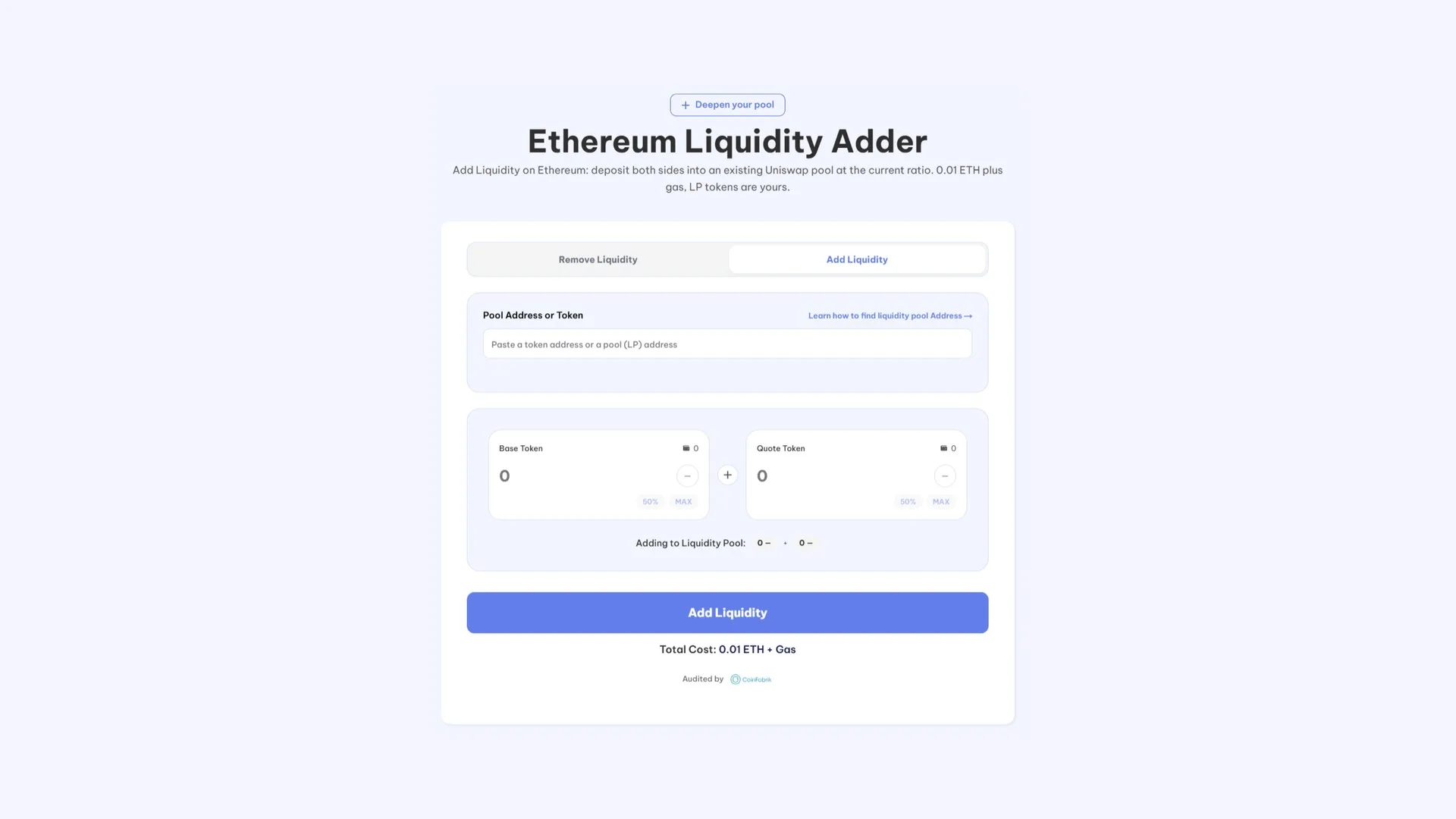
- Connect your wallet and make sure the selected network is the one your pool is on. MetaMask, Rabby or any EVM wallet will do the job.
- Paste the pool or token address. The tool will find the pair you want to add funds to.
- Enter the amount for one side of the pair. The other side auto-fills based on the pool’s current ratio.
- Hit Add Liquidity and sign.
Once it’s done, the LP tokens land in your wallet and the pool gets deeper. Smithii doesn’t take the LP tokens or a cut of what you deposit: the tool has a flat fee you pay once.
Now that you know how to add liquidity on Uniswap with this guide, all that’s left is to jump straight into the tool for your chain:
What you need before you start
- Both tokens in the pair, in amounts close to the pool’s current ratio.
- The network’s native token to cover the fee and gas.
- The pool or token address. You can use the selector with your wallet, or paste an address. We walk you through how to find the contract address of a token in another article if you’re not sure how.
How much it costs to add liquidity on Uniswap by network
The fee is fixed per network and doesn’t scale with how much you deposit. These are the networks where the Liquidity Adder works on Uniswap pools:
| Network | Tool cost |
|---|---|
| Ethereum | 0.01 ETH + gas |
| Base | 0.01 ETH + gas |
| Arbitrum | 0.01 ETH + gas |
| Blast | 0.01 ETH + gas |
| Robinhood Chain | 0.01 ETH + gas |
| Polygon | 250 POL + gas |
| Avalanche | 3 AVAX + gas |
| Monad | 900 MON + gas |
The tool also covers BNB Chain, at a cost of 0.025 BNB plus gas, though over there the volume lives on PancakeSwap and not on Uniswap.
Where you actually feel the difference is in the gas, not the fee. On Ethereum mainnet you’re signing three layer 1 transactions, and that adds up, so it pays to make one large deposit instead of several small ones. On Base, Arbitrum, Blast or Polygon gas is basically noise and you can top up the pool little by little without the cost hurting you.
Which pool you’re adding to: V2, V3 and the fee tier
The same pair can have several pools live at once, and depositing into the wrong one is the most expensive mistake in the whole process because nothing flags it: the transaction goes through and your funds end up somewhere they aren’t needed.
On Uniswap V2 there’s a single pool per pair. There’s nowhere to go wrong, plus Smithii lets you pick a pair tied to your wallet directly. Practically every liquidity adder mentioned above uses Uniswap V2, except Robinhood, which does use V3.
How much liquidity to add and when
There’s no universal number, but there is a sensible way to think about it: look at what buy size you want your pool to absorb without breaking a sweat and work backwards from there. If you want a normal entry not to move the price beyond a reasonable percentage, the depth has to support that.
On timing, two practical notes. Adding right before a campaign or a listing makes sense, since the wave of buys hits with the pair already prepped. Adding in the middle of a strong price move is a worse idea, because the ratio is shifting while you sign and you end up depositing at a proportion that wasn’t the one you had in mind.
If you’re still figuring out the size of the pool, the full breakdown is over at how much liquidity you should add to your token.
What you should know before depositing
Adding liquidity is reversible, but it isn’t free from a risk standpoint. Here are the three things you need to be clear on.
Your funds are exposed to price divergence
When the price of one token in the pair moves, arbitrageurs rebalance the pool and your position ends up with more of the token that dropped and less of the one that went up. If you withdraw at that moment, you exit with a different split than the one you came in with. That’s what’s known as impermanent loss, and it stops being impermanent the moment you pull out.
For a project topping up its own pool this weighs less than it does for an outside investor, since the goal isn’t to farm yield but to hold up the pair. Even so, it’s worth knowing that the funds you deposit don’t stay put in the ratio you added them at.
LP tokens are the key
Without the LP tokens you can’t recover what you deposited. They go to the wallet that signs, so deposit from a wallet you control long term and not from a throwaway one.
Withdrawing is a separate operation
Pulling the funds out follows a very similar process, but from another version of the tool. Here’s the step by step of how to remove liquidity from Uniswap in case you also want to know how it works.
Common mistakes when adding liquidity
- Depositing into the wrong pool of the same pair. It goes through without a warning and the money ends up in a pool with no volume. Double-check the address and the fee tier.
- Mixing up the token address with the pool address. They’re different contracts: the token is the asset, the pool is the pair.
- Depositing from the deployer wallet without thinking. Everything is visible on the explorer, and sometimes you’d rather the pool top-up not come from the same address that launched the token.
- Reinforcing the pool and doing nothing else. Depth prevents ugly surprises, but on its own it doesn’t bring more buyers.
Is your token on Solana instead of an EVM network? The equivalent over there works with different mechanics: how to add liquidity on Raydium.
FAQ on adding liquidity on Uniswap
Does adding liquidity push up the price of my token?
No. A deposit at the current ratio goes in on both sides at once, so the proportion holds and the price stays where it was. What changes is that from then on, each trade moves it less.
Do I need both tokens in the pair?
Yes. A Uniswap deposit always goes in on two sides and in the ratio set by the pool’s current price. If you only hold one, swap part of it for the other before depositing.
Can I add liquidity to a pool I didn’t create?
Yes. Any Uniswap pool accepts deposits from anyone, and the Liquidity Adder works the same whether the pool is yours or not. What you get back are LP tokens for the share you contribute.
How much does it cost to add liquidity on Uniswap with Smithii?
The fee is fixed per network: 0.01 ETH plus gas on Ethereum, Base, Arbitrum, Blast, and Robinhood Chain; 250 POL plus gas on Polygon; 3 AVAX plus gas on Avalanche; and 900 MON plus gas on Monad. No percentage is charged on the funds you deposit.
Can I pull the funds I added back out?
Yes, by using the LP tokens to reclaim your share of the pool plus the accumulated fees. It’s a separate action from adding, with its own flow. The exception is pools with liquidity locked by contract.
How much liquidity should I add?
Enough that a typical buy in your pair doesn’t move the price more than you’re willing to accept. There’s no standard number; it depends on the size of the project and how its holders behave.
Wrapping up
Adding liquidity on Uniswap is the way to fix a pair that has gone thin without touching anything else in the project. The price doesn’t move, depth goes up, and the next trader to come through feels it, which is exactly the point.
The mechanics wrap up in three signatures with the Liquidity Adder: you pick the pool, the tool calculates the ratio, you deposit, and the LP tokens land in your wallet. The only things worth thinking about beforehand are which pool exactly you’re adding to and how much depth your pair actually needs.
If you want the technical detail on how Uniswap calculates prices and distributes fees, the official Uniswap documentation covers it in depth.

Content creator and SEO contributor at Smithii. Systems Engineering student and crypto-tech enthusiast.



