









How to Create a Token on Base and Pay L2 Fees, Not Mainnet
If you want to create a token on Base, the first thing worth knowing is that setting it up costs the same as any other ERC-20, and using it costs a fraction of what you’d pay on Ethereum. You pay L2 fees, not mainnet fees, and you don’t need Solidity, scripts, or a developer to pull it off.
The tool itself takes a couple of minutes. What actually takes time is deciding what your token will be able to do once it’s live: whether you’ll be able to keep minting more, whether you’ll be able to pause it if something breaks, and whether the first buyers will be real people or bots. All of those switches sit on the same screen, and several can’t be added later.
Here’s everything: how to create the token, what each option is for, how much it costs, and what to do the moment it exists. Everything that comes after works the same way, from opening liquidity to launching a airdrop. Sign with your wallet and the contract is yours.
If you’d rather watch it done, this video walks through the process from start to finish:
What a token on Base actually is
Base is a Layer 2 on Ethereum, so a token on Base is a standard ERC-20. Same contract format, same behavior, same compatibility with any EVM wallet, explorer, and DEX you already use. No Base-specific dialects.
What changes is the bill. Transactions settle at L2 prices, not mainnet ones, and that’s the practical reason projects launch here instead of on Ethereum: the same token, without gas deciding whether a small buy is worth it. If you’re still comparing ecosystems, ERC-20 vs BEP-20 breaks down how the standards differ across chains.
Tokens on Base cover the usual range: in-product payment currency, contract execution, swaps, governance, equity-style designs, and meme coins.
What you need before you start
- A wallet compatible with Base. MetaMask and Coinbase Wallet are the go-to options.
- ETH on Base to cover the flat fee and network cost.
- A name, a ticker, and a supply number. Everything else on this page is optional and can wait until you’re inside the tool.
Create a token on Base in 4 steps
The tool is the Base Token Creator by Smithii. Connect, fill in four fields, sign once.
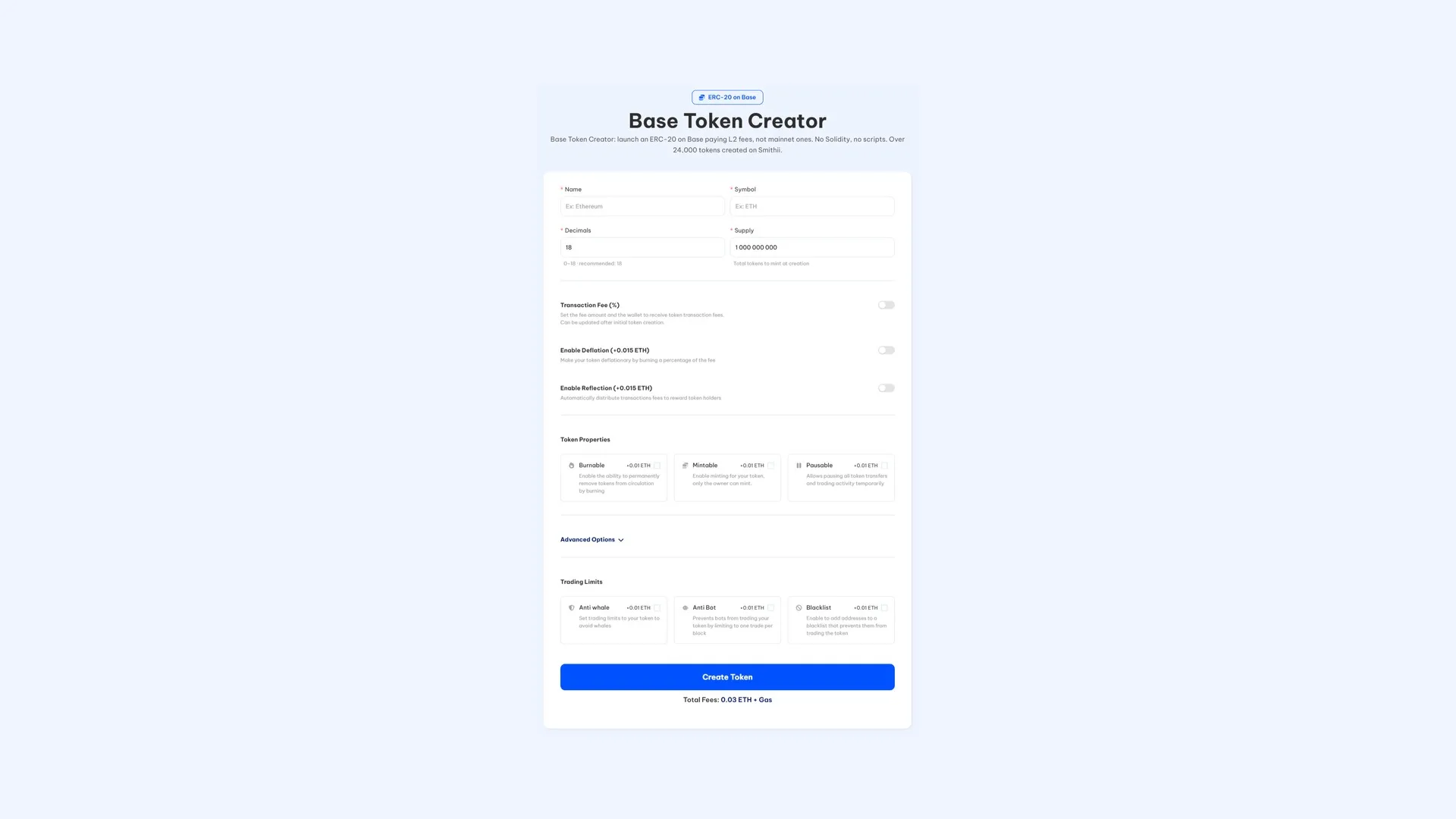
- Connect your wallet and check that the network reads Base. Whatever signs becomes the contract owner.
- Enter the name and symbol. This is what wallets, explorers, and DEX interfaces will display, so pick a short ticker that isn’t already taken.
- Set decimals and supply. Leave decimals at 18 unless you have a reason to change it, since that’s what the standard assumes. The supply you enter is minted once and lands in your wallet in full.
- Click Create Token and confirm. Read the total on screen first, then sign.
At that point the token already exists. Copy the address from the confirmation, or track it down later with our guide to finding a token’s contract address.
You will not find a logo or description field, and nothing is missing. Branding was never part of what an ERC-20 stores, so on Base it gets published alongside the token instead of inside it. The tool can push all of it to DEXTools for you, which is covered further down.
Choosing what your token will be able to do
Everything from here on is optional, and it’s worth thinking about it in terms of what you want to achieve rather than as a feature checklist. Most of these have to be enabled at creation, so it’s worth spending a couple of minutes on them now.
If you want the token to fund the project
- Transaction Fee (free). Charges a percentage on every buy and sell and splits it across up to 10 wallets based on the allocation you define. The percentage can be adjusted after launch, and turning it on costs nothing beyond the base fee.
- Deflation (0.015 ETH). Burns part of that fee on every trade, so supply drops the more the token moves.
- Reflection (0.015 ETH). Sends part to holders instead, automatically, with a minimum balance to qualify. No claim step, no staking contract.
If you want to keep some control after launch
- Mintable (0.01 ETH). You can issue more supply later, and only you can do it. Makes sense for phased emissions or reward programs, and looks terrible if your pitch was a hard cap.
- Burnable (0.01 ETH). You can destroy tokens whenever you want, which is what announced burns and buybacks need.
- Pausable (0.01 ETH). Halts every transfer and trade instantly. Think of it as the handbrake for the day your pool starts behaving weirdly and you’d rather buy sixty seconds than sit there watching.
How to survive the first hour
This is the part most first launches underestimate. The moment liquidity opens, your token becomes a target, and on a cheap L2 the bots have even less reason to hold back.
- Anti-Bot (0.01 ETH). Caps the token at one trade per block, which is what breaks sniping. Our guide on how to stop snipers on a Base token breaks down how they operate.
- Anti-Whale (0.01 ETH). Sets a ceiling on trade size, on the cooldown between trades from the same address, and on the total any wallet can stack up, for as many days as you pick. The reasoning lives in anti-whale mechanisms on Base.
- Blacklist (0.01 ETH). Locks the addresses you name out of trading, which is what you reach for after spotting a bot cluster or an address pushing the price around.
How to launch properly, not just exist
- Multi-Wallet Distribution (0.01 ETH). Splits the supply across up to ten addresses while the token is being created. Team, marketing, airdrop and the liquidity allocations are already in place at launch, instead of costing you an afternoon of transfers and gas.
- Socials and banner on DEXTools (0.15 ETH). Publishes your branding and channels on DEXTools straight from the tool: website, Telegram, Discord, X, plus the logo and banner. You get there sooner and for less than filing the request by hand, and you decide how your pair reads on the first chart a trader opens. The manual route is covered in adding a logo and info to a Base token.
- Create a liquidity pool (0.01 ETH). Pairs the token with ETH without leaving the creator, and shows the opening price on screen while you still have room to change your mind. Two signatures cover the whole launch.
A point that trips people up: pairing ETH into a pool is not the same as spending it. That ETH stays in the pool and flows back to you as buyers arrive.
How much does it cost to create a token on Base?
The deployment itself is 0.03 ETH, and the Base gas on top is small enough that it isn’t worth comparing to what the same transaction would cost on mainnet. Every option above carries its own fee, which means a token with nothing switched on pays only the flat fee.
The tool adds up your exact setup on screen before you sign, so treat that number as the one that counts.
Making your token tradeable
Without a pool your token has no price at all. It can be transferred, airdropped, and parked in wallets, and none of that lets anyone buy it as long as there’s no liquidity on the other side.
If you skipped the pool option during creation, the dedicated guide is creating a liquidity pool for a token on Base. Before settling on a number, how much liquidity to add on Base is the one to read: pool depth is what decides whether a normal buy moves your chart 2% or 40%. To unwind it later, pulling liquidity on Base covers the exit.
What to do once your token is live
- Put it in front of people. One airdrop beats hundreds of manual transfers, and how to run a airdrop on Base walks through the flow.
- Keep the pair active once holders show up, with the Base volume bot.
- Watch your distribution by running a snapshot of your holders on Base.
- Submit for listings. Both are free: get listed on CoinMarketCap and get listed on CoinGecko. Requests move a lot smoother with a working market behind them.
If what you’re launching is a meme coin, the priorities shift quite a bit. That version is covered in how to create a meme coin on Base.
Who controls the contract
The wallet you connect, from the very first block. The tool runs the deployment and steps aside, and nothing in the process asks for a seed phrase, a private key or access to anything you already have in your wallet.
The contracts behind the creator have been reviewed by external security firms. That doesn’t settle what you’ve switched on, which is the part holders will actually judge.
FAQ
How much does it cost to create a token on Base?
0.03 ETH, plus Base gas. Any optional starts at 0.01 ETH on top, and the running total shows up on screen before you approve anything. Since this is an L2, the gas portion of that bill is tiny.
Do I need to know how to code?
Not a line. No Solidity, no scripts, no local setup: the tool collects what the contract needs and a single approval ships it, using an audited ERC-20 template.
Is a Base token the same as a Ethereum token?
Technically yes, it’s a standard ERC-20. The difference is where it settles and what it costs, since transactions on Base count as L2 activity, not mainnet.
Can I add a logo when creating the token?
There’s no field for that, because images were never part of an ERC-20. The DEXTools option covers it without leaving the creator, and posting the details yourself afterwards works too.
Who owns the contract?
You do, from block one. The contract is deployed under the wallet that signs, and at no point are you asked for a private key or access to anything you hold.
Can I trade the token right away?
Not until a pool exists. A freshly created token can move between wallets without issue, so airdrops work from day one, but there’s no market and therefore no price.
Wrapping up
Creating a token on Base comes down to a tool and a signature, and the low fees are the reason many projects kick off here instead of mainnet. The decisions that actually matter are the ones that define what the contract can do, because most are locked in at creation and can’t be added later.
Launch it bare when that’s enough. Turn the rest on only when your launch will actually put it to use. Beyond that, no tool decides the outcome.
Your token on Base exists, but a project needs a lot more. In our definitive guide for devs on Base you’ll find the full path, from tokenomics to getting listed on the aggregators.

Industrial Engineer turned Solana trader. Marketing at Smithii and contributor to the $SHRIMP memecoin launch.



