

How to create a liquidity pool on TRON for your TRC-20
If you want to create a liquidity pool on TRON fast and without touching code, you’re in the right place. It’s what your token needs to have a price: until the pool exists, the contract is deployed but nobody can buy or sell it.
The Liquidity Pool Creator by Smithii handles it in a single transaction and leaves your pair ready to trade on SunSwap. On top of that, you’ll show up on screeners and DEXes, which doesn’t happen until you actually have a liquidity pool. Below is the full step-by-step, followed by the two decisions worth having sorted beforehand: what to pair the token with and how much liquidity to seed.
What you need before creating the pair
- Your TRC-20 on the wallet, with the amount you plan to deposit into the pool.
- The asset on the other side: TRX or a stablecoin, for the amount you’ll pair it with.
- TRX for the fee and the Energy the transaction burns through.
Quick heads-up before you start: the ratio between the two amounts you deposit is the launch price of your token. It isn’t typed into any field; it comes out of that division, and the tool shows it calculated for you before you sign.
If you don’t have a token yet, start by deploying your TRC-20 on TRON
How to create a liquidity pool on TRON step by step
The Liquidity Pool Creator by Smithii for TRON spins up the pair and the market in a single transaction, without touching the DEX interface or deploying anything yourself. The best part is that it calculates the launch price live as you type in the amounts, so you see it before signing instead of finding out after. When you land on it, here’s what you get:
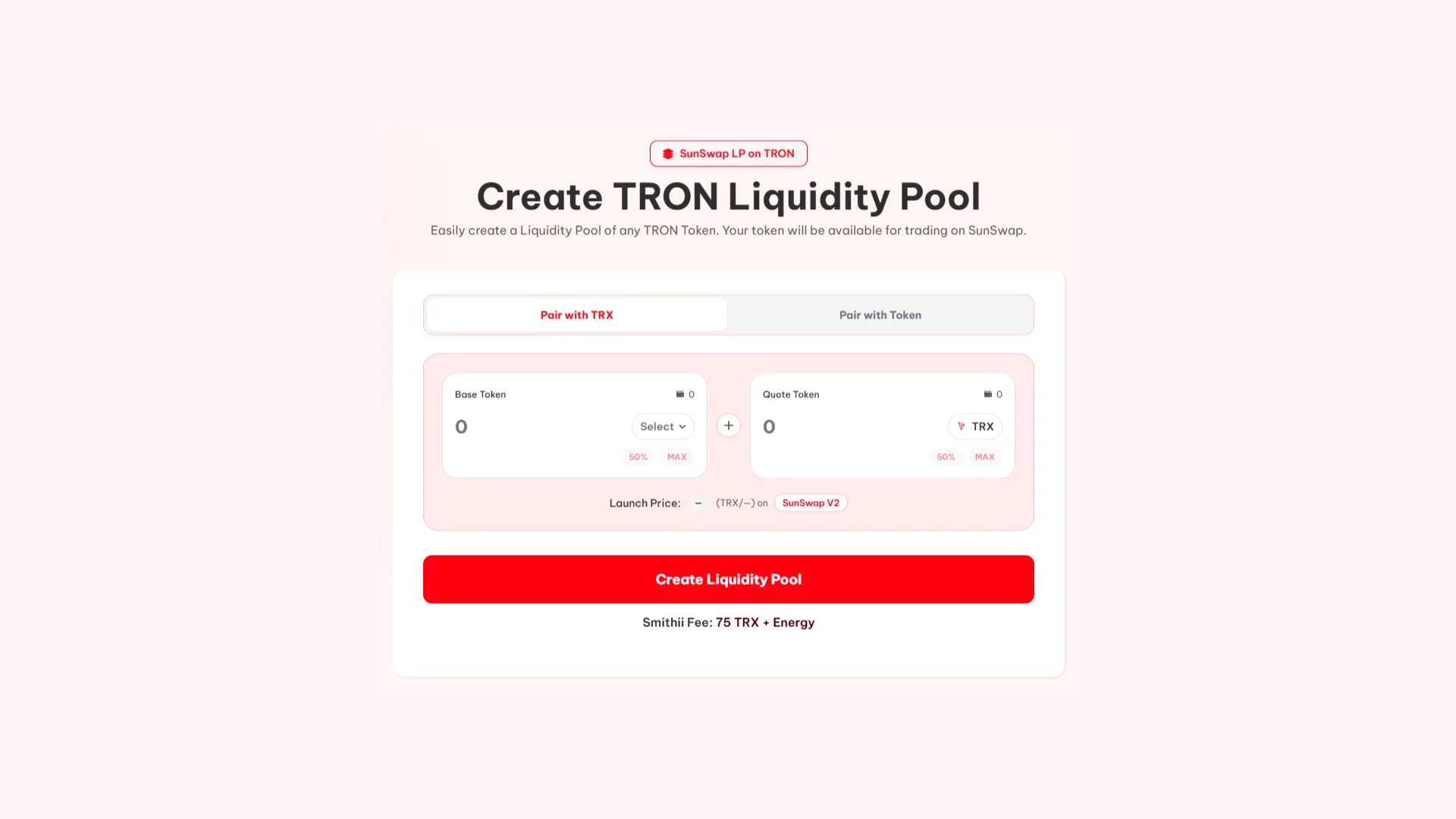
With your wallet connected and the funds ready, here’s how it goes:
- Pick the pair type: the Pair with TRX or Pair with Token tab, depending on what you want to pair it with.
- Select the Base Token: this is your TRC-20, the one that comes out of the Select dropdown.
- Set the Quote Token: TRX by default, or whichever stablecoin you prefer. It’s the asset that anchors the price on the other side.
- Enter the two amounts: type them in manually or use the 50% and MAX shortcuts to seed half or all of your balance of each asset.
- Check the Launch Price: it shows up under the two fields and is exactly the price your token launches at. If it’s not what you wanted, tweak the amounts until it is.
- Hit Create Liquidity Pool and sign. The pair is live and tradable on SunSwap V2.
Step five is the one you don’t want to skip. It’s the only point in the process where you can fix the launch price without it costing you anything.
What to pair your token with on SunSwap
The tool gives you two paths, pair with TRX or with another token, and in practice the choice comes down to three candidates. Each one changes how the pair behaves.
| Paired with | What it means | When it fits |
|---|---|---|
| TRX | Your token’s price also moves whenever TRX moves | It’s the default option and the one that pulls the most volume on the network |
| USDT | The price stays pegged to the dollar and only reflects your own demand | When you want a clean read on what your token is actually worth |
| USDC | Same as USDT, with less depth in the TRON ecosystem | If your community is already active on USDC |
The real difference is noise. With a pair against TRX, your chart moves up and down based on TRX price action that has nothing to do with you, and explaining that to a community watching the price drop is uncomfortable. Against a stablecoin, that goes away.
On the flip side, the TRX pair is where the volume is. TRON is a network where the native asset and USDT concentrate almost all the activity, so that pair usually finds a counterparty faster.
If you haven’t renounced ownership yet, check our guide on how to renounce authority on a token on TRON
How much liquidity to add when launching the pool
The second call is how much you deposit, and it decides one very concrete thing: how much a normal buy moves the price.
In a shallow pool, a modest buy eats a big chunk of the reserve and the price jumps. The buyer sees massive slippage, and the next one sees a chart that looks manipulated. With enough depth, that same buy barely registers.
The practical rule: think about the typical buy you expect and make sure it doesn’t move the price by more than a tolerable percentage. If what you have isn’t enough, better to add less supply while keeping the ratio than to leave a pair that breaks on the first trade.
Keep in mind that the funds you deposit stay working in the pool, they’re not spent. You can pull them out, but doing so removes the depth holding up the price, so don’t count on that money for anything else.
If you want to go deeper into this, check out our post on how much liquidity you should add to a liquidity pool.
How much it costs to create a liquidity pool on TRON
The tool charges 75 TRX plus the Energy the operation consumes, and that fee covers both the market creation and the pool itself. It’s a one-time payment: there’s no recurring fee to keep the pair alive.
Separate from that is what you put in as liquidity, which isn’t a cost but capital you’re depositing. Worth splitting the two figures when you budget: one gets spent, the other gets locked up.
What to do right after creating the pool
The pair starts existing the moment the transaction confirms, and aggregators pick it up on their own once it has liquidity. No need to register the token anywhere or fill out any listing forms.
What does depend on you is that the pair sees activity. A market with no trades won’t show up on trending lists no matter how deep it is, so distribution to the community and communication come right after this step.
For the initial distribution, use the bulk TRC-20 sender to multiple wallets
FAQ
How much does it cost to create a liquidity pool on TRON?
The tool charges 75 TRX plus the Energy of the operation, and that fee covers both the market creation and the pool. Separate from that is whatever liquidity you decide to add, which isn’t an expense but capital deposited into the pair.
Who sets the initial token price?
You do, through the ratio between the two amounts you deposit. There’s no price field: if you put in a million tokens against a thousand TRX, the launch price is 0.001 TRX. The tool calculates it and shows it as Launch Price before you sign.
Which DEX does my token get listed on?
On SunSwap V2, the go-to decentralized exchange on TRON. Once the pair is created and has liquidity inside, aggregators detect it on their own without you having to request any listing.
Can I pull back the liquidity I added?
Yes, you can withdraw it at any time, but doing so removes the depth holding the price up and leaves the pair with no counterparty. That’s why you should only add what you can afford to keep deposited, and not count on those funds for other expenses.
Wrap-up
Creating the pair is the step that turns a deployed contract into a token someone can actually buy. The tool handles the technical side in a single signature, so the real work sits in the two numbers you type in: the ratio that sets the price, and the pool size that decides whether the pair can take the pressure.
Take a proper look at them in the Launch Price panel before you confirm. It’s the cheapest moment to change your mind, and the only one where fixing something costs you nothing.

Content creator and SEO contributor at Smithii. Systems Engineering student and crypto-tech enthusiast.



