

How to manage a token on Arc: ownership, supply, taxes, and limits
You launched the token with settings tuned for day one, and now day one is behind you. The anti-bot that shielded a thin pool is getting in the way, the tax routes to an address you no longer use, and there’s a partner who shouldn’t be paying the fee. All of that lives inside the contract and gets changed with transactions, not by editing a form.
Learning how to manage a token on Arc comes down to a single panel that bundles those transactions. It reads the contract owner, only surfaces what your wallet can actually sign, and groups everything into five tabs: ownership, supply, taxes, trading limits, and address lists. Worth knowing upfront: several of the actions you can take are not reversible.
How to manage a token on Arc step by step
The Token Manager by Smithii for Arc works on ERC-20s deployed with their tools and never custodies anything: every action is a transaction you sign yourself. The header summarizes the selected token with its current supply, tax, and caps, and on the left you’ll find the five setting groups:
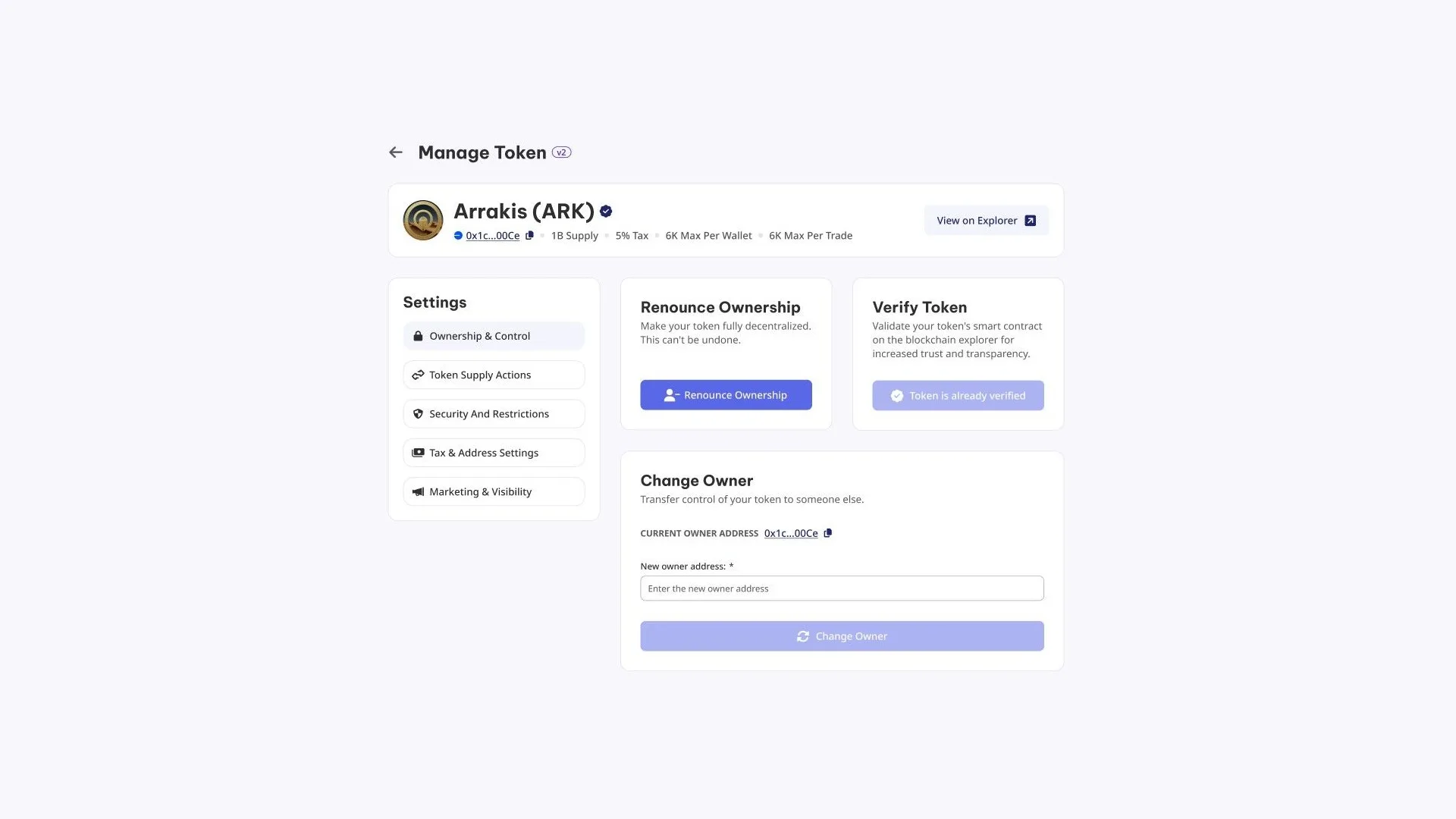
Managing any setting always follows the same sequence:
- Connect the EVM wallet that owns the contract to the network. The panel checks ownership before enabling anything.
- Pick the token you want to manage from the ones that wallet controls.
- Open the group you need from the left column: ownership, supply, security, taxes, or visibility.
- Set the values for that action, whether it’s an amount, a new address, or a toggle.
- Hit the action button and approve the transaction in your wallet.
- Wait for the on-chain confirmation, which takes a few seconds, and check that the header reflects the change.
The five setting groups
Each token only exposes what its own contract supports, so two different tokens can show different screens. Here are the groups and what falls under each one:
- Ownership and control: transfer the contract to another address or renounce it permanently. This is also where you trigger contract verification on the explorer if it wasn’t verified yet.
- Supply: mint more units or burn them to take them out of circulation, as long as the token was deployed with those capabilities.
- Security and restrictions: anti-bot, anti-whale, per-transaction cap, cumulative cap, cooldown between buys, and opening window.
- Taxes and addresses: the percentage, who collects it, and which wallets are exempt from paying it.
- Visibility: the token’s presentation data for explorers and aggregators.
On top of that, there are the address lists, which work both ways: a blacklist locks a specific address out, and a whitelist does exactly the opposite.
What no panel can change
There are three data points that don’t show up on any tab, and it isn’t an oversight: the name, symbol, and decimals are written once, when the contract is initialized. The standard doesn’t include any function to rewrite them, so no tool can touch them, not this one and not any other.
This catches people off guard when they come from Solana, where metadata stays editable until you revoke the update authority. On Arc the logic is the opposite: they were never editable, so a typo in the symbol gets fixed by deploying another token, not by correcting this one.
What you can rework as many times as you want is the part that lives off-chain. The logo, description, and project links are stored by explorers and aggregators in their own listings, and those do accept edits.
Renouncing ownership of a token on Arc: the one-way move
Renouncing ownership of a token on Arc assigns the contract’s ownership to the zero address. From that moment on, nobody mints, nobody pauses, nobody edits a tax, and nobody touches a list, simply because there’s no longer an address the contract will accept those orders from. The panel itself warns you before you click. This is a vote of confidence you should weigh if you want to signal transparency and commitment.
It’s done for the same reason a buyer looks for it. An owner still in place is a set of powers that could be used, however unlikely, and reading a renounced contract is how someone convinces themselves that the supply won’t grow and their tokens won’t get frozen. If you want to see how that signal reads from the outside, run your contract through the Arc risk scanner before and after.
Since the change is permanent, order matters: renouncing ownership is the last thing you do, not the first. Before that, set your taxes where you want them, loosen the launch-window limits, and confirm you won’t need to burn supply later. Transferring ownership to another address is the soft version of the same idea, and that one the new owner can undo.
Changing token taxes on Arc after launch
The settings that matter on day one are almost never the ones that matter three months in. Anti-bot and tight caps exist for the opening blocks, when the pool is thin and a single address can grab a big slice, so it’s normal to relax them once the market settles.
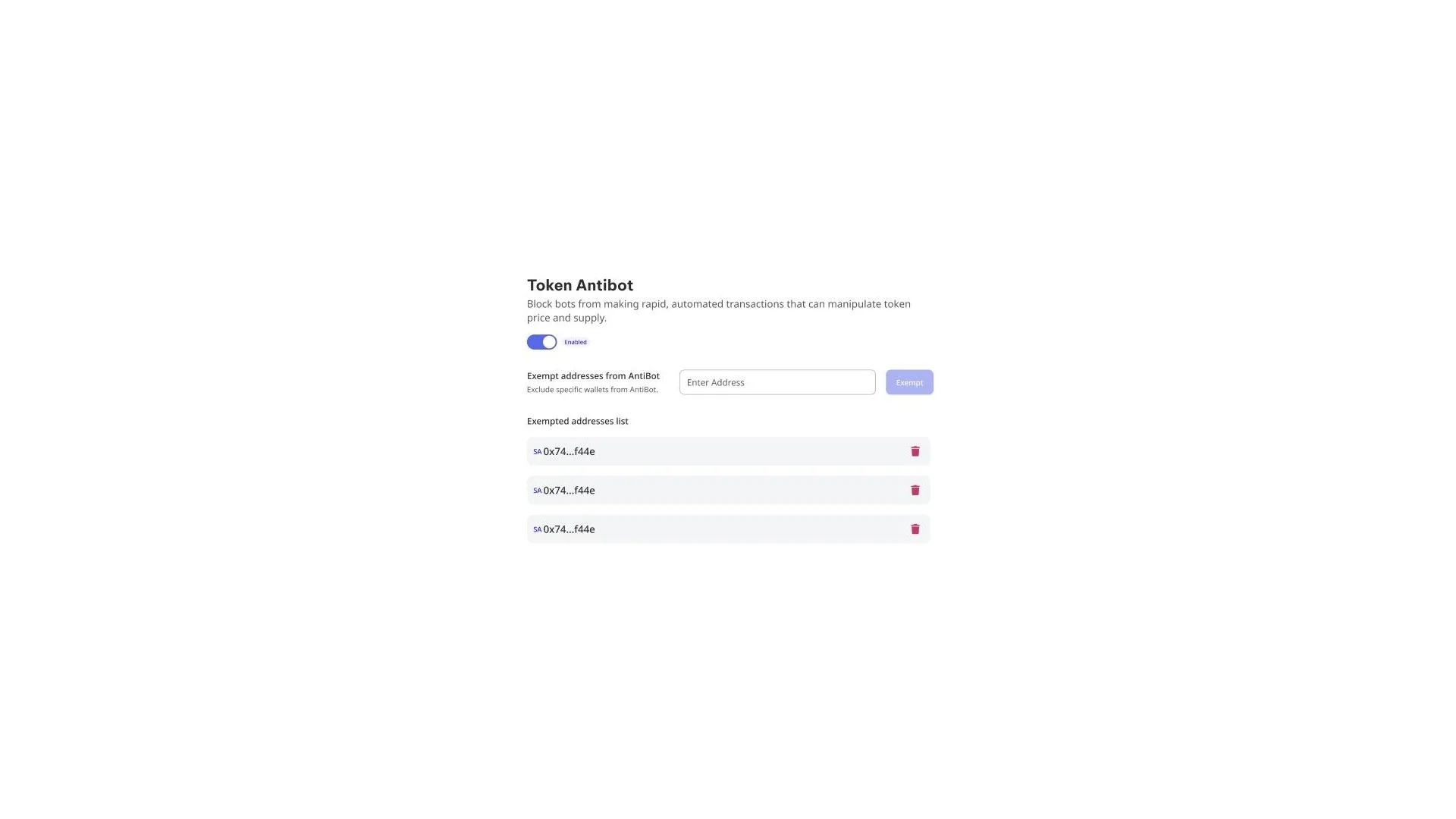
Exemptions are the most practical part of this section. Each restriction accepts a list of addresses that sit outside it, so you can keep anti-bot on and at the same time let the pool breathe, or a staking contract, or a partner’s wallet that needs to move large amounts. You add them one at a time and remove them the same way.
Taxes work the same way. You can change the percentage, redirect collection to another address when treasury moves, or exempt an integration so it doesn’t pay a fee on every operation it runs.
Which actions cost money and which don’t
The split is simple. Basic actions (transferring ownership, renouncing, minting, burning, adjusting a tax) only cost network gas. Advanced features (anti-bot, anti-whale, blacklists and whitelists, deflation and reflection) carry a one-time fee per token paid the first time you enable them.
Here Arc has an edge you feel in practice: both the fee and gas settle in USDC, which is the currency the network runs on. The number you see on the button is the exact amount leaving your wallet, not an estimate in an asset whose price shifts while you’re signing. That said, the owner wallet has to hold that balance, so it’s worth funding the wallet with USDC before you start signing.
FAQ
Who can manage a token from the panel?
Only the wallet listed as owner of the contract on-chain. The tool reads that address the moment you connect and grays out any action your wallet can’t sign, so you never end up paying for a transaction that was going to revert.
Can I undo renouncing ownership?
No. Ownership goes to the zero address and there’s no way to get it back, not from this tool and not from any other. If what you want is to hand over control while keeping the option to reverse it, transfer the contract to another address instead of renouncing.
Can the token name or symbol be fixed?
No. Those fields, along with decimals, are locked in when the contract is created and the standard doesn’t allow changing them afterwards. The only way out of a typo is deploying a new token. Logo and description, on the other hand, live off-chain and can be updated.
Why isn’t my token showing every option?
Because the panel reflects what your specific contract supports. A token deployed without minting capability won’t show the mint action, and one without taxes won’t show the tab that adjusts them. Those features are chosen when you create the token on Arc and can’t be added later.
Does the tool ever custody my token?
Never. Every action becomes a transaction that leaves your own wallet and gets signed by you, so control of the contract doesn’t change hands just because you’re using the panel.
Conclusion
The value of a panel like this isn’t being able to touch everything, it’s knowing what you can touch and in what order. Taxes and limits are meant to move as the market changes. Ownership is meant to be released once. And the token’s identity isn’t meant to move at all, because it was decided the day you signed the deploy.
If you’re planning the launch, that order saves you headaches: tune first, relax later, and renounce at the end, when there’s nothing left you’d want to change.

Content creator and SEO contributor at Smithii. Systems Engineering student and crypto-tech enthusiast.



