

How to check the security of a token on Arc and why part of the report comes back as Unknown
Someone drops an Arc token address in a group chat and the question answers itself: if I ape in, can I get out? Reading the contract by hand on the explorer covers part of it, but you need to know what to look for in the bytecode plus a decent amount of patience for a token you might rule out in thirty seconds.
Learning how to check the security of a token on Arc is quick: the rug checker automates that first pass of analysis. You paste the contract address and the scanner returns what it can read from ownership, bytecode, and any published liquidity. It’s free, works without connecting your wallet, and covers any token on Arc.
It also doubles as a guide to get your token through the trust checks, because maybe people aren’t buying since you did something that trips the alarms for anyone looking and you didn’t even notice. No more intro. Let me show you straight up how to analyze a token on Arc.
How to check the security of a token on Arc step by step
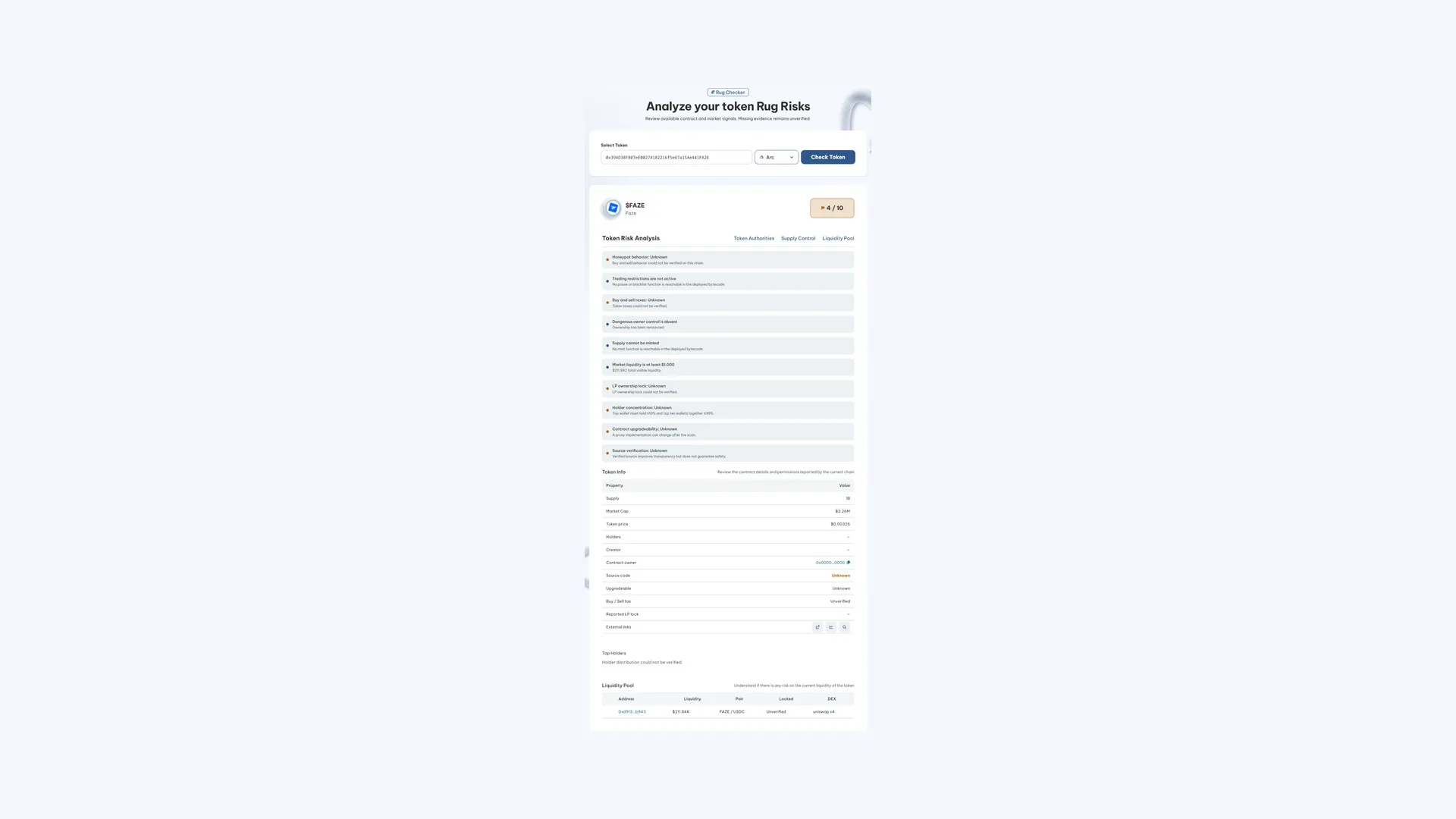
The Smithii Rug Checker for Arc is read-only: it doesn’t sign anything, doesn’t ask for permissions, and doesn’t need you to connect a wallet, so you can analyze any contract quickly and easily. Here’s the screen with a report already generated:
The whole process breaks down into two quick steps:
- Paste the contract address you want to analyze into the search field. Right below it, you’ll see shortcuts to the tokens with the most activity in case you’re just exploring.
- Hit “Check Token” and give it a few seconds to pull the contract and market data.
That’s it. Now you can see the analysis summary that our rug check delivers: supply and liquidity controls, the key points to keep in mind, and the risk factors. You’ll also see info about the token such as its market cap, who the creator is (if there’s one), and the top holders.
Why part of the report shows up as Unknown
As soon as the report generates, you’ll see several lines flagged as Unknown, and that’s not a bug. Token scanners rely on third-party providers that simulate buys and sells to catch honeypots, and those providers don’t cover Arc yet because the network is still very new.
There are two ways to handle that. One is to fill the gap with a pass and make the report look complete. The other is to admit that the data isn’t available. This tool goes with the second option, so no check that can’t actually run is presented as passed. Here’s what you’ll see when using the rug checker:
- Honeypot behavior, meaning whether the contract lets you buy but blocks the sell.
- Buy and sell taxes, both the current percentage and whether the owner can crank them up later.
- Holder concentration, which measures whether a single wallet or a handful of them hold enough supply to wipe out the liquidity.
How to read the score without getting it wrong
At the top of the report there’s a score out of ten, and it’s the number most people misread on this network. Since checks that can’t run don’t add to the total, a mediocre score can come from missing data rather than a dangerous contract.
The example in the screenshot shows it clearly. That token has ownership renounced, no mint function left, no pause or blacklist, and visible liquidity in its pair against USDC. All good signs. Still, the score lands mid-table, because five out of ten checks couldn’t be completed.
That’s why the number in the corner is a rough guide and not much more. What actually matters is reading it line by line: which ones came back green, which ones red, and how many were left unanswered. A token with two red flags and eight clean checks is worse news than one with six Unknown boxes, even if the score says otherwise.
Even though you get a detailed analysis really fast with this tool, it’s true that it’s not the final word. The best way to make sure a token is legit and not a scam is doing your own deep research on the people behind it and the positions of the wallets holding part of the supply.
What signals actually get verified on-chain
What the scanner does read comes straight from the deployed contract and the live market, no middlemen involved. These are:
- Owner privileges. If ownership is still in the hands of someone who can pause trading, blacklist wallets, or change the transfer rules after buyers come in, it gets flagged. If ownership has been renounced, that shows up too.
- Transfer restrictions, checking the bytecode for a pause or blacklist function that can be called.
- Ability to mint more supply, which is the check for whether a reachable mint function is still present in the deployed code.
- Market liquidity, with the total visible figure and the minimum threshold below which the pair is too thin to exit without wrecking the price.
- Contract upgradability, because a proxy could point tomorrow to code that’s different from what you’re reading today.
Further down, the contract card fills in the context: supply, market cap, price, owner address, whether the source code is verified, and whether there’s any declared liquidity lock. It wraps up with the pair table, where you see the pool address, how much liquidity it holds, what it trades against, and which DEX it lives on.
Si la pool de tu token reúne poca, aquí tienes cómo añadir liquidez en Arc sin mover el precio.
What you need to review on the Arc token yourself
Here are the reasonable ways to cover the gaps while automated coverage catches up with the network.
For supply concentration, the Arc explorer lets you inspect the contract and see which addresses hold which portion. It’s manual work, but going through the top ten positions takes a couple of minutes and answers the question that matters most: whether a single wallet can sink the pair whenever it wants.
For honeypot and taxes, the practical check is buying a tiny amount and trying to sell it right away. If the sell fails, or goes through with a haircut you weren’t expecting, you just found out for cheap what the scanner couldn’t tell you. And if the source code is listed as verified, reading the transfer function clears up both questions at once.
It’s also worth remembering that no scanner guarantees a token is safe, not here and not on a network with full coverage. A clean contract is still perfectly compatible with a team that walks away from the project or pulls liquidity from a position they never locked.
FAQ
How much does an Arc rug check cost?
Nothing. The scan is free and read-only, so you can run it on as many contracts as you want. There’s no transaction involved either, which means no gas is spent when you run it.
Do you need to connect a wallet to scan a token?
No. Just paste the contract address. Since you’re not connecting your wallet, you’re not granting any approvals or signing anything, which is exactly the right precaution when you’re investigating a token you don’t trust.
Does an Unknown result mean the token is safe?
No, it means that evidence isn’t available. The tool flags checks it can’t run on Arc this way instead of marking them as passed, and every one of them is still a risk you need to verify separately before trading.
Can I scan a token that isn’t mine?
Yes, and that’s the standard use case. Everything it reads is public data from the deployed contract and the market, so you don’t need any relationship with the project or permission from anyone.
Is it useful for checking my own token before launch?
Yes, and it’s a solid habit. Running your contract through the scanner shows you exactly what anyone doing due diligence before buying will see. If you used the token creator on Arc and already renounced ownership, it’ll show up right there.
Wrapping up
Arc’s rug check does two things well: it rules out contracts with active privileges in seconds and it tells you point-blank what it couldn’t verify. The second part matters just as much as the first, because a report that pretends to be complete is more dangerous than no report at all.
Use it as a first filter, not a verdict. Drop what shows up red, dig into what shows up as Unknown on your own, and save your capital for what clears both tests. As the network matures and full coverage rolls in, that second bucket will shrink on its own.

Content creator and SEO contributor at Smithii. Systems Engineering student and crypto-tech enthusiast.



