

How to add liquidity on NEAR: deepen your token’s Rhea pool without moving its price
When a token starts getting buyers, a small pool runs out fast, and knowing how to add liquidity on NEAR lets you deepen it without touching the price. With more depth, each buy moves the chart less, bigger buyers step in with more confidence, and your token handles activity spikes better.
In this guide I’ll walk you through what changes in a pool when you add more liquidity, when it actually makes sense to do it, how the process works with the Smithii tool, and the risks you take on as a liquidity provider. Let’s get into it.
What changes in your pool when you add liquidity
A Rhea pool holds two reserves, your token and wNEAR, and the price is just the ratio between them. When you add liquidity you contribute to both reserves in the same proportion, so the price doesn’t move, but the pool gets bigger.
What does change is the impact of each trade. In a pool with 50 NEAR, a 5 NEAR buy moves the price in a very visible way. In one with 500 NEAR, that same buy barely registers. That difference is what makes a chart look stable or erratic, and what decides whether a big buyer is willing to step in.
When it makes sense to deepen the pool of a token on NEAR
You don’t need to add liquidity every day, but there are moments when a shallow pool works against you.
- Before a campaign or an announcement: if you’re expecting a wave of buys, a bigger pool keeps the price from spiking and then crashing right after.
- When daily volume is way bigger than liquidity: it’s a signal that every trade is pushing the price too much.
- After a large airdrop: many recipients sell within the first hours, and a deep pool absorbs those sells without tanking the chart.
- When the project generates revenue: reinvesting part of the dev taxes into liquidity is a visible way to show commitment to the token.
If you’re not sure how much liquidity you should add to a token, check out our dedicated post.
How to add liquidity on NEAR step by step
The Smithii Liquidity Adder for NEAR is a tool that lets you add your token and NEAR to its Rhea pool with a single approval after the fee. You type one side, the other adjusts to the pool’s ratio, and the tool handles registering what’s missing, wrapping your NEAR and depositing everything. Once you’re in the interface, you’ll see something like this:
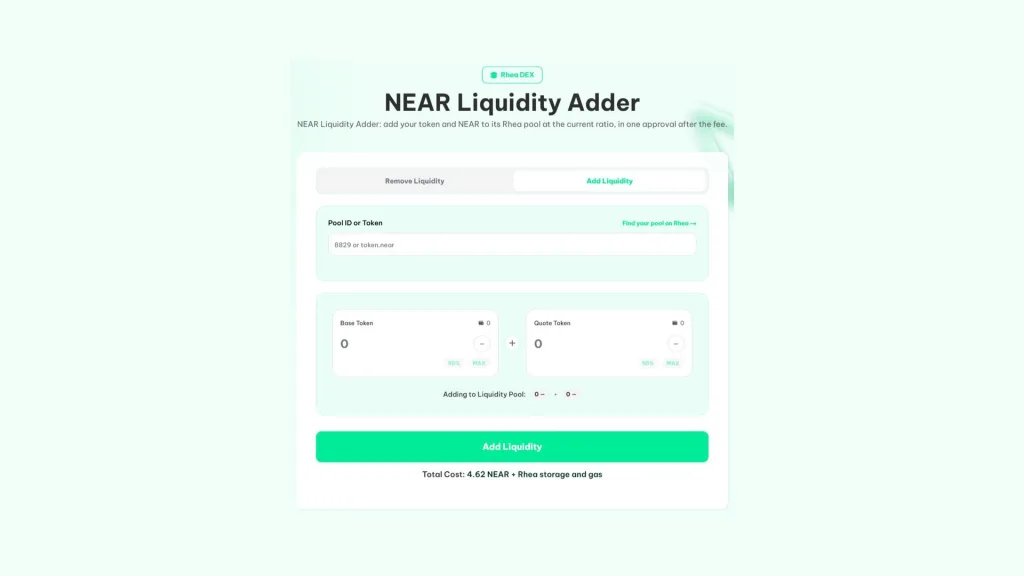
If your token already has a pool on Rhea and you hold both assets in your wallet, do this:
- Connect your NEAR wallet: with the token and the NEAR you’re going to add.
- Point to the pool: type its pool ID or the token account, for example 8829 or token.near.
- Enter one of the two amounts: the other is calculated automatically based on the pool’s current ratio.
- Hit Add Liquidity: and approve the fee in your wallet.
- Approve the liquidity: your shares are credited to your Rhea account.
If the transaction fails, the next attempt doesn’t charge you again. And before asking anything from you, the tool checks that the token isn’t paused or has a restriction blocking the deposit.
How to find the pool ID of your token
Every Rhea pool has a number. The easiest way is to type the token account into the field and pick its NEAR pool from the list that pops up. If you’d rather look it up yourself, the Find your pool on Rhea link takes you to the DEX, and the number you see in the pool’s address is its ID.
Why there may be a leftover balance in your Rhea account
Rhea adds the liquidity exactly at the pool’s ratio at that moment. If the price moves a bit between the time you calculate the amounts and the moment the trade executes, a small leftover from one side stays in your internal DEX balance. It’s not lost: the tool returns it to you with one click, or you can withdraw it from app.rhea.finance.
What you’re signing up for when providing liquidity in a NEAR pool
When you add liquidity you stop holding a fixed amount of tokens and NEAR and instead hold a share of the pool. What you get back when you withdraw depends on how the price has moved in the meantime.
If your token price pumps hard, the pool sells tokens for NEAR and you’ll withdraw more NEAR and fewer tokens than you put in. If it drops, the opposite happens. That gap compared to simply holding both assets is called impermanent loss, and it’s the cost of market-making a token. In return, liquidity providers earn a share of the fees from every swap.
Tax tokens: the detail that changes the amount
If your token charges a transfer fee, it also charges when depositing into Rhea. The tool calculates liquidity based on what the DEX actually receives, not what leaves your wallet. If you’re the owner, your wallet is exempt as long as you haven’t renounced ownership, which is why it pays to strengthen the pool before doing so.
Before locking down your token’s permissions, go through the right order to renounce ownership of your token on NEAR so you don’t overpay on fees.
Adding liquidity to the pool of a token that isn’t yours
The tool isn’t limited to your own tokens. It works for any NEP-141 token with a pool against NEAR on Rhea, so you can also strengthen the pool of a project you’re part of or a token from your community. The risk is different here, since you don’t control the contract.
Before adding to someone else’s pool, check who holds permissions over the token, whether the owner can pause transfers or mint more supply, and how holders are distributed. A couple of minutes of analysis saves you from supplying a token that can be drained, and you can do it for free with a rug check for token on NEAR.
How much it costs to add liquidity with Smithii
| Item | Amount | Who gets it |
|---|---|---|
| Smithii fee | 4.62 NEAR | Smithii |
| Rhea storage | Small and mostly refundable | Rhea |
| Gas | A few cents of NEAR | The network |
| Your liquidity | Whatever you decide | Still yours inside the pool |
The fee is charged once per operation, even if you have to retry it. The liquidity you add isn’t an expense: you can pull it back whenever you want by withdrawing your shares.
When the time comes, here’s how to remove liquidity on NEAR and get native NEAR back.
FAQ
How much does it cost to add liquidity on NEAR with Smithii?
The fee is 4.62 NEAR, plus a small Rhea storage deposit (mostly refundable) and network gas. The tokens and NEAR you supply stay yours inside the pool.
Can I choose the price at which I add liquidity?
No. When you add liquidity, it follows the ratio the pool already has, which is what sets the current price. That’s why you type in one amount and the other is calculated for you. Setting a new price only happens when you create a pool from scratch.
Why does a bit of a token get left behind in Rhea?
Because Rhea adds liquidity at the exact pool ratio, and a small leftover from one side can stay in your Rhea balance. The tool refunds it with one click, or you can withdraw it from app.rhea.finance paying only gas.
How do I find the pool ID for my token?
Enter the token account and the tool shows you its pools paired against NEAR. You can also open the pool on Rhea: the number in its address is the pool ID.
What happens if the transaction fails?
The next attempt won’t charge the fee again. If any token was deposited into Rhea before the failure, it stays in your DEX balance and you can recover it or finish the operation.
Conclusion
Once you know how to add liquidity on NEAR, you can give your pool more depth without moving the price, at the moment that works best for your project. The tool handles the registrations, converts the NEAR and refunds any leftovers.
Pick your timing carefully, keep impermanent loss in mind, and if your token has a tax, reinforce the pool before renouncing ownership. If you don’t have a pool yet, start by opening your token market on Rhea.

Content creator and SEO contributor at Smithii. Systems Engineering student and crypto-tech enthusiast.



