

How to remove liquidity on NEAR: pull your token and native NEAR out of a Rhea pool in a single transaction
If you added liquidity to a pool and now need your funds back, knowing how to remove liquidity on NEAR saves you from stringing together multiple actions on Rhea. You can pull part or all of your position to rebalance the project, move the liquidity to another pool, or take profits, and get your token and native NEAR delivered straight to the wallet.
In this guide I’ll walk you through exactly what you get back when you withdraw, how the process works with the Smithii tool, what pulling liquidity does to your token, and what it costs. Let’s dive in.
What you get back when you remove liquidity from a Rhea pool
When you provide liquidity on Rhea, you don’t hold a fixed amount of each token. You hold pool shares, which represent your slice of its two reserves. When you withdraw them, you receive that slice in whatever state the pool is in at that moment.
That’s why the amounts rarely match what you put in. If your token’s price has gone up, you’ll get back more NEAR and fewer tokens. If it’s dropped, more tokens and less NEAR. On top of that difference, you also collect the swap fees the pool accrued while your liquidity was in it, which work in your favor.
There’s a technical detail the tool handles for you. When you pull liquidity, Rhea doesn’t send anything directly to your wallet: it credits both tokens to your internal DEX balance, and a second operation is needed to withdraw them. Smithii does both in the same transaction and also converts the wNEAR into native NEAR.
How to remove liquidity on NEAR step by step
The Smithii Liquidity Remover for NEAR is a tool that lets you pull part or all of your liquidity from a TOKEN/NEAR pool on Rhea and receive both assets in your wallet without writing any code. You pick the pool, choose the percentage, and sign. Once you’re in the tool’s interface, here’s what you’ll see:
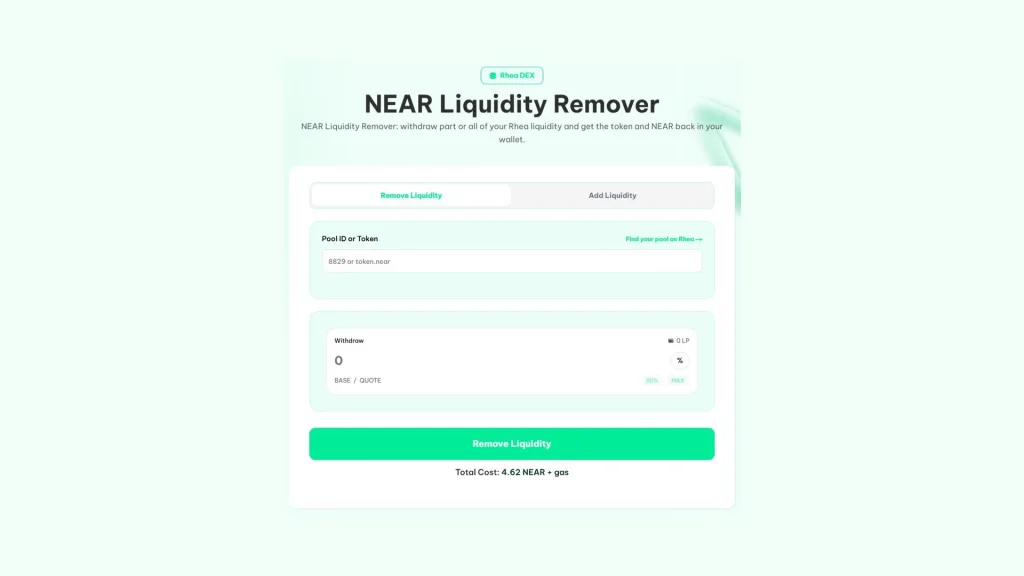
If you’ve got shares in a Rhea pool and some NEAR for the fee and gas, here’s the flow:
- Connect your NEAR wallet: the same one you provided liquidity with.
- Pick the pool: enter the pool ID or the token account.
- Choose the percentage: how much of your shares you want to pull, with shortcuts for 50% or the full amount.
- Hit Remove Liquidity: and approve the fee in your wallet.
- Approve the withdrawal: the token and the NEAR land in your wallet in the same transaction.
The token and the NEAR arrive together in your wallet, with the wNEAR already unwrapped. If the withdrawal fails, your next attempt won’t charge the fee again.
How to check how much liquidity you have before pulling it
As soon as you pick the pool, the Withdraw field shows you how many shares you hold in it, and once you choose the percentage you get a preview of the tokens and NEAR you’ll receive. If you can’t remember which pool you provided to, enter the token account and select its NEAR pair, or check your positions in Rhea’s liquidity section.
The 20% slippage protection
Between the moment you confirm and the moment the withdrawal executes, the pool price can move. So you don’t get caught off guard, the operation has a 20% slippage limit: if you were about to receive less than that margin against the preview, the withdrawal fails instead of shortchanging you. On calm pools you’ll never notice it, but when things get volatile it has your back.
If the tokens don’t make it to your wallet
In rare cases, the liquidity gets pulled but the transfer to your wallet doesn’t finish. The tokens aren’t lost, they stay in your Rhea balance, and you can move them to your wallet from app.rhea.finance paying only the gas.
Partial withdrawal vs full exit: the impact on your token
Pulling liquidity isn’t neutral for the market. The shallower the pool, the more the price moves on every buy or sell, and holders spot it on the chart right away.
- Partial withdrawal: handy for rebalancing or taking some profit off the table. If the pool stays deep, the price impact is barely noticeable.
- Full withdrawal: leaves the token with no market in that pool. If you do it on your own project’s token without warning, the community will read it as a rug pull.
- Migrating to another pool: if you’re moving liquidity, announce it beforehand and do it as fast as possible so the token isn’t left without a market.
The rule of thumb is transparency. If you’re the token’s dev, say what you’re going to do with the liquidity before you touch it. The transaction is public on NearBlocks, and it’s better that the community hears it from you than from a tracker.
If you need to reinforce the pool afterwards, here’s how to add liquidity on NEAR without moving the price.
Why you receive less of your token with tax
Tokens with a transfer tax also charge it when Rhea sends them back to you, because the DEX contract isn’t exempt from those fees. The result is that you receive the amount after the tax, burn fee, or reflection built into the token is deducted.
The tool shows you the final amount after deductions before you confirm, so there are no surprises. If you’re the owner of a token with tax, keep this in mind when planning: pulling liquidity always triggers those fees, and adding it while you’re the owner is the way to avoid paying them on the way in.
How much it costs to remove liquidity on NEAR
| Item | Amount |
|---|---|
| Smithii fee | 4.62 NEAR |
| Network gas | A few cents of NEAR |
| token fees | Only if your token has tax, burn fee, or reflection |
| Retry after a failure | No new charge |
The fee is paid to Smithii only once per withdrawal. Everything else is network cost or rules from the token itself, and the form shows them to you before you sign.
What to do with the funds after pulling liquidity
Once you have the token and NEAR back in your wallet, what you do next depends on why you withdrew. These are the most common scenarios for a dev:
- Relaunch with a different ratio: if the pool opened with a badly calculated price, you can pull out and open a new one with the correct amounts, giving your community a heads-up first.
- Distribute to holders: the recovered tokens can go toward an airdrop or rewards instead of sitting idle in the team wallet.
- Boost the treasury: the recovered NEAR can fund development or marketing, as long as the remaining pool is still deep enough to operate.
If you want to open a new pool after withdrawing, check out how to create a liquidity pool on NEAR and set its price.
FAQ
How much does it cost to remove liquidity on NEAR with Smithii?
The fee is 4.62 NEAR plus network gas. If the withdrawal fails, the retry doesn’t charge you again.
Do I receive NEAR or wNEAR when I withdraw?
You receive native NEAR. The tool converts the wNEAR from the pool back to NEAR along the way, so you don’t have to do that step separately.
Why do I receive less of my token than expected?
If your token has transfer fees, they get charged when Rhea sends it back to you, because the DEX isn’t exempt. The form shows you the final amount after deductions before you confirm.
Can I withdraw only part of my liquidity?
Yes. You pick the percentage of your shares you want to pull out, from a small portion up to the full amount, and the rest stays in the pool.
What if the tokens don’t show up in my wallet?
If the withdrawal to your wallet fails after you pull the liquidity, the tokens stay parked in your Rhea balance. You can withdraw them from app.rhea.finance, paying only gas.
Final thoughts
Once you know how to remove liquidity on NEAR, you can recover your Rhea position in a single transaction, with NEAR already converted and slippage protection that blocks withdrawals at a bad price. What you get back depends on how the price has moved, so double-check the preview before confirming.
If the token is yours, flag any major withdrawal before you make it. Liquidity is what builds trust in a token, and pulling it without warning carries a cost no tool can undo.

Content creator and SEO contributor at Smithii. Systems Engineering student and crypto-tech enthusiast.



