










How to Create Meme Coin on Polygon: Full No-Code Guide
We’re going to walk you through how to create a Meme Coin on Polygon as fast as possible, with no code and no extra hassle.
Then we’ll cover how to configure the token on Polygon to give it proper meme coin identity by adding a logo, links and information tied to whatever meme angle you picked. Finally we’ll create the liquidity pool on Uniswap to launch the meme coin of Polygon to market.
In a few minutes of reading you’ll know everything you need to create a Meme Coin on Polygon, but first let’s go over a few key concepts. If you’d rather watch, check out the video below where we run through the whole process.
What is a meme coin on Polygon?
A “meme coin” is a type of cryptocurrency inspired by internet memes or humorous themes. These coins, often treated as speculative assets, have gained traction thanks to active communities, viral marketing and explosive price runs, with coins like $POLYDOGE and $DOGELONMARS as prime examples.
Meme coins started out as a parody or commentary on speculation in the crypto market. Over time, some of them have outgrown their joke origins, building real communities of followers and finding use cases in the crypto ecosystem, from blockchain gaming to NFTs and crowdfunding.
To sum it up, creating a Meme Coin on Polygon is essentially the same as creating any token on Polygon, with the only difference being the humorous nature of the meme token. So a meme coin on Polygon is, at the end of the day, just a layer-2 token ERC20.
Creating a meme coin isn’t the hard part: things to keep in mind
First off, we have to be clear that the heart of a meme coin is the meme itself. Sounds obvious, but it’s easy to forget. Basically, what makes a meme coin “relevant” is how easy it is to create memes with it.
The more and better memes you can produce, the more reach you’ll get.
The more reach you have, the more exposure and sales you’ll pull in.
Beyond the process of creating a meme coin on Polygon itself, we’ll show you how to launch it to market by creating a Liquidity Pool on Uniswap, and how to give it that meme coin identity by assigning a logo and links to your website and social profiles.
All of these factors need to be considered when analyzing how much it costs to create a meme coin cryptocurrency on Polygon. You also need to keep design, marketing and liquidity costs in mind.
I’d also recommend holding off on launching a meme coin until you have the basics ready: Branding, Marketing Plans, Social Media and Tokenomics.
Marketing and creating a meme coin on Polygon
Marketing is inseparable from launching a meme coin. These tokens have no real utility beyond being a meme. From a marketing angle, you need to understand what drives the market (hype) and which platforms get the most action. We go deeper into this in the guide to promoting a memecoin.
Looking at hard data and meme coin success stories, most of the tokens with strong exposure and the best performance tend to use “influencer” promotions and get pushed in DAOs by Alpha Callers.
Other marketing moves worth considering are community-driven social platforms like X and Discord, and it’s strongly recommended to look into running a dedicated project website too.
How much does it cost to create a meme coin on Polygon?
As we mentioned before, creating a meme coin on Polygon is really just creating a Layer 2 token ERC20, and since every token built on that standard is a smart contract, you’ll need a developer with the right skills and experience who you’ll have to pay to build the smart contract behind your token, which usually isn’t cheap.
The disruptive angle of the smithii tools suite is that it lets anyone with zero coding knowledge generate the smart contract for a meme coin (AKA Layer 2 ERC20 token) from a friendly interface while paying a tiny fee of just 900 POL.
Why create a meme coin on Polygon?
Right now, the Polygon blockchain is a solid pick for launching your own token. That comes down to the low fees and low congestion you get from a layer 2 ERC20 blockchain.
Since it inherits ERC20’s security guarantees and is still relatively new, Polygon is an ecosystem worth exploring, even with fewer users compared to other blockchains.
The Polygon meme coin market hasn’t been tapped as hard as Solana or Ethereum. Even Base’s blockchain moves more meme coin volume. For bold builders, that’s an opportunity.
How to create meme coin on Polygon step by step
To create meme coin on Polygon we’ll head to the Polygon Token Creator tool from Smithii Tools, which lets us create the token without writing a single line of code.

- Connect your wallet
- Pick the name and ticker for your token.
- Set the supply of your token.
- Click Create Token, approve the transaction, and wait for your token to land in your wallet.
If you want, you can use advanced options when creating your Meme Coin on Polygon, like setting a tax, airdrop mode, anti-bot, and anti-whale.
Under «Tax» you can pick the fee you’ll take from every transaction of your token and set the address of the wallet that receives those transaction fees.
Turning on «Airdrop Mode» blocks users from sending or trading your token until you switch it off.
With «Anti Bot» you can limit what snipers can do and how bots act on your token’s liquidity pool, since it caps the time allowed between transactions per wallet.
«Anti Whale» is a key feature that lets you set a max amount a single wallet can buy/sell, a time limit between buy/sell transactions from the same wallet, a cap on how many tokens a wallet can hold, and best of all, you can set a total number of days the anti-whale mechanism stays active, protecting your token from exploits during the first days after launch.
Polygon PoS es una sidechain EVM-compatible diseñada para ofrecer transacciones rápidas y gas fees por debajo del centavo. Las meme coins desplegadas en Polygon son tokens ERC20 estándar, totalmente compatibles con wallets como MetaMask.
Polygon PoS
How to launch Polygon’s meme coin: create the liquidity pool
Once you’ve deployed the smart contract for your meme coin with Polygon Token Creator from Smithii Tools, all that’s left is to create a Liquidity Pool on Uniswap, pairing your new token with a valuable one like $USDC or $ETH, and ship it to market.
But first, you’ll need to update the image, logo, and extra info for your token over at https://polygonscan.io/. You can follow our guide on adding logo, social links, and other info to a Ethereum token. Since it’s the same protocol, the steps are similar.
How to create the liquidity pool on Polygon
Let’s head over to the online Create Liquidity Pool on Polygon tool and, once you’re there, follow these steps:
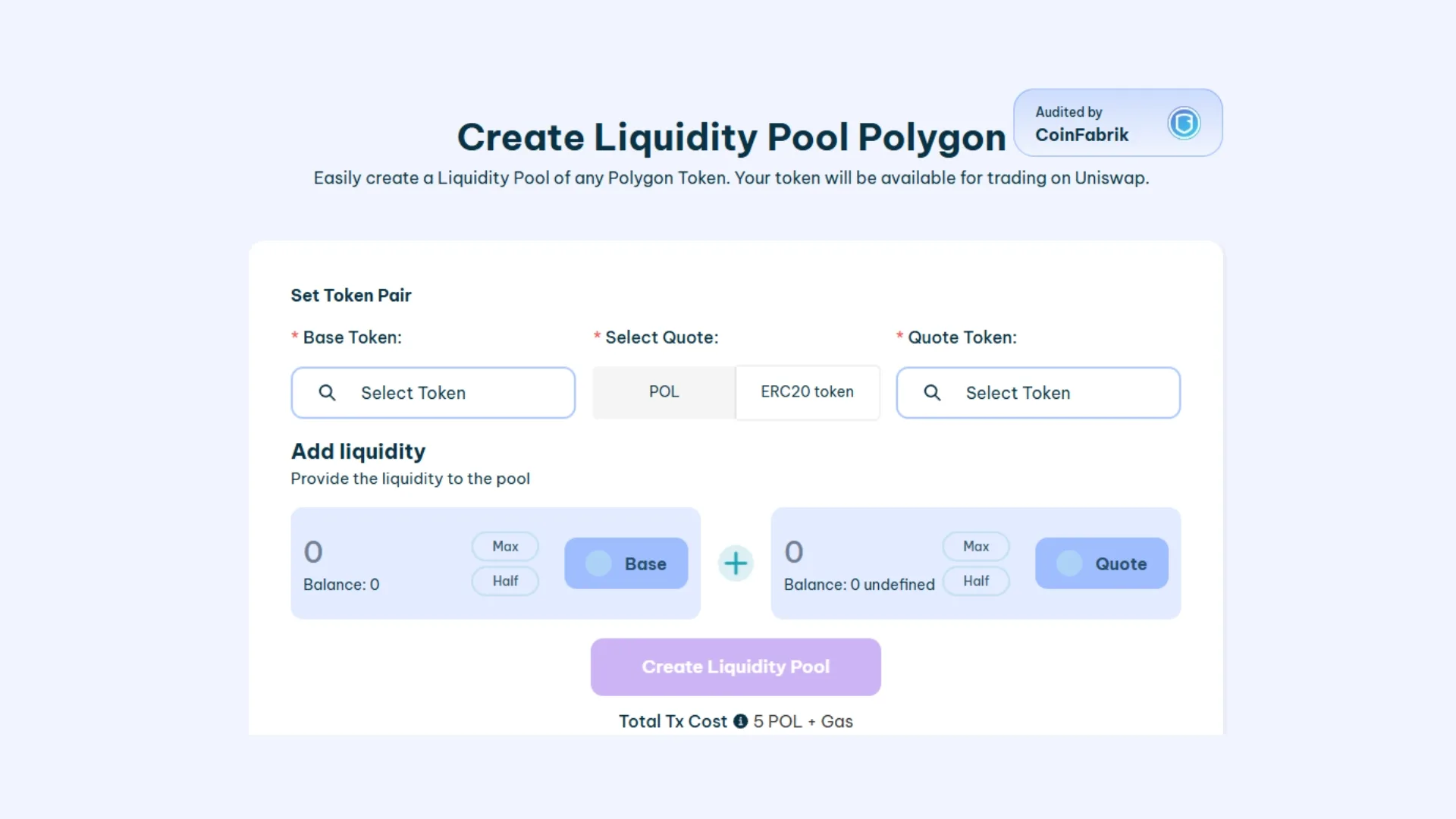
- Connect your wallet
- Pick the “Base Token” (this is the one that sets the price, usually $ETH, $USDT, $USDC, etc.)
- Pick the “Quote Token”, this is your token ready to hit the market.
- Add liquidity, choose the amounts of Base Token and Quote Token to pair. This sets the starting price of your token
- Click “Create Liquidity Pool” and approve the transactions.
Seconds later your Liquidity Pool is live, launched on Uniswap, and you can head over there to check it. Creating a polygon liquidity pool on Smithii costs 250 POL, which covers the fees for the token pair creation and the liquidity.
How to list your Polygon meme coin on Coinmarketcap and Coingecko
Done. That wraps up the process of creating and launching meme coin on Polygon. All that’s left is marketing and getting your token listed on Coinmarketcap and Coingecko, which just requires filling out an application and is completely free.
From here, you can run a volume bot to boost your efforts and make your meme coin look attractive so more people ape in. If you want to learn how it works, we have a guide on using the volume tool for Polygon.
FAQs about creating meme coin on Polygon
What is a meme coin on Polygon?
A meme coin on Polygon is a token ERC20 deployed on the Polygon PoS sidechain whose value comes from a humor, community, or internet culture narrative rather than any technical utility. Technically it’s a standard ERC20, with the minimum gas fees that define Polygon.
How much does it cost to create a meme coin on Polygon with Smithii?
Deploying the smart contract with Polygon Token Creator costs 900 POL. Creating the liquidity pool on Uniswap adds another 250 POL if you use the Smithii tool. On top of that, you need to add the initial liquidity to the pair, which sets the launch price of the token.
Do I need to know how to code to create a meme coin on Polygon?
No. Polygon Token Creator generates the smart contract for you: enter name, ticker, supply, and advanced options (tax, anti-bot, anti-whale) from the interface and the tool deploys the contract on Polygon PoS. The alternative is writing the ERC20 by hand in Solidity, which requires experience and a proper code audit.
How do I launch Polygon’s meme coin to market?
After deploying the token, open a liquidity pool on Uniswap v3 over Polygon by pairing your token with a liquid quote token like WMATIC/WPOL, USDC, or USDT. The pool sets the starting price and opens public trading for the token.
How do I protect the liquidity pool from bots and whales?
Turn on the anti-bot and anti-whale options when deploying the token. Anti-bot adds a cooldown between swaps per wallet to slow snipers down; anti-whale caps how many tokens a wallet can buy or sell during the first days, blocking dumps that would tank the price.
Conclusion
Creating Meme Coin on Polygon lets you leave a mark on the blockchain. It’s the kind of asset devs and project owners in the crypto space identify with, since it’s how you connect with your community and investors. At the end of the day, we’re all here to get something out of the web3 space, and creating a meme coin can be the difference between just another user and someone with bigger ambitions.
Today it’s easy thanks to our online tools, which work as a Polygon smart contract generator where you can build a meme coin without knowing how to code.
Thanks for reading, and remember to subscribe to our newsletter for weekly content built for web3 creators.

Crypto writer focused on the Web3 space. Former contributor to the Smithii editorial team.



