



How to create a token on NEAR step by step: launch your NEP-141 with no code and a single signature
If you’re looking at how to create a token on NEAR without compiling Rust contracts or wrestling with the CLI, the fastest route is to deploy it from a dApp that handles everything for you. That way you can launch a meme coin, mint your community’s token or set up rewards for a project and have the full supply in your wallet in a matter of seconds.
In this guide I’ll walk you through exactly what a token on NEAR is, the full process using the Token Creator from Smithii, what each option costs and what to do right after launch. Let’s get into it.
What is a NEP-141 token and why is it an account on NEAR
On NEAR, fungible tokens follow the NEP-141 standard, the equivalent of ERC-20 on EVM networks. The difference here is that each token lives in its own account, with a readable name that works like a domain. For example, Rhea’s token sits at token.rhealab.near, and that name is also its contract address.
There’s another detail that changes how you work. NEAR charges for the space each piece of data takes up on chain, a model called storage staking where 1 NEAR is locked per 100 KB. That’s why a wallet has to register with a token before it can receive it, depositing a small amount to pay for the slot its balance takes up. It’s a step every Smithii tool on NEAR handles automatically.
How to create a token on NEAR step by step
The Token Creator from Smithii for NEAR is a tool that lets you launch a NEP-141 token without writing a line of code, picking name, supply, logo and advanced options like tax or anti-bot. The Smithii contract charges the fee, creates the token account and sends the full supply to your wallet in a single operation. Once you open the interface, you’ll see something like this:
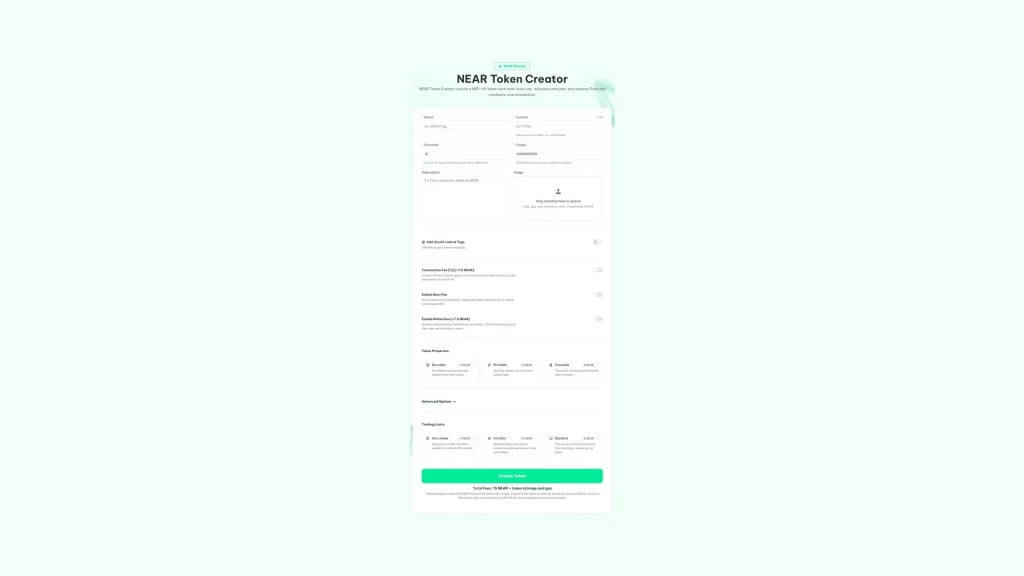
If you already have a NEAR wallet with at least 15 NEAR plus whatever options you want to enable, and a bit extra for storage and gas, do this:
- Connect your NEAR wallet: HOT, Meteor or any other one that shows up in the selector.
- Type in the name and symbol: the symbol, in lowercase, will become part of the token account.
- Set decimals and supply: the full supply lands in your wallet the moment it’s created.
- Upload a small logo: it’s stored on chain itself, compressed down to 3 KB.
- Enable the options you need: mint, burn, pause, blacklist, anti-bot, anti-whale, tax or reflection.
- Review the total and hit Create Token: the tool pulls the exact price from the contract before you sign.
- Approve the transaction: in a few seconds your token is live on NEAR mainnet.
If something fails during creation, the contract refunds your full deposit in the same operation and the page tells you so. There’s no way to end up having paid and have no token.
What address will your token have on NEAR
Since tokens on NEAR are accounts, yours is created as a subaccount of Smithii. Its name combines your symbol in lowercase and a counter, with a format like pepe-12.smithii.near. The number is assigned at creation time and never reused, so two tokens can’t share an address even if they have the same symbol.
That account is what you’ll share with your community and paste into every other tool, from the multisender to the pool creator. Save it as soon as the transaction wraps up.
Your NEP-141 token options and what each one costs
The tool starts from a basic token and lets you add features based on the type of project. Each one is paid once at token creation, and the price is read directly from the contract before you sign.
| Option | What it does | Price |
|---|---|---|
| Base Token | Name, symbol, decimals, supply and logo | 15 NEAR |
| Burnable | Any holder can burn their own tokens | +5 NEAR |
| Mintable | Only the owner can mint more supply later | +5 NEAR |
| Pausable | The owner can pause and resume all transfers | +5 NEAR |
| Anti-whale | Caps each transfer and each wallet during the window you set | +5 NEAR |
| Anti-bot | Anyone buying from a pool can’t move those tokens in the same block | +5 NEAR |
| Blacklist | The owner can block accounts from sending or receiving | +5 NEAR |
| Transaction fee (tax) | A cut of every transfer goes to up to 5 accounts | +7.5 NEAR |
| Reflection | A cut of every transfer is distributed across holders | +7.5 NEAR |
The burn fee, which destroys a slice of every transfer, shows up in the form with no extra charge, but there’s an important catch: once the token is live, it can’t be changed. If you enable tax, burn fee or reflection, the token needs at least 6 decimals so the splits don’t get lost to rounding.
The rules that protect your holders after launch
Some options can only be softened over time. The tax can never go above the amount set when the token was created, though you can lower it or turn it off, and anti-whale limits can only loosen, never tighten. It’s a guarantee your buyers can verify, because neither you nor anyone else can raise the dev taxes on them once they’re in.
How much it costs to create a token on NEAR in total
On top of the option pricing, there are two network costs. The first is the storage for the token account, around 0.03 NEAR that stays in that account to pay for its space, plus up to 0.03 NEAR extra if you upload a logo. The second is gas, which caps at about 0.015 NEAR, and whatever you don’t use comes back to your wallet.
For example, a token with anti-bot and blacklist costs 25 NEAR in fees plus those cents of storage and gas. None of the network costs are a Smithii fee, and the exact total shows up under the button before you confirm anything.
Why nobody can modify your token once it’s created
Other NEAR dApps deploy a full copy of the code into every token, which locks up roughly 2 NEAR of storage per launch. Smithii takes a different approach: every token shares a single audited codebase, published once on-chain as a global contract, and each token only pays for its own data. That’s why storage stays around 0.03 NEAR.
On top of that, the token account is created with no access keys. That means nobody, Smithii included, can swap out its code or touch holder balances. The only thing you keep is the owner permissions for the options you turned on, and you can drop them whenever you want from the Token Manager.
When you’re ready to close out those permissions, here’s how to renounce ownership of a token on NEAR and in what order to do it.
What to do with your freshly created NEAR token
A freshly created token can be transferred and held, but nobody can buy it yet. These are the usual next steps, in the order they typically happen.
- Open the market on Rhea: create a TOKEN/NEAR pool and set the opening price with your first liquidity.
- Distribute the supply: send tokens to the team, early backers, or a full community with a batch airdrop.
- See what a buyer sees: run your own token through a rug check to spot which signals it’s throwing before you announce it.
- Decide which permissions you keep: if you won’t need mint or pause, renouncing them builds trust with buyers.
The natural next step is creating your token’s liquidity pool on NEAR with Rhea, so it can actually be bought and sold.
If you plan to distribute it before opening the pool, the airdrop runs from the same wallet that received the supply. Our guide on running a airdrop on NEAR walks through the full process with account registration included.
FAQ
How much does it cost to create a token on NEAR with Smithii?
The base token costs 15 NEAR. Each option (mint, burn, pause, blacklist, anti-bot, and anti-whale) adds 5 NEAR, while tax and reflection add 7.5 NEAR each. On top of that, around 0.03 NEAR of storage stays in the token account, plus a bit of gas.
Do I need to know Rust to launch a token on NEAR?
No. The token contract is already written, audited, and published on-chain, so you just fill in a form and sign a transaction. You don’t have to compile or deploy anything yourself.
Which wallets can I use?
Any of the ones listed in the NEAR connector. Smithii tests every version with HOT Wallet, on extension, mobile, and Telegram, and with Meteor Wallet.
Can I change the ticker or decimals later?
No. The ticker and decimals are locked in when the token is created. The name, logo, and links can be updated later from the Token Manager.
What happens if creation fails halfway through?
The Smithii contract refunds your deposit in full in the same operation, and only the network gas is lost. The page lets you know when it happens.
Where can I see my token once it’s created?
On any NEAR explorer, like NearBlocks, by searching for the token account, which will follow a format like symbol-12.smithii.near.
Conclusion
Once you know how to create a token on NEAR, you can launch a full NEP-141 with a single signature, with the supply in your wallet and a dedicated account nobody else can touch. The options you pick decide how much control you keep, so think them through before hitting the button, not after.
With the token live, the rest of the flow is about opening a liquidity pool, distributing the supply, and deciding which permissions to lock. It all happens inside the same suite and with the same wallet, no platform-hopping at every step.

Content creator and SEO contributor at Smithii. Systems Engineering student and crypto-tech enthusiast.



