

How to Get the Holders of a NFT on TRON and Reach the Whole Collection
Knowing how to get the holders of a NFT on TRON gives you the wallets that own the NFT in a collection and how many each one holds, in just a few minutes and without writing a line of code. It’s what you need to reward your community with a airdrop or build a whitelist from the people who already bought in.
The NFT Snapshot on Smithii queries the chain from the contract address, without relying on any marketplace. Below you’ll find the step-by-step, and first, what that list is actually useful for, because the audience you get looks nothing like the one from a token.
What You Can Do With the Wallets of a NFT Collection
The list has two columns that matter: the address and how many NFT from the collection that wallet holds. The second one is what unlocks the interesting plays, because it lets you treat someone with one differently from someone with twelve.
| Use case | How to set it up | Why it works |
|---|---|---|
| Airdrop to your community | Distribute your fungible token to the holders of your collection | You reward those who already showed commitment by buying and holding |
| Proportional distribution | More tokens to whoever holds more NFT from the collection | Recognizes bigger collectors without shutting out those with just one |
| Whitelist for a mint | Early access for holders of a previous collection | Kicks off the new collection with buyers already vetted |
| Reach into an aligned community | Snapshot from a collection with a theme close to yours | You hit people already active in NFT on TRON, not random addresses |
That last one comes with a caveat. Distributing to holders of another project is a common and completely legit practice, but it only works when there’s real affinity. A token that lands in the wallet of someone who has never heard of you gets dumped the same day, and on top of that you paid the fee for each of those addresses.
How to Get the Holders of a NFT on TRON Step by Step
The NFT Snapshot on Smithii for TRON queries the chain directly using the collection’s contract address, with no dependency on any marketplace or third-party indexer. That means it works just the same with a collection that is no longer listed anywhere. When you open it, this is the screen you get:
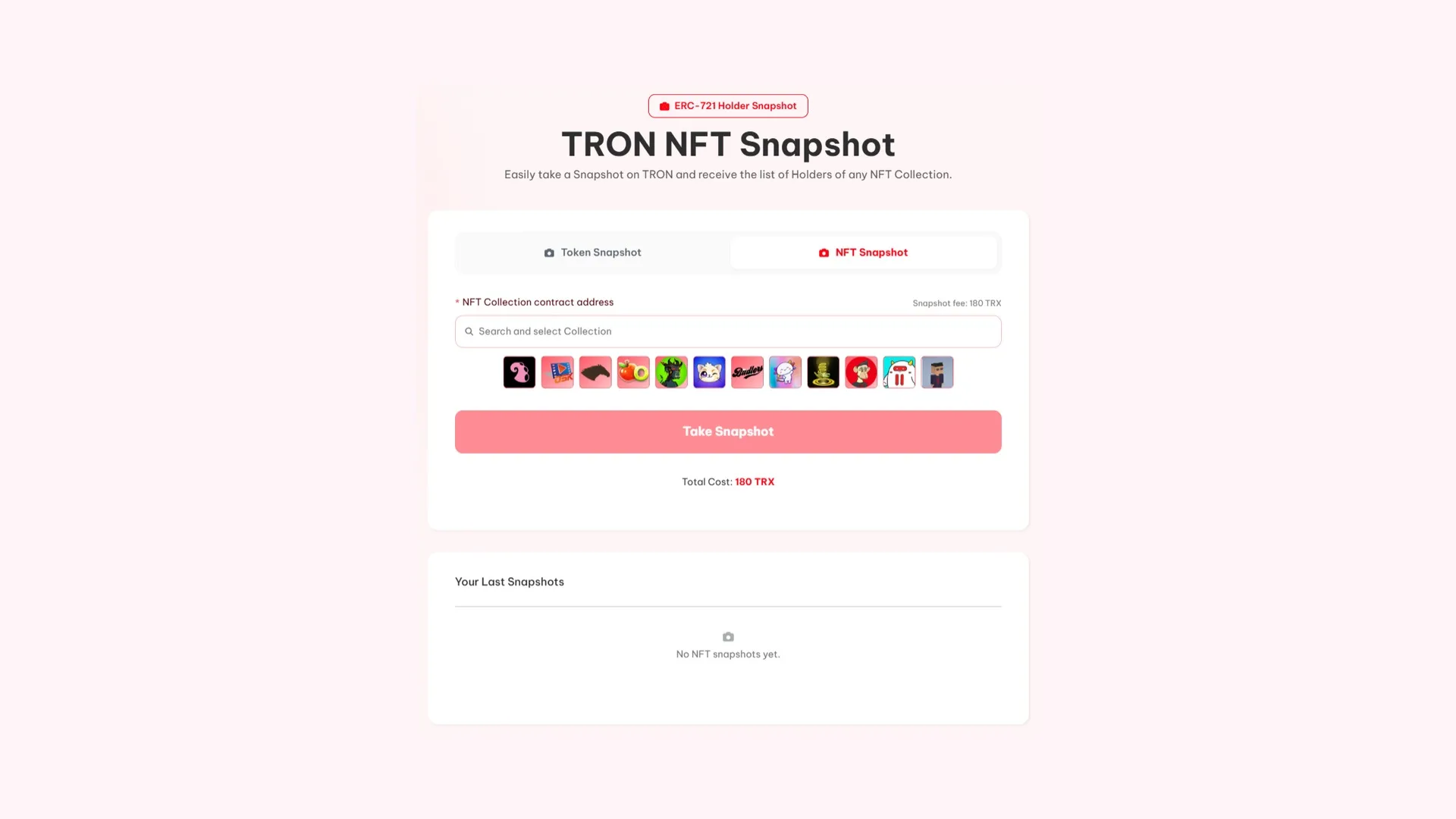
You need the collection’s contract address, not the address of an individual NFT. From there:
- Paste the collection address into NFT Collection contract address.
- Run the snapshot and confirm the payment. It takes a few minutes while it goes through the holders.
- Download the CSV with the wallets and the NFT count for each one, or copy the addresses directly.
The file comes out in the format the multisender accepts as-is, so you can chain the distribution without touching the CSV.
What the list won’t tell you
Before using the file to distribute, there are two things the snapshot doesn’t pick apart and that you should check yourself.
The first is that a wallet holding a lot of NFT isn’t always a fan. It could be a marketplace, a staking contract, or someone who bought in volume to flip. Distributing proportionally without reviewing the biggest addresses usually means sending most of the airdrop to a contract.
The second is that the snapshot reflects the exact moment you run it. In a collection with an active market, today’s list isn’t last week’s list. If you announce you’re going to reward holders, say when you’ll take the snapshot too: otherwise, anyone can buy right before to sneak into the distribution.
There are two ways to announce it and they don’t produce the same result. Naming the exact date upfront is the most transparent, but it invites people to buy the day before and sell the day after. Announcing that the snapshot has already been taken, with no heads-up, rewards those who were there without making noise and tends to work better when what you’re after is loyalty and not a one-off volume spike.
Whichever one you go with, spell it out from the start. The community will accept either rule; what it won’t accept is finding out after the fact that the rule was actually something else.
And there’s a third thing the list doesn’t capture either: one person can hold multiple wallets. Splitting by address isn’t the same as splitting by person, and in smaller collections the gap shows. There’s no clean way to solve this from the snapshot, but it’s worth keeping in mind when sizing your distribution.
If what you’re after is holders of a token rather than a collection, check out how to pull the list of a TRC-20 with balances
Pricing and when it pays off
180 TRX, and the fee is the same whether the collection has a hundred holders or ten thousand. Since it doesn’t scale with size, the cost per address drops as the collection grows.
If the only purpose of the list is an immediate airdrop, the multisender can pull it directly for the same price using the NFT Holders method, and you skip the download step. Pulling it separately makes sense when the list itself is an asset you’ll reuse more than once: a whitelist, a historical snapshot for comparison, or the criteria for a tiered campaign.
FAQ
How much does a NFT snapshot cost on TRON?
180 TRX per run, regardless of collection size. A hundred-piece collection costs the same as a ten-thousand-piece one, so the cost per wallet pulled drops the bigger the collection you query.
How is it different from the token snapshot?
The token one lists holders of a fungible TRC-20 with their balance. This one lists holders of a NFT collection and how many pieces each one holds. Use whichever fits the asset type you want to reach; both cost the same.
Can I distribute tokens to NFT holders?
Yes, and it’s one of the most common use cases. The snapshot CSV loads straight into the multisender without reformatting, so you can reward the community backing your collection with a fungible token. You can also do it in a single step from the multisender itself.
Do I need to be the creator of the collection?
No. All you need is the contract address, and that info is public on the blockchain. That’s why it works both for your own collection and for reaching the community of a project adjacent to yours inside the TRON ecosystem.
Does the snapshot include NFT that are listed for sale?
It depends on where they’re listed. If the NFT stays in the owner’s wallet while it’s for sale, it shows up under their address. If the marketplace escrows it in a contract during the listing, that contract shows as the holder and the actual person doesn’t appear in the list. It’s another reason to review the biggest addresses before distributing.
Wrapping up
The advantage of these lists isn’t technical, it’s audience quality. You’re reaching wallets that already paid for something and held onto it, which is the closest thing to on-chain proof of interest you’ll find.
Make the most of it by reviewing the biggest addresses before distributing and announcing when you take the snapshot. Both steps take ten minutes and keep the airdrop from landing in a contract or in the hands of someone who bought in just to sneak onto the list.
On Arc the export comes deduplicated by owner and without a per-piece count, worth knowing before you plan any distribution: it’s covered in the guide on snapshot from a collection on Arc.

Content creator and SEO contributor at Smithii. Systems Engineering student and crypto-tech enthusiast.



