

How to get the holder list on TRON and see who actually holds your TRC-20
Knowing how to get the holder list on TRON with a token snapshot gives you every wallet holding a TRC-20, with each balance, in minutes and without writing a single line of code. It’s the step before any airdrop, whitelist, or distribution check on your token.
The Token Snapshot from Smithii queries the chain directly and hands you the file ready to download as a CSV. Below you’ll find the step-by-step, and after that, what’s worth checking in that list before using it.
What the snapshot actually returns
Worth clarifying up front, because not every tool of this kind returns the same thing. Here you get three useful columns: the wallet address, the balance it holds of that token, and the percentage of total supply that represents.
It’s a snapshot of the chain at the moment you run it. It doesn’t refresh on its own: if you need data a month from now, you have to run the snapshot again.
It includes every holder with no balance filter, from the whale down to the wallet with dust. That’s the right call for auditing, and something to keep in mind if you’re planning to distribute afterward: you probably don’t want to send tokens to addresses sitting on residual balances.
The result can be copied or downloaded as a CSV, in the format the multisender accepts directly, with no reformatting needed.
How to get the holder list on TRON step by step
The Token Snapshot from Smithii for TRON queries the chain and gives you the full holder list in seconds, without relying on an external indexer or needing the token to be listed anywhere. All it needs is the contract address, so it works with any TRC-20, yours or not. Here’s the interface:
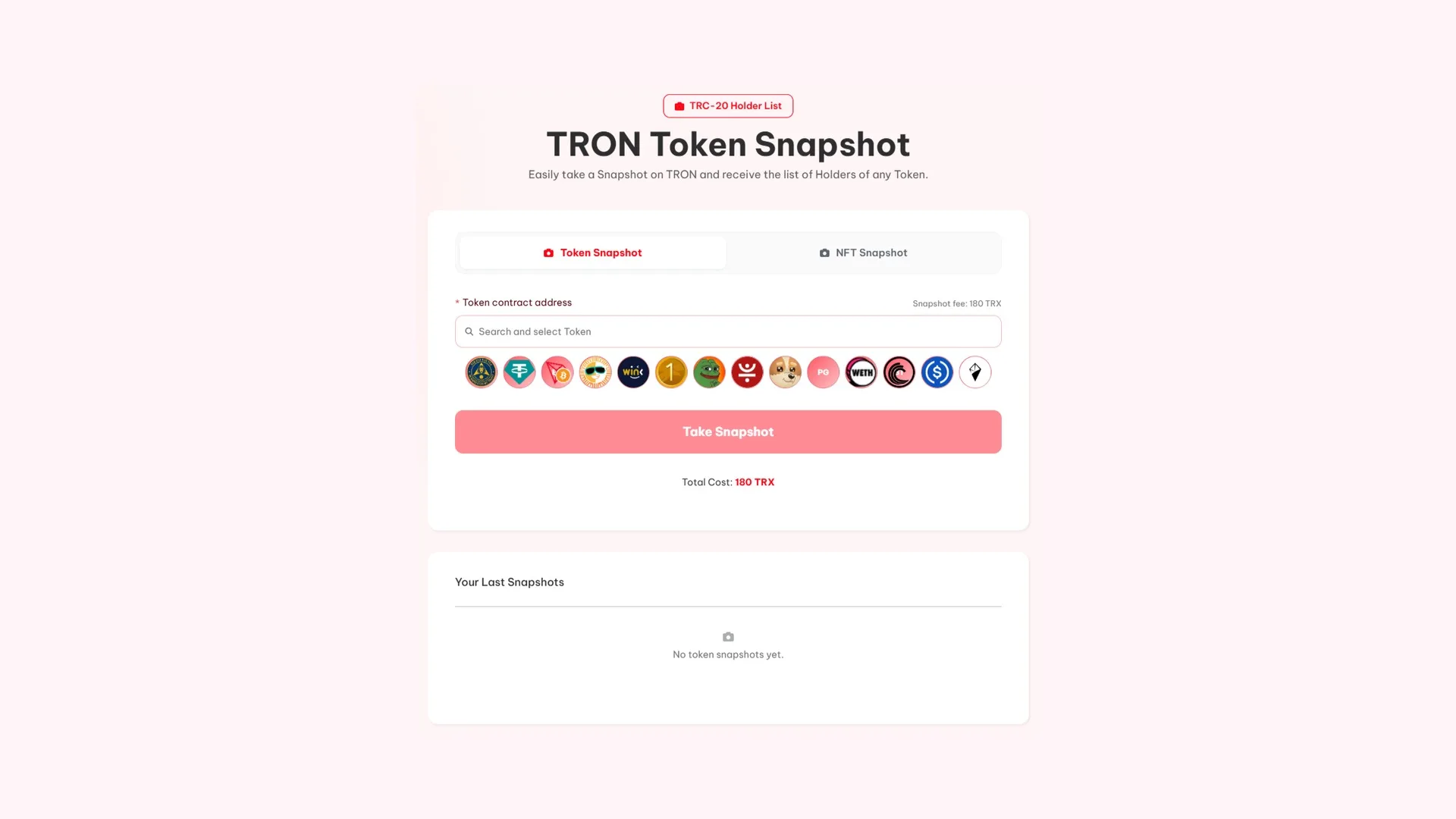
With the contract address ready, it’s three steps:
- Paste the token address into the Token contract address field. You don’t have to be the contract owner.
- Launch the snapshot and confirm the payment. The process takes a few minutes depending on how many holders there are.
- Copy the addresses or download the CSV with the full list, ready to analyze or load into the multisender.
Three things to read into your list
Having the CSV is useless if you don’t actually look at it. These three things show up in five minutes with the percentage column sorted high to low.
- How much the top ten wallets hold. That’s the number anyone thinking about entering looks at first. If those ten add up to a majority of the supply, your token depends on none of them selling.
- How many wallets hold a real balance. Separating the ones with a meaningful amount from the ones sitting on dust turns your holder count into a number you can actually defend.
- Whether the pool is where you think it is. Liquidity shows up as just another wallet in the list. Spotting it confirms how much supply is actually out on the market and how much is in real hands.
The most direct payoff comes right after: segmenting. With balances in front of you, you can reward by tier instead of distributing blindly, or leave dust addresses out of the drop so you don’t burn fees on wallets that are never coming back.
That last point has real money implications on TRON, where the distribution is billed per address. If out of your 3,000 holders, 1,200 sit on residual balances they never moved, filtering them out before the airdrop saves you the fee on those 1,200 wallets and focuses the drop on the people actually holding the project up.
If any of those readings worry you, here’s how to spot a rug pull on TRON by checking holder concentration and the rest of the token checks.
Compare two snapshots taken weeks apart
A single list describes a moment. Two lists a few weeks apart describe a trend, and that’s a lot more useful.
Comparing them shows you whether new holders are coming in or the same balances are just shuffling around, whether the big wallets are stacking or offloading, and whether holder growth comes from real people or from addresses that show up with dust balances and never trade again.
It’s also the honest way to measure if a campaign worked. A airdrop that multiplies holders and changes nothing else six weeks later didn’t onboard anyone: it handed out tokens that got dumped.
With the list in hand, the natural next step is to distribute the token to those wallets
How much it costs to pull the holder list of a token on TRON
180 TRX per snapshot, and the fee doesn’t scale with the holder count: a token with two hundred wallets costs the same as one with fifty thousand. It’s a one-off payment per run, so repeating it a few months later costs the same again.
That said, there are two ways to get the same list, and it’s worth knowing which one fits your case before you pay.
| Route | What you get | When to pick it |
|---|---|---|
| Snapshot standalone | Downloaded CSV file, yours to keep, with addresses, balances and percentages | When you plan to analyze, store or reuse it |
| From the multisender | The list loads straight into the distribution form | When the only goal is an immediate airdrop |
Both cost the same, so the call isn’t about price, it’s about what you’ll do next. Pulling it separately pays off when the list is an asset: to compare it against another one a few months down the line, to segment by tiers calmly in a spreadsheet, or to show a partner how your token is distributed.
If you already know you’re distributing to every holder without filtering, the middle step adds nothing: the multisender pulls the same list and loads it in for you.
FAQ
How much does a token snapshot on TRON cost?
180 TRX for each snapshot you run. The price is the same regardless of how many holders the token has, and it’s pay-per-run: if you need a fresh list later, you launch a new one and pay again.
Does the file include each wallet’s balance?
Yes. The CSV includes the address, the balance that wallet holds of the token, and the percentage of total supply it represents. With those three columns you can sort by weight and split the distribution by tiers instead of treating every holder the same.
Can I pull the holders of a token I don’t own?
Yes. The tool only needs the contract address, and holder data is public on the blockchain. It’s commonly used to study how other projects are distributed before aping in, or to reach a related community with a distribution.
Does the list update on its own over time?
No. A snapshot is a snapshot of the exact moment it runs, and balances change with every transfer. For fresh data you need to run a new snapshot, and comparing two taken weeks apart is exactly what shows you whether your holder base is growing or concentrating.
Wrapping up
The snapshot is the cheapest tool you have to stop guessing how your token is actually distributed. It costs 180 TRX and a few minutes, and what it gives back is the foundation for almost every decision that follows: who you reward, how much, and in what order.
Pull it before you design the distribution, not after. Segmenting with balances in front of you versus airdropping blind costs exactly the same, but the results aren’t even close.
If your token lives on Circle’s network, both the process and the file contents change: the guide on how to export the holders list on Arc walks through it.

Content creator and SEO contributor at Smithii. Systems Engineering student and crypto-tech enthusiast.



