

Solana token gating: the full Ancla guide for Discord and Telegram
Solana token gating is a practical way to turn your community into a verifiable access space: users get in when they meet an onchain condition, such as holding a token or NFT in their wallet, and stay in as long as they keep meeting it.
In this article, we’ll start with the core concepts: what it is, how it works, and why teams use it. Then you’ll get a practical walkthrough for setting it up on Discord and Telegram with Ancla, with no code required and a free plan available.
You may prefer the video walkthrough, so I’ve included it below.
What is token gating, and why use it on Solana?
Understanding token gating takes the idea of a closed community a step further. In simple terms, it is an access control system that does not rely on a password, but on ownership of an onchain asset.
If the wallet holds the required token or NFT, it gets access; if not, it stays out. On Solana, gating is usually handled with:
- SPL tokens: access based on a minimum balance, such as holding 100.000 tokens.
- NFTs: access based on owning a specific mint or collection.
What Problem Does It Solve for Communities?
Without gating, any open community ends up dealing with new accounts coming in to spam, people joining out of curiosity and dragging down the conversation, and members who sell but still remain inside private channels.

token gating reduces that problem because membership is verified onchain, not through promises or screenshots.
How does token gating work?
The typical flow, without the technical jargon, looks like this:
- The user connects their wallet or completes a verification.
- An onchain verifier checks whether that wallet meets the requirement.
- If it qualifies, access is granted (role, channel, group, or permissions).
- If it no longer qualifies, access is revoked.
Ancla does more than that. It regularly checks whether every user still meets the requirements, and if they do not, it removes them automatically. It also provides a very clear onboarding experience when you set up web3 token gating.
Real benefits of token gating in Solana
When implemented well, token gating is not just about exclusivity. It gives you operational control:
- Automated access: less manual moderation, fewer mistakes.
- Tiered segmentation: create layers for holders, OGs, whales, and contributors.
- Social value protection: if someone sells and your community rules say so, they lose access.
- Better UX for legitimate members: everyone quickly understands what they need to get in.
Why does Web3 Token gating matter?
For token gating in web3, there are two common approaches:
- Tools built for products or dApps.
- Tools built for communities.
If your community lives mainly on Discord or Telegram, a community-first setup is the better fit: fast verification, role management, and entry/exit rules that keep gating from turning into a daily mess.
Why Use Ancla for Solana token Gating
Ancla is positioned as Smart Token-Gated Access for Communities and, at least in this first stage, focuses on Solana. That matters because it avoids multi-chain setups that add extra complexity when your community is fully rooted in the Solana ecosystem.
What stands out is that it does not stop at balance-based gates. It introduces Gate by Conviction and smarter gating rules, with the focus on member quality rather than balance alone.
Notable features of Ancla holder verifier:
- Discord and Telegram support using the same verification flow.
- Auto-verify: fast verification when users join, with access assigned automatically.
- Auto-kick for sellers: if someone sells and no longer qualifies, they can be removed automatically.
- Periodic revalidation: the system checks member status at set intervals.
- Analytics: signals and metrics to understand your community’s activity and behavior.
We have a post on token gating platforms on Solana where we compare some of the current options, in case you want to explore the alternatives available.
How to Set Up Solana Token Gating with Ancla
With Ancla, setting up token gating is extremely simple. Just log in, create a community, and follow the instructions. Still, we’ll walk you through the process step by step.
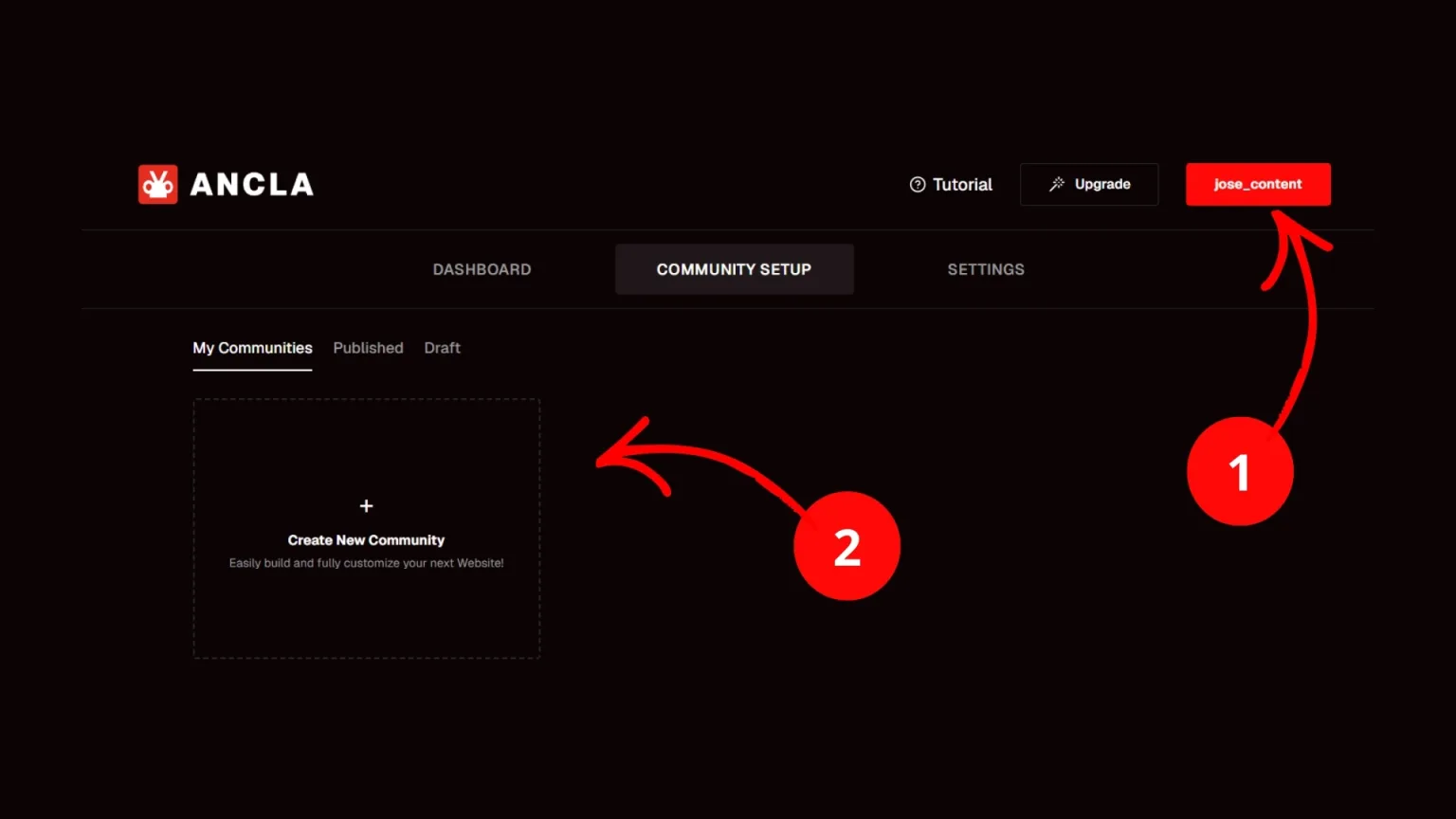
1.Log in to Ancla: you can do this directly with Telegram, Discord, or a wallet Solana like Phantom.
2. Create a community: go to the “Community Setup” tab.
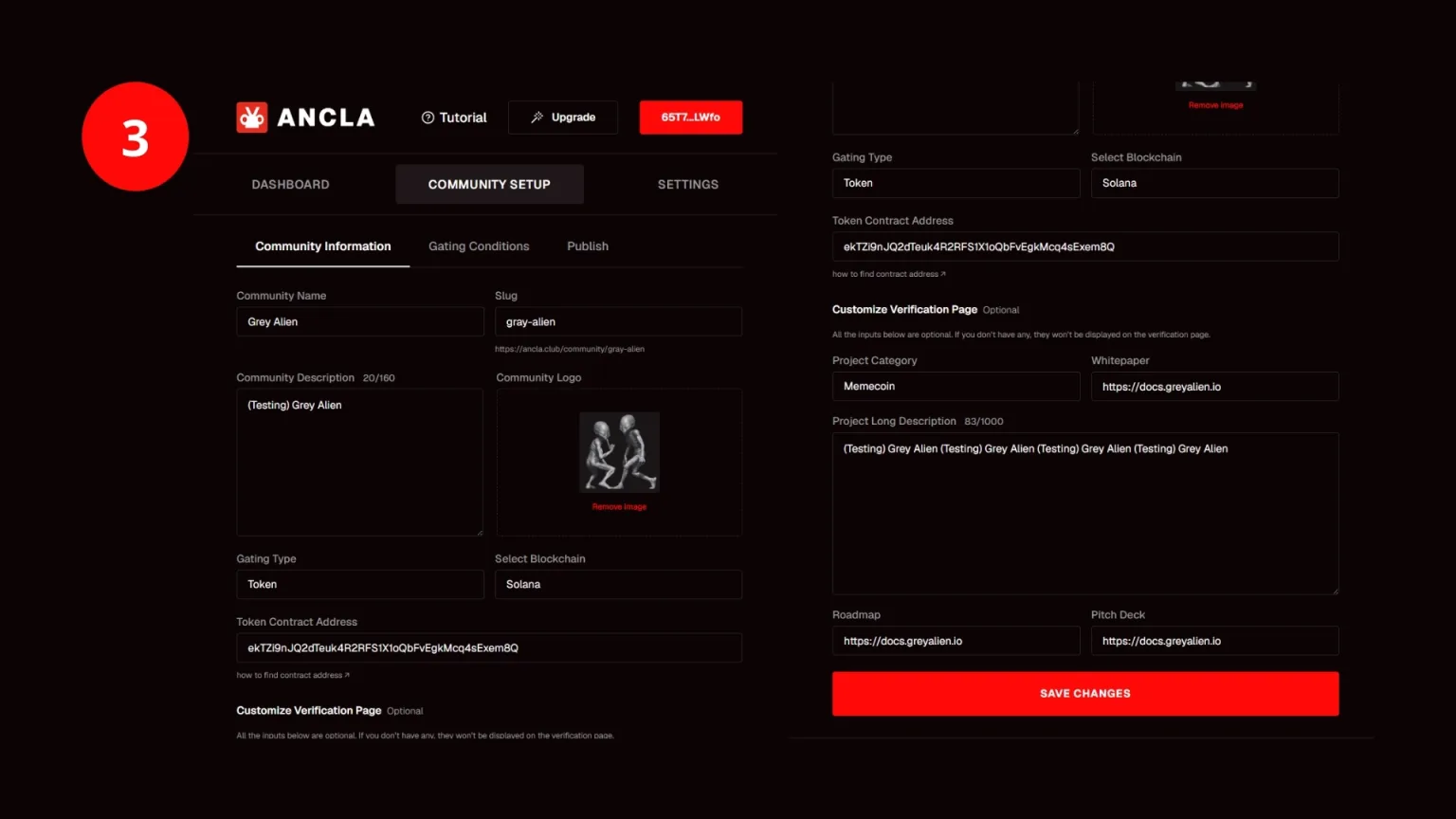
3. Customize your channels: edit the name, the unique link you will share, the description, image, category, and more. Then add the bot to Telegram and/or Discord, add roles with rules, and save your changes.
4. Share your link: users need to verify through Ancla so the bot can assign roles correctly.

If your community mainly uses Discord for NFT’s, check this dedicated guide on how to create a NFT gated server on Discord for more precise instructions.
And if you use Telegram instead of Discord, pair this with the guide to token gating on Telegram to set up group-level gating properly, along with welcome messages and automation.
How much does Ancla cost?
You can create a community with 25 members completely free, which is ideal if you want to test Ancla before moving to a plan with more benefits. The maximum cost is $59 USD on its highest plan, with annual billing discounts available.
Tips for setting up token gating the right way
Any community can be gated, but there are times when it is not necessary. If you add it without a clear purpose and only to “give users more,” you may be adding friction your community does not actually need.
To start, a new community should be public, unless token gating is part of the exclusivity you want to offer. New holders are unlikely to go through a verification flow just to join a community with little or no reputation.
Build the Right Role Hierarchy
- Set reasonable thresholds: define a minimum holding amount that makes sense and is not excessive.
- Use multiple roles: higher balance or specific NFT access (alpha, calls, perks).
- Reward contribution: assign roles for real input, and separate “holding” from “doing.”
Avoid Common Mistakes
- Do not gate everything: keep a public channel that explains the rules and benefits, for example.
- Do not make onboarding confusing: making a simple process feel complicated will hurt conversion.
- Set the selling policy: make it clear that only holders can stay in the server, even if they sell later.
Frequently Asked Questions
This section answers the most common questions about token gating.
Is Solana token gating only for NFTs?
No. You can gate access by NFT or by SPL token. It depends on how you structure your community.
What does web3 token gating mean in practice?
It means access to channels, groups, or perks is based on an onchain condition (owning tokens/NFTs), not traditional login credentials.
Can I use token gating on Discord and Telegram at the same time?
Yes, as long as you use a platform that supports both. Ancla is built specifically around this kind of community use case.
What happens if someone sells the token after getting verified?
In a well-designed setup, if they no longer meet the requirement, they lose access. Ancla treats this as part of its exit rules.
Do I need to code to set up token gating?
Not necessarily. With community-focused tools, the goal is to configure verification and permissions without writing code. At most, you may need to authorize a few steps or copy and paste an integration setting when required.
Conclusion
Solana token gating is a key layer for communities that want access to be structured and verifiable: it defines who gets in, who stays, and under what rules.
If you implement it with a simple experience (clear rules, short onboarding, and defined revocation), you end up with a cleaner, better-segmented community.
Ancla is built for that exact use case: Discord and Telegram communities that want Solana gating with fast verification and entry/exit rules they can tighten as the project grows.

CEO & Co-Founder at Smithii. Building on Solana since 2021 and sharing playbooks from the trenches. Also founder of Lince after years investing in DeFi.



