

How to spot a rug pull on TRON: scan any TRC-20 token in seconds before your buyers do
If you’re about to launch, buy, or shill a token, knowing how to spot a rug pull on TRON saves you from finding out too late that the contract was hiding a trap. On a chain where TRC-20s get deployed daily, the risk signals live on-chain: who controls the contract, whether more supply can be minted, whether liquidity can be pulled, and how many tokens a handful of wallets are sitting on.
In this guide I’ll walk you through the red flags that give away a rug pull on a TRC-20, how to read them with Smithii’s Rug Check for TRON, how much each control weighs in the score, and what to do if the token you’re analyzing is your own. Let’s get into it.
The red flags of a rug pull on a TRC-20 token
A rug pull is rarely a technical mystery. It’s just the use of a permission the contract has had since day one, and that’s why you can spot it coming if you know where to look. On TRON, the usual red flags are these:
- Owner with dangerous powers: functions that let the team change fees, pause transfers, or claw back ownership after supposedly renouncing it.
- Blacklists and sell restrictions: TRON inherits from USDT the habit of contracts with a blacklist, and on a small token that can be used to block anyone trying to sell.
- Expandable supply: an active mint function dilutes every holder the moment someone decides to use it.
- Liquidity that can be pulled: if the SunSwap pool shares aren’t locked, whoever holds them can drain it in a single transaction.
- Concentrated supply: a wallet holding a big chunk of the supply can tank the price with a single sell.
None of these red flags proves a scam on its own. Plenty of legit projects keep the owner during launch, for example. What matters is how many of them line up and whether the team explains them. This same info is also useful if you’re inspecting your own token and want to see what you should fix.
How to spot a rug pull on TRON step by step
The Smithii Rug Check for TRON is a free tool that lets you review any TRC-20 contract without connecting a wallet. It cross-checks the contract data on TRON with GoPlus security signals and the active tokens on Dexscreener, and gives you back a report with ten controls. When you run a query, you’ll see a report like this one:
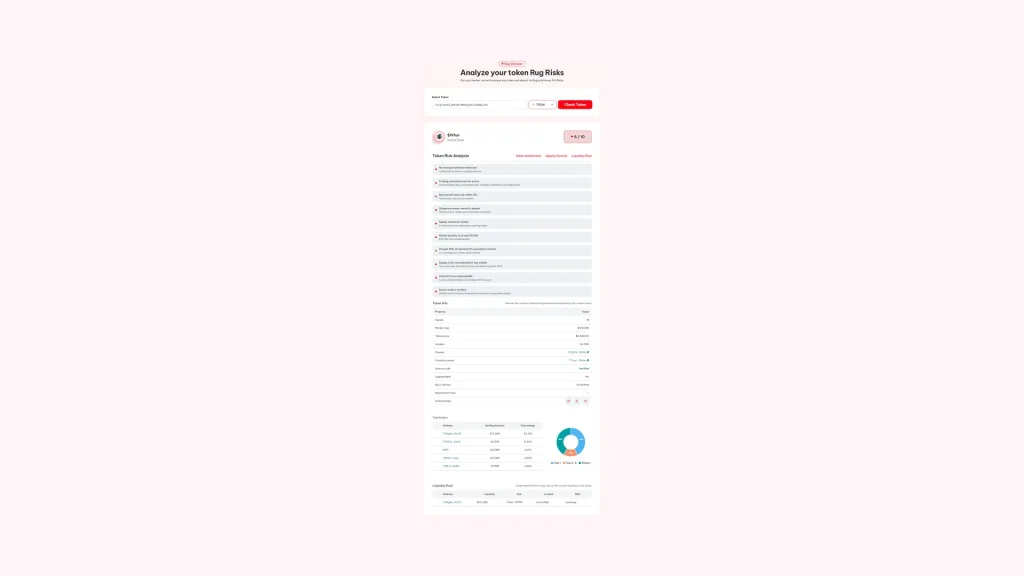
All you need is the token contract address, which you’ll find on TronScan or directly on the pair page on SunSwap or Dexscreener. With that in hand, here’s the process:
- Paste the contract address: the TRC-20 you want to review, either in Base58 format (starts with T) or in hex.
- Check that the network is TRON: using the selector next to the field, so the query hits the right chain.
- Hit Check Token: and wait a few seconds while the contract, security data, and market info are pulled.
- Read the score and the level: the Danger level runs from 1 to 100 and also adds a Confidence percentage.
- Go through each control one by one: especially the ones showing in red or unverified, plus the holders and liquidity tables.
The report is generated in a few seconds and you can run the check as many times as you want. If you paste an address that isn’t a token contract, the tool tells you instead of making up a result.
Base58 or hex: which address to paste
On TRON the same address can be written two ways: the Base58 one that starts with T, which is what TronLink and TronScan display, and the hex version. The tool accepts both and always shows the result in Base58, the format anyone on the network will recognize.
How much each of the ten controls weighs
The corner score, something like 6 / 10, counts how many controls passed. But they’re not all worth the same: the internal scoring weights each one based on the damage it can do.
| Control | What it checks | Weight |
|---|---|---|
| Honeypot | Whether the token can actually be sold after you buy it | 22 |
| Trading restrictions | Blocked buys, incomplete sells, blacklists or whitelists | 13 |
| Dangerous owner | Active, hidden, or recoverable ownership | 12 |
| Buy and sell tax | Neither one above 10% | 10 |
| Mint | No way to create more supply | 10 |
| Liquidity | At least $1,000 of visible liquidity | 10 |
| LP lock | At least 50% of reported liquidity locked | 8 |
| Concentration | Top wallet up to 10% and top ten up to 30% | 7 |
| Upgradeable contract | Not a proxy whose logic can change | 5 |
| Verified code | Source code published on TronScan | 3 |
There are two failures that flag the token as Danger even if everything else checks out: honeypot and trading restrictions. It makes sense, since those are the two that directly block selling. To hit Good, on the other hand, every check needs to pass with nothing left unverified.
Why some checks come back unverified in TRON
It’s normal for a TRON report to show a few controls grayed out. The reason is technical: on other networks, the tool simulates a real buy and sell to measure the tax and rule out a honeypot, but that simulation relies on functions that the TRON node doesn’t expose. On TRON, the trading analysis comes from GoPlus, which runs it through its own engine for the network.
When GoPlus doesn’t have data on a token, usually because it’s brand new, the control stays unverified instead of being marked safe. The same goes for LP lock if nobody has reported where the LP positions sit. Treat those gaps as open questions and, if the token interests you, check them yourself on TronScan before buying.
If what you want is to see who holds the supply, you can download the full holder list of a TRC-20 as CSV.
How to improve the report on your own TRC-20
The Rug Check isn’t only for scanning other people’s tokens. If you’re the creator, this is exactly the report your buyers will see, and many of its controls depend on decisions you can still make:
- Renounce ownership once you no longer need it: the owner check turns green and any doubts about future changes disappear.
- Give the pool real depth: below $1,000 of liquidity the check fails, and a thin pool also punishes every buy with a price jump.
- Spread the supply: a airdrop to your community cuts concentration in the top wallets.
- Verify the code on TronScan: it’s the lowest-weight control, but also the easiest to fix.
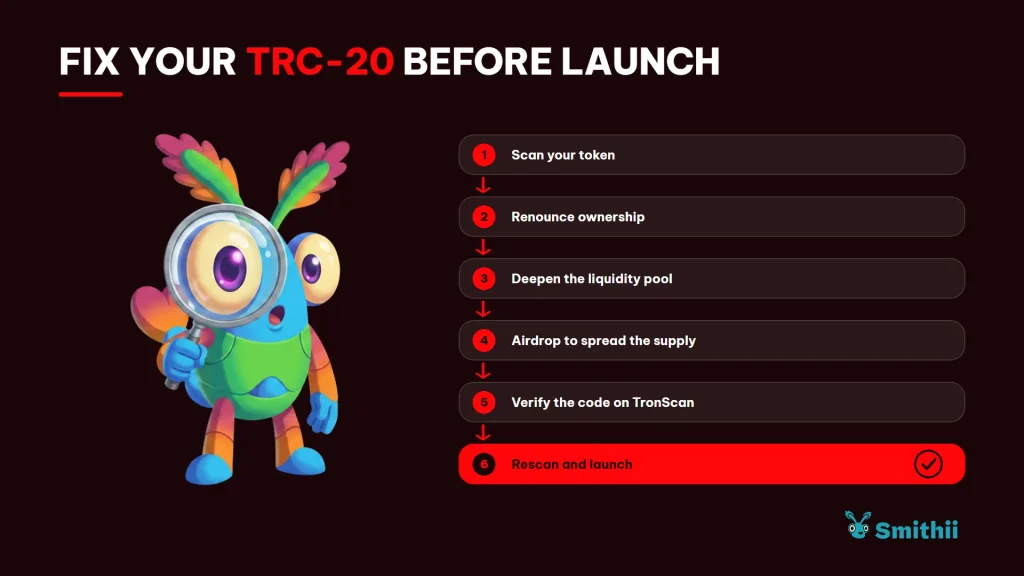
Every fix shows up on the next scan, so you can scan, fix, and scan again before you announce the launch. Here’s how to renounce ownership of a TRC-20 when the time comes.
And if the issue is depth, check out how to add liquidity to your SunSwap pair without moving the price.
FAQ
How much does the Rug Check from TRON cost?
Nothing. It’s free and read-only: you don’t connect any wallet, you don’t sign anything, and no Energy is burned, because no transaction is sent.
Does a Good result guarantee the token is safe?
No. The report flags risks that are visible on-chain at the moment of the scan. An owner can change parameters later, and none of that shows up in an earlier scan.
What does it mean when a check comes back unverified?
It means there wasn’t enough data to answer it. Unverified doesn’t mean passed: the score counts that check as a half-fail, and the level can’t go above Caution.
Does it work for tokens that aren’t TRC-20?
No. The tool analyzes TRC-20 contracts. If you paste a regular wallet or a token from a different standard, it will warn you that the address isn’t a valid token contract.
Can I use it to review my own token before launching?
Yes, and it’s good practice. Scanning your TRC-20 right after creating the pool shows you the same thing buyers will see and gives you time to fix anything that comes up red.
Conclusion
Once you know how to spot a rug pull on TRON, you can review any TRC-20 in seconds without connecting your wallet, understanding which checks carry the most weight and why some stay pending. The score gives you a first read, but the real value is opening each check and understanding what it says.
If the token is yours, use the report as a to-do list before launch. Buyers are going to look at the same things you do, so make sure whatever they find has an answer.

Content creator and SEO contributor at Smithii. Systems Engineering student and crypto-tech enthusiast.



