

How to generate volume for a token on NEAR: real buys and sells on Rhea from fresh accounts
A freshly created pool doesn’t show up on trackers until someone trades, which is why knowing how to generate volume for a token on NEAR is what separates an invisible launch from one people actually find. With activity from the start, your token racks up volume and makers on DexScreener, shows up on Rhea’s listings and signals that something’s moving.
In this guide I’ll walk you through what trackers actually measure, how to use the Volume Bot from Smithii for NEAR, how it works under the hood and what it costs, plus what a volume bot simply can’t do for your token. Let’s get into it.
What trackers measure and why it matters on NEAR
Tools like DexScreener rank tokens by three signals: volume traded, the number of makers (the unique wallets that have traded), and the transaction count. A token with heavy volume but only two makers looks shady. One with a hundred makers and steady activity looks alive.
On NEAR there’s an extra wrinkle. Neither Rhea nor DexScreener will show a new pool until it has trades, so a freshly launched token is invisible to anyone scouting new projects. The first buys and sells are what pull it out of the shadows.
How to generate volume for a token on NEAR step by step
The Volume Bot from Smithii for NEAR is a tool that lets you generate real buys and sells of your token on Rhea from a bunch of fresh accounts, and returns any leftover NEAR back to you when it’s done. You pick a target, set makers, budget and duration, and the bot verifies the payment on-chain before kicking off. When you open the tool you’ll see this screen:
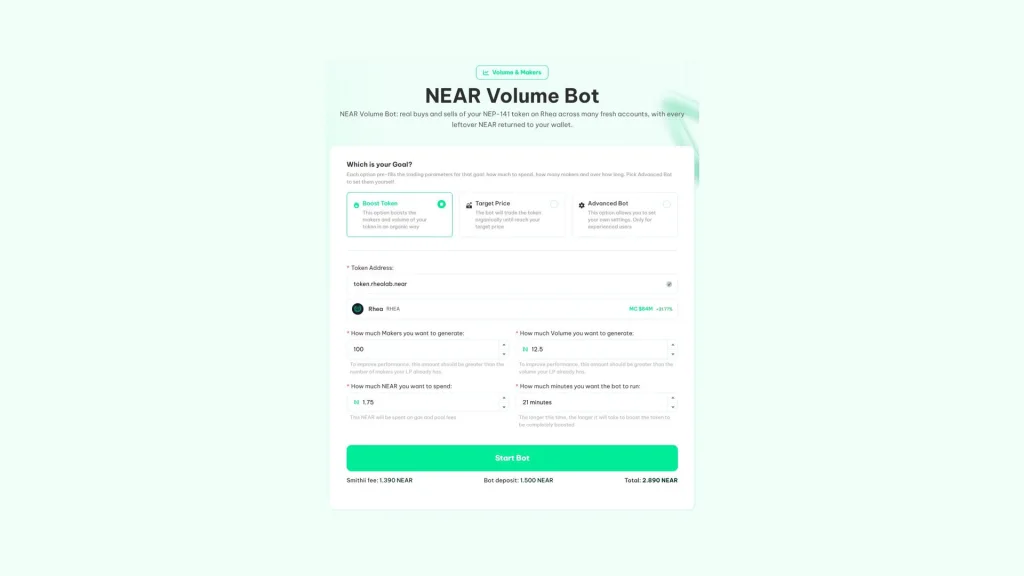
If your token already has a pool against wNEAR on Rhea and you’ve got NEAR for the fee and the operating budget, follow these steps:
- Connect your NEAR wallet: HOT, Meteor or any of the ones in the selector.
- Pick the target: Boost Token, Target Price or Advanced Bot.
- Paste the token account: for example token.rhealab.near. It needs to have a pool against wNEAR on Rhea.
- Set makers and budget: how many makers you want to generate and how much NEAR you’re putting into the run.
- Hit Start Bot and approve the payment: the fee and the operating deposit go through in a single approval.
Below the button you’ll see a breakdown of the Smithii fee, the operating deposit and the total before you approve. If your token doesn’t have a pool yet, the tool won’t be able to operate, so create the pool first.
Boost Token, Target Price or Advanced Bot
Each target fills in the parameters for you: how much to spend, how many makers and for how long. Boost Token spreads the activity out organically to stack makers and volume. Target Price keeps trading until the token hits a price target. Advanced Bot lets you set every value by hand and is built for anyone who’s already run a volume bot before.
One tip the interface itself drops: for the effect to actually show, the makers and volume you request should beat what your pool already has. If your token already moves 200 makers a day, a run of 50 is barely going to move the needle on the trackers.
How the NEAR volume bot works under the hood
Each maker is a fresh NEAR account, one of the implicit ones, created solely for that run. That account converts NEAR to wNEAR, buys your token on Rhea, sells it, and closes right after, sending its NEAR back to the run. On closing it also releases the storage deposits it made, so no NEAR gets stuck in abandoned accounts.
When the run finishes, everything left over goes back to your wallet. Before kicking off, the bot verifies on-chain that the payment to Smithii went through for the correct amount and from your account, and each maker’s keys are stored encrypted. If you want to stop the volume bot early, you can do it at any time and get the remaining NEAR back.
If your token has tax
The bot accounts for transfer fees on your token. Sells use the amount the token actually delivers after tax, and before each buy it checks that the token isn’t paused or hitting a limit that would block it.
How much the volume bot costs on NEAR
The cost has two parts. The Smithii fee, charged in blocks of 100 makers, and the operating deposit, which covers network gas and the swap fees in the pool.
| Makers | Cost |
|---|---|
| 100 | 1.39 NEAR |
| 500 | 6.95 NEAR |
| 1.000 | 13.9 NEAR |
You don’t lose the full deposit. Part of it goes to gas and the swap fees on each trade, and the rest comes back to your wallet once it finishes. On top of that, if you’re a liquidity provider on that pool, a share of the swap fees flows into your LP position.
When it makes sense to run the volume bot on NEAR
The same budget performs very differently depending on timing. These are the windows where it hits hardest:
- Right after creating the pool: the first trades are what get Rhea and DexScreener to index it.
- During an announcement or a campaign: anyone landing from your post finds a chart with movement instead of a dead pool.
- With a pool that has some depth: on a very small pool each swap moves the price a lot, and a longer runtime spreads the activity more evenly.
What a volume bot can and can’t do for your token
A volume bot is a visibility tool, not a replacement for the project itself. Know where the line is before spending on one.
- It can: pull your pool out of obscurity, stack visible makers and volume, and give activity to a token while your community shows up.
- It can: back up a launch or a campaign, so anyone arriving from your announcement finds a token with movement on it.
- It can’t: create holders that stick around. The bot accounts buy and sell in the same run, so they don’t hold any tokens.
- It can’t: guarantee your token will trend or hold the price if there’s no real demand behind it.
The combo that works best is volume up front and community after. The bot gets you found; the project is what makes people stay. If you’re planning to hand out the token to your earliest supporters, here’s how to run a airdrop on NEAR from the same wallet.
FAQ
What do I need to use the volume bot on NEAR?
A NEP-141 token with a pool against wNEAR on Rhea and a NEAR wallet with enough balance to cover the fee and the operating deposit shown in the form.
How much does it cost to generate volume for a token on NEAR?
The Smithii fee is 1.39 NEAR per 100 makers. On top of that you pay an operating deposit that covers the swaps and the network, and whatever is left over at the end comes back to your wallet.
Is the volume real?
Yes. Every buy and every sell is a real swap on Rhea from a different account, and anyone can verify it on NearBlocks. That’s why they count as volume and makers on DexScreener and other NEAR trackers.
What happens if the bot stops partway through?
Each account closes after trading and returns its NEAR to the run, which sends everything that’s left back to you at the end. The account keys are stored encrypted, so a stopped run can also be closed out.
Will my token trend?
Smithii can’t guarantee that. Whether a token trends depends on volume, makers and timing, but also on factors no tool controls, like the community or market interest.
Conclusion
Once you know how to generate volume for a token on NEAR, you can give your Rhea pool real activity from day one, with makers that count on the trackers and the leftover NEAR back in your wallet. The bot verifies the payment, closes each account when done, and lets you recover the funds even if the run stops.
Use it for what it is, a way to get visible, and pair it with what no tool can manufacture: a community with reasons to stick around.

Content creator and SEO contributor at Smithii. Systems Engineering student and crypto-tech enthusiast.



