How to Create a Liquidity Pool for a token: multi-chain guide (+Tool)
If you want to create a Liquidity Pool for a Token, this post is for you. We’re going to show you how to create a Liquidity Pool for a Token in just 5+1 steps.
Pick your Blockchain to see the step-by-step tutorial
Before jumping into the tutorial, let’s cover what a liquidity pool is and whether it’s the right call to create one for your Token. Then we’ll go straight into the step-by-step for each blockchain. Let’s get into it.
What is a Liquidity Pool
A Liquidity Pool is a pool of funds that lets any user buy and sell the tokens that make up that pool.
This pool of funds is created by grouping two tokens that form a “pair” and locking a certain amount of them in an exchange. Thanks to this pool of funds, other users can swap the tokens that make up this pair.
Usually at least one of the tokens in the pair has an established value (USDT, ETH, SOL, USDC, etc.), which lets the other token in the pair get a price.
Thanks to this, any user can buy tokens (taken from this liquidity pool) in exchange for the other token that has an established value (deposited into the liquidity pool). And any user can also sell tokens (by depositing them into the liquidity pool) and receive the other token (taken from the liquidity pool). Supply and demand, trading, it all starts with a liquidity pool.
Key Factors To Consider Before Creating Liquidity Pool
Before we jump into creating the Liquidity Pool, let’s go over 4 factors that will shape our decisions.
1. Creating A Liquidity Pool Isn’t Free
To create a liquidity pool we need to deposit tokens, and typically one of them will be a Stablecoin or a Token like ETH, SOL, MATIC or BNB, which means we have to invest in adding enough liquidity to keep it alive.
On top of that, spinning up this liquidity pool on an exchange isn’t free either. We’ll have to pay certain fees that vary depending on the Blockchain where we create the liquidity pool.
2. The Token Pair In Our Pool Is Locked
Keep in mind that once you create a token pair and add liquidity, you can’t swap out the tokens that make it up. You can create a new pair and add liquidity to it, but you’ll lose the fees paid on the mistake.
3. Why It Matters To Create Liquidity With A Stablecoin
It’s important to understand that when we create a token pair with a token whose price fluctuates, the price of our token will also fluctuate. That’s why it’s worth thinking about whether it makes more sense to create the liquidity with a stablecoin.
If we use a stablecoin its price won’t fluctuate, so the price of our token will depend on demand alone. More buys push the price up, more sells push it down.
4. Creating A Liquidity Pool Carries Risk
Creating a liquidity pool means the price of our token will fluctuate. It’s really important to be aware of the risk involved, because if the price tanks too hard, our project will likely end up in the same spot.
Think carefully about whether this is really the best move or whether there are other options that fit your goals. We recommend creating a liquidity pool only if you’re confident you can sustain a healthy economy around it.
Ethereum Liquidity Pool
How To Create A Token Ethereum Liquidity Pool
On Ethereum we’ve got dozens of Exchange Platforms where you can create a liquidity pool with your Token. But in this case we’re going with Uniswap, without a doubt the DEX with the highest user volume on the entire Blockchain.
You’ve got 2 options here: use the dApp Create Ethereum Liquidity Pool from Smithii or head straight to Uniswap. Our interface is simpler and audited, so that’s the one we recommend, but we’ll walk through both:
1. Create Ethereum Liquidity Pool Using Smithii
Let’s head over to the online tool Create Liquidity Pool on Ethereum, make sure you’ve selected the Ethereum blockchain and connect your preferred wallet.
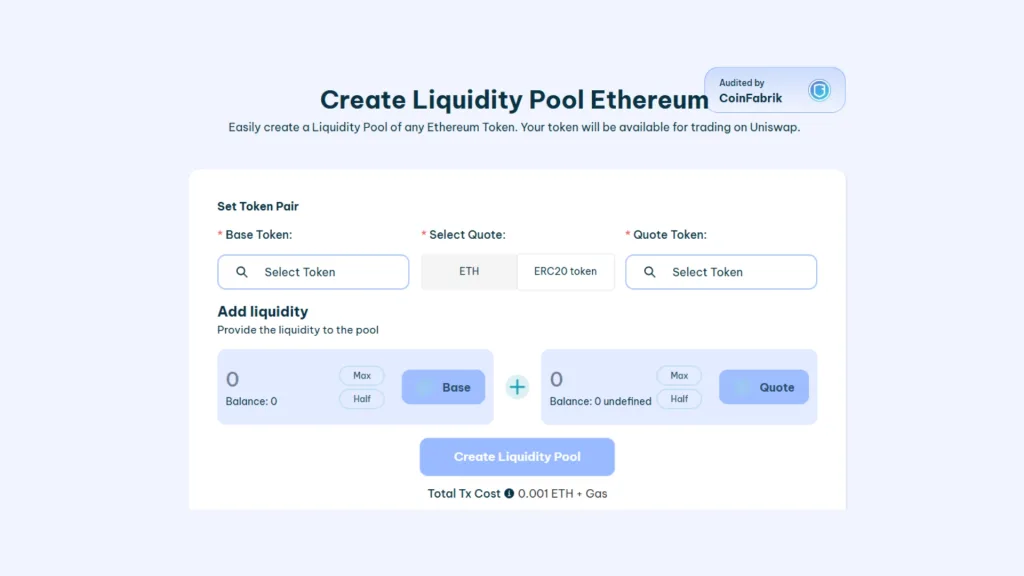
- Connect your wallet on the dApp Create Liquidity Pool on Ethereum
- Pick the “Base Token”, this is your token ready to hit the market.
- Pick the “Quote Token” (the one that sets the price, usually $ETH, $USDT, $USDC, etc.)
- Add Liquidity, choose the amounts of Base Token and Quote Token to pair, this sets the initial price of your token
- Click “Create Liquidity Pool” and approve the transactions.
Seconds later your Liquidity Pool will be live, it launches on Uniswap, and you can head over there to check it out. The cost of creating a liquidity pool for Ethereum on Smithii is 0.001 ETH, which covers the fees for creating the token pair and the liquidity pool.
Si aún no tienes tu token, aquí te explicamos como crear tu propio ERC20 token sin programar
2. Create Liquidity Pool on Uniswap
To kick off the process on Uniswap, connect your wallet on the Uniswap app and go to “Pools“.

Make sure you’ve selected the Blast blockchain in the top right. Click “New Position” and follow these steps to create your liquidity pool:
- Choose your token pair. First, pick a stablecoin like USDT or USDC.
- Set the transaction fee. The recommended option is 0.3%.
- Define the price range.
- Confirm the liquidity deposit and approve the transactions.
And that’s it, your liquidity pool for Ethereum is live on Uniswap.
FAQ about liquidity pool on Ethereum
¿ES RECOMENDABLE CREAR UNA LIQUIDITY POOL EN ETHEREUM?
Si tienes un token en Ethereum crear una liquidity pool puede ser peligroso sin un plan, ya que puede implicar que tu proyecto se hunda. Te recomendamos que crees una pool de liquidez si tienes una buena estrategia y un tokenomics sano.
¿CUANTO CUESTA CREAR UNA POOL DE LIQUIDEZ EN ETHEREUM?
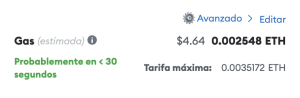
Crear una Pool de Liquidez en Ethereum tiene 2 costes: Fees de creación y Liquidez.
Los Fees de creación actualmente rondan los 5$.
El coste de liquidez depende de ti, es decir, puedes añadir tanta liquidez como decidas. Lo más común es añadir entre 500 y 5000$.
¿DÓNDE PUEDO CREAR UNA LIQUIDITY POOL EN ETHEREUM?
Pese a que puedes usar varias plataformas DeFi y DEX para crear tu Pool de Liquidez en Ethereum, la más recomendable es Uniswap. Uniswap es la plataforma de intercambio más usada en la Blockchain y además crear tu pool de liquidez en ella es rápido y fácil.
Solana Liquidity Pool
How To Create A Token Solana Liquidity Pool
If you have or are about to create a token on solana, spinning up a liquidity pool is a really interesting move. We’ve got several DEX to create it on, though the most common and recommended one is Raydium. Without further ado, let’s jump straight into the step-by-step tutorial on how to create a liquidity pool on Solana.
If you prefer the video version, this one’s for you:
Aquí te explicamos cómo crear un SPL Token de Solana.
Create A Liquidity Pool On Solana In 1 Step
With the dApp Smithii “Create Liquidity Pool” tool, you can do it in just 1 step, meaning you create the Openbook Market + Liquidity Pool in a single shot. Head over to the dApp from Smithii to create Liquidity Pool on Solana and you’ll see the following view:
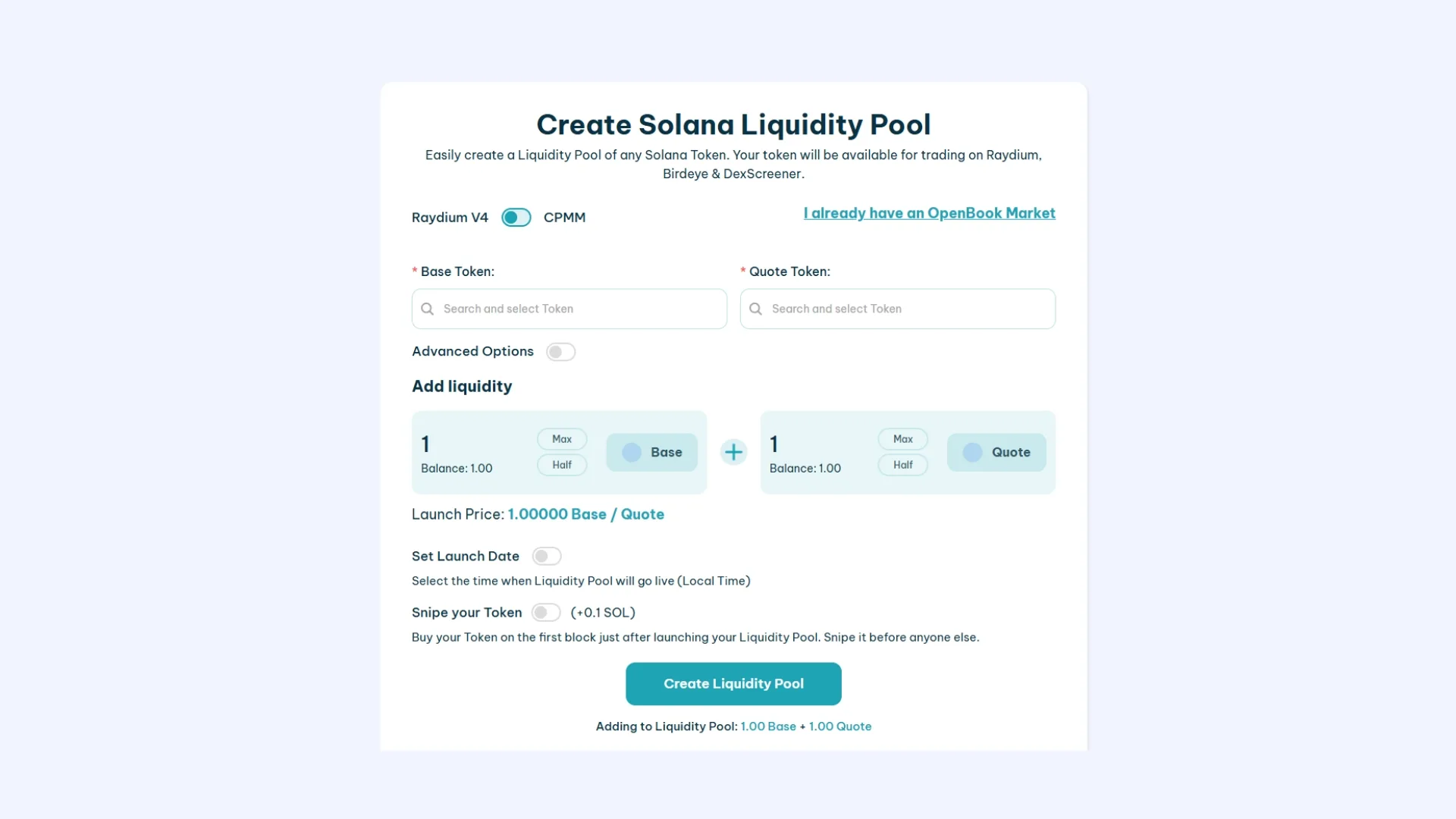
This tool lets us create our liquidity pool on Raydium with a user-friendly interface and starting from just 1 SOL (up to 3.5 SOL depending on the setup you go with).
You can choose to create the liquidity pool under raydium’s v4 or v5 protocol. If you want to know the differences, we cover them in our comparison, but for now we’ll stick with v4.
- Head to Create Liquidity Pool and connect your wallet to use the tool.
- Select the “Base Token” (The token you created that doesn’t have a market value yet)
- Select the “Quote Token ” (A token with market value. Usually SOL or USDC)
- Set the advanced options: Event Queue Length, Request Queue Length, and Orderbook Length (only if you want to use a cheap Market ID, starting from 0.4 SOL)**
- Set the token amount and SOL/USDC you want to add.
- Set the launch date (optional)
- Snipe your Own token (optional)
- Click on “Create Liquidity Pool” and approve the 3 transactions.
It will take a moment to complete, and then you’ll see the market ID and the liquidity pool address. Save them, as you may need these addresses later on.
**Under “advanced options” we can tweak the size of our OpenBook Market. Here are the inputs you should use for 3 different sizes that I’d recommend:
0.4 SOL:
- Event Queue Length: 128
- Request Queue Length: 63
- Orderbook Length: 201
1.5 SOL:
- Event Queue Length: 1400
- Request Queue Length: 63
- Orderbook Length: 450
2.8 SOL:
- Event Queue Length: 2978
- Request Queue Length: 63
- Orderbook Length: 909
Si quieres Listar tu Token en Jupiter Exchange aquí te explicamos cómo agregar un Token a Jupiter.
Create Liquidity Pool when you already have a Openbook Market
Once we already have the market created on Raydium, we can go straight to creating the liquidity pool.
Keep in mind that you can only create the liquidity pool if your token is “Freeze”, meaning minting more tokens is locked, so the max supply is final. To do that, you can head to this page, pick your token, and complete the process. It only costs 0.1 SOL.
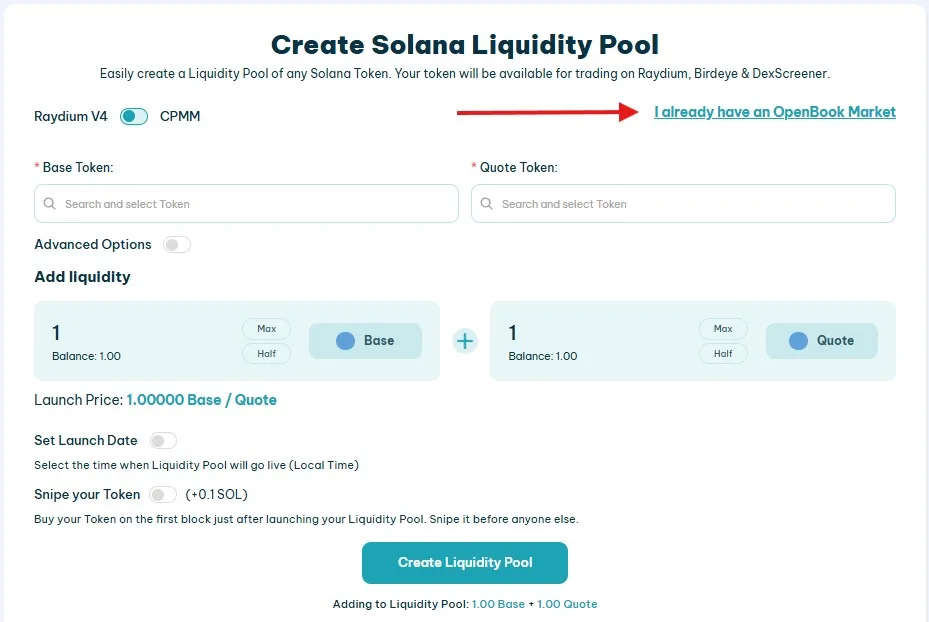
Create a Openbook Market first, then launch a liquidity pool
If what you want is to create the openbook market first and then spin up a liquidity pool, the process is simple. Head over to the openbook market creator and walk through the steps to create an OBM, then launch it on Raydium when you’re ready.

To do it, follow the exact same steps as in the previous section.
FAQ about liquidity pool on Solana
¿ES RECOMENDABLE CREAR UNA LIQUIDITY POOL EN SOLANA?
Crear una pool de liquidez en Solana puede ser muy interesante, pero sí o sí necesitarás una estrategia a seguir para que tu proyecto no se vea afectado. Por lo que antes de comenzar con la creación de la liquidity pool recuerda preparar tu tokenomics y tu plan de marketing.
¿CUANTO CUESTA CREAR UNA POOL DE LIQUIDEZ EN SOLANA?
Crear una Pool de Liquidez en Solana tiene 2 costes: Fees de Market y Liquidez.
Los Fees de market actualmente están entre 0.4 y 3 SOL.
El coste de liquidez depende de ti, es decir, puedes añadir tanta liquidez como decidas. Si vas a crear un token desde 0 y no quieres añadir mucha liquidez lo más común es que empiece con un precio MUY bajo, así la liquidez escala junto al precio del token.
¿DÓNDE PUEDO CREAR UNA LIQUIDITY POOL EN SOLANA?
El DEX más conocido de Solana es Raydium, puedes hacer el proceso de creación completo de tu liquidity pool desde nuestra herramienta en Smithii.
Base Token Liquidity Pool
How To Create A Base Token Liquidity Pool
We can pick from several exchanges to host the liquidity pool of our base token. But in this case, we’ll go with Uniswap, the most popular DEX and the one with the highest user volume across ERC20 Layer 2 blockchains.
Here you have 2 options: use the dApp Create Base Liquidity Pool from Smithii or go straight to Uniswap. Our interface is simpler and it’s audited, so we recommend it, but we’ll walk you through both options:
1. Create Base Liquidity Pool Using Smithii
Let’s head over to the online tool Create Liquidity Pool on Base. Make sure the Base blockchain is selected and connect your preferred wallet.
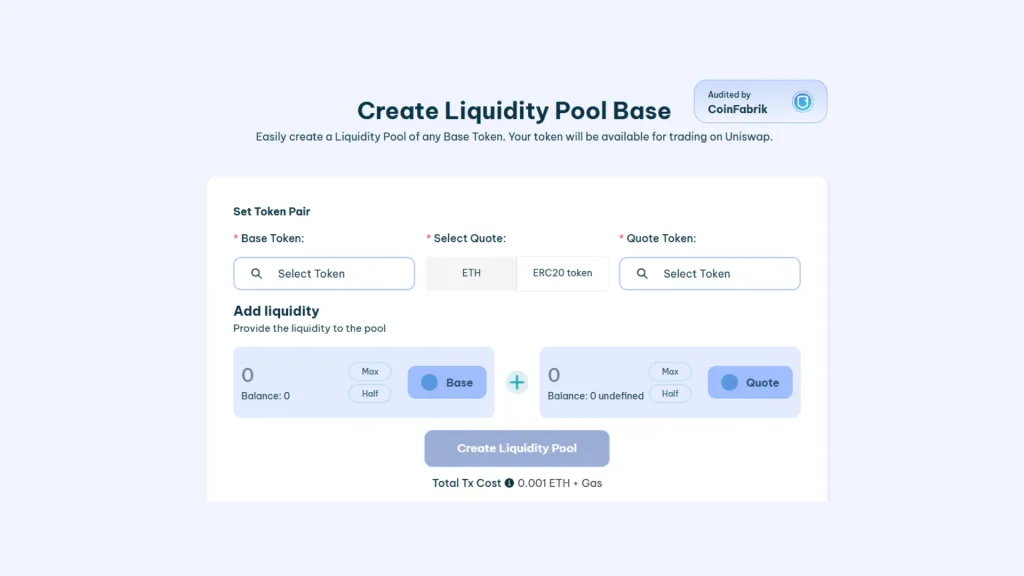
- Connect your wallet on the Create Liquidity Pool on Base dApp
- Pick the “Base Token”. This is your token ready to hit the market.
- Pick the “Quote Token” (this is the one that sets the price, usually $WETH, $USDT, $USDC, etc.)
- Add Liquidity: choose the amounts of Base Token and Quote Token to pair. This sets the starting price of your token.
- Click “Create Liquidity Pool” and approve the transactions.
Seconds later your Liquidity Pool will be live on Uniswap, and you can head over there to check it out. The cost of creating a Base liquidity pool on Smithii is 0.001 WETH, which covers the fees for creating the token pair and the liquidity pool.
Si aún no tienes tu token, aquí te explicamos como crear tu propio token de Base sin programar
2. Create Base Liquidity Pool on Uniswap
To kick off the process on Uniswap, connect your wallet on the Uniswap app and go to “Pools“.

Make sure you’ve selected the Base blockchain in the top right. Click “New Position” and follow these steps to create your liquidity pool:
- Pick your token pair. First, select a stablecoin like USDT or USDC.
- Set the transaction fee. The recommended option is 0.3%.
- Set the price range.
- Confirm the liquidity deposit and approve the transactions.
And that’s it, your liquidity pool Base is live on Uniswap.
FAQ about liquidity pool on Base
¿ES RECOMENDABLE CREAR UNA LIQUIDITY POOL EN BASE?
Si tienes un token en Base crear una liquidity pool puede ser peligroso sin un plan, ya que puede implicar que tu proyecto se hunda. Te recomendamos que crees una pool de liquidez si tienes una buena estrategia y un tokenomics sano.
¿CUANTO CUESTA CREAR UNA POOL DE LIQUIDEZ EN BASE?
Crear una Pool de Liquidez en Ethereum tiene 2 costes: Fees de creación y Liquidez.
Los Fees de creación actualmente rondan los 5$.
El coste de liquidez depende de ti, es decir, puedes añadir tanta liquidez como decidas. Lo más común es añadir entre 500 y 5000$.
¿DÓNDE PUEDO CREAR UNA LIQUIDITY POOL EN BASE?
Pese a que puedes usar varias plataformas DeFi y DEX para crear tu Pool de Liquidez de token de Base, la más recomendable es Uniswap. Uniswap es la plataforma de intercambio más usada en la Blockchain y además crear tu pool de liquidez en ella es rápido y fácil.
Token Liquidity Pool on Blast
How To Create A Token Liquidity Pool On Blast
On the Blast blockchain, there are several options for creating liquidity pools. We recommend using the Smithii tool, built specifically for the Blast ecosystem, or going through compatible DEXs like Uniswap, one of the most popular and trusted platforms on the network.
Smithii offers a streamlined, audited interface for creating liquidity pools, making the process fast and secure. Here’s a breakdown of both options:
1. Create a Blast Liquidity Pool using Smithii
To get started, head to the Create Liquidity Pool on Blast tool, select the Blast network, and connect your wallet.
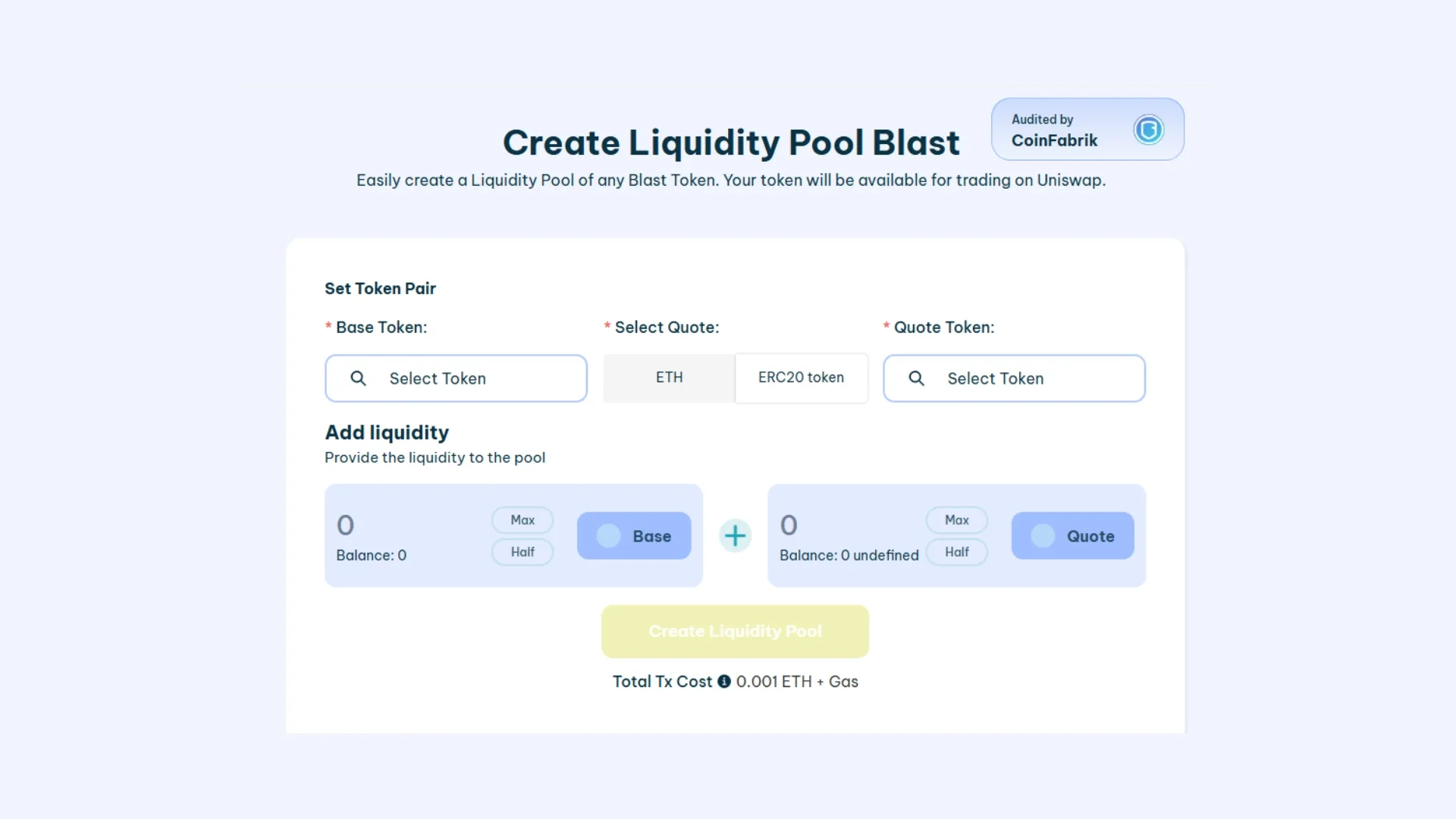
- Connect your wallet on Smithii’s Create Liquidity Pool on Blast.
- Select your “Base Token”, which represents the token you want to launch.
- Pick the “Quote Token” (for example, $USDC, $USDT).
- Set the amounts for both tokens to pair them up and define the initial price.
- Click “Create Liquidity Pool” and confirm the transactions.
Within seconds, your liquidity pool will be ready and live on Uniswap. Creating it on Smithii costs 0.001 ETH, fees included.
2. Create a Blast Liquidity Pool on Uniswap
To kick things off on Uniswap, connect your wallet on the Uniswap app and go to “Pools“.

Make sure Blast is selected as the blockchain in the top right. Click “New Position” and follow these steps to create your liquidity pool:
- Pick your token pair. First, choose a stablecoin like USDT or USDC.
- Set the transaction fee. The recommended option is 0.3%.
- Set the price range.
- Confirm the liquidity deposit and approve the transactions.
And that’s it, your Blast liquidity pool is live on Uniswap.
¿ES RECOMENDABLE CREAR UNA LIQUIDITY POOL EN BLAST?
Sí, siempre que cuentes con un plan de tokenomics sólido. Crear una liquidity pool puede ser un riesgo si no se tiene una estrategia clara.
¿CUÁNTO CUESTA CREAR UNA POOL DE LIQUIDEZ EN BLAST?
Actualmente, los fees para crear una liquidity pool en Blast rondan los $3 USD, y el monto de liquidez depende de tu estrategia.
¿DÓNDE PUEDO CREAR UNA LIQUIDITY POOL EN BLAST?
Uniswap es la opción recomendada por su facilidad y rápida integración con wallets compatibles con Blast.
Polygon Liquidity Pool
How To Create A Token Liquidity Pool On Polygon
Polygon has hundreds of DeFi platforms that support Matic. But without a doubt, the best option for creating a liquidity pool on Polygon is Uniswap. Here’s how to set one up step by step.
1. Create a Polygon Liquidity Pool using Smithii
To get started, head to the Create Liquidity Pool on Polygon tool, select the Polygon network, and connect your wallet.
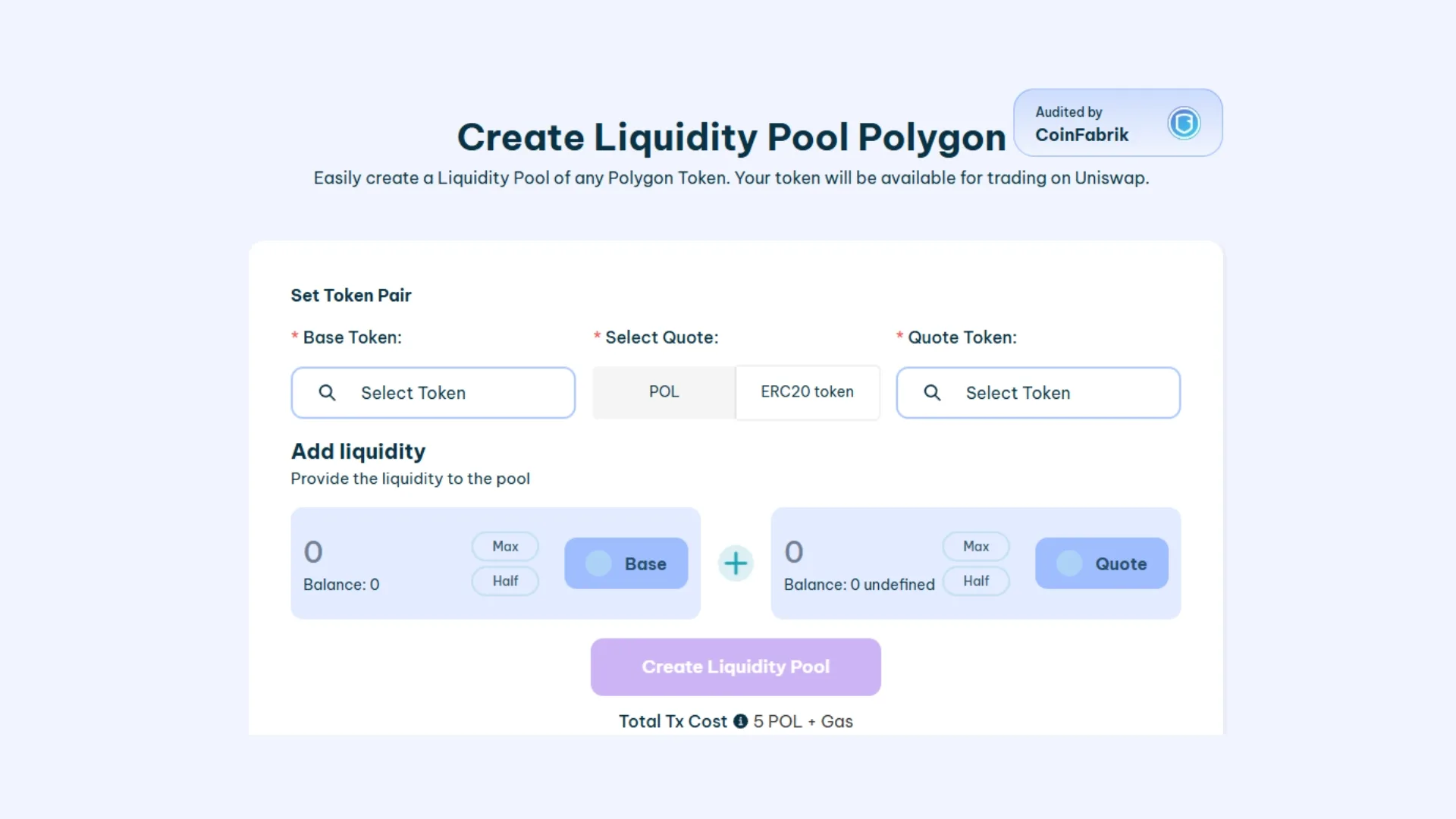
- Connect your wallet on Smithii’s Create Liquidity Pool on Polygon.
- Select your “Base Token”, which represents the token you want to launch.
- Pick the “Quote Token” (for example, $USDC, $USDT).
- Set the amounts for both tokens to pair them up and define the initial price.
- Click “Create Liquidity Pool” and confirm the transactions.
2. Create a Polygon Liquidity Pool on Uniswap
To kick things off on Uniswap, connect your wallet on the Uniswap app and go to “Pools” in the main menu.

First, make sure you’re connected to the Avalanche network in the top right. Then click “New Position” and follow these steps to create your liquidity pool:
- Pick your token pair.
- Set the transaction fee. The recommended option is 0.3%.
- Set the price range.
- Confirm the liquidity deposit and approve the transactions.
And that’s it, you’ve launched your liquidity pool Avalanche on Uniswap.
FAQ about liquidity pool on Polygon
¿ES RECOMENDABLE CREAR UNA LIQUIDITY POOL EN POLYGON?
Es recomendable primero crear tu liquidity pool siguiendo una estrategia y un tokenomics. Luego, en Polygon existen muchas oportunidades para ser pionero en muchos proyectos.
¿CUANTO CUESTA CREAR UNA POOL DE LIQUIDEZ EN POLYGON?
Crear una Pool de Liquidez en Polygon cuesta 5 POL + Gas usando Smithii.
¿DÓNDE PUEDO CREAR UNA LIQUIDITY POOL EN POLYGON?
Pese a que puedes usar varias plataformas de intercambio para crear Liquidity Pool en Polygon, la más frecuente es Uniswap. Uniswap es el DEX más usado en la Blockchain y crear tu pool de liquidez en ella es bastante sencillo y prácticamente gratis.
Token Liquidity Pool on Avalanche
How To Create A Token Liquidity Pool On Avalanche
On the Avalanche blockchain, you have several options to create liquidity pools. We recommend using the Smithii tool, built specifically for the Avalanche ecosystem, or going through compatible DEXs like Uniswap, one of the most popular and trusted platforms on the network.
Smithii offers a clean, audited interface for creating liquidity pools, making the process fast and safe. Here’s how both options work:
1. Create Avalanche Liquidity Pool using Smithii
To get started, head over to the Create Liquidity Pool on Avalanche tool, pick the Avalanche network, and connect your wallet.
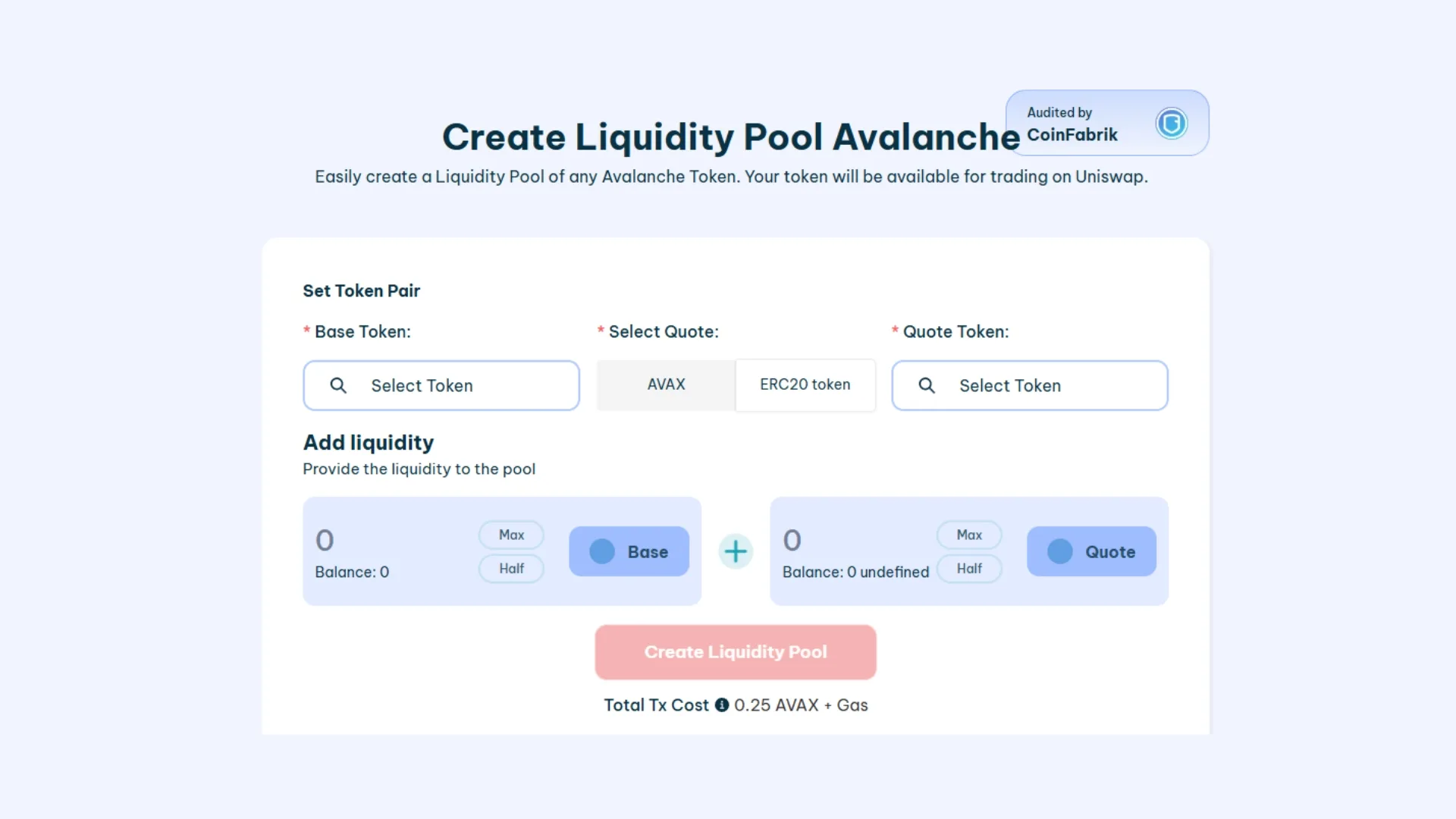
- Connect your wallet on Smithii’s Create Liquidity Pool on Avalanche.
- Select your “Base Token”, which represents the token you want to launch.
- Pick the “Quote Token” (for example, $USDC, $USDT).
- Set the amounts of both tokens to pair them and define the starting price.
- Click “Create Liquidity Pool” and confirm the transactions.
Within seconds, your liquidity pool will be live and published on Uniswap. Creating it on Smithii costs 0.25 AVAX + Gas.
2. Create Avalanche Liquidity Pool on Uniswap
To kick things off on Uniswap, connect your wallet on the Uniswap app and go to “Pools” in the main menu.

First, make sure you’re connected to the Avalanche network in the top right. Then click “New Position” and follow these steps to spin up your liquidity pool:
- Pick your token pair.
- Set the transaction fee. The recommended option is 0.3%.
- Define the price range.
- Confirm the liquidity deposit and approve the transactions.
And that’s it, your liquidity pool for Avalanche is now live on Uniswap.
FAQ about liquidity pool on Avalanche
¿ES RECOMENDABLE CREAR UNA LIQUIDITY POOL EN AVALANCHE?
Es recomendable primero crear tu liquidity pool siguiendo una estrategia y un tokenomics. Luego, en Avalanche existen muchas oportunidades para ser pionero en muchos proyectos.
¿CUANTO CUESTA CREAR UNA POOL DE LIQUIDEZ EN AVALANCHE?
Crear una Pool de Liquidez en Avalanche cuesta 0.25 AVAX + Gas usando Smithii.
¿DÓNDE PUEDO CREAR UNA LIQUIDITY POOL EN AVALANCHE?
Pese a que puedes usar varias plataformas de intercambio para crear Liquidity Pool en Avalanche, la más frecuente es Uniswap. Uniswap es el DEX más usado en la Blockchain y crear tu pool de liquidez en ella es bastante sencillo y prácticamente gratis.
Binance Smart Chain Liquidity Pool
How To Create A Token Liquidity Pool On Binance (BNB)
1. Create Binance Liquidity Pool using Smithii
To get started, head over to the Create Liquidity Pool on Binance tool, pick the Avalanche network, and connect your wallet.
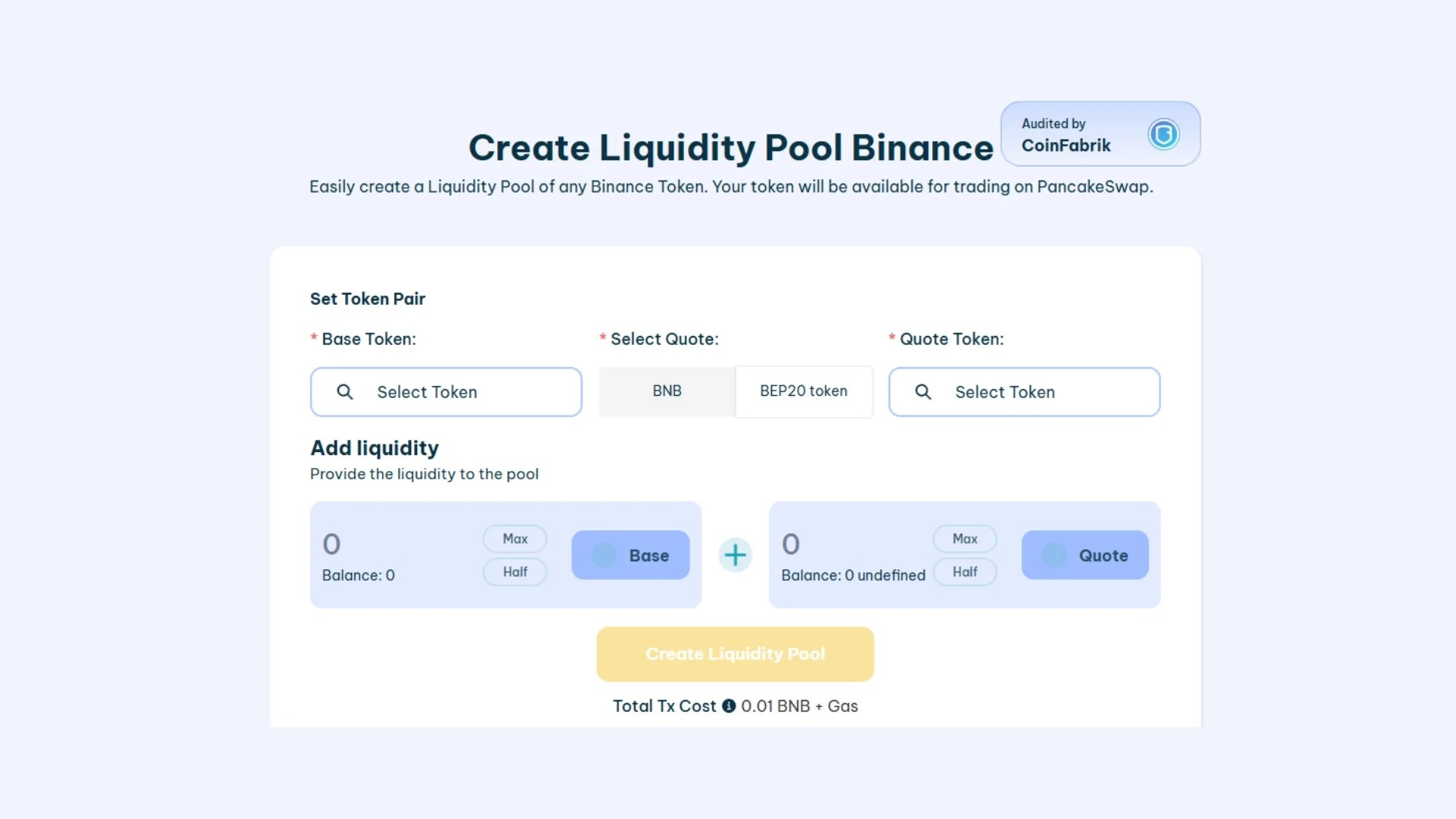
- Connect your wallet on Smithii’s Create Liquidity Pool on Binance.
- Select your “Base Token”, which represents the token you want to launch.
- Pick the “Quote Token” (for example $BNB, $USDC, $USDT).
- Set the amounts of both tokens to pair them and define the starting price.
- Click “Create Liquidity Pool” and confirm the transactions.
Within seconds, your liquidity pool will be live and published on Uniswap. Creating it on Smithii costs 0.01 BNB + Gas.
2. Create BNB Liquidity Pool on PancakeSwap
BNB has hundreds of places where you can create a liquidity pool for your token. But without a doubt, the most used and most popular DEX on BSC is PancakeSwap, which makes it our best pick for the liquidity pool.

First, make sure you’re connected to the BNB network with your wallet. Then click “Earn > Farm / Liquidity” and follow these steps to create your liquidity pool.
- Pick your token pair.
- Set the transaction fee tier. It can range from 0.01% to 1%.
- Deposit the token amounts. This kicks off the liquidity pool and gives the quote token its value.
- Confirm the liquidity deposit and approve the transactions.
And that’s it, your liquidity pool for Binance is now live on PancakeSwap.
FAQ about liquidity pool on Chain
¿ES RECOMENDABLE CREAR UNA LIQUIDITY POOL EN BINANCE?
Crear una Pool de liquidez para tu token en la Red de Binance puede ser peligroso sin una estrategia a seguir ya que puede provocar que tu proyecto caiga y pierdas toda la liquidez. Recuerda siempre preparar un tokenomics para tener una economía sana.
¿CUANTO CUESTA CREAR UNA POOL DE LIQUIDEZ EN BNB?
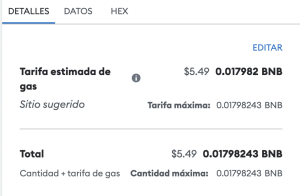
Crear una Pool de Liquidez en Polygon tiene 2 costes: Fees de creación y Liquidez.
Los Fees de creación actualmente son unos 5$.
El coste de liquidez depende de ti, es decir, puedes añadir tanta liquidez como decidas. Lo más común es añadir entre 500 y 5000$.
¿DÓNDE PUEDO CREAR UNA LIQUIDITY POOL EN BINANCE SMART CHAIN?
Pese a que puedes usar varias plataformas de intercambio para crear Liquidity Pool en BSC, la más frecuente es PancakeSwap. PancakeSwap es el DEX más usado en la red de Binance y crear tu pool de liquidez en ella es bastante sencillo.
Token Liquidity Pool on Arbitrum
How To Create A Token Liquidity Pool On Arbitrum
On the Arbitrum blockchain, there are several ways to create liquidity pools. We recommend using the Smithii tool, built specifically for the Arbitrum ecosystem, or going through compatible DEXs like Uniswap, one of the most popular and trusted platforms on the network.
Smithii offers a simplified, audited interface for creating liquidity pools, making the process fast and secure. Here’s a breakdown of both options:
1. Create Arbitrum Liquidity Pool using Smithii
To get started, head over to the Create Liquidity Pool on Arbitrum tool, select the Arbitrum network and connect your wallet.
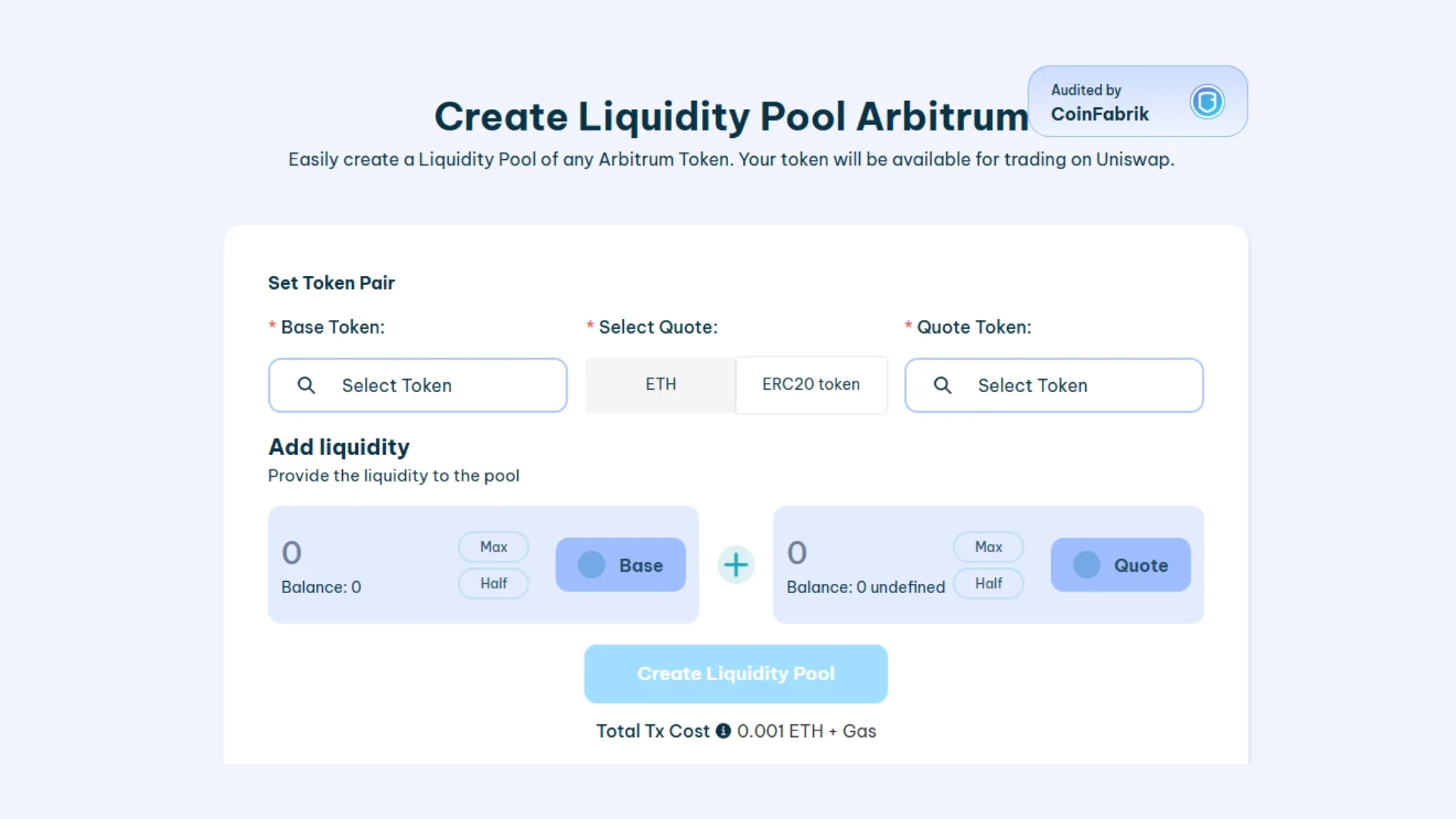
- Connect your wallet on Smithii’s Create Liquidity Pool on Arbitrum.
- Pick your “Base Token”, which represents the token you want to launch.
- Choose the “Quote Token” (for example, $USDC, $USDT).
- Set the amounts of both tokens to pair them and define the initial price.
- Click “Create Liquidity Pool” and confirm the transactions.
In just a few seconds, your liquidity pool will be live on Uniswap. Creating it on Smithii costs 0.001 ETH + Gas.
2. Create Arbitrum Liquidity Pool on Uniswap
To kick off the process on Uniswap, connect your wallet on the Uniswap app and go to “Pools” in the main menu.

First, make sure you’re connected to the Arbitrum network (top right). Then click “New Position” and follow these steps to create your liquidity pool:
- Pick your token pair.
- Set the transaction fee. The recommended option is 0.3%.
- Define the price range.
- Confirm the liquidity deposit and approve the transactions.
That’s it, your liquidity pool Arbitrum is now live on Uniswap.
FAQ about liquidity pool on Arbitrum
¿ES RECOMENDABLE CREAR UNA LIQUIDITY POOL EN ARBITRUM?
Si tienes un token en Arbitrum, crear una liquidity pool puede ser beneficioso para proporcionar liquidez y facilitar el intercambio de tu token. Sin embargo, es esencial contar con una estrategia sólida y un tokenomics bien estructurado para evitar riesgos y asegurar el éxito de tu proyecto.
¿CUÁNTO CUESTA CREAR UNA POOL DE LIQUIDEZ EN ARBITRUM?
Crear una pool de liquidez en Arbitrum tiene dos costos principales: las tarifas de creación y la liquidez aportada. La tarifa total en Smithii es de 0.001 ETH + Gas.
¿DÓNDE PUEDO CREAR UNA LIQUIDITY POOL EN ARBITRUM?
Puedes utilizar varias plataformas DeFi y DEX para crear tu Pool de Liquidez de token en Arbitrum. Una de las más recomendables es Uniswap, debido a su popularidad y facilidad de uso.
Sui Token Liquidity Pool
How To Create A Sui Token Liquidity Pool
Creating a Sui Token Liquidity Pool on its largest DEX (Cetus) takes just a few minutes and zero coding knowledge. With Smithii’s tools, you can launch your project on a liquidity pool in no time.
You’ve got 2 options here: use the Create Liquidity Pool SUI by Smithii dApp (https://tools.smithii.io/liquidity-pool/sui), or head straight to Cetus. Comparing the two, ours is simpler and fully audited, plus we’ll soon roll out extra perks for creating liquidity pools, like anti-bot protection. Either way, you’ll find clear steps for both methods below.
1. Create Sui Liquidity Pool Using Smithii
Let’s head to the online Create Liquidity Pool on Sui tool. Make sure you have a wallet compatible with the Sui blockchain.
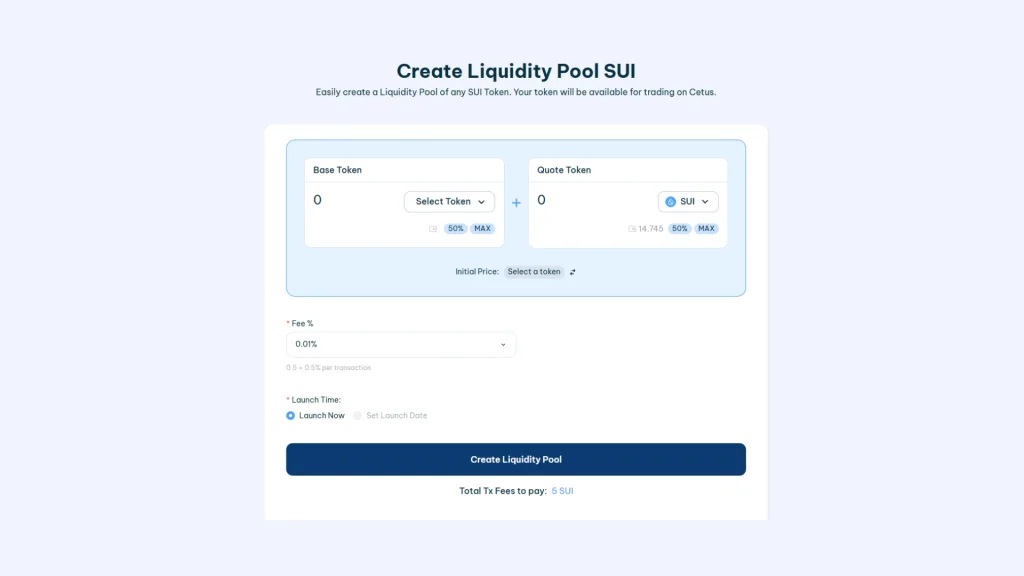
- Connect your wallet on the Create Liquidity Pool on Sui dApp
- Pick the “Base Token”, this is your token ready to hit the market.
- Choose the “Quote Token” (this one sets the price, $SUI is typically used).
- Add Liquidity, choose the amounts of Base Token and Quote Token to pair, this sets the starting price of your token
- Add a fee that you’ll keep on every transaction that uses your liquidity pool.
- Click “Create Liquidity Pool” and approve the transactions.
A few seconds later your Liquidity Pool will be live and visible on Cetus. The cost of creating a Sui liquidity pool with Smithii is 5 SUI.
2. Create Sui Liquidity Pool directly on Cetus
Go to the official Cetus portal to create liquidity pools. Once you’re in, follow these steps:

- Click “Create a new pool”
- Select the pairs that will be used for trading (same as with Smithii)
- Set the fee percentage you’ll earn on each transaction
- Specify the initial prices for your tokens. You can either set a price range or let the market define the value of the Sui token.
- Add the liquidity that will go into the initial pool.
- Approve the transaction and your own liquidity pool will be live on Cetus.
That said, Cetus doesn’t offer the unique features that Smithii does, plus the process on Smithii is much faster and simpler.
Want to outpace your competitors?
Join our Newsletter and get weekly Blockchain news tailored for NFT creators.

FAQ on how to create a liquidity pool
To wrap up, let’s go over the most common questions that come up when you’re thinking about creating a liquidity pool:
Can I create my own liquidity pool?
Yes, you can spin up your own liquidity pool on decentralized exchanges (DEX) like Uniswap for ERC20 and ERC20 layer 2; Raydium for Solana, or PancakeSwap for BSC. A liquidity pool lets you deposit tokens into a smart contract, making them available for other users to swap. Setting up a liquidity pool is a straightforward process that doesn’t require coding skills, though a basic grasp of decentralized finance (DeFi) helps.
How much does it cost to create a liquidity pool?
The cost of creating a liquidity pool depends on the platform you pick and the blockchain it runs on. You’ll usually pay a gas fee to deploy the smart contract and add liquidity, which can range from a few dollars to several hundred depending on network congestion. On top of that, you’ll need to put up an initial amount of tokens to fund the pool.
How do you provide liquidity to a pool?
Providing liquidity means depositing two types of tokens into a liquidity pool in equal value. For example, on Uniswap, you could deposit ETH and an token ERC20. In return, you’ll receive liquidity provider (LP) tokens, which represent your share of the pool and can be redeemed for your initial deposit plus a cut of the trading fees the pool generates.
How to create an LP (Liquidity Pool)?
Creating an LP comes down to picking a DEX, connecting your wallet, choosing the tokens you want to pair, and depositing them into the pool. The platform walks you through each step, making sure you supply equal value of both tokens. Once you confirm the transaction, your liquidity pool goes live and you’ll receive LP tokens as proof of your contribution.
How to make an LP?
Making an LP is the same thing as creating a liquidity pool. It comes down to depositing two assets into a smart contract on a DEX. The process is automated, with the DEX handling the technical side. Your job is to pick the token pair, make sure you have enough balance, and confirm the transaction, which mints LP tokens for you.
How to create a liquidity pool smart contract?
If you’ve got coding skills, you can build a custom smart contract for a liquidity pool by writing it in a language like Solidity for Ethereum-based projects. That said, most users stick with existing DEX platforms that offer built-in tools to create liquidity pools without writing a single line of code, or better yet, audited platforms like Smithii that provide online tools with an intuitive interface to make creating your Liquidity Pool easy.
How are liquidity pools created?
Liquidity pools are created when a user or group of users deposit token pairs into a smart contract on a DEX. This contract holds the tokens and facilitates swaps between them, with prices set by the ratio of tokens in the pool. Users who contribute to the pool earn trading fees as a reward for their contribution.
Final thoughts
You’ve got everything you need to create your liquidity pool. Weigh whether it’s worth the effort, and if the answer is yes… you’ve got no excuse not to take your token To The Moon!
Thanks for reading!

CEO & Co-Founder at Smithii. Building on Solana since 2021 and sharing playbooks from the trenches. Also founder of Lince after years investing in DeFi.