

How to download the holder list on Hyperliquid without coding or depending on anyone
Knowing how to download the holder list on Hyperliquid gives you back the full list of wallets holding a token, with balances, in a ready-to-use file. Works with yours and with any other on the network.
The second use case is the highest-ROI one and also the most overlooked: the holders of a project similar to yours are the most qualified audience you’ll ever find, because they already proved they buy in your niche. In short, you can run an airdrop to active wallets that hold tokens in the same theme as yours.
In this guide I’ll walk you through how to run a snapshot on a token on Hyperliquid and what to do with the data once you have it.
What a token snapshot is on Hyperliquid and what it returns
Taking a snapshot is like snapping a photo of a token at a specific moment. It’s pulled straight from an onchain query, so you get real, verifiable data on the holders of any token. This info is genuinely useful for running incentive plays aimed at active wallets that might also be interested in your token.
You’ve probably noticed that your wallet receives random tokens every so often. That’s no accident. Other people run the snapshot + airdrop combo to grab the attention of wallets that might want to buy a token. In everyday terms, it’s like handing out free samples of a product, only this time it lands with people who are actually interested based on the quality of the snapshot.
With a solid snapshot you can:
- Target a airdrop. Distribute to people who already buy projects like yours instead of random addresses.
- Audit your distribution. How many holders you have, how much the largest one controls, and whether the split matches what you’ve been claiming publicly.
- Spot concentration early. Better that you see the wallet with an uncomfortable percentage before the market does.
- Lock in who held what at a specific moment, for rewards or governance.
Analytics culture runs deep on any blockchain, so your distribution is something others will look at anyway. Better to know it first so you can make the calls that keep your supply distribution healthy.
How to download the holder list on Hyperliquid step by step
With that said, to take a snapshot we’re going to use the Token Snapshot for Smithii on Hyperliquid, a tool that lets you pull the holders list instantly and without hassle. Once you’re inside the tool, here’s what to do:
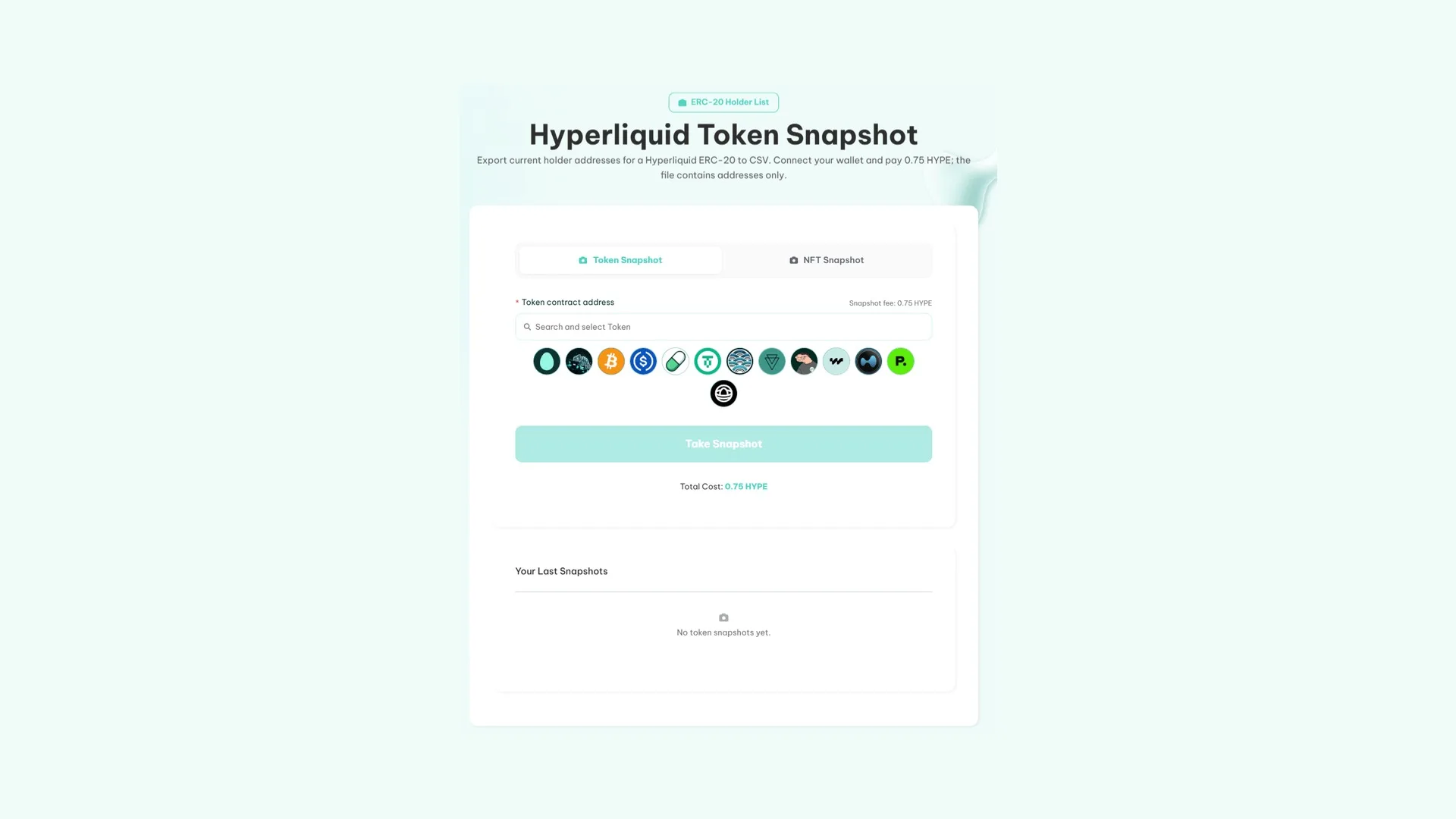
- Connect your wallet. It can be any wallet unrelated to your project or directly the wallet you use to launch your token.
- Paste the token address. You don’t need to be the creator; you can take a snapshot of any token on HyperEVM.
- Launch the snapshot by clicking ‘Take Snapshot’ and confirm the transaction in your wallet.
- Download the file with addresses and balances. Your snapshots are saved in your history.
How much the Token Snapshot for Hyperliquid costs
The tool has a flat fee of 0.75 HYPE plus gas (no matter how many holders the token has). The tool walks the full state of the token and hands you the list of every holder at that moment.
What you can do with the Snapshot of a token on Hyperliquid
Taking a snapshot and then running an airdrop is a common play. You pull the holders of a token close to yours, load the list into the multisender, and each address gets a fraction of the token you’re holding. A lot of people jump in to check what they just received, and that’s qualified traffic you didn’t pay for in ads.
What decides the outcome is affinity, not size. A massive list that has nothing to do with your project is expensive noise. So it’s not just about taking any random snapshot and calling it done, because the idea is to get more people paying attention to you, not just ‘giving away’ tokens at random.
If you want to run an airdrop after a snapshot, check the guide on how to use the multisender on Hyperliquid.
On top of that, with the Hyperliquid Token Snapshot for Smithii you don’t have to worry about missing the csv download in the moment, because every snapshot you take is saved in your history.
Why take a snapshot of your own token
In some situations it also pays to take a snapshot of your own token. For example, to quickly measure whether holders are keeping their positions, adding to them, or whether they qualify for an ongoing incentives program (like picking who gets into a reward pool, for instance).
It’s also a useful practice to gauge the quality and health of your project, for things like:
- Top-holder supply concentration. If the biggest holder is your deployer wallet, distribute before you go looking for buyers and consider renouncing ownership.
- Whether holders can actually trade: without your own liquidity pool on Hyperliquid, having holders doesn’t get you far.
- The trend. Two snapshots taken at different times show you whether the base is actually growing or just the wallets are rotating.
There are other variables you can use to gauge the quality of your token, and you can check them through the Rug Checker by Hyperliquid.
FAQ
Can I pull the snapshot of a token that isn’t mine?
Yes. Every token is queryable on-chain, so you can see all the holders of a token on Hyperliquid even if you’re not the creator and don’t hold any supply.
How much does a token snapshot cost on Hyperliquid?
0.75 HYPE plus gas. The fee is flat and doesn’t scale with the number of holders.
What format does the list come in?
You can download a .csv file with every extracted wallet, but you can also copy the addresses directly.
Does it include every holder?
Yes. It sweeps the full state of the token at the exact moment you run it. It’s a snapshot of that instant, not a period.
Is it useful for prepping a airdrop?
That’s exactly what it’s built for: pulling the holder list of a related token and using it as the recipient base for the distribution.
Conclusion
Now that you know how to run a snapshot of a token on Hyperliquid, you can grab the full holder list of a token with a theme similar to yours to run marketing plays or measure the quality of the people involved.
Used right, it’s the most direct way to put your project in front of people who already buy what you’re offering.
On Arc, extraction has its own rules, starting with the fact that the file doesn’t include balances. The guide on exporting holders on the Arc network walks through them.

Content creator and SEO contributor at Smithii. Systems Engineering student and crypto-tech enthusiast.



