

How to renounce ownership of a token on Hyperliquid: the step with no way back
Of every operation you can run on your token, this is the only one that doesn’t allow a fix. Renouncing ownership of the contract hands the admin permissions to an address nobody controls, and that’s the end of the story.
Here’s how to renounce ownership of a token on Hyperliquid and, more importantly, when it actually makes sense: it gets recommended a lot and explained very little. It’s almost always framed as a trust badge you need to earn as fast as possible, and that rush is exactly what leaves some projects without tools they were going to need.
Let’s break it down: what that role actually is, what you gain by letting it go, what you lose, and how to tell if it’s your moment or not yet.
What’s at stake when you renounce the contract
When you deploy a token, the signing address gets written into the contract as its owner. That record unlocks whatever admin functions you built in: minting extra supply, pausing transfers, tweaking fees, or managing address lists.
If your contract doesn’t include any of those functions, the role exists but barely does anything. If it includes all of them, that role is a key with serious power over other people’s money, and that’s exactly what anyone thinking about buying from you is going to evaluate.
Renouncing means transferring the role to an address with no known owner. The code doesn’t change: the functions are still there, there’s just no one left who can call them.
The case for giving up control
- It’s verifiable in seconds. Anyone can pull up the contract and see it has no owner. They don’t have to take your word for it, they can check.
- It removes the worst-case scenario. Without that role, nobody can inflate the supply or block buyers, which are the two classic ways to drain a project from the inside.
- It takes one conversation off your plate. The recurring question about what you plan to do with those permissions just stops existing.
On a network where reading the contract before buying is standard practice, that reassurance carries more weight than it does elsewhere. And it helps distance you from the patterns we describe in why 90% of tokens don’t make money.
The case against, which also exists
Nobody usually tells this side of the story. Once you renounce, you lose the ability to intervene forever.
If six months from now you spot a miscalibrated fee, run into a problem that requires pausing transfers, or reach the emission phase you had planned, you won’t be able to do a thing. Your only way out would be to deploy a new contract and convince everyone to migrate, which in practice means starting from scratch.
That’s why the right question isn’t whether to renounce, but when:
- Do it if the supply is fixed, there are no mechanics that need maintenance, and the contract already behaves exactly the way you want it to behave forever.
- Wait if you have emissions planned, fees still being tuned, or any function you’re planning to use.
- Don’t do it as a substitute for a solid setup. A badly configured contract with no owner is badly configured on a permanent basis.
How to renounce ownership of a token on Hyperliquid step by step
Renouncing is done from the Token Manager by Smithii for Hyperliquid, the panel that groups everything you can do on a token that’s already deployed. It sits in the ownership section and gets settled in a single transaction: the role moves to an ownerless address and the owner-only functions can no longer be called. There’s nothing to configure, so all the weight is on the decision, not on the process. Here’s what it looks like with a token loaded:
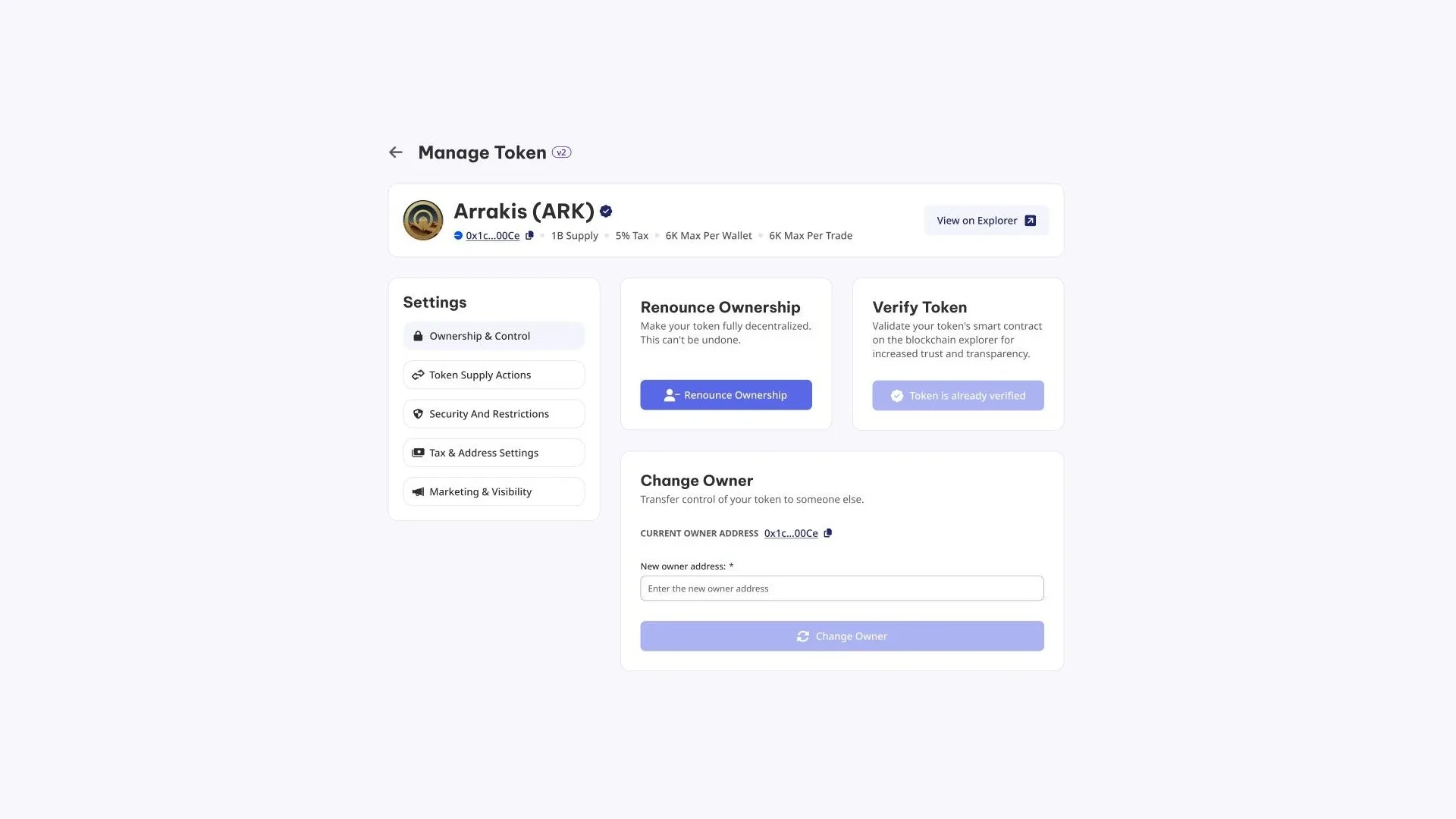
With the owner wallet connected and the contract address ready, the path is this:
- Open the Token Manager with the owner wallet. It has to be the one that actually holds the role, not another one on the team.
- Enter the address of the contract you’re going to renounce. Up top you’ll see its name, supply, and whatever parameters it has configured.
- Go into the Ownership & Control section and double-check the setup one last time. This is literally your last chance to change anything.
- Hit Renounce Ownership and sign. The contract is left permanently ownerless.
A powerless owner is the first thing your buyers check when they want to spot a honeypot on Hyperliquid before buying.
How much does renouncing cost on Hyperliquid
The operation costs 0.3 HYPE plus network gas.
What becomes unavailable after renouncing
Before hitting the button, it’s worth going through the sections in the left column one by one, because that’s where everything you’re giving up is listed with its name and description. It’s not an abstract catalog of permissions: these are concrete screens that will stop responding.
- Supply. The supply actions block lets you mint new tokens to any address, burn part of the existing ones, and force-move balances between wallets, something designed to rescue stuck funds.
- Restrictions. This is where the blacklist, whitelist, antibot toggle with its exceptions, and the four antiwhale parameters live: how much can be bought at once, how much a wallet can accumulate, the wait time between operations, and how many days the limit stays active.
- Fees. The percentage applied, the wallet that receives it, and the addresses exempt from paying are all edited from the same place.
- Ownership. On top of renouncing, contract verification on the explorer and transferring the role to another address.
That transfer deserves a note. Change Owner doesn’t destroy anything: it hands the role over to another address, which can be a team multisig or a governance contract. It doesn’t look the same as an ownerless contract to whoever’s evaluating you, but it keeps the key from depending on a single person, and unlike renouncing, whoever receives it can transfer it again.
If while going through those sections you paused on any of them, the answer is to wait. If none of them matter to you, you’re not giving up anything you were going to use.
What to have sorted before renouncing
Renouncing is a closing move, not a kickoff. It makes sense to get there once everything else is handled:
- The contract in its final form: how to create a token on Hyperliquid.
- The market open, because a token without a pool can’t be bought no matter how clean its contract is: how to create the liquidity pool.
- The supply distributed, so you’re not the only holder: the Hyperliquid multisender.
Before signing, check how the distribution looks with a holders snapshot. Renouncing the contract while holding most of the supply yourself convinces no one: those two signals get read together.
And if what worries you is the security of the launch itself, that’s a different conversation we cover in how to avoid sniping bots.
FAQ
Can I undo the renounce?
There’s no way to do it. The role goes to an address nobody controls and there’s no recovery mechanism, not for you, not for Smithii, not for anyone.
Do I lose my tokens when I renounce?
No. What you hand over are the contract’s admin permissions. Any balance in your wallet stays intact and available.
How much does it cost?
It costs 0.3 HYPE plus network gas.
Is renouncing a must?
A must, no, but on this network it’s one of the first things people check. If you decide to keep control, be ready to explain which functions you’re keeping and why.
What happens if my token has open minting and I renounce?
That function becomes permanently disabled. If you had future mints planned, renouncing cancels them for good, so it’s a decision worth making with the calendar in front of you.
Conclusion
Renouncing ownership is the cheapest trust signal you can give and the hardest one to fake, because anyone can verify it on the explorer and there’s no going back.
That’s exactly why it’s not a marketing move you pull on launch day. It’s the final step you take once the contract already does what it’s supposed to do and there’s nothing left to tweak.
For an ERC-20 on Arc, the recommended order and the three parameters you can never change are covered in the guide on how to manage a token on Arc.

Content creator and SEO contributor at Smithii. Systems Engineering student and crypto-tech enthusiast.



