








How to create a token on Avalanche without getting lost in the tech
Search how to create a token on Avalanche and half the results will tell you to deploy an ‘ARC-20’. You don’t need that for a regular fungible token. What you deploy on Avalanche C-Chain is a plain ERC-20, the same one Ethereum uses.
Getting this straight saves you real time, because it means every wallet, explorer and EVM DEX already knows what to do with your token. No weird standards, no compiler, no developer.
Below, I’ll walk you through the deploy step by step, along with every feature you can layer on to level up the launch.
Prefer a video walkthrough? This tutorial covers the whole process from start to finish:
What you need to deploy an ERC-20 on Avalanche C-Chain
- A wallet on the C-Chain. MetaMask, Core and Coinbase Wallet all work.
- AVAX in that wallet to cover the flat fee and network gas.
- Name, ticker and supply decided upfront. Everything else you pick inside the tool.
How to create a token on Avalanche step by step
The whole process happens inside the Avalanche Token Creator by Smithii, a no-code tool that lets you fully customize how your token deploys on Avalanche. You can toggle different behaviors that fit your strategy based on your tokenomics. Once you’re in, you’ll see the interface below. Just follow these steps:
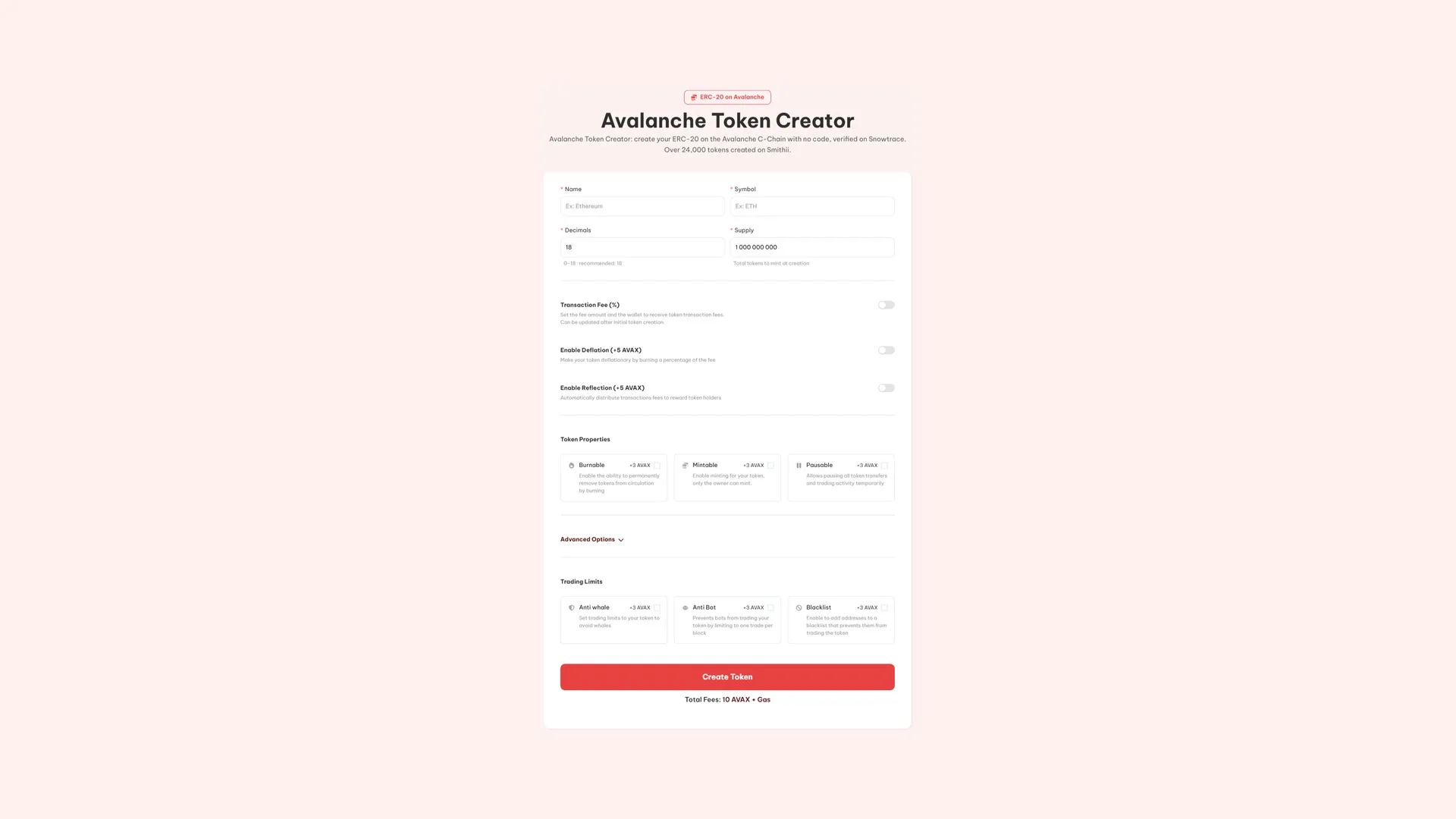
- Connect your wallet and confirm the network shows up as Avalanche C-Chain.
- Enter the name and symbol. This is what wallets and explorers will display.
- Set decimals and supply. Eighteen decimals is the standard; the supply is minted once and delivered in full.
- Pick your optional features like transaction fee, anti-bot, anti-whale, deflation (I break each one down further below).
- Hit Create Token, review the total in AVAX and sign the transaction from your wallet.
After that, the supply lands in your wallet (or in whichever one you selected if you go for a multi-wallet deploy) and the contract gets verified on Snowtrace automatically.
If you need the address later on, our guide on finding a token’s contract address shows you exactly where to look.
The optional features, and what each one costs you in trust
Every single one is visible on the contract. Turning something on is a call your holders can audit, so only enable what the project needs and be ready to defend it.
- Transaction Fee (free). A percentage of every buy and sell, split across up to 10 wallets. Free to enable, and the percentage can be tweaked post-launch.
- Deflation (5 AVAX). Routes part of that fee to a burn, shrinking the supply as volume grows.
- Reflection (5 AVAX). Sends it to holders instead, automatically, above a minimum balance.
- Burnable (3 AVAX). Lets you destroy tokens on purpose, which is what real burns require.
- Mintable (3 AVAX). Keeps the ability to issue more supply, owner only. Don’t pair this with a hard-cap promise.
- Pausable (3 AVAX). Halts transfers and trading instantly. An emergency control, and a powerful one.
- Anti-Whale (3 AVAX). Caps the size of each trade, the interval between them and the total per wallet across whatever window you set.
- Anti-Bot (3 AVAX). Restricts token to one trade per block, which is what stops snipers from taking the open.
- Blacklist (3 AVAX). Strips trading rights from specific addresses as soon as you flag them.
- Multi-Wallet Distribution (3 AVAX). Splits the supply across up to 10 wallets at the moment of creation.
- DEXTools socials and banner (50 AVAX). Push your links, logo and banner to DEXTools straight from the tool.
- Create a liquidity pool (3 AVAX). Spins up the pool in the same run and shows the opening price up front.
How much it costs to launch a token on Avalanche, in AVAX
Deploy runs you 10 AVAX plus network gas. Every option stacks its own fee on top, so a token with nothing extra enabled only pays the base fee. The tool shows the total on screen before you approve, and that’s the number that actually matters.
How to make your token on Avalanche tradeable
A token on its own has no market. Until there’s liquidity, no one can buy your token, no matter how clean the tokenomics look on paper.
Uniswap is where most projects on Avalanche open their first pool. Whichever venue you pick, it’s worth reading how much liquidity to add before committing a number: a thin pool turns normal buys into brutal candles. When it’s time to unwind, pulling liquidity on Avalanche covers the exit.
If you didn’t add liquidity from the Token Creator, you can do it any time by following our guide to creating a liquidity pool on Uniswap, specifically for Avalanche.
After the launch
- Distribute the right way instead of doing it by hand: airdrop for Avalanche tokens.
- Keep the pair active once you have holders, with the Avalanche volume bot.
- Watch your distribution with a snapshot for holders on Avalanche.
- Request listings, free on both: CoinMarketCap and CoinGecko.
If the plan is a meme coin, how to launch a meme coin on Avalanche reframes all of this around what actually matters over there.
Ownership and the legal side
Your wallet owns the contract from block one. The tool deploys it and steps out of the way. At no point does it ask for a seed phrase, a private key, or access to anything you already hold.
On the legal side, the treatment depends on how a token is marketed, sold, and used, much more than on the mere act of deploying it. Anything that involves raising funds, promising returns, or restricted distribution is worth running past a lawyer in the jurisdictions you plan to touch, before you sell and not after.
FAQ
Is a token on Avalanche an ARC-20?
No, and this is where a lot of people get tripped up. A fungible token on the Avalanche C-Chain is a standard ERC-20. There’s no separate ARC-20 standard you need to target for a regular token.
How much does it cost to launch a token on Avalanche?
10 AVAX plus C-Chain gas. Optional features are billed on top, starting at 3 AVAX, and the tool totals up your setup before you sign.
Is Avalanche a Layer 2?
No. Avalanche is its own Layer 1, and the C-Chain is the EVM-compatible piece where contracts live. Gas is paid in AVAX, not ETH.
Can the transaction fee be changed after launch?
The percentage can be adjusted later, but the fee mechanism itself has to be turned on at creation. If you think you might want it down the road, enable it now, even at a low percentage.
Do I need to spin up a Avalanche L1 for my token?
No. Running your own chain is a completely separate project. If what you need is a fungible asset, the C-Chain is where it belongs.
Can my token be traded the moment it exists?
Only once there’s a pool. Before that it can be transferred and airdropped without issues, enough to get it out there, but not enough to give it a price.
Wrapping up
The Avalanche Token Creator turns a C-Chain deploy into a short wallet flow, and the contract stays yours the whole way. The standard you need is ERC-20, not something Avalanche-specific, and that’s the single most useful thing to have straight before you start.
What’s left isn’t clicking a button: whether the supply model holds up, which permissions stay live, how the pool is set up, and why the project needs to be on Avalanche. Nail those down before the contract goes on-chain.
Creating your token on Avalanche wraps up phase one. For everything that comes next, check the definitive guide for devs on Avalanche, which maps out the full launch from prep all the way through promotion.

Crypto writer focused on the Web3 space. Former contributor to the Smithii editorial team.



