





How to create a Token on Blast, the chain that pays yield by default
Most guides on how to create a token on Blast skip the one thing that actually makes the chain interesting. The ETH and stablecoins you hold on Blast earn yield natively, without staking them anywhere, which completely changes the math on anything you leave sitting there.
Creating the token itself takes a couple of minutes and doesn’t require writing a single line of code. The decisions that actually matter are the ones that define what the contract can do afterwards, and most of them can’t be added once it’s deployed.
Here’s the full walkthrough: the deployment, every option in the tool, what you pay, and what the yield model means the moment your liquidity is on the chain.
What changes with Blast
Blast is an Ethereum Layer 2, so what you deploy is a standard ERC-20 that behaves exactly the same as anywhere else in the EVM world. Wallets, explorers, and DEXs don’t need any special handling.
The difference sits underneath. ETH and stablecoin balances accrue yield by default instead of sitting idle, which isn’t the norm: on most chains, parked capital is just parked. For a token project the practical effect shows up in the treasury and in whatever you contribute to a pool, because that capital isn’t doing nothing while it waits.
That’s a reason to pick the chain, not a substitute for having a project. Yield on the ETH side of a pool doesn’t make a token worth holding, and it’s worth being upfront with your community about that.
What you need before you start
- A wallet on Blast, any EVM wallet works.
- ETH on Blast to cover the flat fee and gas.
- Name, ticker, and supply decided before you open the tool.
How to create a token on Blast step by step
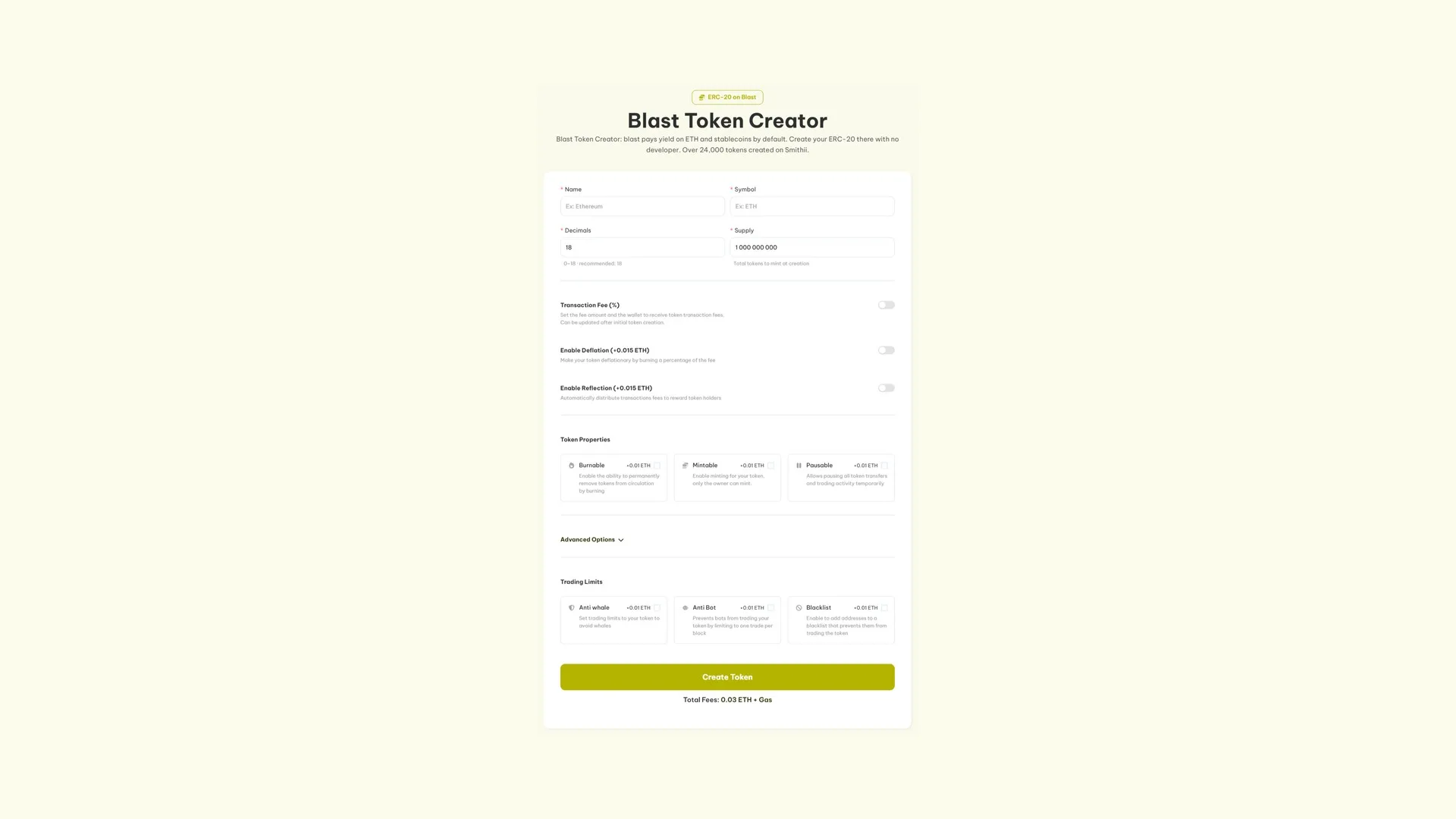
All of this happens inside the Blast Token Creator by Smithii.
- Connect your wallet and confirm the network shows up as Blast.
- Enter the name and the symbol. They’ll follow the token everywhere it gets indexed.
- Set the decimals and the supply. Eighteen decimals unless you have a reason to pick something else, and the full supply lands straight in your wallet.
- Pick the optional features you’ll see covered in the next section.
- Create Token, review the total, and sign.
The token exists from that confirmation, and the supply is already yours. You can grab the address straight from the transaction, or find it later with our guide to finding a token’s contract address.
Every option in the tool
Nothing here is required to ship a working token. Turn on what your launch is actually going to use and leave the rest, because every option stays visible on the contract and several are permanent.
- Transaction Fee (free). Takes a percentage of every buy and sell and splits it across up to 10 wallets on your terms. Enabling it costs nothing, and the percentage can be edited later.
- Deflation (0.015 ETH). Routes part of that fee into a permanent burn, so supply shrinks as trading picks up.
- Reflection (0.015 ETH). Routes it to holders instead, paid automatically to anyone above a minimum balance.
- Burnable (0.01 ETH). Destroy tokens whenever you decide, which is how announced burns actually work.
- Mintable (0.01 ETH). Leaves the door open to issuing more supply later, owner only. Not compatible with setting a hard cap.
- Pausable (0.01 ETH). Halts every transfer and trade. Pull this switch when something goes wrong in the pool and you need to buy time.
- Anti-Bot (0.01 ETH). Caps token to one trade per block and breaks the mechanic snipers rely on.
- Anti-Whale (0.01 ETH). Caps trade size, the gap between trades, and the total accumulated per wallet, for as many days as you want.
- Blacklist (0.01 ETH). Revokes trading rights from any address you flag.
- Multi-Wallet Distribution (0.01 ETH). Splits the supply across up to 10 wallets during creation, so allocations are locked in before launch.
- Socials and DEXTools banner (0.15 ETH). Pushes links, logo, and banner to DEXTools straight from the tool.
- Create a liquidity pool (0.01 ETH). Opens the pool against ETH in the same run and shows you the opening price first.
What you pay
Deployment runs 0.03 ETH plus Blast gas. Options stack their own fees on top, so a bare token costs the flat fee and nothing else. The tool shows you the total on screen before you approve.
Opening the market
A token with no pool has no price. You can transfer it, you can airdrop it, but nobody can buy it.
If the pool option wasn’t part of your run, our guide to creating a liquidity pool on Blast walks you through doing it separately. Size it around the trades you actually expect, not around a round number, because depth is what decides how violently a normal buy moves the chart. When it’s time to close things out, removing liquidity on Blast shows you the exit.
Once it’s live
- Get it into people’s hands with a proper distribution: how to run a airdrop on Blast.
- Track who holds it with a holder snapshot on Blast.
- Request listings, free on both: CoinMarketCap and CoinGecko. Applications land better when there’s real trading behind them.
If the project is a meme coin, the order flips and how to create a meme coin on Blast is a better starting point.
Ownership and security
The connected wallet owns the contract from the second it’s deployed. The tool doesn’t control it, doesn’t hold your tokens, and never needs your seed phrase or your private key.
External security firms have reviewed the contracts behind the tool. That says nothing about the permissions you chose to leave switched on, and that’s the part holders are going to judge you on.
FAQ
How much does it cost to create a token on Blast?
0.03 ETH plus Blast gas. Each option adds its own fee starting at 0.01 ETH, and the tool shows you the running total before you approve.
What sets Blast apart from other L2s?
Native yield. The ETH and stablecoins you park on Blast earn by default instead of sitting idle, and that changes the economics of anything you leave on the chain, liquidity included.
Do I need to code anything?
No. No Solidity, no compiler, nothing to install. The tool takes the token details and deploys with a single approval.
Can I add a logo during creation?
Not as a field, because an ERC-20 doesn’t store images. That’s what the DEXTools option is for: it pushes your logo, banner, and channels from inside the tool itself.
Which decisions can’t be undone?
Burnable, mintable, pausable, trading limits and the blacklist are all locked in at deploy. The only thing you can tweak afterward is the fee percentage per transaction.
Can my token be traded from day one?
Not until a pool exists. A freshly created token can be transferred and sent through airdrop just fine, but with no liquidity there’s no price and no way to buy it.
Wrapping up
Blast gives you a standard ERC-20 on a chain where idle ETH and stablecoins aren’t really idle. The token takes you minutes and requires zero code, and the contract belongs to the wallet that signs it.
Spend your time on the calls that can’t be undone: what the contract is still allowed to do, how the supply is split, and how you protect the pool’s first hour. Native yield is a good reason to pick a chain and a bad reason to buy a token, and your community will spot the difference.
Deploying the contract on Blast is just the starting line. We recommend following up with the ultimate guide for devs on Blast, where the entire launch is laid out in order, from distribution to liquidity.

Crypto writer focused on the Web3 space. Former contributor to the Smithii editorial team.



